Answered

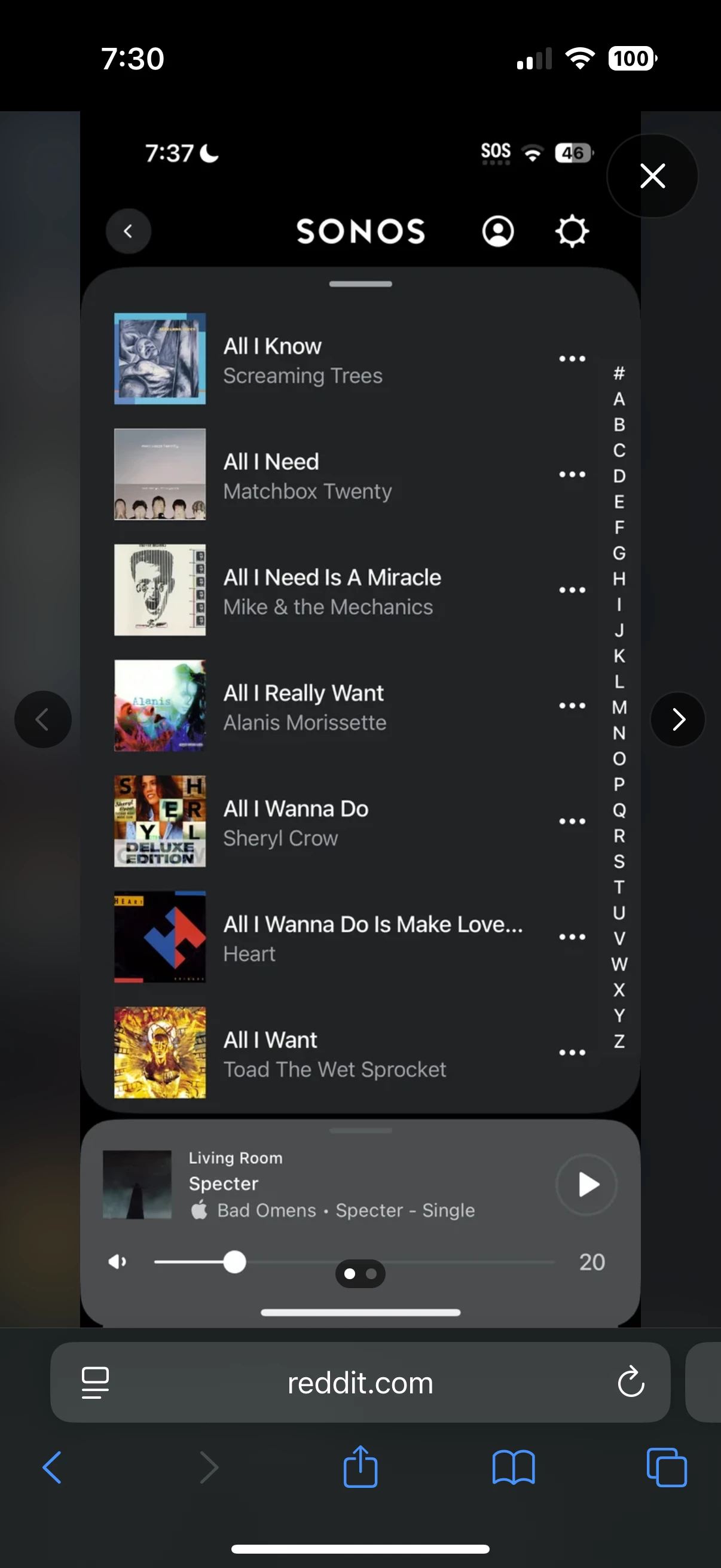
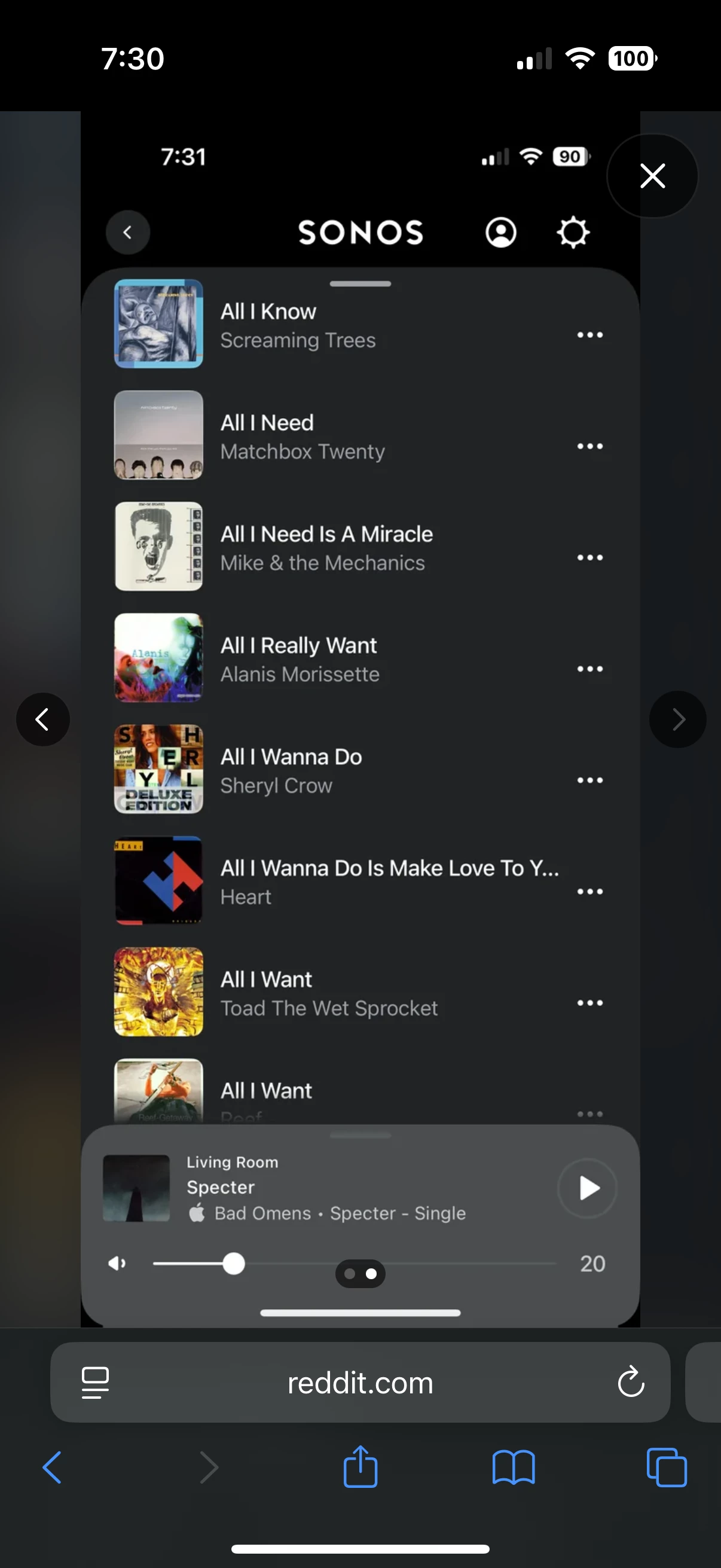
A-Z listing disappeared from Local library on update 14/4/26

  • April 15, 2026
  • 41 replies
  • 333 views

Show first post

41 replies

Forum|alt.badge.img+1
  • Lyricist III
  • May 12, 2026

If you touch the long edge of the screen does the index appear?

No. 


Forum|alt.badge.img+5
  • Author
  • Renowned Enthusiast I
  • May 12, 2026

If you touch the long edge of the screen does the index appear?

no


buzz
  • May 12, 2026

Did you attempt to scroll along this edge? if you have the Apple Pencil does this help?

I have no proof but I suspect that there could be slightly different versions rolling out over several days -  along with my previous speculation that this issue is tied to screen width.

My Windows system is down at the moment, but I didn’t have issues dealing with a “little” 50K playlist.


Forum|alt.badge.img+3
  • Enthusiast II
  • May 12, 2026

When I scroll the ‘songs’ list up or down a very narrow scroll bar appears at the very right had side of the screen.  It is very narrow, and difficult to select with a finger. When you do manage to select it you can scroll up and down the list very quickly , but still no A-Z markings to give an indication of where you are in the list. (My local song list is only about 4,000 tracks). 


Forum|alt.badge.img+1
  • Lyricist III
  • May 13, 2026

Did you attempt to scroll along this edge? if you have the Apple Pencil does this help?

I have no proof but I suspect that there could be slightly different versions rolling out over several days -  along with my previous speculation that this issue is tied to screen width.

My Windows system is down at the moment, but I didn’t have issues dealing with a “little” 50K playlist.

Yes of course, ive tried scrolling the edge. I’ve also  reinstalled the app and tried it on some of the different iOS devices in my household. All exhibit this issue. 


  • May 13, 2026

Did you attempt to scroll along this edge? if you have the Apple Pencil does this help?

I have no proof but I suspect that there could be slightly different versions rolling out over several days -  along with my previous speculation that this issue is tied to screen width.

My Windows system is down at the moment, but I didn’t have issues dealing with a “little” 50K playlist.

If this was tied to screen width, the problem wouldn’t exist on all my devices using various screen sizes using the current iOS controller. It is only a problem on iOS. Are you saying that the A-Z index appears on your iOS device when selecting the Music Library → Songs listing?


Stanley_4
  • Grand Maestro
  • May 13, 2026

Maybe a font or screen zoom setting?

With so few reports it has to be something most users aren't seeing.


Corry P
Forum|alt.badge.img+19
  • Sonos Staff
  • May 13, 2026

Thanks, ​@kdowling and ​@RavingDave  - I’ve passed those on.


buzz
  • May 13, 2026

Are you saying that the A-Z index appears on your iOS device when selecting the Music Library → Songs listing?

Is this an issue only for the Songs list and the other lists have the index?


  • Lyricist I
  • May 13, 2026

Here’s a before and after that I posted on reddit. 


Mr. T
  • May 13, 2026

Sonos confirmed this was a bug on the Reddit post https://www.reddit.com/r/sonos/comments/1sm3pm5/az_scroll_bar_is_gone/


Forum|alt.badge.img+5
  • Author
  • Renowned Enthusiast I
  • May 13, 2026

@Corry P thanks for your help in getting this one acknowledged


MoPac
Forum|alt.badge.img+19
  • Headliner III
  • May 13, 2026

Are you saying that the A-Z index appears on your iOS device when selecting the Music Library → Songs listing?

Is this an issue only for the Songs list and the other lists have the index?

For me on IOS it’s only Songs.


  • May 13, 2026

Are you saying that the A-Z index appears on your iOS device when selecting the Music Library → Songs listing?

Is this an issue only for the Songs list and the other lists have the index?

Yes, that is correct.


  • May 13, 2026

Maybe a font or screen zoom setting?

With so few reports it has to be something most users aren't seeing.

All font and screen zooming is at defaults on the iOS devices.

I’ve never looked at Music Library → Songs before checking for this. Maybe most other people don’t either. It’s not a way I would select songs to play, since my library is so large.


buzz
  • May 13, 2026

If you are looking for a specific song, search is available.