
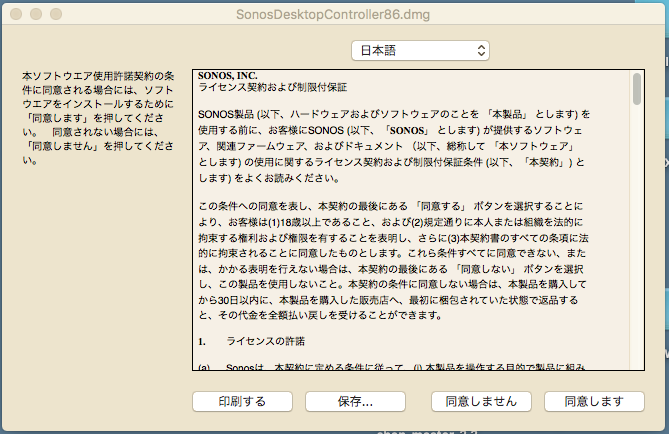
Am not able to install controller on my mac laptop (Sierra 10.12.5). When I click Sonos app link from Safari, nothing happens (I suspect file is being deemed a security risk by OS). When I click app link from Chrome, get warning of risky file. When I confirm to proceed (why wouldn't I trust Sonos??) I get a Chinese install window per image below (all settings english - I checked). Please advise on how to proceed.
For a system that is supposed to be seamless and fool-proof, I am surprised at the number of challenges I have faced at every step. Original wireless setup failed on multiple attempts and required multiple help centre conversations (eventually requiring boost device despite strong 60Mbps signal in every corner of my house), Alexa in Canada is garbage (unless you are willing to conduct major brain surgery through a 100 or so lines of instructions posted by users online) and now the Mac OS app is garbage. Please Sonos - at least try to live up to your promise!!!
Answer
Sonos Controller App for Mac will not install and Procedure Suspicious
Best answer by Keith N
Hi there! The top drop-down box says "Japanese" in Japanese. If you click that top drop-down, it will give you all the options of languages, regardless of what language you have selected in your system.
Select "English" and you should be good to go.
In general, diagnostic reports only give us things like connectivity from Sonos speakers to the local network or errors from an existing system. In this case, this seems to be a bit more focus on the computer itself rather than the Sonos system.
This topic has been closed for further comments. You can use the search bar to find a similar topic, or create a new one by clicking Create Topic at the top of the page.
Enter your E-mail address. We'll send you an e-mail with instructions to reset your password.

