Answered

Sonos app on Mac

  • May 1, 2026
  • 39 replies
  • 3702 views

Show first post

39 replies

AjTrek1
  • August 27, 2026

The Sonos interface IMO has gone through three (3) upgrade phases:

S1 > S2 > Sonos App

The latter two incarnations IMO having crossover features besides the fact that users never really adopted the moniker of Sonos App and continued to refer to it as S2.

Sonos is also culpable in the confusion as when one goes into “About Your System” it reads as S2 and not Sonos App.

As far as term “legacy” is concerned to my understanding it only refers to devices that cannot operate on the S2 (Sonos App) controller/Firmware. Furthermore I believe it has to do with memory capacity as well as system architecture that requires more efficient/powerful processors.

Edit:

Maybe some day the app may be called Sonos (App) Ultra 😂😂😂


Stanley_4
  • Grand Maestro
  • August 27, 2026

Somehow I feel like the marketing types are actively working to make it difficult to search for Sonos answers with their naming choices. The "why?" behind their choices would be an interesting story.


  • August 27, 2026

As far as term “legacy” is concerned to my understanding it only refers to devices that cannot operate on the S2 (Sonos App) controller/Firmware. Furthermore I believe it has to do with memory capacity as well as system architecture that requires more efficient/powerful processors.

The problem with that is: 

System/firmware release notes say this for S2 systems:

Current system version

96.1-79270
 
Release date: 8/11/2026

In this update:

Bug fixes and improved performance.

Current legacy system version

86.8-78270 7/14/2026
 

And I can find no mention of devices not able to run S2 being called “Legacy”.

We've implemented a new software management strategy that allows us to deliver new features and innovations to our modern Sonos players while continuing to support our older S2 "legacy" devices with essential updates.

Legacy Product Update


And of course, all that leads to the question: Why did they call the S1 Controller update in the OP “Legacy”?


jgatie
  • August 27, 2026

Naming conventions sometimes rise to the most absurd levels.  I once was developing a process to export bar codes to a 3rd party vendor for incorporation into a promotional app.  Like most competent engineers would, I designed it to allow for multiple third party vendors, chosen via a drop down.   The 3rd party's execs flipped out, thinking they were being generic-ised due to the drop down selection being labeled as their company name (yeah, I didn't understand it either).  So I had to label the drop down as something generic, while keeping the internal parameters and output file company specific, all in order to not generic-ise their company's role in the project.

As I said, an absurd level.


AjTrek1
  • August 27, 2026

As far as term “legacy” is concerned to my understanding it only refers to devices that cannot operate on the S2 (Sonos App) controller/Firmware. Furthermore I believe it has to do with memory capacity as well as system architecture that requires more efficient/powerful processors.

The problem with that is: 

System/firmware release notes say this for S2 systems:

Current system version

96.1-79270
 
Release date: 8/11/2026

In this update:

Bug fixes and improved performance.

Current legacy system version

86.8-78270 7/14/2026
 

And I can find no mention of devices not able to run S2 being called “Legacy”.

We've implemented a new software management strategy that allows us to deliver new features and innovations to our modern Sonos players while continuing to support our older S2 "legacy" devices with essential updates.

Legacy Product Update


And of course, all that leads to the question: Why did they call the S1 Controller update in the OP “Legacy”?


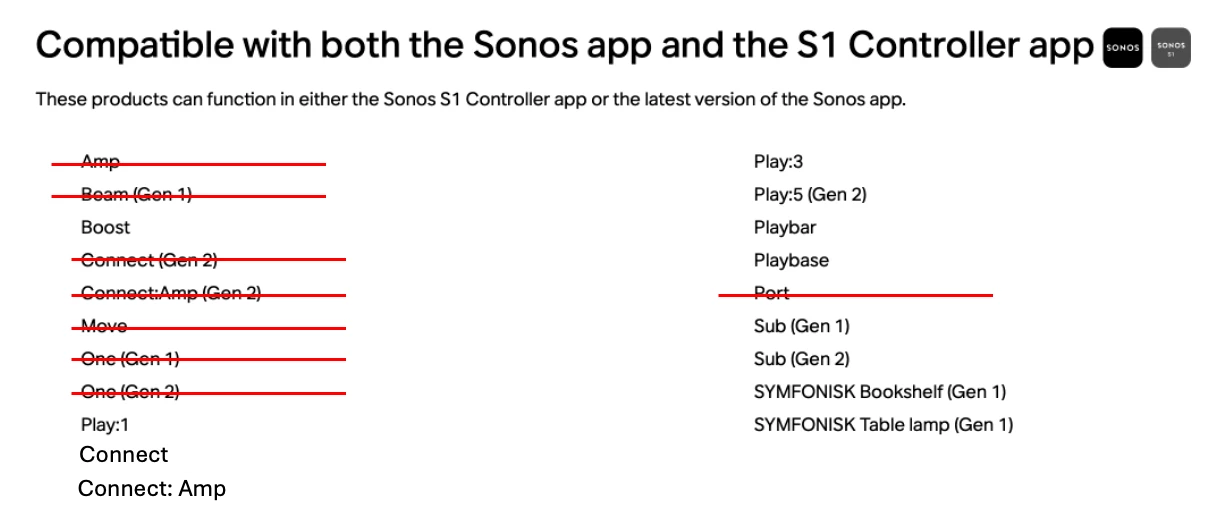
It makes sense to me. As I read it Sonos is saying that some products that are S1 and S2 compatible may no longer receive updates to new features that require Sonos App compatibility based upon memory (Click the link you provided)

In the diagram below I’ve crossed out products that are still S1 and S2 compatible which will continue to receive additional Sonos App feature/updates. For how long only Sonos knows. 🤔 The remaining products will not receive Sonos App feature/updates. * JMHO


 * I manually added Connect and Connect: Amp to match the link Legacy Product Update 


controlav
Forum|alt.badge.img+24
  • Lead Maestro
  • August 27, 2026

Based on device firmware versions:

S1: v57.x will never get to v58 (as that is already used for S2)

S2 “legacy”: v86.x with room to get to v89.x if desired

S2 “not-legacy”: v96.x and likely to increment way past that

The v96+ capable devices are really S3, getting new features and the like, but compatible with S2 legacy devices (unlike the S1/S2 split).


  • Contributor I
  • August 27, 2026

I remember I’m here in this thread earlier on. I was having trouble with having my bedroom legacy Sonos speaker play my Mixcloud uploads, as well as also my newer cellar/office Sonos speaker. Both of which needed separate Mac desktop controllers to operate, or at least to set up queues. I had to get with support who managed set me up okay—after quite a bit of effort. Today maybe things might go easier.

It was later that I discovered I was able to add all my 5000+ hourlong Mixcloud uploads randomized onto both queues separately and have them play at the touch of a button. Something I don’t know how I could do with any other system.

All I’m saying now is I’m quite happy with how my older and newer Sonos devices are working okay.


  • August 27, 2026

Here’s how I see it… There are only 2 controllers. S1 and S2. There are only two systems, S1 & S2. The S2 system now has older devices that are considered S2 Legacy with it’s own firmware branch.. The S2 legacy devices still use the S2 controllers and are S2 systems.

Those S2 legacy devices are not OLD S2, they got updated in the big May 2024 UPDATE. They are running the current S2 API etc. So they are S2.


AjTrek1
  • August 27, 2026

Simply put… It makes sense to me no matter the confusing (to some) the language may be about so called Legacy S2 products. As I said TMU they are still S2 products but due to hardware limitations they may not receive some features that the newer Sonos App (or S2 products if you want to make a distinction) will receive.

Things will probably come to ahead in a future update when those so- called “legacy S2” products have a functional gap vs other products that were designated as S2.

Granted For right now my system is unique in that none of my products are older than a Sonos Amp or Port. So my biggest worry is when those products get left behind. But then again they’re not critical to my system. 😂😂


  • August 27, 2026

As far as term “legacy” is concerned to my understanding it only refers to devices that cannot operate on the S2 (Sonos App) controller/Firmware.

You can see where the confusion comes from, correct? That statement is not true. The legacy devices do operate with the S2 controller/firmware. That was, and is, my point.

Things will probably come to ahead in a future update when those so- called “legacy S2” products have a functional gap vs other products that were designated as S2.

I agree, that will inevitably happen. We’ll have to see how Sonos handles that when the time comes.


Stanley_4
  • Grand Maestro
  • August 27, 2026

Please, don't let them switch to Roman  Numerals for version numbers, about the only more confusing option. :-)


AjTrek1
  • August 27, 2026

Let me try to better illustrate my point.

Fictionally speaking both Product A and Product B are considered as S2 and also operate under the renamed Sonos App since 2024 (which is used interchangeably in conversation).

Product A has 300 MB memory 

Product B has 256 MB memory which is the terminal point for S2 products. 

The next feature update requires 275 MB memory 

Theoretically both Product A and Product B are S2. However, the latest feature update requiring 275 MB memory essentially relegates Product B to S2 legacy. It still operates under the current S2/Sonos App but doesn’t support the new feature that Product A is capable of.

Thankfully, at that fictitious crossroads it wasn’t necessary to split the system as was the case with products formerly being designated as S1 and S2/Sonos App.

That my friends is my understanding until Sonos can provide an alternative explanation.


  • August 27, 2026

However, the latest feature update requiring 275 MB memory essentially relegates Product B to S2 legacy. It still operates under the current S2/Sonos App but doesn’t support the new feature that Product A is capable of.

Exactly. It (Product B - S2 Legacy) still operates under the current S2/Sonos App. I knew you could get there. :)


AjTrek1
  • August 27, 2026

However, the latest feature update requiring 275 MB memory essentially relegates Product B to S2 legacy. It still operates under the current S2/Sonos App but doesn’t support the new feature that Product A is capable of.

Exactly. It (Product B - S2 Legacy) still operates under the current S2/Sonos App. I knew you could get there. :)


What do you mean? I was already there I just had to break it down from the Einstein level 😂