Answered

Save Queue to a Sonos Playlist (Again)

  • January 27, 2026
  • 47 replies
  • 560 views

Forum|alt.badge.img+2

So the latest App release for IOS (81.00.52) says that it now includes re-intstatement of the much requested ‘save your queue as a playlist’.

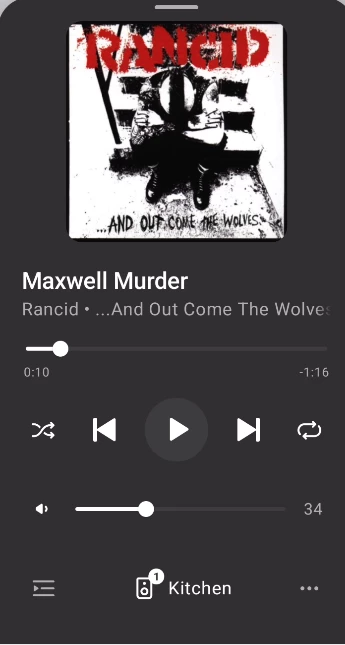
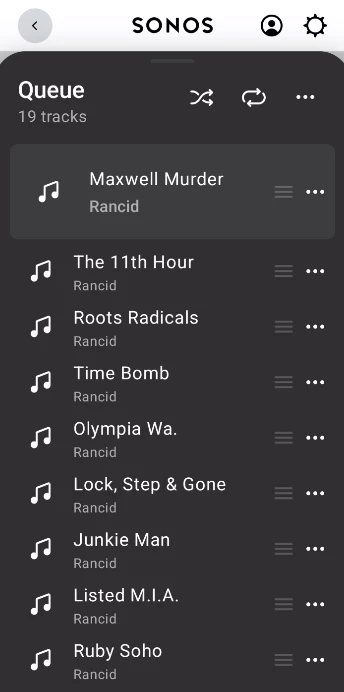
However, having updated both App and Sonos system I am still none the wiser as to how this can be achieved.  I tried tapping on the ‘queue’ icon at the bottom left of the now playing screen.  This displays the queue, but no new controls have been added to the queue screen (still just shuffle, repeat, and clear).

Anyone have any ideas how the queue can be saved?

Is it buried away in some other sub-menu somewhere?


Best answer by Smilja

For the past year, features have been enabled/unlocked in stages around a fortnight period in order to catch any bugs that might have escaped them during beta testings.

47 replies

jgatie
  • January 27, 2026

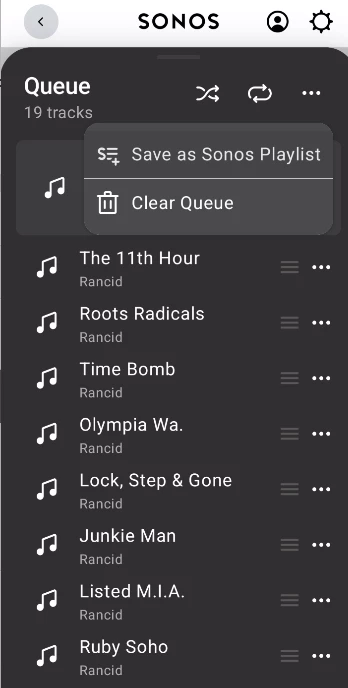
From the Now Playing screen, tap the Queue icon (lower left)


From there, tap the three dots (. . .) at the very top right (on the Queue level).


Tap Save as Sonos Playlist.


Forum|alt.badge.img+2
  • Author
  • Enthusiast II
  • January 27, 2026

Unfortunately I don’t have the 3 dots in the top left, just the ‘clear queue’ icon.  


Stanley_4
  • Lead Maestro
  • January 27, 2026

Is that Android?

Did you get the Jan app update? Android can take a couple weeks to be released for your devices.


jgatie
  • January 27, 2026

Unfortunately I don’t have the 3 dots in the top left, just the ‘clear queue’ icon.  


Rollouts for releases are incremental.  Check your app version, the new versions are:


81.00.51 (Android)

81.00.49 (iOS)

Release date: 1/27/2026


Forum|alt.badge.img+2
  • Author
  • Enthusiast II
  • January 27, 2026

Strangely it works OK on my iPad, but option not showing on 2 iPhones (14 pro and SE).  I’ve tried the usual of deleting the app, restarting the phone, and re-installing (latest version 81.00.52), but still don’t have the 3 dot option at the top right of the Queue screen - just the old ‘bin’ clear icon. Perhaps it will magically appear in a few days?


Forum|alt.badge.img+2
  • Author
  • Enthusiast II
  • January 27, 2026

Is that Android?

Did you get the Jan app update? Android can take a couple weeks to be released for your devices.

I’m on IOS, and using the Jan update. Works OK on my iPad, but not on iPhone. 


Forum|alt.badge.img+2
  • Author
  • Enthusiast II
  • January 27, 2026

Unfortunately I don’t have the 3 dots in the top left, just the ‘clear queue’ icon.  


Rollouts for releases are incremental.  Check your app version, the new versions are:


81.00.51 (Android)

81.00.49 (iOS)

Release date: 1/27/2026

iOS showing as 81.00.52 in the UK App Store. 


Smilja
  • January 27, 2026

@RavingDave, You’ll need to await the firmware update for the speakers.

Update your Sonos speakers | Sonos


Forum|alt.badge.img+2
  • Author
  • Enthusiast II
  • January 27, 2026

@RavingDave, You’ll need to await the firmware update for the speakers.

Update your Sonos speakers | Sonos

@Smilja, I’ve updated the firmware to latest version 93.1-73190, released 27/01/2026. Still only works on iPad, but not on iPhone. 


Smilja
  • January 27, 2026

@RavingDave, Uninstall the Sonos app, reboot the iPhone, and re-install the Sonos app from the App Store.


Forum|alt.badge.img+2
  • Author
  • Enthusiast II
  • January 27, 2026

@RavingDave, Uninstall the Sonos app, reboot the iPhone, and re-install the Sonos app from the App Store.

Tried that already.  Made no difference


Forum|alt.badge.img
  • Trending Lyricist I
  • January 27, 2026

I get exactly the same, I thought great Sonos have finally fixed this, 2 years now since it broke. App updated, firmware updated and still can’t save queue to a playlist 


Forum|alt.badge.img+1
  • Trending Lyricist I
  • January 27, 2026

I’m on IOS and experiencing the same as RavingDave. In the past when features have been released on a rolling basis I’ve always been one of the last to receive them, so no doubt it will appear in the next week or two.


Forum|alt.badge.img
  • Trending Lyricist I
  • January 27, 2026

Why does the App Store say it fixes it then, in bug fixes,

same old, pooor, rubbish Sonos,

bless they are trying to fix things and can’t, so they have to lie, shocking behaviour.


Forum|alt.badge.img+4
  • Renowned Enthusiast II
  • January 28, 2026

I just did the app update on four iOS devices and used one of them to do the firmware update. All devices are now showing system is up to date, but only two of the devices show the new save option. If I save a list on those, it does then show up on the others, so at least I can manage things that way for now. I’m hoping that over the next few days, the other 2 devices will get the new Save option as well.


thismarkhohnson
Forum|alt.badge.img

It’s a bit hidden — open the queue, then tap the three-dot (⋯) menu in the top-right of the queue screen to see “Save Queue”. If you don’t see it yet, the feature is still rolling out server-side, so some accounts won’t have it immediately even on the latest app.


Forum|alt.badge.img
  • Trending Lyricist I
  • January 28, 2026

Hello,


🙋‍♂️ unfortunately I don’t have the x3 dots. As I am up to date, firmware and app. How can it then roll out, do Sonos then randomly connect to customers devices and apply fix. Sounds like the post office horizon scandal all over again. Sonos are secretly accessing our systems without our knowledge and messing around and breaking things.


so unimpressed with Sonos.


Forum|alt.badge.img+2
  • Enthusiast II
  • January 28, 2026

, do Sonos then randomly connect to customers devices and apply fix.

It’s not random, it’s on purpose to enable a feature you presumably want. 


Forum|alt.badge.img+2
  • Enthusiast II
  • January 28, 2026

I just did the app update on four iOS devices and used one of them to do the firmware update. All devices are now showing system is up to date, but only two of the devices show the new save option. If I save a list on those, it does then show up on the others, so at least I can manage things that way for now. I’m hoping that over the next few days, the other 2 devices will get the new Save option as well.

I encountered the same problem. Deleting and reinstalling the app fixed it on the devices where the feature was missing.


Forum|alt.badge.img
  • Trending Lyricist I
  • January 28, 2026

Thanks but this didn’t fix it for me


Forum|alt.badge.img+2
  • Author
  • Enthusiast II
  • January 28, 2026

It’s a bit hidden — open the queue, then tap the three-dot (⋯) menu in the top-right of the queue screen to see “Save Queue”. If you don’t see it yet, the feature is still rolling out server-side, so some accounts won’t have it immediately even on the latest app.

I could perhaps understand it rolling out on an account by account basis, but there are several cases reported here where on a single account some control devices show the new feature whereas other control devices do not.  Doesn’t  make sense to me that Sonos could rollout the new change to an App on one device, but somehow hold it back from other devices running the same App, all connected to the same account?


Stanley_4
  • Lead Maestro
  • January 28, 2026

I'm pretty sure you download the new app version, it reaches out to Sonos to see what features to enable and which to leave disabled. Over time the app reaches out to Sonos to see if it then has permission to activate any features.

I messed this process up with some of my overly enthusiastic LAN security settings and got a bit of insight of the process as I got Sonos help sorting my stuff.

Not saying Sonos can't reach out to your device in some manner, just it doesn't appear to be how this bit works.


Smilja
  • January 28, 2026

@RavingDave, It appears that updates are rolled out anonymously by (mobile) device model rather than by customer account.


Forum|alt.badge.img
  • Trending Lyricist I
  • January 28, 2026

At Raghu, in my opinion if the app update says it’s going to fix something. It should, you shouldn’t then have to wait for it to be enabled by Sonos. Sounds like madness to me. If that’s the way it works then so be it


Forum|alt.badge.img+2
  • Enthusiast II
  • January 28, 2026

At Raghu, in my opinion if the app update says it’s going to fix something. It should, you shouldn’t then have to wait for it to be enabled by Sonos. Sounds like madness to me. If that’s the way it works then so be it

I agree with you.