
Question

Remove Boost from system

  • June 28, 2026
  • 10 replies
  • 58 views

Forum|alt.badge.img+1

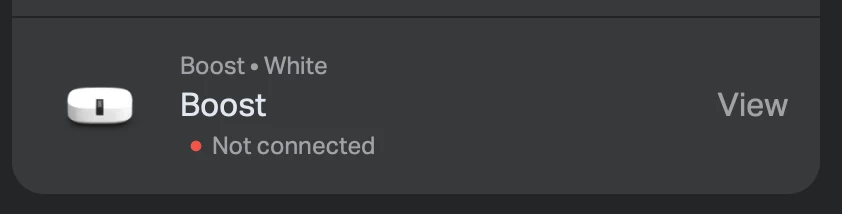
I have been waiting since the release of the new feature to disable SonosNet for the toggle to appear in my app. No luck so far, but when I check in play.sonos.com, in System Details, besides the S2 speakers, my old Boost is listed as well. Does anyone know how to remove this S1 device, so there is a possibility to finally get the option to disable SonosNet?
 

10 replies

Airgetlam
  • June 28, 2026

Generally speaking, any not connected Sonos device will disappear on its own, when the IP lease gets released (I think). I suspect you can force this by making sure the BOOST is unplugged, and reboot your router.

FWIW, the BOOST can run either S1 or S2, it is the BRIDGE which is only S1.


buzz
  • June 28, 2026

Power down the BOOST. It will naturally disappear from the controller in a few days.


Airgetlam
  • June 28, 2026

Oh, and the BOOST won’t ‘disappear’ from your list of registered devices on your account at www.sonos.com, until such time as it gets registered to another user. My advice above was only for your local Sonos system (about my system). 


Forum|alt.badge.img+1
  • Author
  • Trending Lyricist I
  • June 28, 2026

Generally speaking, any not connected Sonos device will disappear on its own, when the IP lease gets released (I think). I suspect you can force this by making sure the BOOST is unplugged, and reboot your router.

FWIW, the BOOST can run either S1 or S2, it is the BRIDGE which is only S1.

Thanks for your reply. As you can see from the status it is unplugged. I have a static IP, so it won’t change after a reboot of my router. I’ve been told by one of the forum members that a Boost is S1. Anyway, I still seeking for the way to get the “disable SonosNet” toggle.


Stanley_4
  • Grand Maestro
  • June 28, 2026

Sadly the Sonos supports documents disagree with the other forum member on the Boost S1 issue. You can confirm that yourself with a visit to the support site.

My Boost disappeared from my app after a few days of being unplugged, having a reserved DHCP Address didn't impact that.

Having it appear is usually a cosmetic issue, not an operational one, are you saying having it listed is preventing the Sonosnet switch from working?


Airgetlam
  • June 28, 2026

Static IPs are different than reserved IPs. A ‘Static IP’ is something you set up for your router, reserved IPs (like I was discussing) is what is set up in the router’s DHCP table for your Sonos (and other things on your local network). Generally speaking, I don’t think you can set up a ‘Static IP’ for a Sonos device, there is no interface to do so. Many (most? But not my current one!) routers allow you to set up reserved IPs for your devices…and once they expire, or are deleted, the device should disappear from your router (and the controller) since it no longer is recognized by your network. As suggested by ​@buzz above, it should just disappear from your router and controller’s display after some time.


Forum|alt.badge.img+1
  • Author
  • Trending Lyricist I
  • June 29, 2026

Sadly the Sonos supports documents disagree with the other forum member on the Boost S1 issue. You can confirm that yourself with a visit to the support site.

My Boost disappeared from my app after a few days of being unplugged, having a reserved DHCP Address didn't impact that.

Having it appear is usually a cosmetic issue, not an operational one, are you saying having it listed is preventing the Sonosnet switch from working?

This is a funny thing, my boost disappeared from my app within days, but hasn’t disappeared from play.sonos.com, this started my doubts about the Boost. Also, it’s not very clear wether it is S1 or S2.

You’re right ​@Airgetlam, I can’t use static IP-addresses for Sonos devices, I do use reserved IP-addresses with my DHCP server, but I thought you meant my public IP-address, because you mentioned my router, which is only used for my internet connection. I use switches for my Sonos devices. 


Airgetlam
  • June 29, 2026

I don’t have any experience with play.sonos.net. If the device is still showing there, after a reboot if the device where that controller is running, you may want to call Sonos Support to discuss it.

When you speak directly to the Support staff, they have tools at their disposal that will allow them to give you advice specific to your network and Sonos system.

On the other hand, I’d really not be worried about it, especially as it is powered off. 


Stanley_4
  • Grand Maestro
  • June 29, 2026

The Boost can be either S1 or S2, it all depends on how you configured it, I linked to the Support document:

https://support.sonos.com/en-us/article/sonos-app-version-compatibility

Since it has been discontinued, in 2014, most folks followed Sonos guidance and removed it back then.

https://support.sonos.com/en-us/article/boost-end-of-sale


The web controller does odd things, try clearing all your browser data and see if tne Boost entry disappears. The apps and desktop controllers don't seem to have that issue. Maybe you need to call support.


buzz
  • June 29, 2026

Any router configuration changes, such as address reservations, will remain until the router configuration is manually updated. Even then, I had one ISP’s router remain crabby about reusing the formerly reserved address of a unit that was no longer present on the network until I rebooted the router. This particular router tended to get its knickers tied in a knot unless I rebooted it about once a month.

Units will remain in your list of owned units until they are adopted by another user account. I’m not aware of this causing any issues unless you are a neatness freak and have recycled or “binned” some ancient units, such as a BRIDGE.
