Answered

macOS controller and Apple Silicon

  • February 17, 2026
  • 65 replies
  • 2760 views

Show first post

65 replies

Forum|alt.badge.img
  • Trending Lyricist I
  • May 27, 2026

I realise this thread is a month old but I too have landed here while searching on the recent macOS warning. It popped up updating to 17.2.3.

I use the Mac app because I’m on that most of the day. The iOS and iPadOS apps are shocking and I find them extremely hard to navigate and get anything to play. Basically I just change radio channels. I stream Apple Music to HomePods. I know others will disagree. I find the Watch Lyd app is more logical, but that’s limited.

It sounds like a childish comment from me but this will effectively kill off any Sonos versatility I now have. I’m not whinging. That’s all in the future, still so plenty of time to see how it goes and maybe save up for a surround sound system that will match my TV of choice. Someone will want my Sonos when and if it gets replaced as it is still good stuff.


AjTrek1
  • May 27, 2026

I doubt very strongly that Sonos position regarding the MacOS app transitioning to silicon will ever happen. Especially so as Sonos stripped the functionality of the MacOS and Windows version years ago in anticipation of moving to the web based version.


Forum|alt.badge.img
  • Trending Lyricist I
  • May 27, 2026

I’ve seen a web version mentioned in the thread. I had no idea it existed, what it was and if it meant a literal browser.

Educating myself, I searched. I had a go of the “try it” button and it does indeed open my system but it is slow to perform an action, like volume up/down and I am not enamoured by the layout. I’ll have to try it more when I have time. Maybe it’ll be “bah! An extra tab!” and I’ll calm down.


Airgetlam
  • May 27, 2026

Here is the announcement of the ‘new’ web app:

Note, it’s both two years ago, and a little lost in the combination of two apps….both mobile and web. Easy, IMHO, to miss. 


Forum|alt.badge.img
  • Trending Lyricist I
  • May 27, 2026

I made a new “web app” into the dock from Safari. That’s a start.


Forum|alt.badge.img
  • Trending Lyricist I
  • May 28, 2026

It occurred to be that we are putting a lot of trust in Sonos. I don’t think it beyond the wit of a hacker to at some time insert code into the web page that forms the controller and so execute it on our Macs/PCs. I’m just saying.


Airgetlam
  • May 28, 2026

Just as much as them hacking in to your individual Mac’s, and executing code directly there. Just saying. 


Forum|alt.badge.img
  • Trending Lyricist I
  • May 28, 2026

Sure. I was thinking of a bulk attack rather than targeting individuals. Same with any site really. Maybe I could have just said it in my head but there’s so many voices… 


Forum|alt.badge.img
  • Trending Lyricist I
  • May 29, 2026

If I don’t get on with the web controller when I lose the current one, there’s always Menu Bar Controller for Sonos from the Lyd people. Lyd on Watch and iPhone is pretty good so likely the Mac version will be too, for a fee.

Moderator Edit: Link removed


Forum|alt.badge.img+18
  • Prodigy II
  • May 29, 2026

Sure. I was thinking of a bulk attack rather than targeting individuals. Same with any site really. Maybe I could have just said it in my head but there’s so many voices… 

“And in other news tonight, Sonos is reporting a cyber attack on their web app. Speakers in customers’ homes all over the world have been turned up to 46 and are playing Barry Manilow’s Copacabana on repeat. Sonos has said it is rolling out a fix, but has warned that it’s a phased roll-out so some users (especially those on Android phones) may find Barry singing loudly in their homes for up to two weeks. The CEO of Sonos has apologised and gone onto Reddit (rather than Sonos’ own forum) to explain what’s happening.”


Robert_50
Forum|alt.badge.img
  • Lyricist III
  • June 7, 2026

Anticipating the demise of the Mac app, I just tried the web interface and find it very slow and clunky. 

Sonos not bothering to update their app to Apple Silicon is just lazy and insulting to Mac owners, many of whom, like me were early Sonos adopters. 

I did a quick investigation, and discovered that the Sonos Mac app is basically old junk code using deprecated Carbon APIs and very early versions of Cocoa going back decades. If Sonos had kept the app up to date, it would be a simple matter to recode for Apple Silicon. As it is, it will probably never happen. 

This is a very bad reflection on Sonos's software management and priorities, but as we've seen with the iOS app, they've basically fucked up software multiple times and probably will do again. 

Such a shame, as overall I'm very impressed with the sound quality from my various Sonos speakers and systems. 


Robert_50
Forum|alt.badge.img
  • Lyricist III
  • June 7, 2026

I made a new “web app” into the dock from Safari. That’s a start.

This works very well to give you a quick alternative to get to the Sonos controller on the web. It's still the same sluggish web app with invisible volume controls, but at least it's an easy way to get there. 

A Quick Alternative on Mac
If you want a native-feeling experience without relying on the aging, emulated Intel app, you can turn their web player into a standalone app:

  1. Open Sonos controller in Safari.
  2. Click File in the Mac menu bar.
  3. Select Add to Dock.

This creates a lightweight, Apple Silicon-native progressive web app (PWA) that runs independently of your browser and skips Rosetta entirely.


AjTrek1
  • June 7, 2026

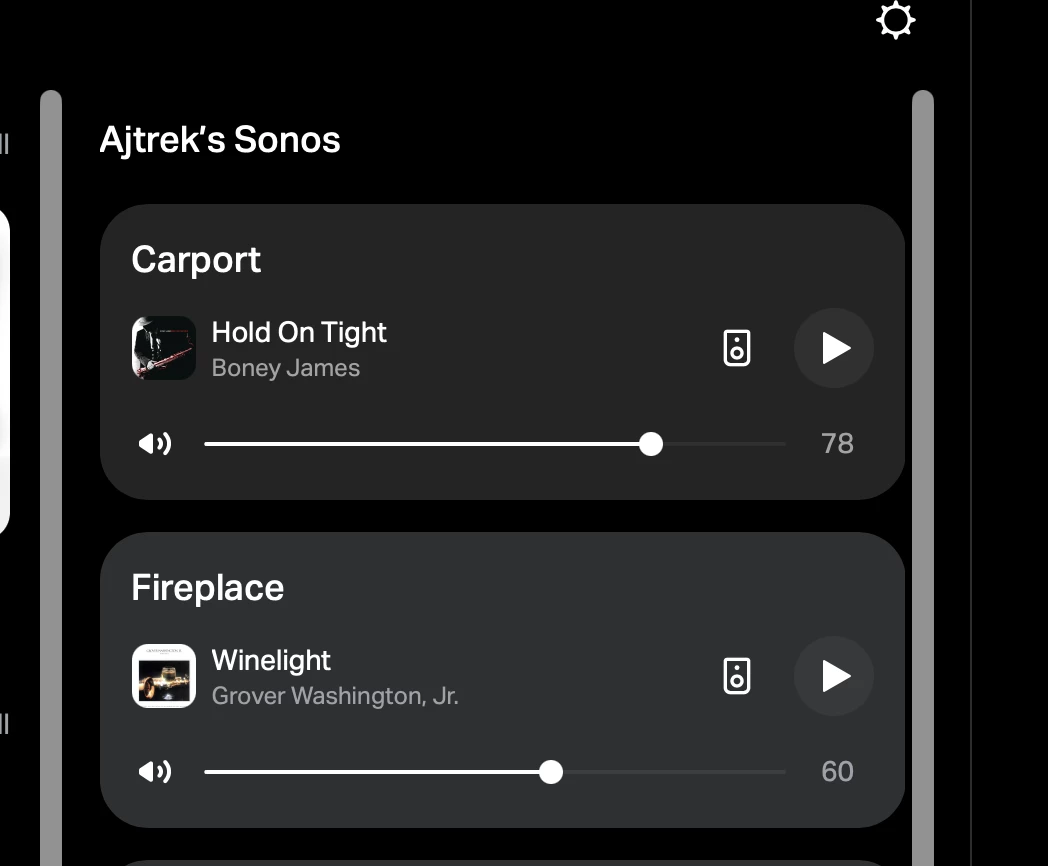
play.sonos.com looks fine on my Mac’s including Volume Sliders The screenshot is captured from my Mac Studio Display connected to MacMini_M4 running macOS Tahoe 26.5.1. 


Robert_50
Forum|alt.badge.img
  • Lyricist III
  • June 7, 2026

Thanks AJ. I am on 26.6 b1 not sure if that is why. I’ll keep experimenting UPDATE sorted, it was an extension called darker that keeps Safari in Dark Mode in this case. It was affecting the volume sliders and weirdly nothing else.  Looks much better with it turned off 🤣


AjTrek1
  • June 7, 2026

Thanks AJ. I am on 26.6 b1 not sure if that is why. I’ll keep experimenting UPDATE sorted, it was an extension called darker that keeps Safari in Dark Mode in this case. It was affecting the volume sliders and weirdly nothing else.  Looks much better with it turned off 🤣

Glad you figured out the appearance issue.

FYI, for future reference Sonos Tech Support doesn’t offer support for OS beta’s of any type. That’s also information that we in the community (although we are not Sonos Tech Support) need to know as well. We could spend a lot of time offering solutions that normally work but not on a beta.