Mac OS app - intel based to silicon

  • April 10, 2026
  • 38 replies
  • 3714 views

Show first post

38 replies

Bob235178
Forum|alt.badge.img+1
  • Enthusiast I
  • June 24, 2026

Having come across the message I decided to try phonos ultimate 

Do you know if it has an apple silicon binary, or is it just x86


Airgetlam
  • June 24, 2026

What did a Internet search show, when you looked for ‘Phonos Ultimate’?


Bob235178
Forum|alt.badge.img+1
  • Enthusiast I
  • June 24, 2026

What did a Internet search show, when you looked for ‘Phonos Ultimate’?

It doesn’t say on the developer’s site (no contact info and the faq doesn’t have a search function), and in the app store it just says compatible with this mac, which for now may require Rosetta or it may not.


  • June 24, 2026

I’m sure the developer will be along to say for sure, but it looks like a universal binary to me. So, no, it doesn’t require Rosetta.


Bob235178
Forum|alt.badge.img+1
  • Enthusiast I
  • June 24, 2026

I’m sure the developer will be along to say for sure, but it looks like a universal binary to me. So, no, it doesn’t require Rosetta.

did you verify that it has an arm64 app?.  I find out by using Terminal to go to the /Applications/Example.app/Contents/MacOS folder and ls to get the files there and use “file filename” and it will tell you if it’s x86_64, x86_32, arm64, arm64e or a combination of two of those.  The reason I ask is because on older universal apps, the universal meant x86_64/x86_32, and new apps could be x86_64/arm64.

Or, I could just pull the trigger on the $5 app and look myself, lol.   I’ll do that.


  • June 24, 2026
PhonosUltimate: Mach-O universal binary with 2 architectures: [x86_64:Mach-O 64-bit executable x86_64] [arm64]
PhonosUltimate (for architecture x86_64): Mach-O 64-bit executable x86_64
PhonosUltimate (for architecture arm64): Mach-O 64-bit executable arm64

Doesn’t require Rosetta.


Bob235178
Forum|alt.badge.img+1
  • Enthusiast I
  • June 24, 2026

Doesn’t require Rosetta.

Thank you very much for posting that.  Downloading it now.


controlav
Forum|alt.badge.img+24
  • Lead Maestro
  • June 25, 2026

Having come across the message I decided to try phonos ultimate 

Do you know if it has an apple silicon binary, or is it just x86

It’s both. You can open the package and take a look inside if you like. (I am the author).


  • Lyricist II
  • July 15, 2026

Why would the app not run via Apple’s Rosetta 2?  So far I haven’t had any trouble running my existing Sonos app for Mac.


AjTrek1
  • July 15, 2026

Apple’s next MacOS will no longer support Rossetta 2 as an interpolator for InTel based apps to work with Apple Silicon.


piddonkadonk

Chiming in here a little late, but I have tried a stupid amount of 3rd party MacOS (and iOS) Sonos apps. It’s really obnoxious that Sonos is abandoning a group of people that have a specific MacOS workflow like OPs here, which seems close to mine. Throughout my day, working on different projects, I have to switch back and forth between my Mac Mini, Macbook Pro and company-issued Chromebook (via KVM), and the web app does suffice when working strictly off ChromeOS - you can easily create a nice little web app if you choose to do so. But that segue to a web app has been pretty awful with Safari for instance which like OP, don’t want open at times. I created a web app via both Unite Pro and Coherence X that aren’t bad, but I love the frills of a real player that stacks some fun functionality in it. Music is my world and why should it have to be mundane - especially when we’ve dropped god knows how much money on hardware to see some major fails time and again - and as a loyal consumer I’d like to see Sonos pay it back with something that wows. Maybe the web app will get there, but in the meantime here are my favs for 3rd party MacOS functionality in order of preference:

1) MenuBar Controller for Mac (made by Lyd, which is also an awesome iOS app) - really quick functionality from your Menu Bar including grouping, volume, track change and a player/library function that keeps on improving - you can now search library and services with ease.

2) Clic (also has an amazing app for with robust functionality) - Clic is constantly getting better, the dev is super active and if there were a few tweaks to the menu bar and quick volume edits it would be my daily Sonos macOS driver

3) Orto - doesn’t look pretty and there is some glitchy behavior, but it works (

I wouldn’t recommend Soro for MacOS - there are a bunch of reasons, but it just feels unfinished and they hype it up, but it can’t compete on MacOS and has too many places where extra clicks are unnecessarily added. 

Frills: For both MacOS and iOS I place a ton of value in stuff like Control Center, Live Activities, lockscreen controls, apple audio player integration, widgets, etc.

I’ve also used these apps and their iOS apps on my Mac Mini through iPhone mirroring which normally is pretty solid unless the apps are wrapped in a way that don’t allow for the scrolling, clicking, etc via a computer mouse.

Sidenote for iOS users - Sonify is an amazing option, it’s a fairly recent addition, is free and the dev and updates are active. For straight functionality and what I envision a Sonos app should look and feel like, Sonify wins. They just need to add a MacOS app and throw some of the frills I noted above in there and then it will be my “go to”.

Second sidenote for iOS user - Sono+ is also a great app that is kind of like an addendum to the Sonos app rather than something to replace it. It provides alot of those frills above.

Hope this diatribe helps someone.


  • Lyricist II
  • July 21, 2026

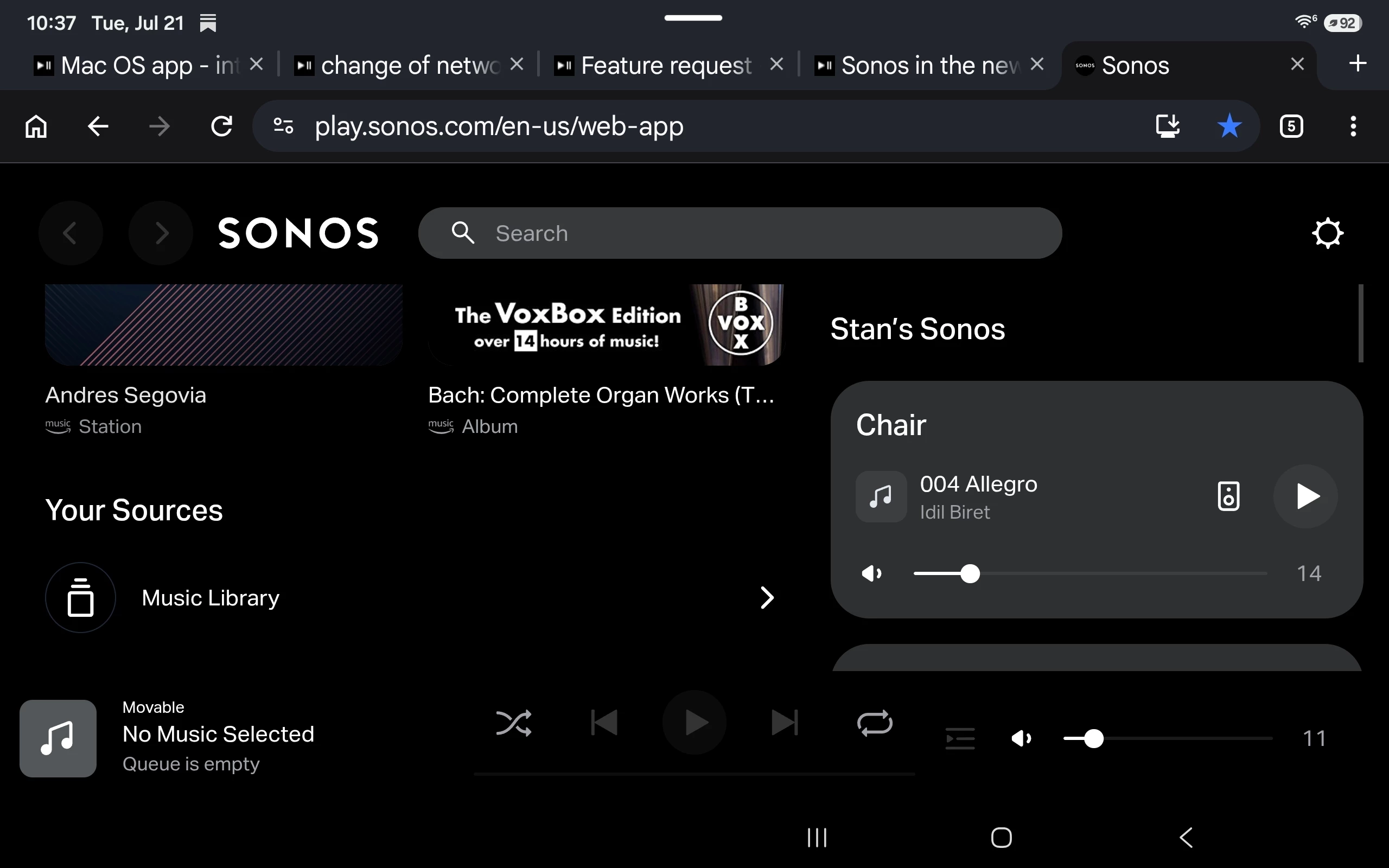
There does not seem to be a way to play from the library on the Web App.  Only streaming services.


Stanley_4
  • Grand Maestro
  • July 21, 2026

On Android and Chrome web controller, the music library is at the bottom.