
Question

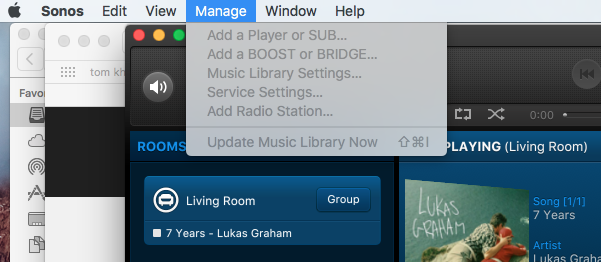
I can't select anything from the Manage tab drop down menu on my Mac desktop controller

  • April 18, 2016
  • 13 replies
  • 1103 views

I can't select anything from the Manage tab drop down menu on my Mac desktop controller ?

This topic has been closed for further comments. You can use the search bar to find a similar topic, or create a new one by clicking Create Topic at the top of the page.


13 replies

Chris
Forum|alt.badge.img+22
  • Lead Maestro
  • April 18, 2016
This means you are not on the most recent software update for the MAC.

Goto Sonos.com / support at top and download the latest controller.

  • Author
  • Contributor I
  • April 18, 2016
Hi Chris thanks for the reply I'm running the latest version 6.2.2 this is what happened after I did a update?

Chris
Forum|alt.badge.img+22
  • Lead Maestro
  • April 18, 2016
Then your Sonos units aren't updated. Is there an update now icon at top music selection panel?

  • Author
  • Contributor I
  • April 19, 2016
Hi Chris there is no update now icon at top music selection Panel

Chris
Forum|alt.badge.img+22
  • Lead Maestro
  • April 19, 2016
Under help. Ably my Sonos what controller version does it say and what version do the players say. There is a mismatch.

  • Lyricist I
  • December 27, 2016
I have exact issue and have uninstalled and reinstalled the latest version. cannot manage any setting on my mac

  • Lyricist II
  • December 27, 2016
Same issue here, help!!

  • Lyricist II
  • December 27, 2016
using version 7

  • Lyricist II
  • December 27, 2016
I have had this issue for some time and have just updated the Sonos SW but no change. My music library is not working and i need to resync or delete and add again but obviously can't without access to the menu bar. Please fix this asap

ratty
  • December 27, 2016
I have had this issue for some time and have just updated the Sonos SW but no change. My music library is not working and i need to resync or delete and add again but obviously can't without access to the menu bar. Please fix this asap
If your Sonos software is up to date then you must be using an older macOS -- 10.7 or 10.8. These are now only partially supported. There's no fix, apart from an operating system upgrade.

Alternatively, use a different controller.

  • Lyricist II
  • December 28, 2016
the controller is not the issue it is the library. I cant access the 3000+ songs on my itunes through Sonos. Unless your telling I can through a mobile phone controller?

ratty
  • December 28, 2016
This thread is about greyed out options on the Mac controller. Presumably you have the same problem. The controller -- or more specifically the operating system -- is therefore very much the issue.

If you have an outdated operating system the Manage options won't work. You can use other controllers, such as on a phone or tablet, to configure your library settings.

  • Lyricist II
  • January 2, 2017
thanks - the phone controller works but has issues when I try to sync the library
