
Question

Folders and Albums missing from Music Library

  • October 1, 2026
  • 5 replies
  • 59 views

Forum|alt.badge.img+1
  • Enthusiast I

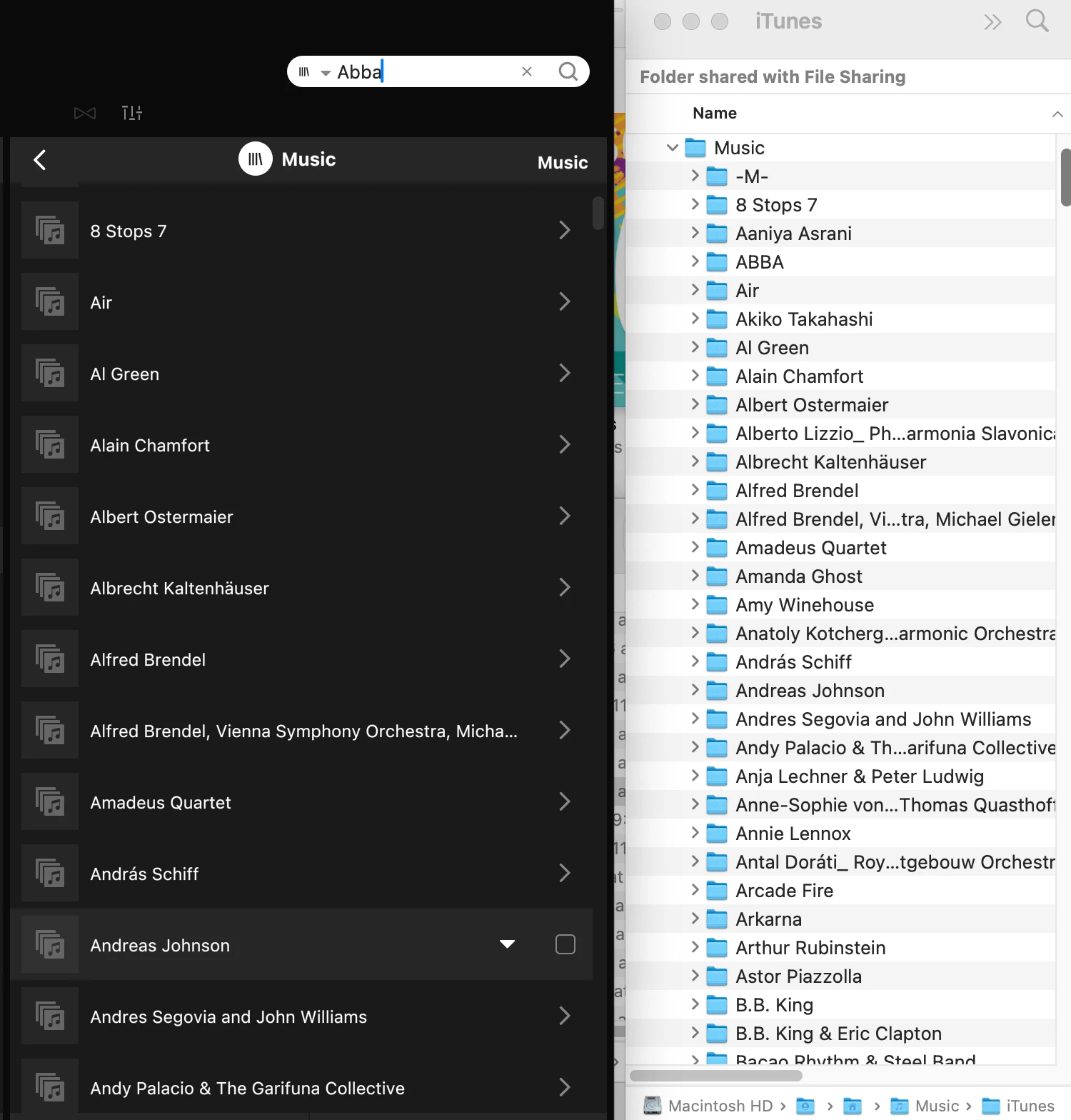
I am posting this after checking all the other posts related to this issue. After my speakers updated from S1 to S2, I was able to add the Music Library, but a lot of folders and tracks are randomly missing. I repeated this step at least three times with the exact same results. All files should be compatible and my library is under the maximum allowed limit. Please note that the main reason I had downgraded all my speakers to S1 was that none of these issues were present in S1. And I do not have time to become a test person for the SONOS technicians again, as it was the case years ago. Problem is, downgrading the speakers and adding the S1 system again is also a very lengthy process… Any solutions anywhere, after all these years?? Thanks.
 

5 replies

Jamie A
Forum|alt.badge.img+17
  • Sonos Staff
  • October 2, 2026

Hi ​@mhd, 

I’m sorry to hear that some of your tracks and albums aren’t showing on your system.

There are a few reasons why tracks and albums may fail to show in your Sonos music library, but the most likely candidates here would be missing metadata or that the music library failed to index. There was an auto diagnostic created on your system, but like the library isn’t failing to index from what I can see.

If you search for a specific song rather than the artist (something from ABBA since that’s missing in your screenshot) and the song shows, then I’d recommend checking the metadata of your missing items. If the song doesn’t show, can you temporarily move a missing track or album to another location on your computer as a test, then add it to your music library to see if it shows, as it could be due to folder permissions.

If the steps above don’t get the missing items to show then, other than checking for DRM (which is generally only an issue with older purchases from iTunes), I would recommend specifically a call to our support team as they have the necessary tools to start a remote session to look into your system and see what’s wrong, which the community or live chat don’t have. 

I hope this information helps.


  • October 2, 2026

​@Jamie A 

Could this be related to this bug, known by Sonos - and will Sonos correct it?


Claramae
Forum|alt.badge.img
  • Lyricist I
  • October 2, 2026

Since adding the library three times gave the same result, I wouldn’t repeat that again. Is the library stored on a NAS or a computer, and are the missing tracks absent from every library view or only the Folders view? That would help distinguish missing indexing from a browsing issue.


Jamie A
Forum|alt.badge.img+17
  • Sonos Staff
  • October 2, 2026

​@Jamie A 

Could this be related to this bug, known by Sonos - and will Sonos correct it?


After looking through the thread, I’d say no, but it likely falls under a general umbrella of music library issues. The original issue in the thread was albums being split when they shouldn’t, with other different music library issues being raised such as duplicate entries or issues with favorites. There was one user who mentioned an empty music folder in their library, but nobody has mentioned missing tracks/albums in that thread which ​@mhd is experiencing. 

Regarding what was raised to the team in that thread; We can’t say when an issue will be resolved, but if it’s known to us, then the team is aware and working on it.


Forum|alt.badge.img+1
  • Author
  • Enthusiast I
  • October 2, 2026

Hi All,

Thanks for all your responses. It’s not the bug as linked to. I could fix that one with selecting the iTunes compilation feature. My screenshot above shows the folder structure in SONOS compared to my Mac, so it’s not the metadata issue either. Exactly the same folders and tracks are not indexed each time I try and update, and it is a lot, and my guess is that only a third of my library was indexed. There was another user who had a similar issue, but it wasn’t resolved even with the SONOS tech support, as there were no errors shown. It might have been a time out issue in that case, with a much larger library, but that would not make sense on my Telus Fibreglass wireless internet. The track count for all songs in my iTunes Library is 9720. A lot of other posts here describing similar issues are closed, often without a solution posted. I have checked all the other possible folder issues, as said in my original post, including compatible files and DRM. When I look at the file structure on my Mac, nothing indicates any permissions differences in comparison to the folders indexed. Some have a third, staff only user listed as read only access, but that’s also the case for the folders and songs that SONOS was able to add. I am not sure whether moving all these folders that have not been indexed in and out of my iTunes folder will mess up the iTunes access, where everything looks alright. And I would have to do this manually and spend a ton of time just selecting them. But I tried just one folder with one song, and deleted the old Music library in Sonos, and added it again. Same results. BTW: Not all albums artwork is copied over either, m although I remember that I fixed a lot of Album metadata and artwork itself to make it work with the SONOS imposed limitations. Again, S1 was able to index at least all the tracks without any issues, but S2 is not, and never was working on my side. A few years ago I literally spent days to fix it, including SONOS support suggestions, which did not help back then. I might try this option one more time, but I am tired of spending so much time again on trouble shooting, and rather downgrade. If their software engineers could at least get rid of the upgrade button in S1 which cannot be disabled against their claim, I would have some stability with at least a workable system going forward. And it also allows me to access my library from my old Time Machine drive again. Currently, I can only link to the one on my MacBook Pro, which means that I have to keep it accessible in the house for access.