
Question

Attention Sonos Devs: Sonos S1 Mac App still (still) has completely broken versioning

  • April 24, 2026
  • 3 replies
  • 24 views

Forum|alt.badge.img
  • Contributor II

I know this is likely just hollering into the wind at this point, but this remains a recurring issue dating back months and months where updates to Sonos S1 Mac app are continually released with completely invalid/missing version data (see https://en.community.sonos.com/topic/show?tid=6931739&fid=229131 and before that https://en.community.sonos.com/topic/show?tid=6929356&fid=229131)

The latest version, as downloaded from https://support.sonos.com/en-us/downloads ➡️ https://www.sonos.com/redir/controller_software_mac ➡️ https://update-software.sonos.com/software/DILU1Q33hC/Sonos_57.23-74170.dmg continues to have no valid CFBundleVersion nor CFBundleShortVersionString values specified within the app’s Info.plist file.
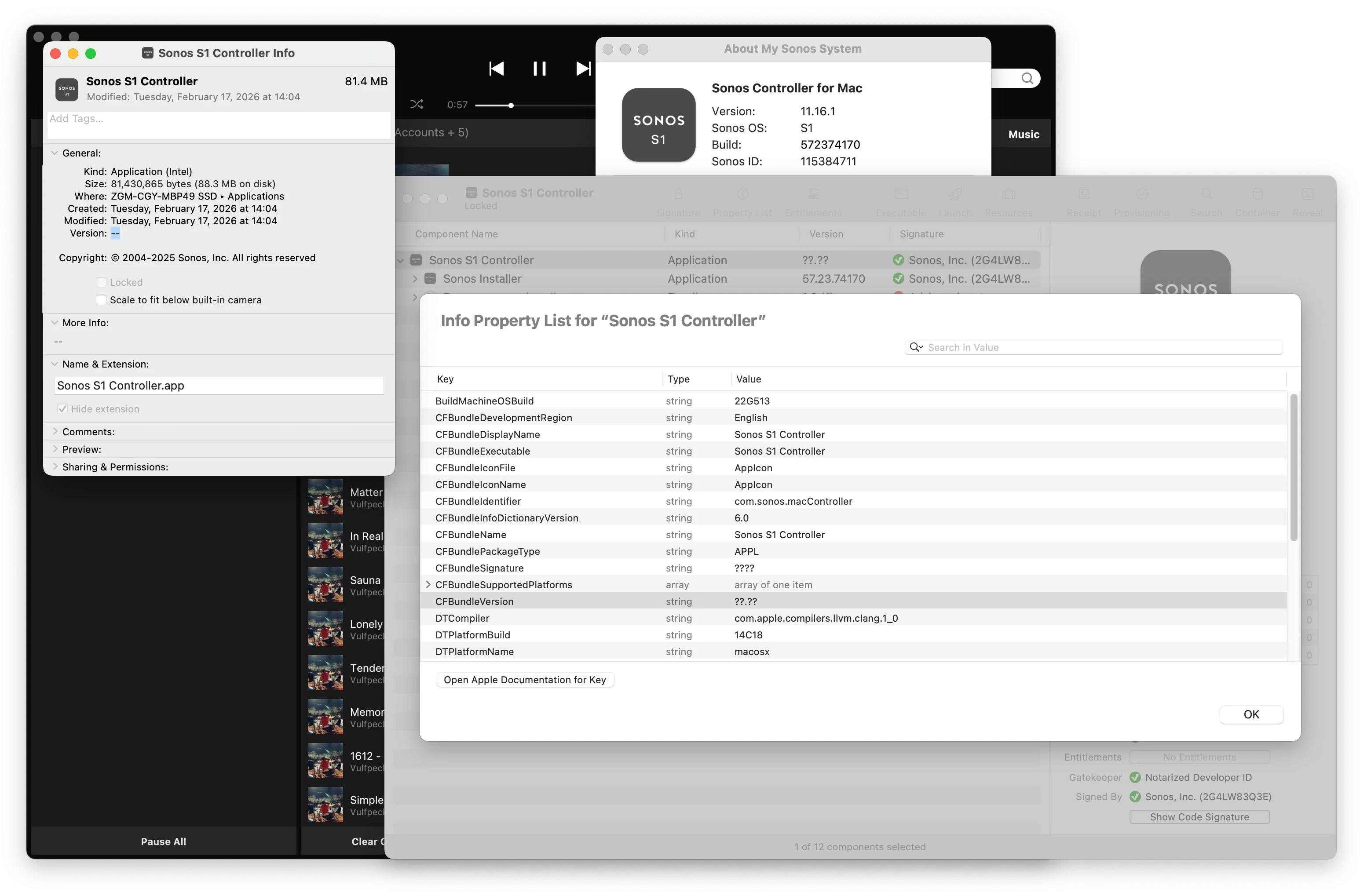
When running, the app itself reports multiple types of versions within the “About My Sonos System” window, however none of those have any bearing on what the software reports in macOS itself and thus, more critically, to any patching or management systems attempting to report on/update the software installed on macOS systems.

Please, please, please make part of the pre-release QA process involve somebody selecting “Get Info” on the app in their Finder and ensuring the version reported is valid —This is somewhat Mac app development 101 ☹️

If there’s a desire to get fancier or even automate that sort of check, here’s a command line one-liner that outputs the exact version keys set within the app’s Info.plist (or not set, as the case may be in):

echo "CFBundleShortVersionString:\t$(defaults read "/Applications/Sonos S1 Controller.app/Contents/Info.plist" CFBundleShortVersionString)\nCFBundleVersion:\t\t$(defaults read "/Applications/Sonos S1 Controller.app/Contents/Info.plist" CFBundleVersion)"

Result: 

The domain/default pair of (/Applications/Sonos S1 Controller.app/Contents/Info.plist, CFBundleShortVersionString) does not exist

CFBundleShortVersionString:

CFBundleVersion: ??.??

😞 

3 replies

Airgetlam
  • April 25, 2026

Given that they no longer have anyone ‘working’ on the desktop OS apps, it does seem unlikely to be ‘resolved’.


controlav
Forum|alt.badge.img+24
  • Lead Maestro
  • April 25, 2026

Yes, but.

Why does this matter? The app isn’t in the App Store, so a proper version story doesn’t matter. The app updates itself if it is out of date, again not requiring any App Store participation. The app knows which version it is, and it knows what version it should be.

Versioning is generally confusing on Sonos anyway. There’s the app version eg 11.16.1. There’s the Build (a 9 digit number). There’s the firmware versions of the devices (which are similar to the two previously listed, but not necessarily identical), and there is a Hardware version on each device.

Once Apple drop Intel emulation support soon this be even more academic anyway as the Mac apps will go away.


Forum|alt.badge.img
  • Author
  • Contributor II
  • April 28, 2026

Yes, but.

Why does this matter?

Well, as was already said: it’s Mac App Development 101 to have proper version keys in the Info.plist  

Being on the Mac App Store is irrelevant; CFBundleVersion and CFBundleShortVersionString (and to a lesser extent CFBundleInfoDictionaryVersion as a desperation-level fallback) are literally the only valid methods by which app versioning can get reported to the OS and OS-level tooling —but I suppose it goes to show how much attention Sonos is actually paying to the S1 app, even though they are still releasing updates to it…?


The app updates itself if it is out of date

False, not in a managed environment where users run with standard non-admin permissions. Even if the S1 app is installed within ~/Applications the built-in auto-updater will still prompt for admin privileges.

All of which contributes to why having a valid version to facilitate patching & reporting matters. Sure, we could have the MDM yolo out the latest version whenever it feels like it’s time to do so, but that’s hardly best practice. 

And as Rosetta isn’t (supposedly) deprecated until after macOS 27, then for the interim year+ until macOS 28 comes along it would be nice to see Sonos (return) to being a semi-decent Mac platform citizen.

