

I know this is likely just hollering into the wind at this point, but this remains a recurring issue dating back months and months where updates to Sonos S1 Mac app are continually released with completely invalid/missing version data (see https://en.community.sonos.com/topic/show?tid=6931739&fid=229131 and before that https://en.community.sonos.com/topic/show?tid=6929356&fid=229131)
The latest version, as downloaded from https://support.sonos.com/en-us/downloads ➡️ https://www.sonos.com/redir/controller_software_mac ➡️ https://update-software.sonos.com/software/DILU1Q33hC/Sonos_57.23-74170.dmg continues to have no valid CFBundleVersion nor CFBundleShortVersionString values specified within the app’s Info.plist file.
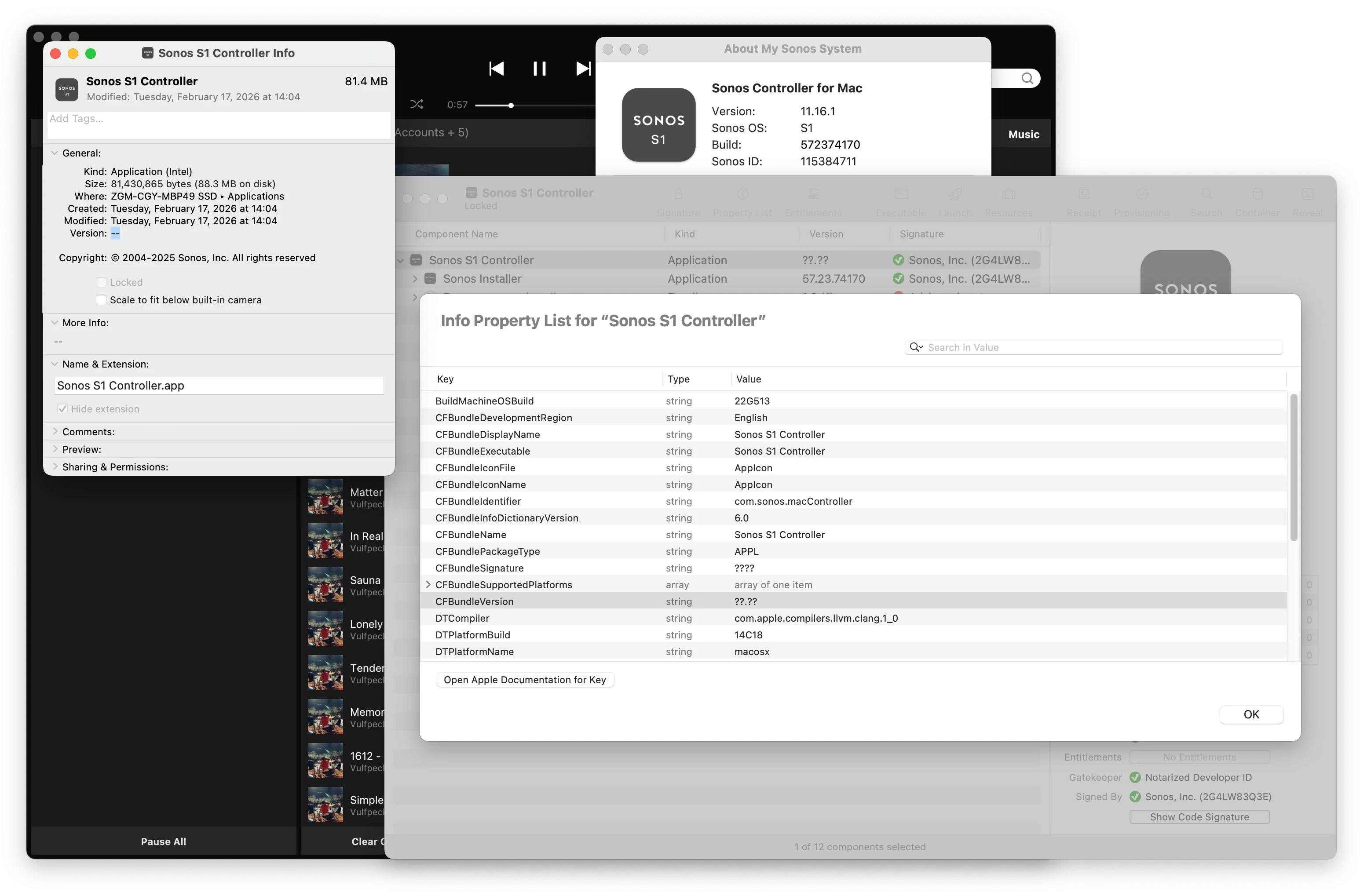
When running, the app itself reports multiple types of versions within the “About My Sonos System” window, however none of those have any bearing on what the software reports in macOS itself and thus, more critically, to any patching or management systems attempting to report on/update the software installed on macOS systems.
Please, please, please make part of the pre-release QA process involve somebody selecting “Get Info” on the app in their Finder and ensuring the version reported is valid —This is somewhat Mac app development 101 ☹️
If there’s a desire to get fancier or even automate that sort of check, here’s a command line one-liner that outputs the exact version keys set within the app’s Info.plist (or not set, as the case may be in):
echo "CFBundleShortVersionString:\t$(defaults read "/Applications/Sonos S1 Controller.app/Contents/Info.plist" CFBundleShortVersionString)\nCFBundleVersion:\t\t$(defaults read "/Applications/Sonos S1 Controller.app/Contents/Info.plist" CFBundleVersion)"
Result:
The domain/default pair of (/Applications/Sonos S1 Controller.app/Contents/Info.plist, CFBundleShortVersionString) does not exist

CFBundleShortVersionString:

CFBundleVersion: ??.??
😞


