
Answered

Alarm Bug for scheduling

  • April 20, 2026
  • 7 replies
  • 39 views

We have multiple Port players deployed throughout our building, and some of them are connected using point‑to‑point wireless links.

When we contacted support about scheduling music, we were advised to use the alarm feature and were shown how to configure it. We understand this is currently a workaround and not true scheduling. While it’s not ideal—especially for commercial environments—it does generally work.

However, we recently ran into a serious issue.

One of our point‑to‑point links went down, and during the scheduled time, half of the building began beeping nonstop. This caused a major disruption and understandably upset many users throughout the building.

In an alarm scenario, this behavior makes sense—if there’s no internet, the alarm should still sound to wake someone up. But in a music scheduling context, this becomes a real problem. Instead of a silent failure, it creates noise in public and shared spaces, which is unacceptable in a commercial environment and negatively impacts guests and staff.

If Sonos intends to continue recommending this workaround in place of proper scheduling, there really should be an option such as:

“If the device is offline, should it beep as a fail‑safe?”

  • Checked - Behaves like a traditional alarm and beeps if offline
  • Unchecked - Plays nothing if there is no internet or online source available

This small option would make a big difference and would prevent disruptions like the one we experienced, while still preserving correct alarm behavior for personal use cases.


 

Best answer by Airgetlam

That’s odd. I’ve never had ‘offline’ speakers beeping. The only instance where I could potentially see them ‘beeping’ is when their alarms go off (since they’re stored internally) and can’t reach the designated stream to play. 

Although that raises the question, how do you acknowledge an alarm that goes off on a speaker that is disconnected? I’d assume touching the controls on it should do it, but that assumes the speaker’s controls were turned on when it was connected.

How certain are you that this ‘beeping’ was associated with the speakers being offline, as opposed to the alarm going off and the speaker’s controls being unable to reach the designated content?

Have you called Sonos Support to discuss it?

When you speak directly to the Support staff, they have tools at their disposal that will allow them to give you advice specific to your network and Sonos system.

7 replies

Airgetlam
  • Answer
  • April 20, 2026

That’s odd. I’ve never had ‘offline’ speakers beeping. The only instance where I could potentially see them ‘beeping’ is when their alarms go off (since they’re stored internally) and can’t reach the designated stream to play. 

Although that raises the question, how do you acknowledge an alarm that goes off on a speaker that is disconnected? I’d assume touching the controls on it should do it, but that assumes the speaker’s controls were turned on when it was connected.

How certain are you that this ‘beeping’ was associated with the speakers being offline, as opposed to the alarm going off and the speaker’s controls being unable to reach the designated content?

Have you called Sonos Support to discuss it?

When you speak directly to the Support staff, they have tools at their disposal that will allow them to give you advice specific to your network and Sonos system.


Stanley_4
  • Grand Maestro
  • April 20, 2026

Maybe try something in the voice control system?


  • Author
  • Contributor I
  • April 20, 2026

The only instance where I could potentially see them ‘beeping’ is when their alarms go off (since they’re stored internally) and can’t reach the designated stream to play. 

This is what is happening 100%.  When you set the schedule in the Sonos App on the computer the Sonos Port (We have them connected to ceiling speakers) saves the schedule locally.   It tried to get the streaming radio station and fails if no internet.  Then this is where the beeping comes from.

Was on phone with support and they stated that it is a feature request.   They stated that the ports can only be hardwired.   Which they are but we have a point to point connecting the two sides of the building.  And randomly it goes down, and when we lose internet for the whole building this issue is happening.
 

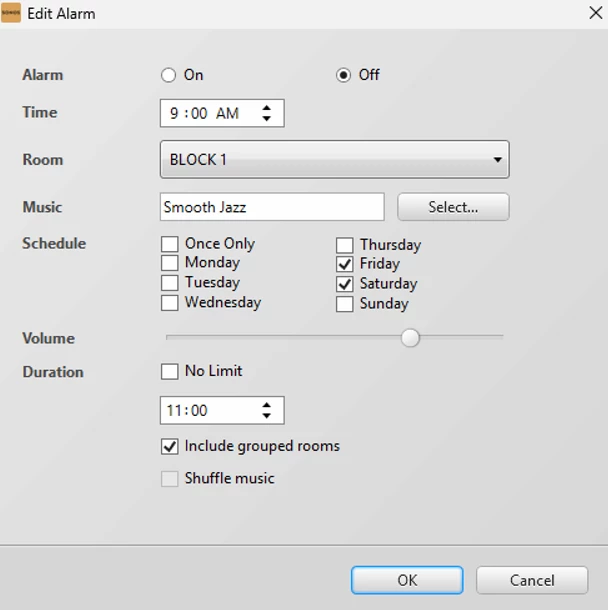
Example of alarm in the Sonos Desktop App


  • Author
  • Contributor I
  • April 20, 2026

Maybe try something in the voice control system?

In my environment the ports don’t have a voice control system…

I am thinking the sonos wireless speakers don’t have this issue from the sounds of it.


Stanley_4
  • Grand Maestro
  • April 20, 2026

You don't need voice control on a Port, just on any speqker in your system.

https://support.sonos.com/en-us/article/control-sonos-with-sonos-voice-control

With Sonos Voice Control added to a voice-enabled Sonos product, you can use voice requests to control any Sonos product in your system.


Not sure why you think wireless speakers would not beep if the selected alarm audio wasn't available? I don't use alarms here but I thought that to be the default behavior. 


  • Author
  • Contributor I
  • April 20, 2026

You don't need voice control on a Port, just on any speqker in your system.

https://support.sonos.com/en-us/article/control-sonos-with-sonos-voice-control

With Sonos Voice Control added to a voice-enabled Sonos product, you can use voice requests to control any Sonos product in your system.


Not sure why you think wireless speakers would not beep if the selected alarm audio wasn't available? I don't use alarms here but I thought that to be the default behavior. 

I would think that would be default behavior for a alarm.. i was going by what Airgetlam was stating he never heard a beeping on an offline speaker.

Thanks for the suggestion, I looked at the commands and nothing seems to point at what I am looking for in a solution with scheduling… unless I am missing something.


Stanley_4
  • Grand Maestro
  • April 20, 2026

Spent some time on Sonos voice control and alarms, less than impressed by the feature sets.

You'd think a play music at 8:00 AM and stop music at 6:00 PM commands would be there.

Same for the fallback to the default beep, that should be optional. Independent volume levels for music and beeping would be good too.


Maybe another home automation system could do more, can't help there as I avoid them here.