Answered

14.2 not playing any songs with special characters from the local library... AGAIN?!

  • March 4, 2022
  • 8 replies
  • 305 views

Forum|alt.badge.img+1

Hi, updated to 14.2 today and suddenly noticed that songs with special characters in the filename or title (have not investigated in depth yet) won't be played from the local library.

I remember this problem from 13.1 and it was fixed in 13.3.

Anyone else experiencing this?

Really frustrating this happening again.


EDIT: Seems to work now after a couple hours. Did some rescans before, so not sure what changed things. Will observe.


Best answer by Corry P

Hi @Luc45 

Thanks for your post!

We’d obviously like to stay on top of this, so if you find you have a persistent issue, please let us know. Thanks.

This topic has been closed for further comments. You can use the search bar to find a similar topic, or create a new one by clicking Create Topic at the top of the page.

8 replies

Corry P
Forum|alt.badge.img+19
  • Sonos Staff
  • Answer
  • March 7, 2022

Hi @Luc45 

Thanks for your post!

We’d obviously like to stay on top of this, so if you find you have a persistent issue, please let us know. Thanks.


Forum|alt.badge.img+1
  • Author
  • Trending Lyricist I
  • March 20, 2022

It is a recurring problem and seems to be associated with updating the music library index.


Forum|alt.badge.img+1
  • Author
  • Trending Lyricist I
  • March 20, 2022

It's the Beam. I can't initiate playback of special character titles from the Beam. Works with the other players.


Corry P
Forum|alt.badge.img+19
  • Sonos Staff
  • March 28, 2022

Hi @Luc45 

Thanks for updating the thread with that info!

I was not aware that this issue had come back, but it appears with the Beam (Gen 2), it is indeed a known issue which we are working on getting fixed.

Hopefully, it will be resolved soon.


  • Contributor I
  • May 7, 2022

Hello, I have been reading that this issue is fixed but it is not, not at least for me! 

I have 13.2.3 S2, build 64321150, using WD My Cloud.


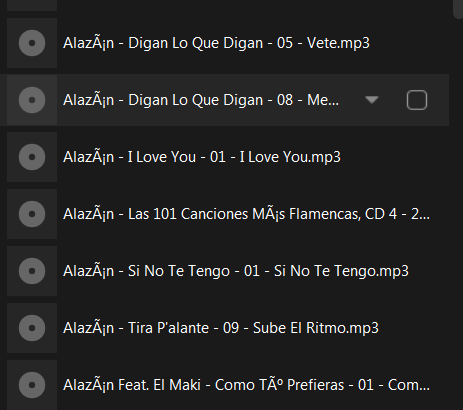
The name of the song is: Alazán - Digan Lo Que Digan - 05 - Vete. (Note the accent on the second “a”). I get the following message when I try to play it from the “PLAYLISTS”.


I CANNOT play it.

However, I am able to play the same song from “ARTISTS” (or SONGS, etc.): That is how the list of songs appears in Sonos when using PLAYLISTS: 


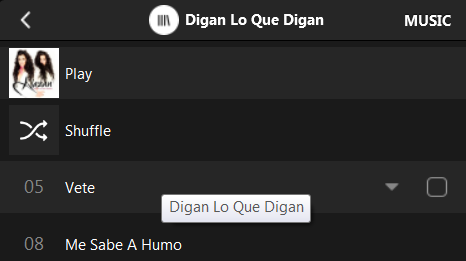
BUT in ARTISTS, here is what I see


It looks fine and I can play it!


HELP!!!! Thank you….


Stanley_4
  • Lead Maestro
  • May 7, 2022

My solution sucks but it works, did it many years ago when I lost patience.

I used a mass FLAC editor to make new copies of all my music files and to replace all accented characters with un-accented ones. I still have the originals and some day it may be safe to switch back to them.


  • Contributor I
  • May 8, 2022

That is not right of Sonos users to have to do such acrobatics! In fact, I did DUPLICATE part of my library due to the HARD-CODED limitation on the memory in the speakers. 

I was thinking to do what you said to my list but I thought, there must be an easier solution somewhere that Sonos can finally fix it for good. Hopefully...


Thanks Stanley_4!


  • Contributor I
  • May 12, 2022

***** PROBLEM SOLVED *****

While the excellent Sonos team was gathering information from me to help resolve this, I have spent some time myself researching and troubleshooting the issue. Since this only happens with playlists, I looked into how iTunes generates the .M3U files. It seems they have some "hidden" characters or some different mapping (!) when it comes to non-standard English letters.

So, I copied the content of the iTunes-generated .M3U file and copied it into a new .TXT file. I then changed .TXT to .M3U.

Et voilà,.... it worked !!!