
Trending Lyricist I
April 20, 2022
Answered

Problem streaming Apple Music
  • April 20, 2022
  • 41 replies
  • 12548 views

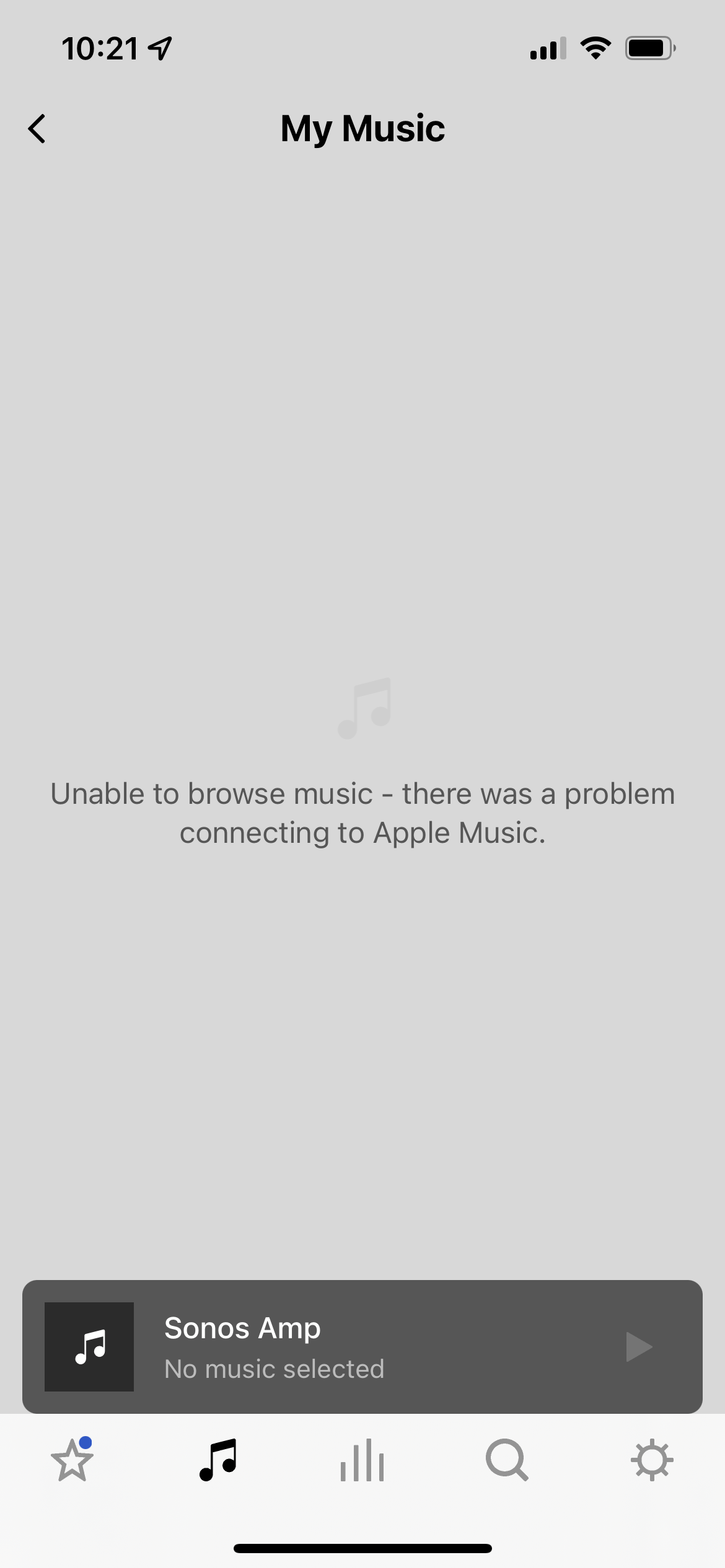
Since about 5 days ago I can’t stream Apple Music or even browse my AM library through my Sonos system. I’ve tried deleting my account via the Sonos app and reauthorizing my AM account, that didn’t help. AM results will appear in the Search screen but when I try to play them I get “unable to add songs to queue,” and when I try to browse my AM library I get the error shown in the attached screenshot. 
 

All other sources work, including Spotify and local Sonos library. I am also able to stream AM to Sonos via AirPlay. Is there a known issue with Sonos directly connecting to AM at the moment?

This topic has been closed for further comments. You can use the search bar to find a similar topic, or create a new one by clicking Create Topic at the top of the page.
Best answer by Airgetlam

When I click on ‘View real time service status’ next to your post, it shows Apple Music as a green check mark, which, along with the lack of thousands of similar posts, suggests the issue is a local one to your system. 

I’d certainly try re-authorizing the Apple Music service in your controller by removing it completely, waiting five minutes, then adding it back in, which should force an auth with Apple. But if that didn’t work, I’d submit a system diagnostic and call Sonos Support directly to discuss it. They’d be likely to pinpoint the issue in the diagnostic, and help you get back to connecting to Apple Music. 

41 replies

Airgetlam
July 20, 2022

What did the folks at Sonos suggest when you contacted them?

Bruce
Avid Contributor III
August 2, 2022

I have a proble with my Sonos one player. When I as Alexa to play Apple Music it plays music. But when I ask for any song or artist it just says “Cannot find in Apple Music”. This has been going on for some time, Sonos told me that the problem was with Amazon but they are not responding to my requests. 

Ken_Griffiths
August 2, 2022

I have a problem with my Sonos one player. When I ask Alexa to play Apple Music it plays music. But when I ask for any song or artist it just says “Cannot find in Apple Music”. This has been going on for some time, Sonos told me that the problem was with Amazon but they are not responding to my requests. 

What troubleshooting steps were tried with you when you spoke to Sonos Support Staff before they diagnosed the issue was an Amazon problem? - I ask, because there’s no point in just going over the same old ground with you again, if you’ve tried the ‘usual’ things already, like removing the Sonos & Apple skills and deregistering your Sonos component devices and removing the sharing agreement etc.

Can you provide the detail of what was tried already, it might help save some time.

By the way have you tried telephoning Amazon Support? In my own experience of speaking to them in the past, I have always found them to be extremely helpful with these type of account-linking issues?

Avid Contributor III
August 6, 2022

I have carried out all the recommended steps. It is an interesting situation. I have an echo input connected to a non Sonos speaker and that works perfectly with Alexa and Apple Music. My Sonos One seems to work with everything except finding songs, artists or my AM playlists. But if I ask to play Apple Music it does and the selection is clearly from music I have played before

Ken_Griffiths
August 6, 2022

I have carried out all the recommended steps. It is an interesting situation. I have an echo input connected to a non Sonos speaker and that works perfectly with Alexa and Apple Music. My Sonos One seems to work with everything except finding songs, artists or my AM playlists. But if I ask to play Apple Music it does and the selection is clearly from music I have played before

Yes, IIRC it’s the same if you search for tracks too in the Sonos App, the results from the Apple Music will still appear and you can select them to play. You just need to get the AM service plugin interface to work.

I am normally an iOS device user and couldn’t get the Sonos AM service to work either, but I got hold of an Android device and installed the AM app and Sonos App on that device and connected it to my (existing) Sonos system and added the AM service using that device. It worked immediately... it then also began working on every device including my iPhone/iPad. That was from one of the fixes mentioned in other threads here in the community.

The AM service has worked for me ever since I followed that fix.

Enthusiast I
August 7, 2022

Well, I’ve also experienced many issues trying to play content from Apple Music on the Sonos app, the playing is stable but I get multiple message errors when I try to select a song, skip, resume or even pause, and my Sonos Roam disconnects, I’ll attach a photo so you have an idea, O can’t get a diagnostic right now because my Roam is powered off, but as soon as anything happens, I’ll do that     

La discapacidad visual no es ningún impedimento, a disfrutar Bros
Prominent Collaborator I
August 7, 2022
Have have had the same problem, but Appel Music now works again, after being away from my Sonos app for approx. one day.
Ken_Griffiths
August 7, 2022

@Manu84 
That sounds a bit more like a local network connection issue, rather than a service issue - do you have an STP issue with your LAN router/switches perhaps🤔? - what router, or mesh system is it? Do you have switches across the LAN and are they managed/unmanaged?

Also have you tried changing the routers DNS? Perhaps try it using Google’s public DNS servers… 8.8.8.8 and 8.8.4.4.

Contributor I
August 10, 2022

Same problem here for last week or so.


I’ve ‘reauthorized’ many times, reset router, logged in/out of Apple Music app on Android several times, removed/added service to Sonos.


Still not working...

Did you get this resolved? I'm having the same problem

Lyricist I
August 12, 2022

for so many people to be having this issue, it is not a local issue to each user.  it would have to be something to do with the apple music account.  FYI if you originally setup you apple music using your phone number, apple music is going to make you switch it to an email.  i think personally that this change is what is messing with the system.