James L.
Retired Community Staff
April 22, 2021
F.A.Q.

BT Smart Hub 2 - Connection Issues (April 2021)
  • April 22, 2021
  • 261 replies
  • 54358 views
BT Smart Hub 2 - Connection Issues (April 2021)

Update - 11th June 2021:

BT have confirmed that the firmware update that contains a fix for this original issue has been rolled out to the majority of users. Therefore, we can consider this issue closed. 

If your BT Smart Hub 2 router is still running the affected firmware (V0.26.03.01286) then please get in touch with BT directly.

Anyone that still experiences issues on the latest firmware, please create a new topic or get in touch with Sonos Customer Care.


Update - 7th May 2021:

BT have issued a new statement:

“We’re aware that a very small number of customers are experiencing an issue with their BT Smart Hub 2 connecting with multiple streaming devices on their Wi-Fi network. Any customer who experiences this should get in touch with BT who will update their device remotely as soon as possible. BT will be rolling out an update to all devices later this month. We’re sorry for any inconvenience caused.”


Original post - 22nd April 2021:

Hey everyone,


We’re aware of an issue affecting Sonos users with BT Smart Hub 2 routers that causes problems with connecting to players in a wireless configuration. This is caused by a bug in the BT Smart Hub 2’s firmware (version V0.26.03.01286) which prevents devices on the 5GHz band from communicating with devices on the 2.4GHz band, and vice versa. Most of the affected users have iPhones running iOS version 14.4.2, but we have seen other types of controller, such as Android devices, affected by this issue as well.


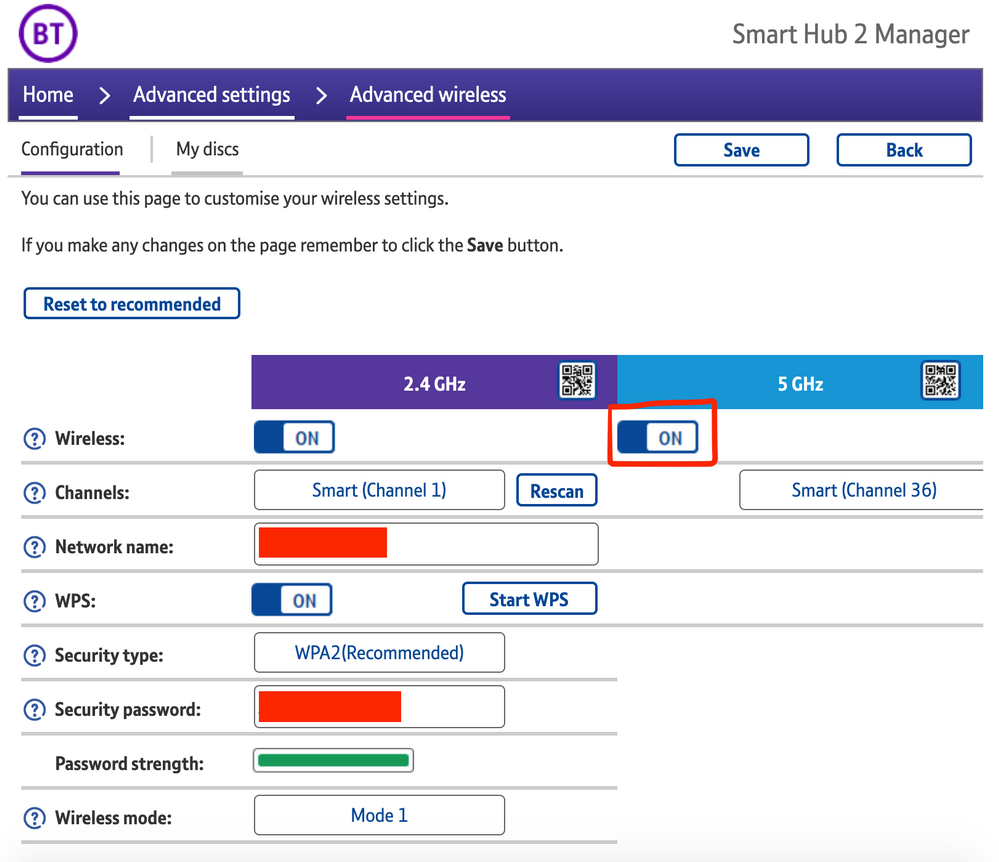
The most consistent workaround we have discovered is to disable the 5GHz band on the BT Smart Hub 2. You can learn more about how to do this using these steps:

Please be aware, turning off 5GHz could affect the speed at which other devices connect through the network and should only be considered a temporary workaround.


Steps taken from a post on the BT Community.


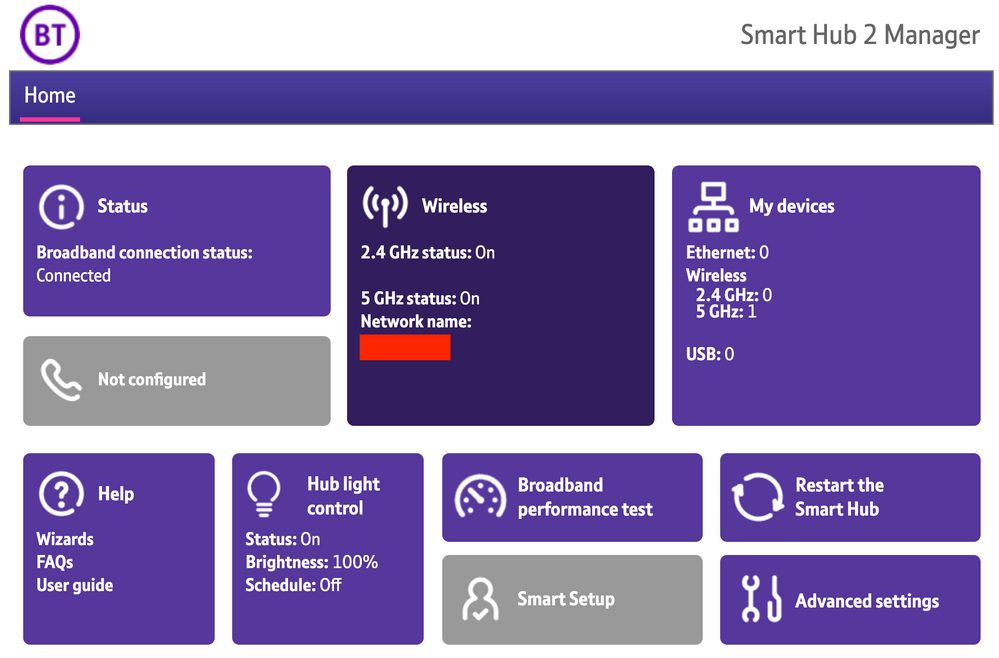
1) Open a new web browser on a device connected to your Hub and type 192.168.1.254 in the address bar. This will open the Hub Manager.
​


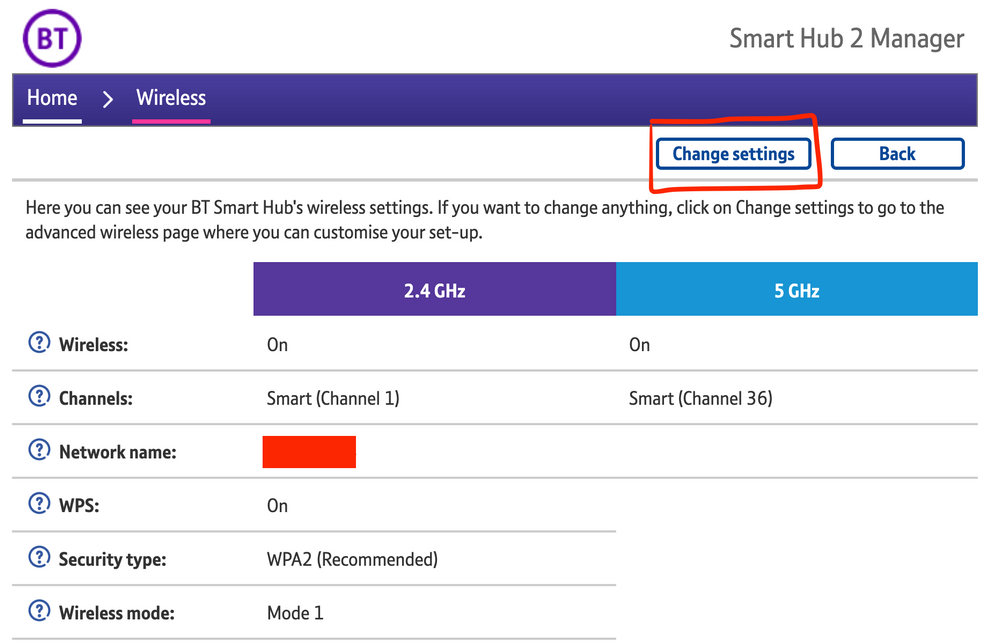
2) Click Wireless. This will open the Wireless Settings page.


3) Select ‘Change settings’
​


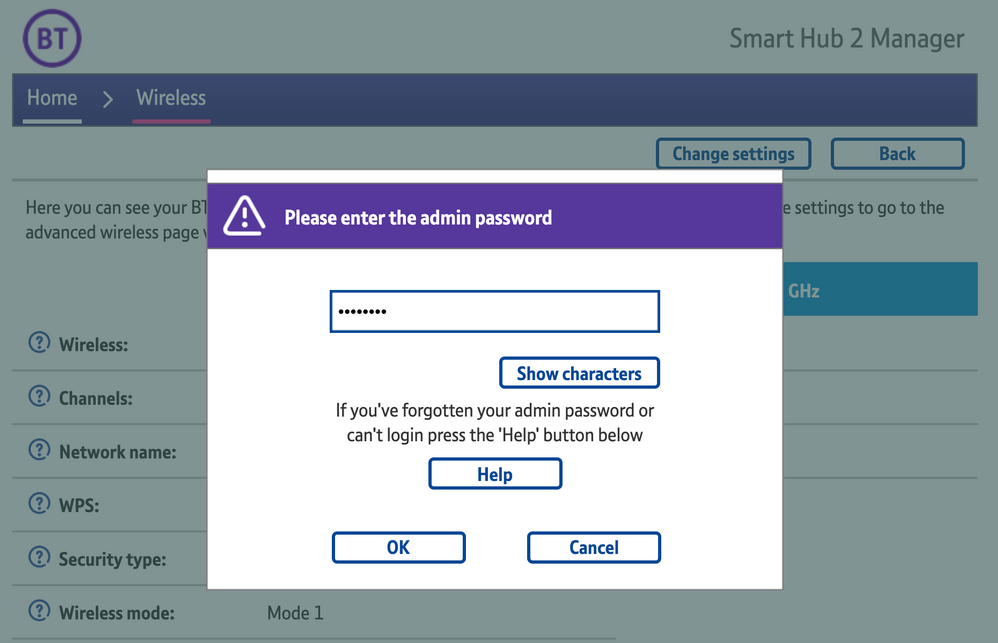
4) Enter the Admin password. This is found on the back of the router and on the removable card. Click ‘OK’
​


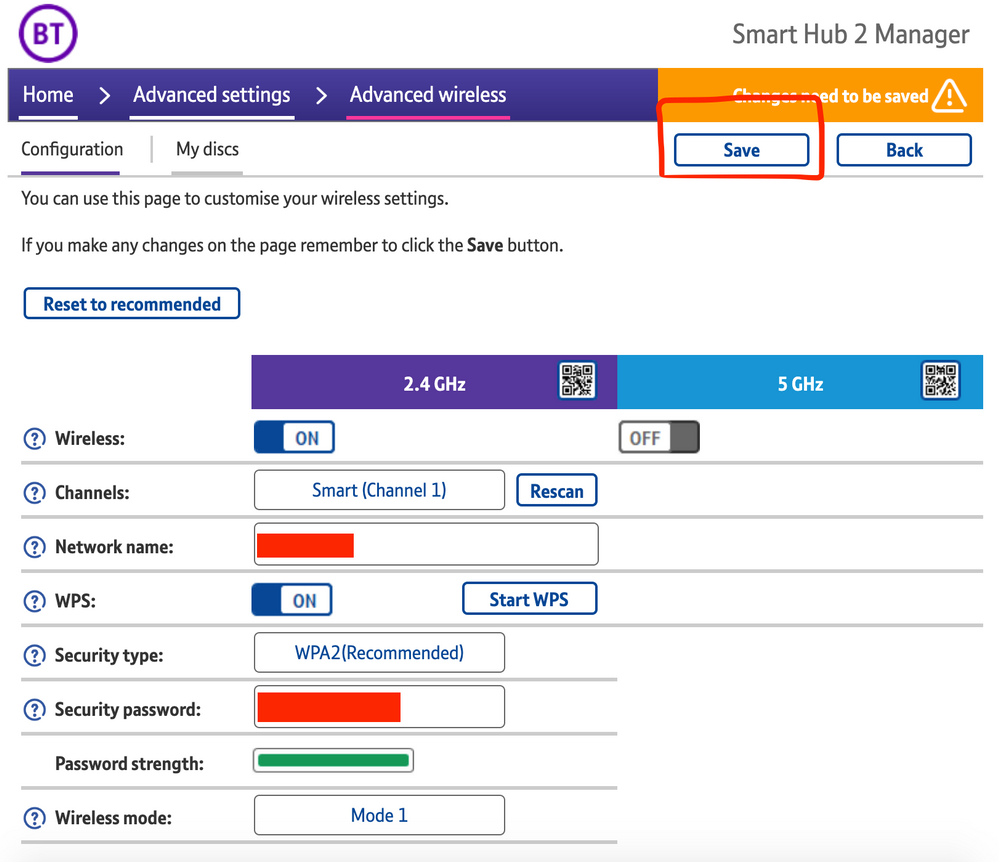
5) Toggle 5GHz OFF

​

6) Click 'Save'

​


7) Click 'Yes' at the warning prompt.
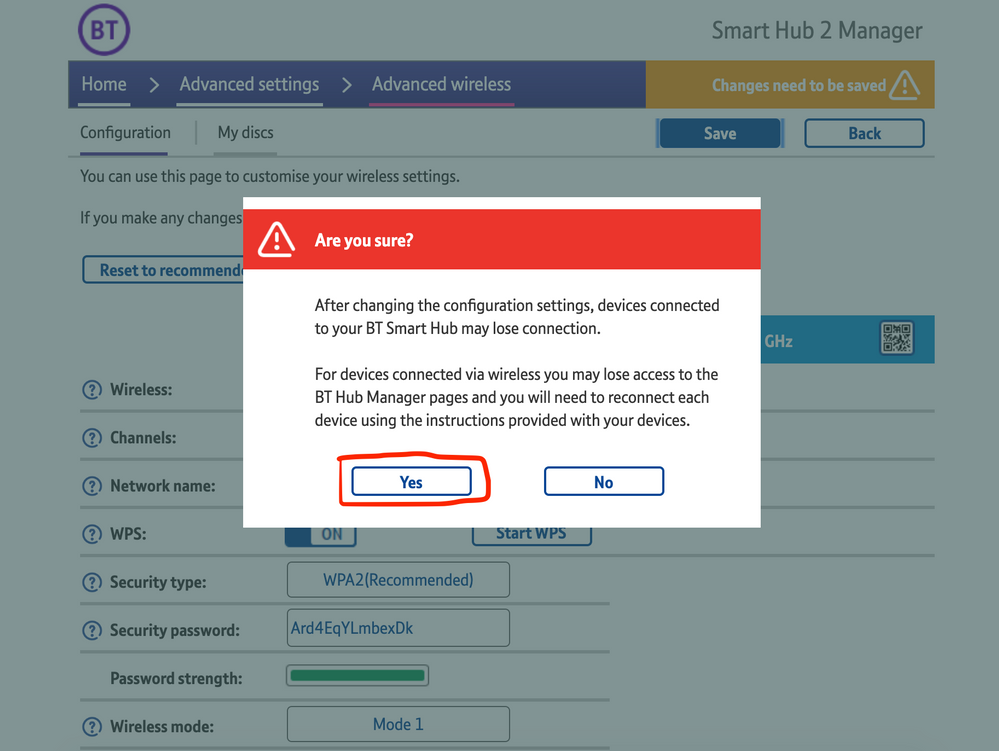
8) Wait for your devices to reconnect. You may need to reboot your Sonos devices by powering them down for 30 seconds and powering them back up.

​


Alternatively, some users have been able to work around the issue by wiring a player directly to the router, though this doesn’t work in every case. Systems that have a Sonos Move or Roam on them will also not be helped by this change, so disabling 5GHz would be best for those households.


 We recommend that you report this issue to BT with the following information:


“Devices connected to the 5GHz band are not able to communicate with devices connected to the 2.4GHz band and it appears the connections are being erroneously isolated.”


You don’t need to specifically mention Sonos devices when reporting this issue to BT as the information alone will be enough for them to recognize the issue you’re facing.
 

BT are indeed aware of this issue and are actively investigating and working to resolve it as quickly as possible. We’ll update this post with any further news as and when we receive it.

This topic has been closed for further comments. You can use the search bar to find a similar topic, or create a new one by clicking Create Topic at the top of the page.

261 replies

Lyricist III
April 27, 2021

Have we had anymore from Sonos on this?


I am still of the opinion this is more than just BT at fault although I don’t doubt the Smart Hub 2 router may be causing headaches. 
 

The original post states this is an issue to do with devices on 2.4ghz being unable to communicate with devices on 5ghz such as your phone when using the Sonos App. 
However, like I said in my earlier post I was beginning to experience the same issues prior to getting the Smart Hub 2. 
So from my perspective it’s either a bad Sonos update. An issue with the last IOS update. A problem with BT or a combination of them all. 
 

I feel this way as upon further investigation on my setup/network I have a mixture of devices from different companies and ultimately the only devices I can not reliably interact with and control are the Sonos devices (2x Ones and 2x Symfonisks). 

I initially stated that the Amazon Echo Dot 4’s where fine and completely unaffected, and that remains the case, however at the time I didn’t realise that the Dot’s worked on both 2.4ghz or 5ghz so I’ve ruled them out for fairness. (Although why are £50 speakers dual band yet £200 ones are 2.4ghz only? Not a dig as such. Genuinely curious as the the reasoning behind the choice). 

However, at the time of my first post I completely forgot about the Ring camera that’s on the 2.4ghz band and has been completely unaffected by the change to the Smart Hub 2. 
The app works absolutely fine and I have full control of all functions and settings and the camera doesn’t ‘disappear’ like the Sonos speakers do in the Sonos App. 
So if the issue is that the BT Smart Hub 2 won’t let devices on different bands talk, then why can the Ring camera on 2.4ghz communicate perfectly fine with my iPhone on 5ghz yet the Sonos set up completely fails to do so. 
 

Like I said in my original post, it’s seems to me at least somewhat too easy to just blame BT outright. 
 

Happy for someone to pick that apart as I’m no tech person and just stating what’s happening for me. 
 

I would definitely like to hear more from Sonos too. 

Lyricist III
April 27, 2021

Another slight update…

The Sonos One’s are voice control with Alexa set up. 
If I ask Alexa to play something it will also result in the One’s (in a stereo pair) to show back up in the Sonos App/work with Airplay. 
They will disappear again but for some reason using Alexa brings them ‘back’ for a bit. 
 

The IKEA Symfonisks once ‘lost’ from the Sonos App remain ‘lost’ unless I ask the Echo Dot’s to control them. 
 

If I ask Alexa on the One’s to play music on the Symfonisks I just get a ‘sorry, something went wrong’ response. 

Thought I’d add this as hopefully every little bit of information helps someone, be that Sonos or BT get to the bottom of the issue. 

Trending Lyricist I
April 27, 2021

Another slight update…

The Sonos One’s are voice control with Alexa set up. 
If I ask Alexa to play something it will also result in the One’s (in a stereo pair) to show back up in the Sonos App/work with Airplay. 
They will disappear again but for some reason using Alexa brings them ‘back’ for a bit. 

I just tried this. I did manage to play music by asking Alexa. I could then control music through the Spotify App. Unfortunately (for me) the Sonos app still didn’t work. 
 

Good that I can still play music, but it’s infuriating that we’re all having this issue.  

Trending Lyricist I
April 27, 2021

Another slight update…

The Sonos One’s are voice control with Alexa set up. 
If I ask Alexa to play something it will also result in the One’s (in a stereo pair) to show back up in the Sonos App/work with Airplay. 
They will disappear again but for some reason using Alexa brings them ‘back’ for a bit. 

I just tried this. I did manage to play music by asking Alexa. I could then control music through the Spotify App. Unfortunately (for me) the Sonos app still didn’t work. 
 

Good that I can still play music, but it’s infuriating that we’re all having this issue.  


Also, just tried to cast BT sport from my iPhone (5 GHz) to my TV via Chromecast which is 2.4Ghz. Doesn’t work. Confirms it’s a BT Smart Hub issue to me. 

Enthusiast I
April 27, 2021

Another slight update…

The Sonos One’s are voice control with Alexa set up. 
If I ask Alexa to play something it will also result in the One’s (in a stereo pair) to show back up in the Sonos App/work with Airplay. 
They will disappear again but for some reason using Alexa brings them ‘back’ for a bit. 

I just tried this. I did manage to play music by asking Alexa. I could then control music through the Spotify App. Unfortunately (for me) the Sonos app still didn’t work. 
 

Good that I can still play music, but it’s infuriating that we’re all having this issue.  


Also, just tried to cast BT sport from my iPhone (5 GHz) to my TV via Chromecast which is 2.4Ghz. Doesn’t work. Confirms it’s a BT Smart Hub issue to me. 

Thanks Mal

Great Detective work, you should be in AC-12

Contributor I
April 27, 2021

It must be a combination of BT, IOS ans Sonos as my ipad is on 5ghz and works fine. iphone on 5ghz doesnt work. Ring devices on 2.4Ghz work perfectly well with both devices. Very frustrating.

Contributor I
April 27, 2021

Another slight update…

The Sonos One’s are voice control with Alexa set up. 
If I ask Alexa to play something it will also result in the One’s (in a stereo pair) to show back up in the Sonos App/work with Airplay. 
They will disappear again but for some reason using Alexa brings them ‘back’ for a bit. 

I just tried this. I did manage to play music by asking Alexa. I could then control music through the Spotify App. Unfortunately (for me) the Sonos app still didn’t work. 
 

Good that I can still play music, but it’s infuriating that we’re all having this issue.  

Ny speakers briefly re appear if i leave the house and come back


Lyricist III
April 27, 2021

Another slight update…

The Sonos One’s are voice control with Alexa set up. 
If I ask Alexa to play something it will also result in the One’s (in a stereo pair) to show back up in the Sonos App/work with Airplay. 
They will disappear again but for some reason using Alexa brings them ‘back’ for a bit. 

I just tried this. I did manage to play music by asking Alexa. I could then control music through the Spotify App. Unfortunately (for me) the Sonos app still didn’t work. 
 

Good that I can still play music, but it’s infuriating that we’re all having this issue.  


Also, just tried to cast BT sport from my iPhone (5 GHz) to my TV via Chromecast which is 2.4Ghz. Doesn’t work. Confirms it’s a BT Smart Hub issue to me. 


Interesting. 
 

Whereas the Ring camera at mine works perfectly well being on 2.4ghz and the phone interacting on 5ghz. 
 

I haven’t tried casting anything to TV yet. IIRC correctly they are all on the 2.4ghz band though. 
Something to look into at some point. 
 

I still largely agree this is probably more a BT issue than Sonos but I still think there’s ultimately more to it and it’s more likely a few things not playing nicely. 
 

Something from Sonos would be nice though seeing as we are all basically going around in circles. 

Contributor I
April 27, 2021

Have we had anymore from Sonos on this?


I am still of the opinion this is more than just BT at fault although I don’t doubt the Smart Hub 2 router may be causing headaches. 
 

The original post states this is an issue to do with devices on 2.4ghz being unable to communicate with devices on 5ghz such as your phone when using the Sonos App. 
However, like I said in my earlier post I was beginning to experience the same issues prior to getting the Smart Hub 2. 
So from my perspective it’s either a bad Sonos update. An issue with the last IOS update. A problem with BT or a combination of them all. 
 

I feel this way as upon further investigation on my setup/network I have a mixture of devices from different companies and ultimately the only devices I can not reliably interact with and control are the Sonos devices (2x Ones and 2x Symfonisks). 

I initially stated that the Amazon Echo Dot 4’s where fine and completely unaffected, and that remains the case, however at the time I didn’t realise that the Dot’s worked on both 2.4ghz or 5ghz so I’ve ruled them out for fairness. (Although why are £50 speakers dual band yet £200 ones are 2.4ghz only? Not a dig as such. Genuinely curious as the the reasoning behind the choice). 

However, at the time of my first post I completely forgot about the Ring camera that’s on the 2.4ghz band and has been completely unaffected by the change to the Smart Hub 2. 
The app works absolutely fine and I have full control of all functions and settings and the camera doesn’t ‘disappear’ like the Sonos speakers do in the Sonos App. 
So if the issue is that the BT Smart Hub 2 won’t let devices on different bands talk, then why can the Ring camera on 2.4ghz communicate perfectly fine with my iPhone on 5ghz yet the Sonos set up completely fails to do so. 
 

Like I said in my original post, it’s seems to me at least somewhat too easy to just blame BT outright. 
 

Happy for someone to pick that apart as I’m no tech person and just stating what’s happening for me. 
 

I would definitely like to hear more from Sonos too. 

I agree, I have multiple devices and the only ones affected are SONOS.

Trending Lyricist I
April 27, 2021

Another slight update…

The Sonos One’s are voice control with Alexa set up. 
If I ask Alexa to play something it will also result in the One’s (in a stereo pair) to show back up in the Sonos App/work with Airplay. 
They will disappear again but for some reason using Alexa brings them ‘back’ for a bit. 

I just tried this. I did manage to play music by asking Alexa. I could then control music through the Spotify App. Unfortunately (for me) the Sonos app still didn’t work. 
 

Good that I can still play music, but it’s infuriating that we’re all having this issue.  


Also, just tried to cast BT sport from my iPhone (5 GHz) to my TV via Chromecast which is 2.4Ghz. Doesn’t work. Confirms it’s a BT Smart Hub issue to me. 

Thanks Mal

Great Detective work, you should be in AC-12


Jesus, Mary and Joseph and the wee donkey 😀