James L.
Retired Community Staff
April 22, 2021
F.A.Q.

BT Smart Hub 2 - Connection Issues (April 2021)
  • April 22, 2021
  • 261 replies
  • 54358 views
BT Smart Hub 2 - Connection Issues (April 2021)

Update - 11th June 2021:

BT have confirmed that the firmware update that contains a fix for this original issue has been rolled out to the majority of users. Therefore, we can consider this issue closed. 

If your BT Smart Hub 2 router is still running the affected firmware (V0.26.03.01286) then please get in touch with BT directly.

Anyone that still experiences issues on the latest firmware, please create a new topic or get in touch with Sonos Customer Care.


Update - 7th May 2021:

BT have issued a new statement:

“We’re aware that a very small number of customers are experiencing an issue with their BT Smart Hub 2 connecting with multiple streaming devices on their Wi-Fi network. Any customer who experiences this should get in touch with BT who will update their device remotely as soon as possible. BT will be rolling out an update to all devices later this month. We’re sorry for any inconvenience caused.”


Original post - 22nd April 2021:

Hey everyone,


We’re aware of an issue affecting Sonos users with BT Smart Hub 2 routers that causes problems with connecting to players in a wireless configuration. This is caused by a bug in the BT Smart Hub 2’s firmware (version V0.26.03.01286) which prevents devices on the 5GHz band from communicating with devices on the 2.4GHz band, and vice versa. Most of the affected users have iPhones running iOS version 14.4.2, but we have seen other types of controller, such as Android devices, affected by this issue as well.


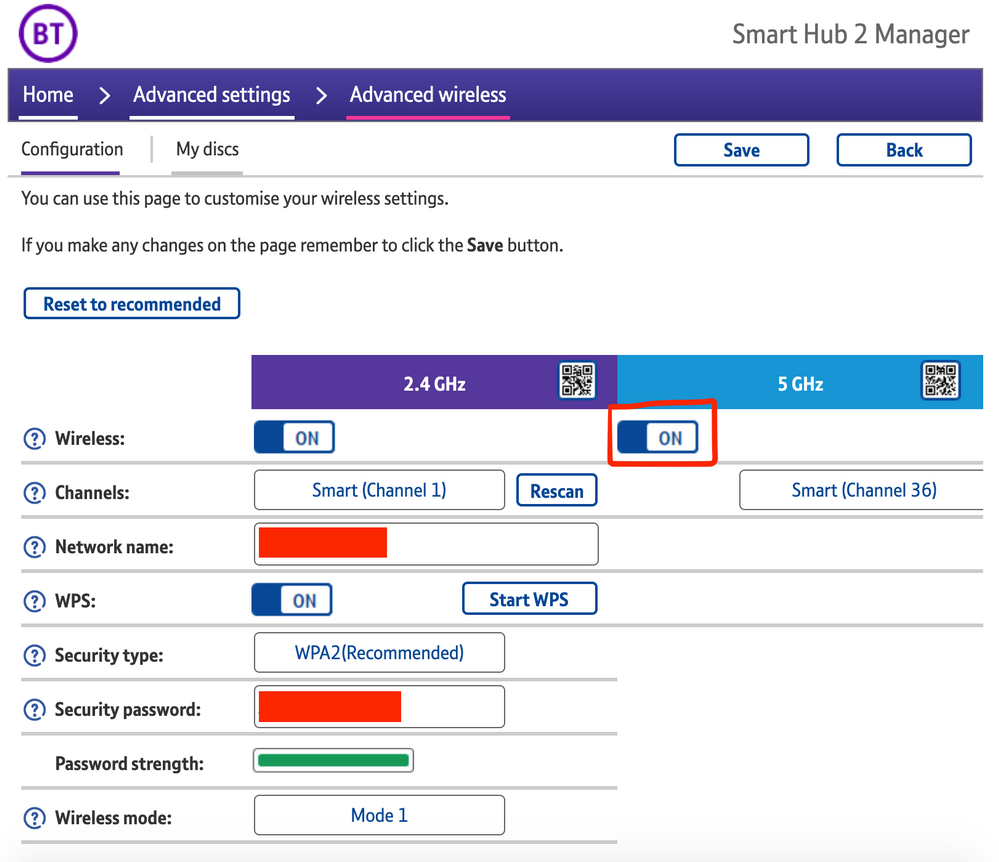
The most consistent workaround we have discovered is to disable the 5GHz band on the BT Smart Hub 2. You can learn more about how to do this using these steps:

Please be aware, turning off 5GHz could affect the speed at which other devices connect through the network and should only be considered a temporary workaround.


Steps taken from a post on the BT Community.


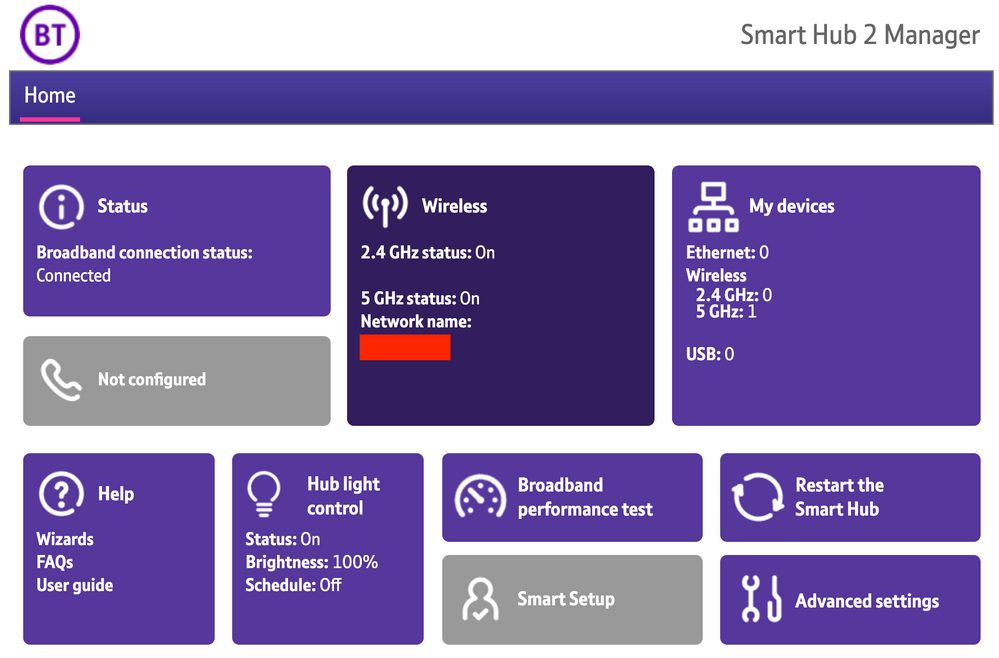
1) Open a new web browser on a device connected to your Hub and type 192.168.1.254 in the address bar. This will open the Hub Manager.
​


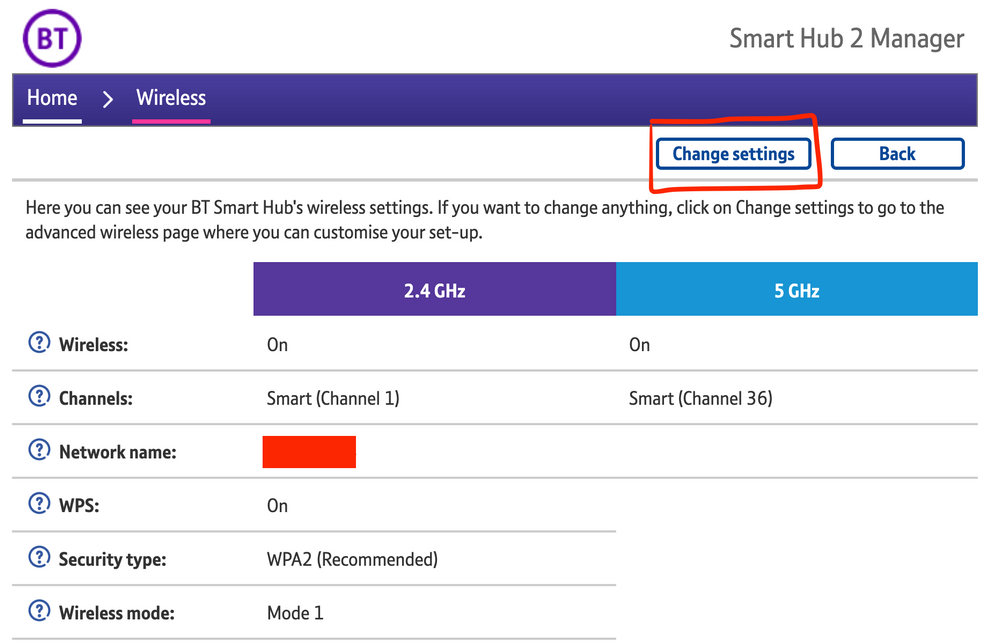
2) Click Wireless. This will open the Wireless Settings page.


3) Select ‘Change settings’
​


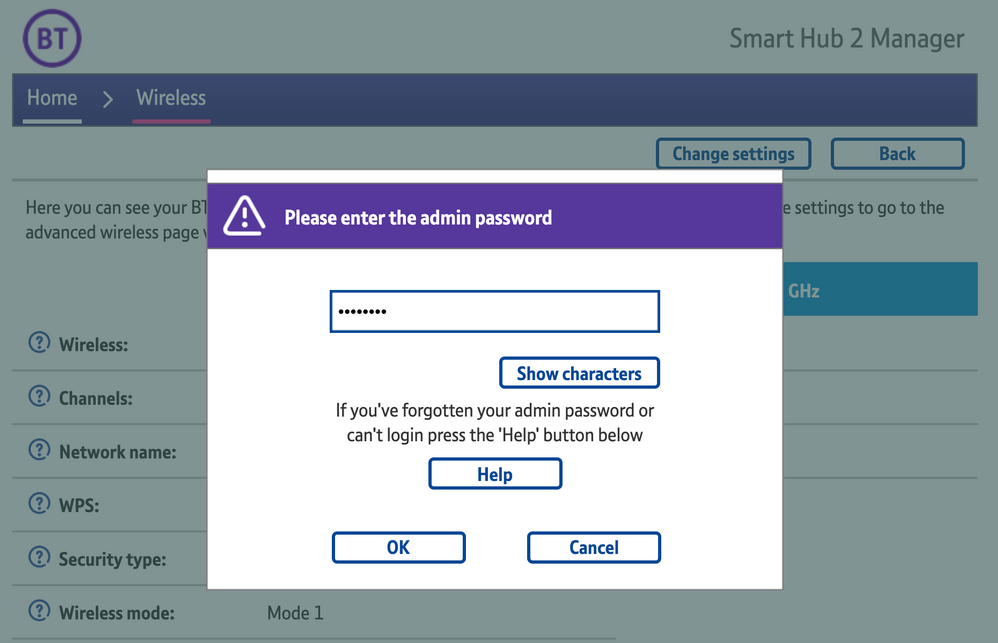
4) Enter the Admin password. This is found on the back of the router and on the removable card. Click ‘OK’
​


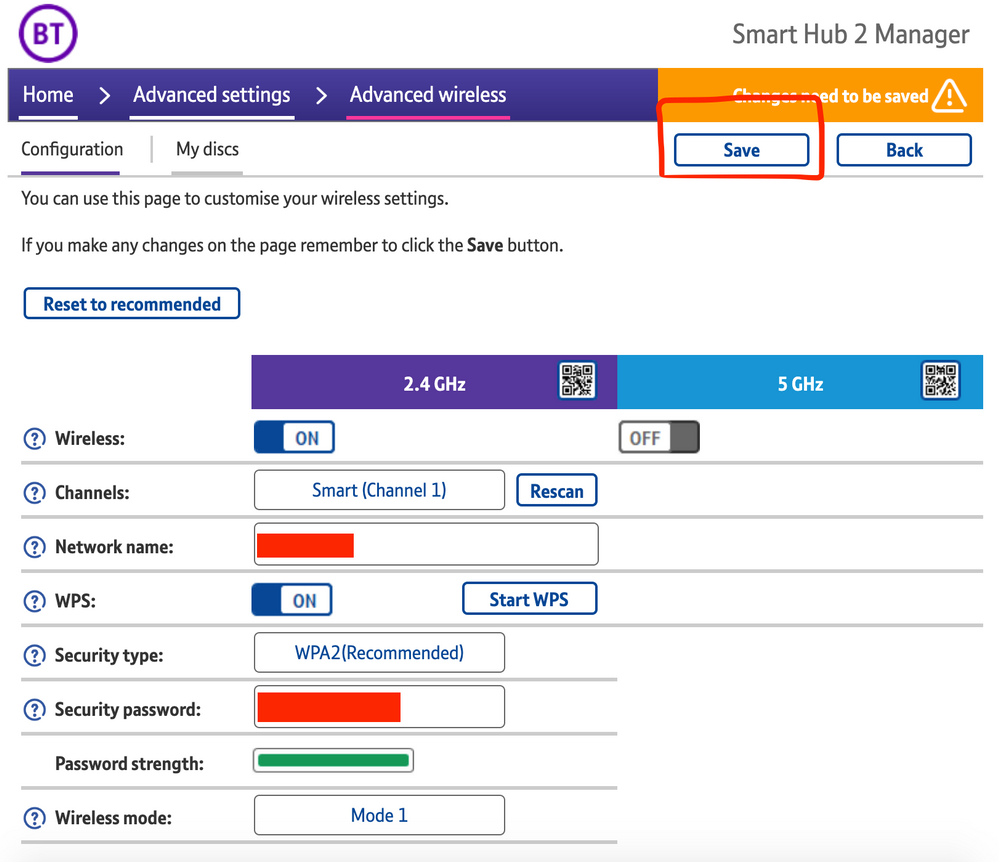
5) Toggle 5GHz OFF

​

6) Click 'Save'

​


7) Click 'Yes' at the warning prompt.
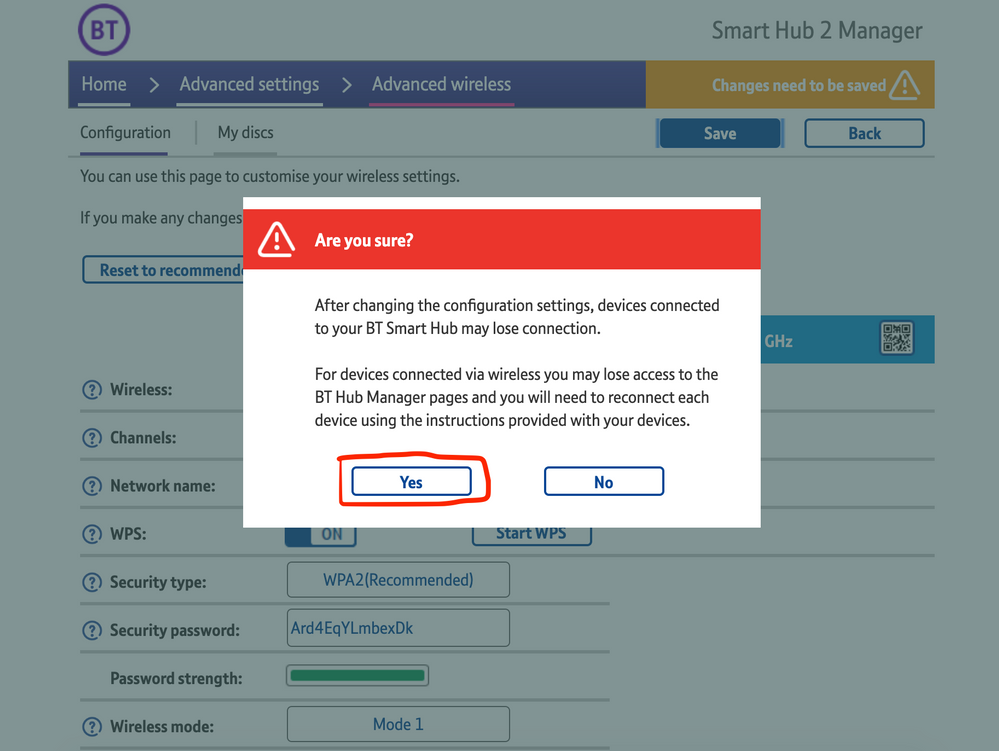
8) Wait for your devices to reconnect. You may need to reboot your Sonos devices by powering them down for 30 seconds and powering them back up.

​


Alternatively, some users have been able to work around the issue by wiring a player directly to the router, though this doesn’t work in every case. Systems that have a Sonos Move or Roam on them will also not be helped by this change, so disabling 5GHz would be best for those households.


 We recommend that you report this issue to BT with the following information:


“Devices connected to the 5GHz band are not able to communicate with devices connected to the 2.4GHz band and it appears the connections are being erroneously isolated.”


You don’t need to specifically mention Sonos devices when reporting this issue to BT as the information alone will be enough for them to recognize the issue you’re facing.
 

BT are indeed aware of this issue and are actively investigating and working to resolve it as quickly as possible. We’ll update this post with any further news as and when we receive it.

This topic has been closed for further comments. You can use the search bar to find a similar topic, or create a new one by clicking Create Topic at the top of the page.

261 replies

Lyricist I
April 26, 2021

Like many others having the same issue a couple of questions (from a dumb user)

     -  Has anyone tried giving different SSID’s names for the 5Ghz and 2.4Ghz leaving 5Ghz for TV and moving everything else to 2.4Ghz?

    - I was thinking of buying a Boost but surprised to see this doesn’t work? Wouldn’t it be the same as connecting a speaker by ethernet?

Thanks for all the useful insights 

Virtuoso
April 26, 2021

Hi, just disabled the 5Ghz connection and now all of my Sonos equipment connected straight away with the app. Thanks for the info as I’ve been pulling my hair out trying to sort this out. 👍

Works reliably as a fix/proof point for me.. but I can’t keep the 5ghz band off as then my tv streaming services drop to potato-cam resolution.. this needs a proper permanent fix between BT/Sonos

Can't you have differently ssid's for 2.4gh and 5ghz?, sign all the Sonos kit on to 2.4 (including controller) and all your Smart TV kit on the 5ghz ssid?.

Enthusiast I
April 26, 2021

Like many others having the same issue a couple of questions (from a dumb user)

     -  Has anyone tried giving different SSID’s names for the 5Ghz and 2.4Ghz leaving 5Ghz for TV and moving everything else to 2.4Ghz?

    - I was thinking of buying a Boost but surprised to see this doesn’t work? Wouldn’t it be the same as connecting a speaker by ethernet?

Thanks for all the useful insights 

Hi Boost works same way as hard wiring one of the speakers, it creates its own mesh (Sonosnet) independent of the other 2.4ghz band. You can't change the SSID’s on the SH2. Move and Roam dont use Sonosnet and instead stick to the router supplied 2.4ghz band. The issue is that if you are trying to control sonos using an iPhone or device on the 5ghz band, it won't talk to sonos and vice-versa leaving products missing from menus, dropping in and out and just a total **** up really. Best thing is to disable 5ghz from the advanced menu (if sonos is important to you everyday) and wait for BT to sort it - dont forget to file a complaint as mentioned above

Lyricist I
April 26, 2021

Like many others having the same issue a couple of questions (from a dumb user)

     -  Has anyone tried giving different SSID’s names for the 5Ghz and 2.4Ghz leaving 5Ghz for TV and moving everything else to 2.4Ghz?

    - I was thinking of buying a Boost but surprised to see this doesn’t work? Wouldn’t it be the same as connecting a speaker by ethernet?

Thanks for all the useful insights 

Hi Boost works same way as hard wiring one of the speakers, it creates its own mesh (Sonosnet) independent of the other 2.4ghz band. You can't change the SSID’s on the SH2. Move and Roam dont use Sonosnet and instead stick to the router supplied 2.4ghz band. The issue is that if you are trying to control sonos using an iPhone or device on the 5ghz band, it won't talk to sonos and vice-versa leaving products missing from menus, dropping in and out and just a total **** up really. Best thing is to disable 5ghz from the advanced menu (if sonos is important to you everyday) and wait for BT to sort it - dont forget to file a complaint as mentioned above


Matt,

Thanks that is really helpful - we don’t have a Move or Roam so the Boost would work for us.

As suggested I have a Complaint raised with BT

Thanks a lot

Lyricist III
April 26, 2021

My understanding is Roam atleast, unsure about Move, have 5ghz capability. So Boost should connect to the all the 2.4ghz speakers and normal WiFi pick up Move/Roam. That’s certainly been my experience with Roam, iOS controller can still see it when it can’t see any of the other speakers. 


Sonos have offered a 30% discount on the Boost, but it’s still £70 I don’t really want to spend. I’d never have considered it, as live in a two bed flat and have never experience any Sonos connection issues prior to this BT issue. 

James L.
James L.Author
Retired Community Staff
April 26, 2021

My understanding is Roam atleast, unsure about Move, have 5ghz capability. So Boost should connect to the all the 2.4ghz speakers and normal WiFi pick up Move/Roam. That’s certainly been my experience with Roam, iOS controller can still see it when it can’t see any of the other speakers. 


Sonos have offered a 30% discount on the Boost, but it’s still £70 I don’t really want to spend. I’d never have considered it, as live in a two bed flat and have never experience any Sonos connection issues prior to this BT issue. 

If you have a Roam or Move in the house I wouldn’t recommend purchasing a Boost to work around this issue. In fact, I wouldn’t be recommending an additional purchase just for getting around this issue anyway. Your best option here would be to disable 5GHz on your BT Smart Hub 2 as I’ve described in my original post.

Mark good posts by pressing the like button, and select the best answer on questions you've asked to help others find solutions.
Lyricist III
April 26, 2021

I’ve tried disabling 5ghz and I know it resolves this specific issue, but it’s like solving one problem by creating another one - causing issues for my experience using the internet on other devices. It moves my speed from 150MB down to less than 30MB. This is rubbish when working from home or trying to watch content on the TV. 
 

Has there been anything occur like this with BT historically and if so, how quick are they to respond? I’m considering temporarily moving a speaker into the utility cupboard, I won’t be able to use it, but at least it will help with the connection issues. 

Trending Lyricist I
April 26, 2021

Have filed a complaint with BT. Easily the worst internet provider I’ve ever encountered. 

Contributor I
April 27, 2021

I’m having the same issues, it’s very confusing as my ipad is connected on 5hz but as it never leaves the house it still has full connection with all devices. both iphones lose all devices. Can’t get through to BT about connection issues as ‘all opeators are busy’

Anyone had any joy on when/if they will get sorted? I was going to get a boost to work around the issue as working from home i cannot disable 5hz

Enthusiast I
April 27, 2021

Update

Just ad BT engineer on the phone following me filing a complaint saying they had made some tweaks to my settings and “everything should be fine now”. in addition, they had turned my 5ghz back on. Difficult as i was in the middle of a meeting at the time so didn't have the opportunity to fully investigate. Bottom line is, the problem still remains and ive had to resort to using 2.4ghz only again as the Roam was not connecting to the iPhone iOS 14.5)

Whilst fiddling with the SH2 settings in advanced, i noticed the the iPhone  “Dual Band” setting had “No” selected with no facility to change this to yes, could this be a cause of the issue??

Going to get back on to BT, watch this space