James L.
Retired Community Staff
April 22, 2021
F.A.Q.

BT Smart Hub 2 - Connection Issues (April 2021)
  • April 22, 2021
  • 261 replies
  • 54358 views
BT Smart Hub 2 - Connection Issues (April 2021)

Update - 11th June 2021:

BT have confirmed that the firmware update that contains a fix for this original issue has been rolled out to the majority of users. Therefore, we can consider this issue closed. 

If your BT Smart Hub 2 router is still running the affected firmware (V0.26.03.01286) then please get in touch with BT directly.

Anyone that still experiences issues on the latest firmware, please create a new topic or get in touch with Sonos Customer Care.


Update - 7th May 2021:

BT have issued a new statement:

“We’re aware that a very small number of customers are experiencing an issue with their BT Smart Hub 2 connecting with multiple streaming devices on their Wi-Fi network. Any customer who experiences this should get in touch with BT who will update their device remotely as soon as possible. BT will be rolling out an update to all devices later this month. We’re sorry for any inconvenience caused.”


Original post - 22nd April 2021:

Hey everyone,


We’re aware of an issue affecting Sonos users with BT Smart Hub 2 routers that causes problems with connecting to players in a wireless configuration. This is caused by a bug in the BT Smart Hub 2’s firmware (version V0.26.03.01286) which prevents devices on the 5GHz band from communicating with devices on the 2.4GHz band, and vice versa. Most of the affected users have iPhones running iOS version 14.4.2, but we have seen other types of controller, such as Android devices, affected by this issue as well.


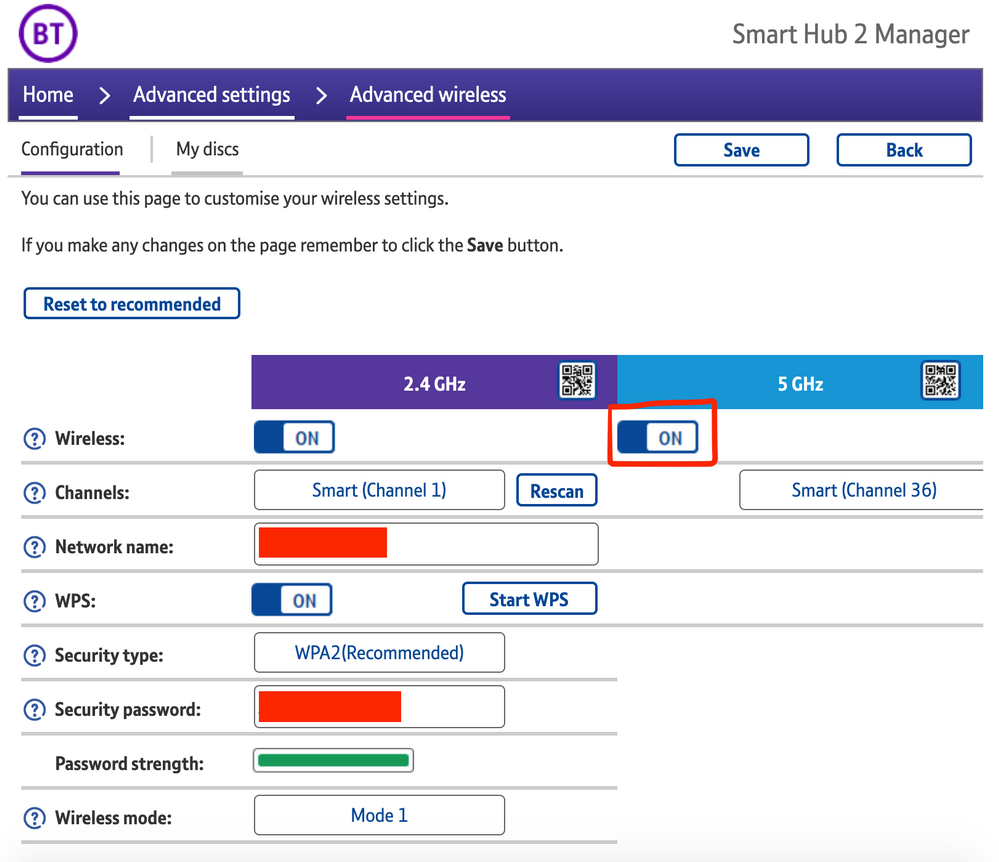
The most consistent workaround we have discovered is to disable the 5GHz band on the BT Smart Hub 2. You can learn more about how to do this using these steps:

Please be aware, turning off 5GHz could affect the speed at which other devices connect through the network and should only be considered a temporary workaround.


Steps taken from a post on the BT Community.


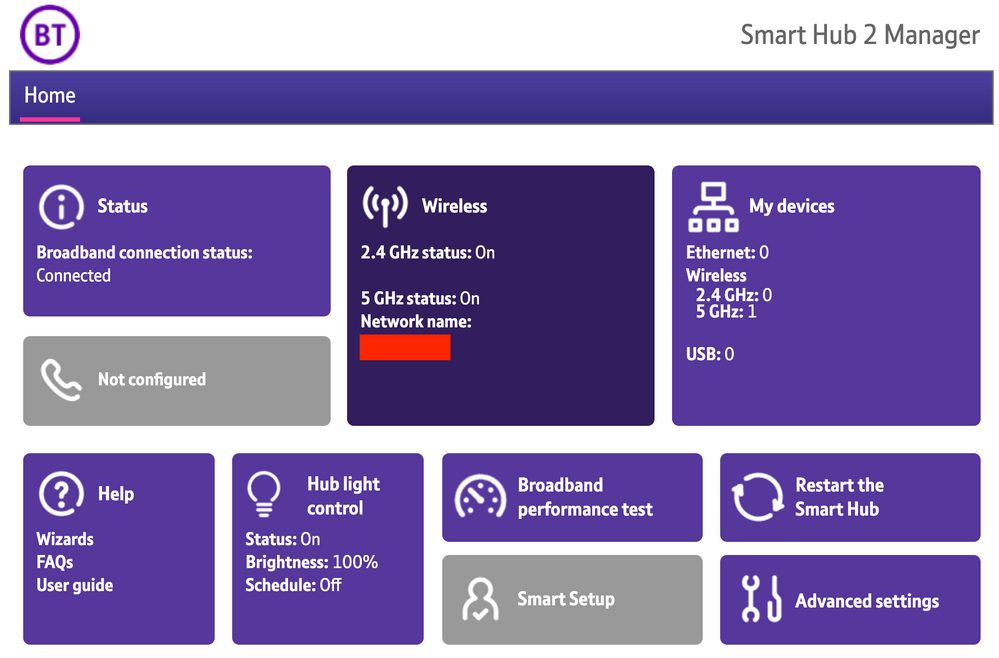
1) Open a new web browser on a device connected to your Hub and type 192.168.1.254 in the address bar. This will open the Hub Manager.
​


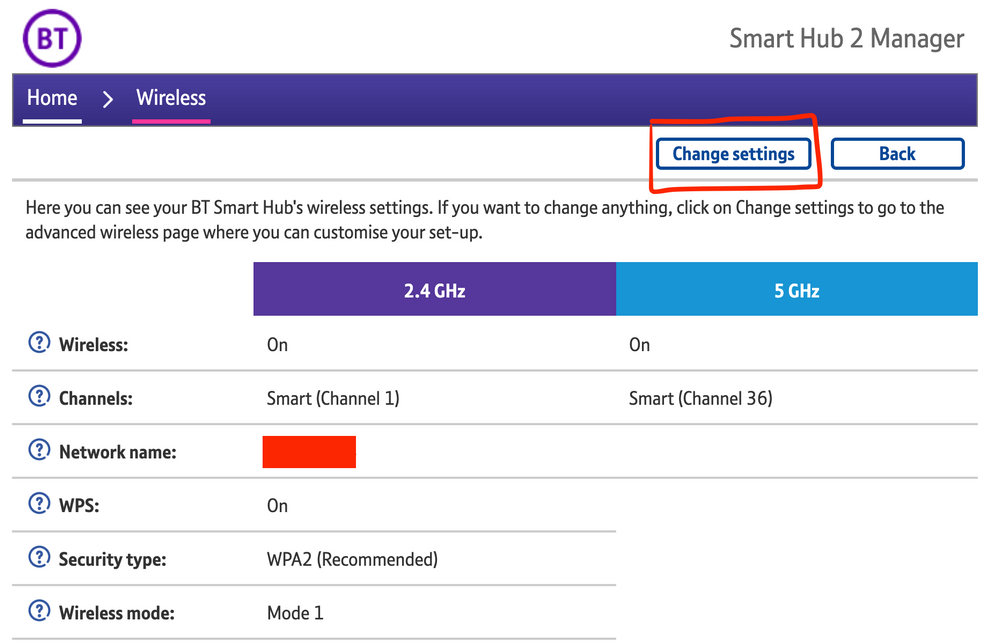
2) Click Wireless. This will open the Wireless Settings page.


3) Select ‘Change settings’
​


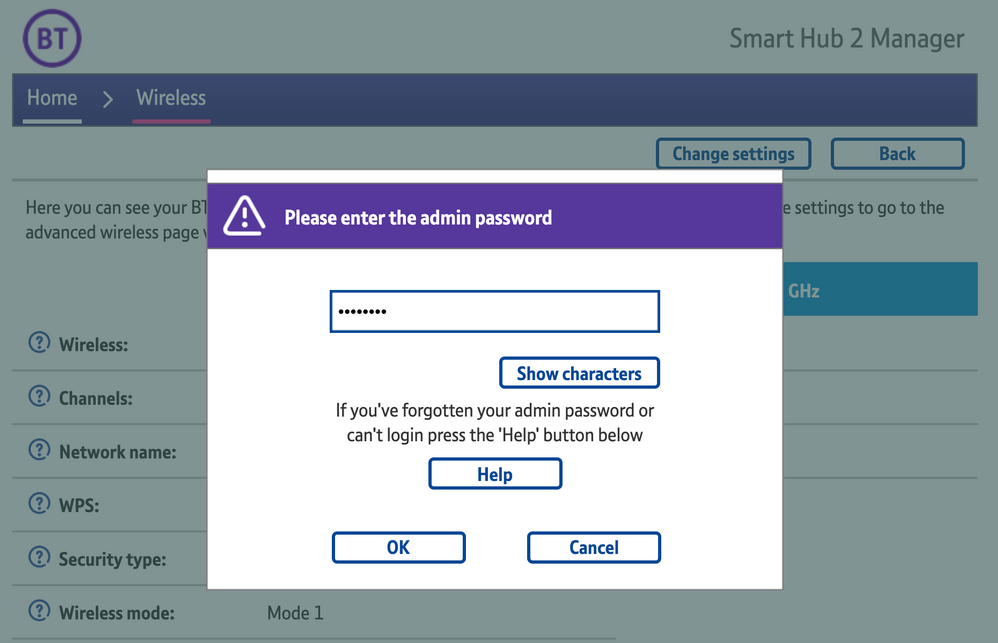
4) Enter the Admin password. This is found on the back of the router and on the removable card. Click ‘OK’
​


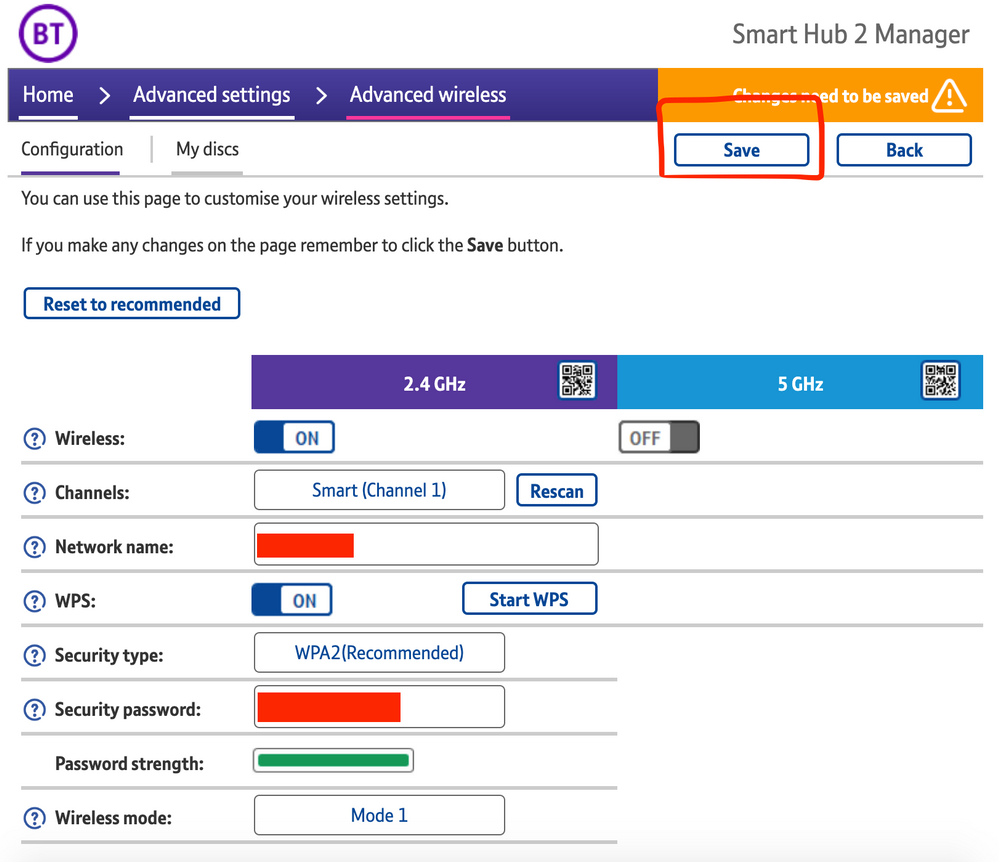
5) Toggle 5GHz OFF

​

6) Click 'Save'

​


7) Click 'Yes' at the warning prompt.
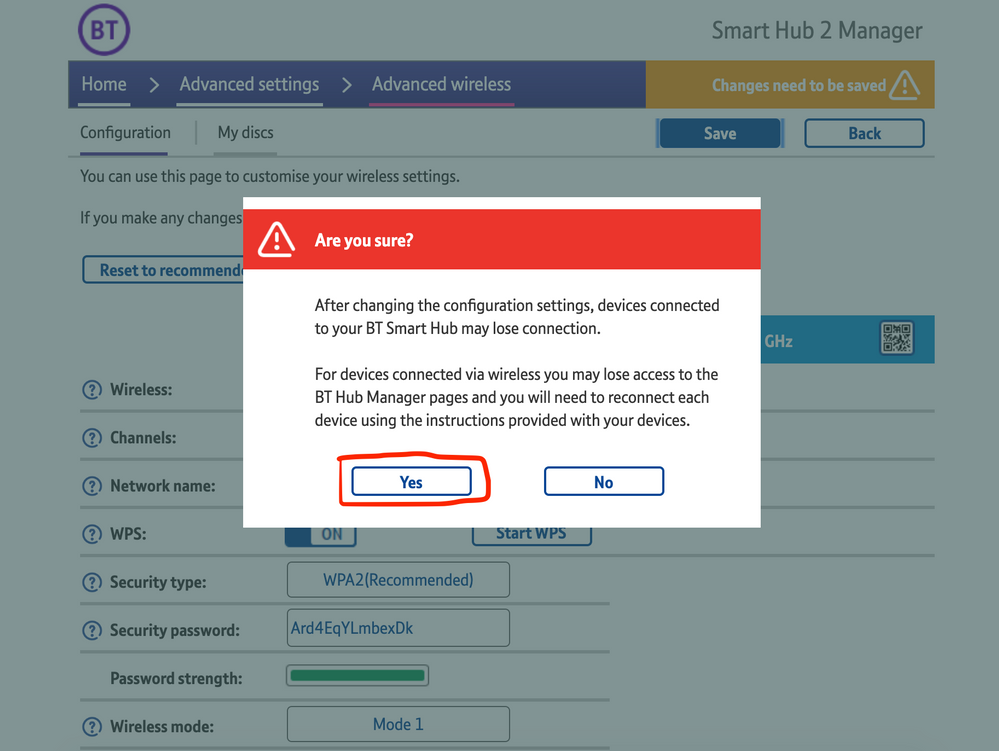
8) Wait for your devices to reconnect. You may need to reboot your Sonos devices by powering them down for 30 seconds and powering them back up.

​


Alternatively, some users have been able to work around the issue by wiring a player directly to the router, though this doesn’t work in every case. Systems that have a Sonos Move or Roam on them will also not be helped by this change, so disabling 5GHz would be best for those households.


 We recommend that you report this issue to BT with the following information:


“Devices connected to the 5GHz band are not able to communicate with devices connected to the 2.4GHz band and it appears the connections are being erroneously isolated.”


You don’t need to specifically mention Sonos devices when reporting this issue to BT as the information alone will be enough for them to recognize the issue you’re facing.
 

BT are indeed aware of this issue and are actively investigating and working to resolve it as quickly as possible. We’ll update this post with any further news as and when we receive it.

This topic has been closed for further comments. You can use the search bar to find a similar topic, or create a new one by clicking Create Topic at the top of the page.

261 replies

Lyricist I
April 25, 2021

Thank you.

I have checked that page and under the ‘2.4Ghz’ - Sonos ZP is listed - I presume that is the Beam?

If I turn off the 5.Ghz, do you think it will effect the internet connections to my other devices?


Thanks again

Lyricist I
April 25, 2021

Thank you.

I have checked that page and under the ‘2.4Ghz’ - Sonos ZP is listed - I presume that is the Beam?

If I turn off the 5.Ghz, do you think it will effect the internet connections to my other devices?


Thanks again

It shouldn’t be a issue. All my devices are connecting fine. 

Lyricist I
April 25, 2021

This is very interesting a good to know as I’ve been pulling my hair out for the last few weeks.

I have 2 x Play1, 1 x OneSL, 1 x Beam and 1 x Boost

Ive been having connectivity issues and a couple of weeks ago we couldn’t connect at all.

Today I have unplugged my Boost and hardwire the Beam instead - all seems to be working again. Not ideal though as the Boost is new 🙄🙄

is this only an issue with the Smart Hub 2 as we’re thinking of moving over to Virgin anyway, so hoping the issue will resolve itself?

Lyricist III
April 25, 2021

This is very interesting a good to know as I’ve been pulling my hair out for the last few weeks.

I have 2 x Play1, 1 x OneSL, 1 x Beam and 1 x Boost

Ive been having connectivity issues and a couple of weeks ago we couldn’t connect at all.

Today I have unplugged my Boost and hardwire the Beam instead - all seems to be working again. Not ideal though as the Boost is new 🙄🙄

is this only an issue with the Smart Hub 2 as we’re thinking of moving over to Virgin anyway, so hoping the issue will resolve itself?

I’ve heard it’s only a BT issue with users with SmartHub 2, firmware update on 10th April is buggy and isolating devices on 5ghz communicating with devices on 2.4ghz.

From my perspective and for what it’s worth, I can  confidently say this is a BT router firmware issue as I was fine before 10th April, and now my Sonos system (which is all on the 2.4ghz with exception of a 5ghz Move) can’t connect to my phone/controller when it’s on the 5ghz band.

Furthermore, I have a Hue Sync Box on the 2.4ghz that my Hue Sync app also can’t reach.

As soon as I turn the 5ghz band off.. boom.. all works perfectly.

I have to have 5ghz on though as bandwidth is too limited on 2.4ghz. I’ve Ethernet-connected a Play:1 in to the router, that allows me to have 5ghz on as ‘sonosnet’ doesn’t care about 2.4 versus 5.. but means I can only intermittently reach my Sonos Move.

Fingers crossed for a router firmware update from BT.


James L.
James L.Author
Retired Community Staff
April 26, 2021

Hi @skg21,


What kind of router do you have? Is it a BT Smart Hub 2? If so, have a read of this article and let me know how you get on.


Mark good posts by pressing the like button, and select the best answer on questions you've asked to help others find solutions.
Enthusiast I
April 26, 2021

Me too, i have Play 3, X2 Play 1, Beam, Move and Roam and its completely screwed up my connectivity via both iOS app and mac controller. Only solution to switch off the 5ghz on the SH2 and wait for bloody BT to get their act together

Lyricist I
April 26, 2021

Sounds like the Boost is pretty much redundant until this issue is sorted out then.

Hopefully BT will pull their fingers out and provide a fix soon!

Enthusiast I
April 26, 2021

Sounds like the Boost is pretty much redundant until this issue is sorted out then.

Hopefully BT will pull their fingers out and provide a fix soon!

Forgot to add, i have a Boost too, bought it 2 weeks ago when this started, all worked fine at first and the the roam and move started playing up again and showing up in the 5ghz channel ?? Will keep the boost tho anyway (even the the move and roam dont use Sonosnet) may be useful in future! 


Lyricist III
April 26, 2021

Also experiencing this issue. Can see the firmware on my Hub updated on 8 April. Can I suggest you don’t just report to BT, but raise as a complaint here: https://www.bt.com/help/complaints it only takes a couple of minutes to complete the web form. Hopefully if there is enough complaints they will do something about it quicker. 

Enthusiast I
April 26, 2021

Also experiencing this issue. Can see the firmware on my Hub updated on 8 April. Can I suggest you don’t just report to BT, but raise as a complaint here: https://www.bt.com/help/complaints it only takes a couple of minutes to complete the web form. Hopefully if there is enough complaints they will do something about it quicker. 

on to it now cheers