James L.
Retired Community Staff
April 22, 2021
F.A.Q.

BT Smart Hub 2 - Connection Issues (April 2021)
  • April 22, 2021
  • 261 replies
  • 54358 views
BT Smart Hub 2 - Connection Issues (April 2021)

Update - 11th June 2021:

BT have confirmed that the firmware update that contains a fix for this original issue has been rolled out to the majority of users. Therefore, we can consider this issue closed. 

If your BT Smart Hub 2 router is still running the affected firmware (V0.26.03.01286) then please get in touch with BT directly.

Anyone that still experiences issues on the latest firmware, please create a new topic or get in touch with Sonos Customer Care.


Update - 7th May 2021:

BT have issued a new statement:

“We’re aware that a very small number of customers are experiencing an issue with their BT Smart Hub 2 connecting with multiple streaming devices on their Wi-Fi network. Any customer who experiences this should get in touch with BT who will update their device remotely as soon as possible. BT will be rolling out an update to all devices later this month. We’re sorry for any inconvenience caused.”


Original post - 22nd April 2021:

Hey everyone,


We’re aware of an issue affecting Sonos users with BT Smart Hub 2 routers that causes problems with connecting to players in a wireless configuration. This is caused by a bug in the BT Smart Hub 2’s firmware (version V0.26.03.01286) which prevents devices on the 5GHz band from communicating with devices on the 2.4GHz band, and vice versa. Most of the affected users have iPhones running iOS version 14.4.2, but we have seen other types of controller, such as Android devices, affected by this issue as well.


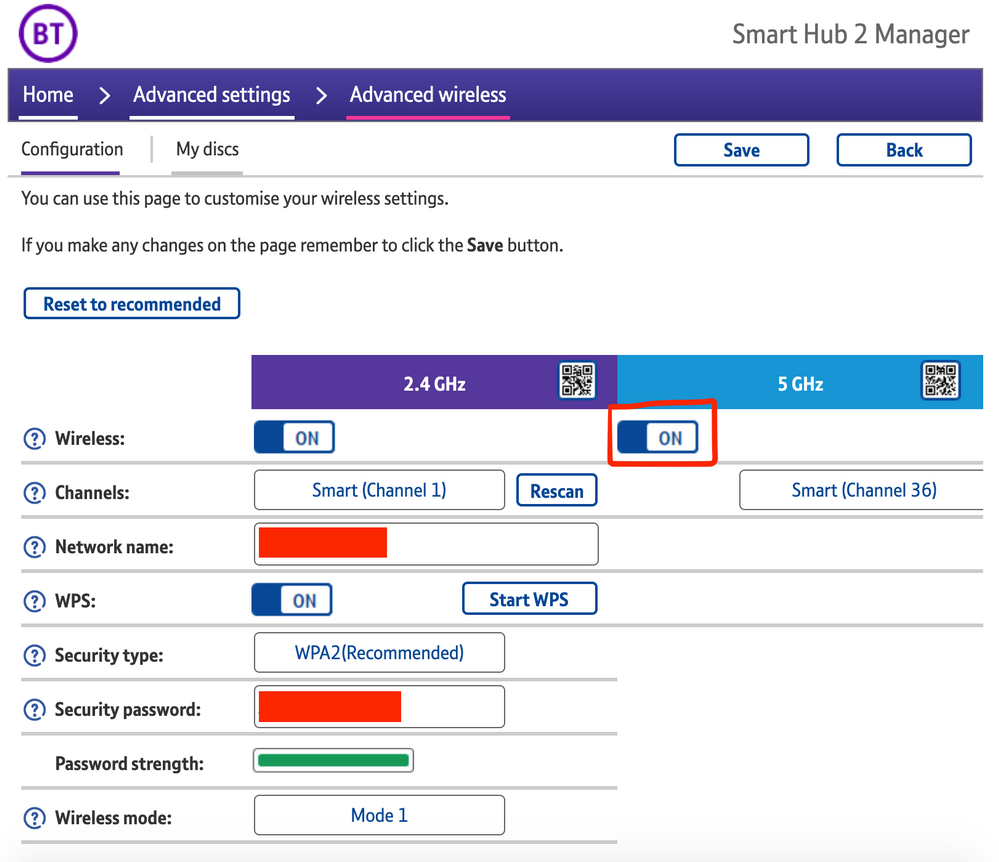
The most consistent workaround we have discovered is to disable the 5GHz band on the BT Smart Hub 2. You can learn more about how to do this using these steps:

Please be aware, turning off 5GHz could affect the speed at which other devices connect through the network and should only be considered a temporary workaround.


Steps taken from a post on the BT Community.


1) Open a new web browser on a device connected to your Hub and type 192.168.1.254 in the address bar. This will open the Hub Manager.
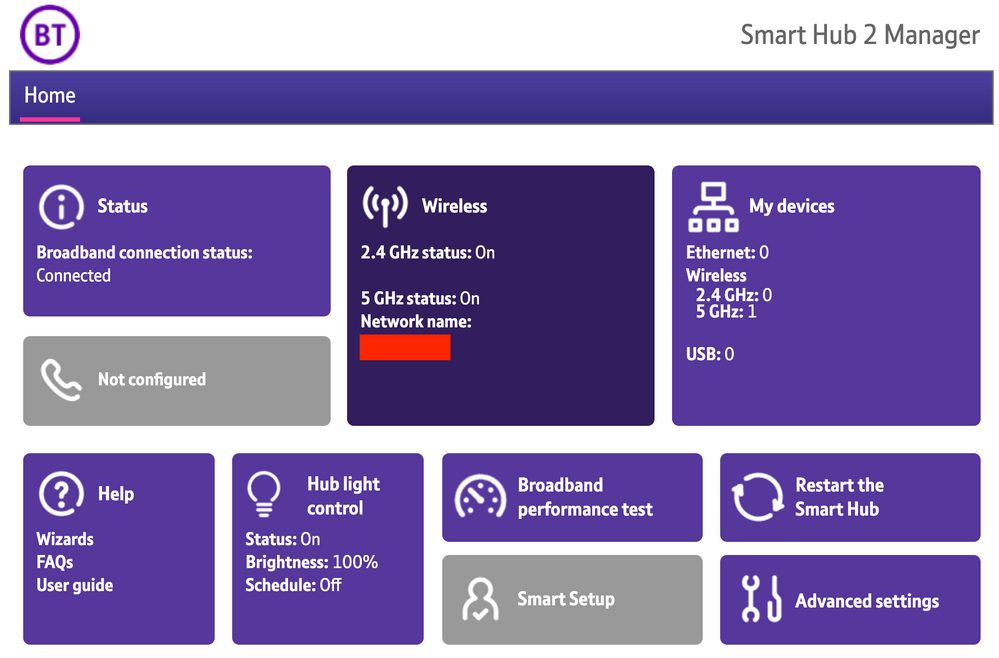
​


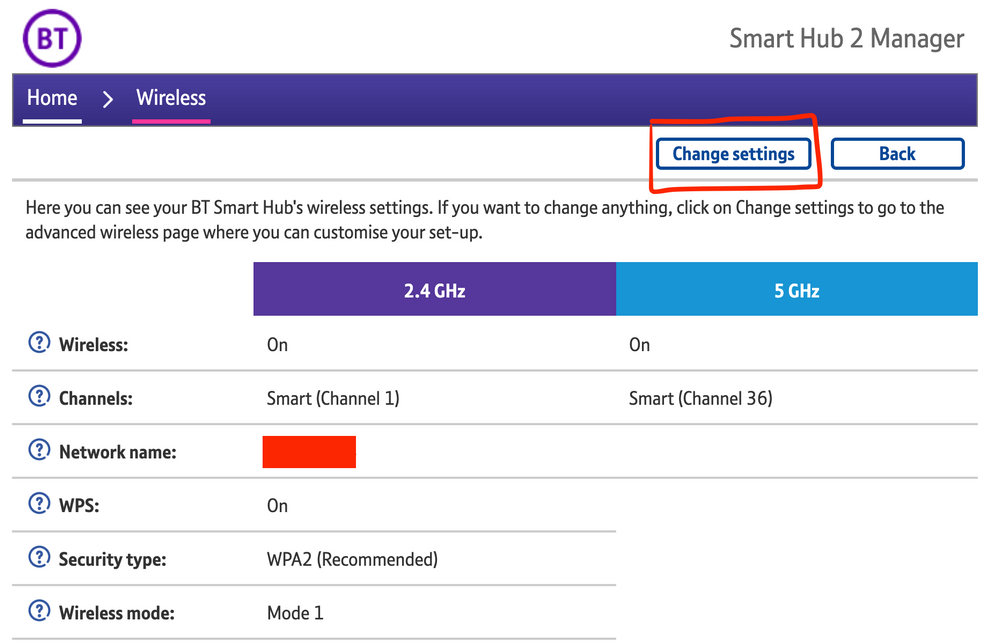
2) Click Wireless. This will open the Wireless Settings page.


3) Select ‘Change settings’
​


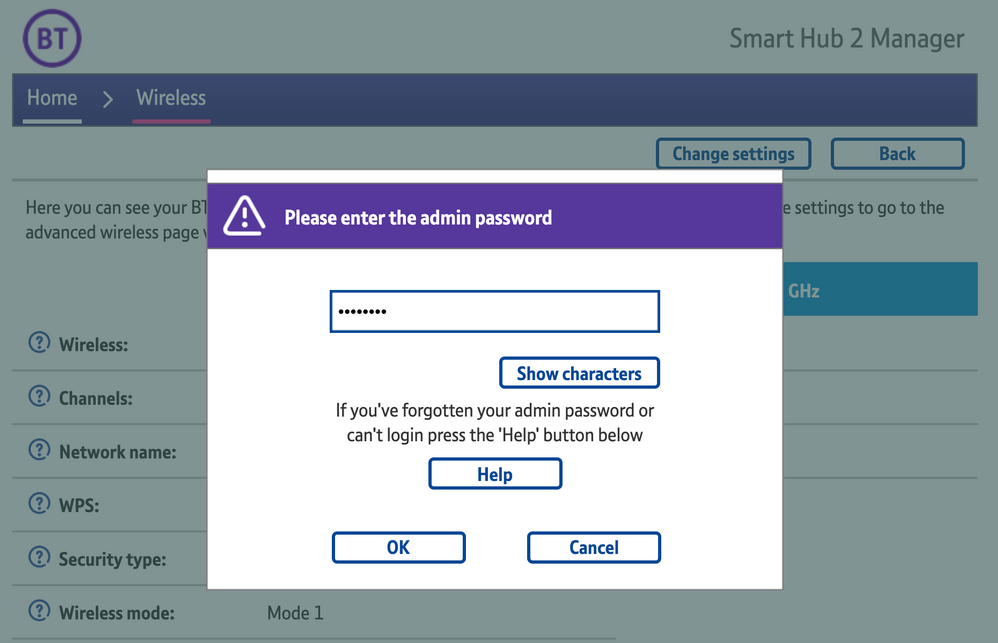
4) Enter the Admin password. This is found on the back of the router and on the removable card. Click ‘OK’
​


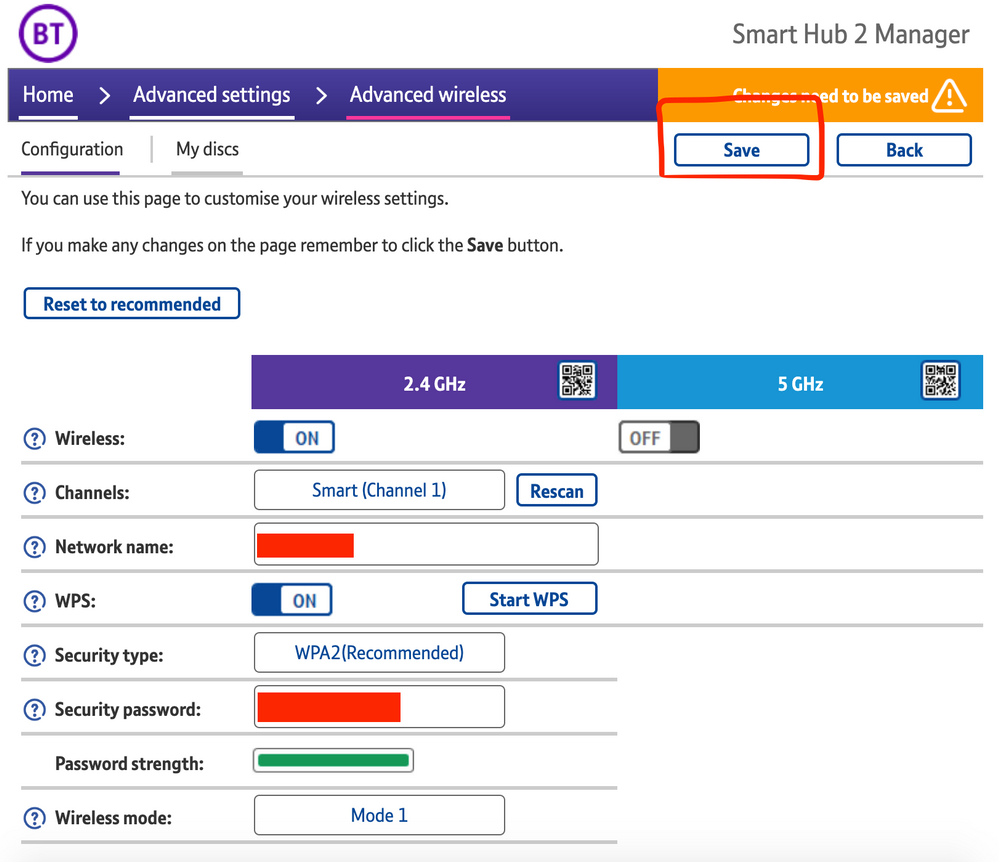
5) Toggle 5GHz OFF

​

6) Click 'Save'

​


7) Click 'Yes' at the warning prompt.
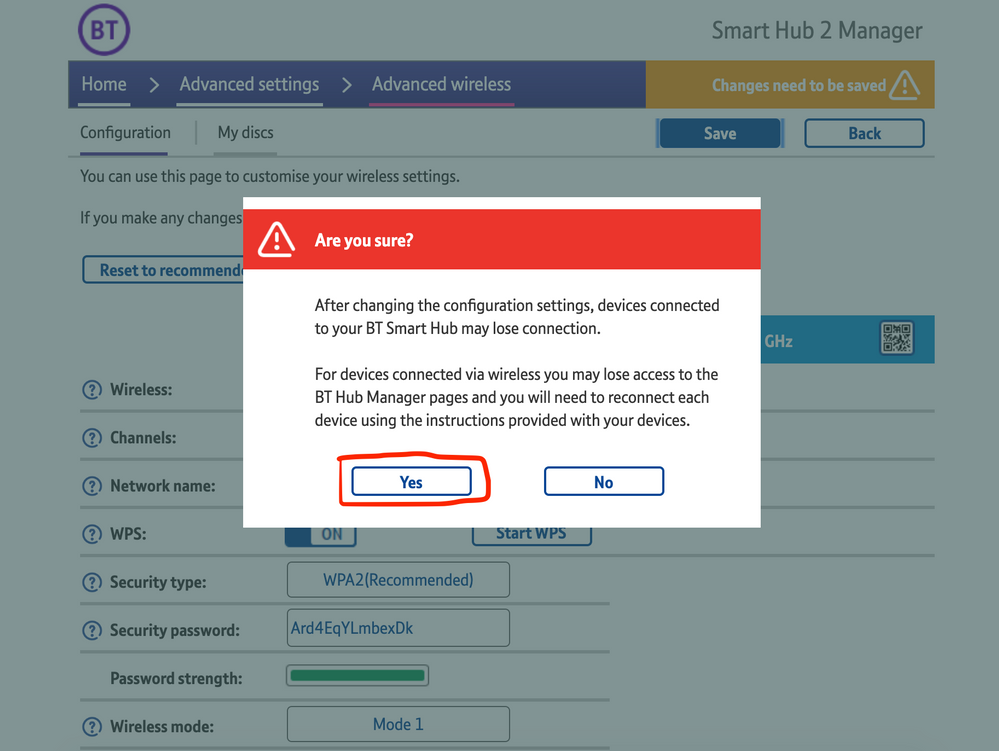
8) Wait for your devices to reconnect. You may need to reboot your Sonos devices by powering them down for 30 seconds and powering them back up.

​


Alternatively, some users have been able to work around the issue by wiring a player directly to the router, though this doesn’t work in every case. Systems that have a Sonos Move or Roam on them will also not be helped by this change, so disabling 5GHz would be best for those households.


 We recommend that you report this issue to BT with the following information:


“Devices connected to the 5GHz band are not able to communicate with devices connected to the 2.4GHz band and it appears the connections are being erroneously isolated.”


You don’t need to specifically mention Sonos devices when reporting this issue to BT as the information alone will be enough for them to recognize the issue you’re facing.
 

BT are indeed aware of this issue and are actively investigating and working to resolve it as quickly as possible. We’ll update this post with any further news as and when we receive it.

This topic has been closed for further comments. You can use the search bar to find a similar topic, or create a new one by clicking Create Topic at the top of the page.

261 replies

Senior Virtuoso
April 24, 2021

This issue has garbaged my Sonos for weeks- extremely disappointing. It can only have been caused by a Sonos app update. How can Sonos blame BT?! 

I finally solved it by turning off Smart Setup on the Home Hub then resetting it. This keeps 5gz.

So you made no change to the Sonos environment, did make a change to the BT one, fixed the problem that way, but still want to blame Sonos? Even though lots of BT Smart Hub users have an issue that isn’t affecting users of other routers? 

Lyricist III
April 24, 2021

This issue has garbaged my Sonos for weeks- extremely disappointing. It can only have been caused by a Sonos app update. How can Sonos blame BT?! 

I finally solved it by turning off Smart Setup on the Home Hub then resetting it. This keeps 5gz.

Hey; I am also having the same issue with a Hue Sync Box on 2.4ghz that I can’t reach with the controller from 5ghz.. so I’m pretty comfortable that this is a BT issue.

It also started happening around 2nd week of April which is exactly when my Smart Hub 2 firmware was updated by BT..

Lyricist III
April 24, 2021

Suffering this issue myself and its getting pretty frustrating. 

Have a mixed bag of a system here. 

2 Sonos One 

2 Ikea Symfonsik 

2 Amazon Echo Dots 

A couple of weeks back the Symfonisk’s became very hit and miss. Would fail to connect via Airplay and would just disappear from the Sonos App. 

The Sonos One’s would work fine during this period so assumed maybe the Symfonisks were failing. However the Echo Dots I discovered could happily control the Symfonisks regardless of whether they were showing in the Sonos App/Airplay so they were working but for whatever reason the Sonos App was ‘losing’ them. 

This was all happening on the older BT Home Hub 2 and right up until that point a few weeks back I had experienced no real issues.  

Anyway I Have recently changed to the Full Fibre BT package and that comes with the BT Smart Hub 2. 

The fun and games that people are experiencing have taken full effect. 

Spent hours trying to get the Sonos/Ikea connected to the network. When they connected it was short lived. I have done everything that the numerous threads have suggested but still having issues. 

The Echo Dots worked instantly and in minutes and have worked perfectly since and can also still control (either via voice control or using the Alexa App) the Sonos/Ikea speakers regardless of what the Sonos App/Airplay are doing. 

To me it seems disingenuous to put this squarely on BT although it may be the case but for me my issues have existed prior to the Smart Hub 2 ‘upgrade’ so lead me to believe that a recent Sonos App update is also causing issues. 

Hope something gets sorted soon as currently I have £600 worth of speakers sat largely useless whilst the cheap as chips Echo Dots work flawlessly. 

Lyricist I
April 24, 2021

Add me to the list of people having trouble with this BT update.

I’m not a Sonos user, but I started having difficulty playing media over DLNA on my PS4 in early April. I switched to a spare Chromecast which was equally problematic. I then realised it was all related to how 2.4ghz devices interacted with 5ghz devices, and here we are. I made a thread on the BT forum, and then found this one.

Let’s hope they get this sorted.

Lyricist III
April 24, 2021

Add me to the list of people having trouble with this BT update.

I’m not a Sonos user, but I started having difficulty playing media over DLNA on my PS4 in early April. I switched to a spare Chromecast which was equally problematic. I then realised it was all related to how 2.4ghz devices interacted with 5ghz devices, and here we are. I made a thread on the BT forum, and then found this one.

Let’s hope they get this sorted.

Thanks for sharing.. good to know the wider impacts beyond just Sonos use

Lyricist I
April 25, 2021

Hi, just disabled the 5Ghz connection and now all of my Sonos equipment connected straight away with the app. Thanks for the info as I’ve been pulling my hair out trying to sort this out. 👍

Lyricist I
April 25, 2021

Hi there,


This month I switched from Sky to BT and I have since had issues updating my WiFi password in the Sonos 2 app.  

The Beam itself has connected to the internet as Alexa is working, for example, but the app keeps stating that the Beam isn’t connected to the internet and it won’t accept my password.  As a result, I can’t access my account details on the App (it is greyed out) and I can’t Airplay music to it either.

I have tried deleting the app, turning off the Beam, etc, to no avail.

Do you think this issue is related to the problem reported on this thread (as I have the Smart Hub 2 router), or something else?

Thank you,

Simon 


Lyricist I
April 25, 2021

Hi,

My sonos has been working fine since day 1, but suddenly this week every time we go to use it the app cant find the system and the only way to fix it is to reboot the router - not only is this really painful, but I shouldnt need to - any ideas on how to fix?

Lyricist III
April 25, 2021

Hi there,


This month I switched from Sky to BT and I have since had issues updating my WiFi password in the Sonos 2 app.  

The Beam itself has connected to the internet as Alexa is working, for example, but the app keeps stating that the Beam isn’t connected to the internet and it won’t accept my password.  As a result, I can’t access my account details on the App (it is greyed out) and I can’t Airplay music to it either.

I have tried deleting the app, turning off the Beam, etc, to no avail.

Do you think this issue is related to the problem reported on this thread (as I have the Smart Hub 2 router), or something else?

Thank you,

Simon 


Sounds like it Simon.. have you tried disabling the 5ghz band from the routers’ home/admin page? http://192.168.1.254.. the fact that the Beam can play internet streamed content/connect to Alexa but you can’t manage it from the controller app sounds like it would be related to this issue.

Lyricist III
April 25, 2021

Hi, just disabled the 5Ghz connection and now all of my Sonos equipment connected straight away with the app. Thanks for the info as I’ve been pulling my hair out trying to sort this out. 👍

Works reliably as a fix/proof point for me.. but I can’t keep the 5ghz band off as then my tv streaming services drop to potato-cam resolution.. this needs a proper permanent fix between BT/Sonos