James L.
Retired Community Staff
April 22, 2021
F.A.Q.

BT Smart Hub 2 - Connection Issues (April 2021)
  • April 22, 2021
  • 261 replies
  • 54358 views
BT Smart Hub 2 - Connection Issues (April 2021)

Update - 11th June 2021:

BT have confirmed that the firmware update that contains a fix for this original issue has been rolled out to the majority of users. Therefore, we can consider this issue closed. 

If your BT Smart Hub 2 router is still running the affected firmware (V0.26.03.01286) then please get in touch with BT directly.

Anyone that still experiences issues on the latest firmware, please create a new topic or get in touch with Sonos Customer Care.


Update - 7th May 2021:

BT have issued a new statement:

“We’re aware that a very small number of customers are experiencing an issue with their BT Smart Hub 2 connecting with multiple streaming devices on their Wi-Fi network. Any customer who experiences this should get in touch with BT who will update their device remotely as soon as possible. BT will be rolling out an update to all devices later this month. We’re sorry for any inconvenience caused.”


Original post - 22nd April 2021:

Hey everyone,


We’re aware of an issue affecting Sonos users with BT Smart Hub 2 routers that causes problems with connecting to players in a wireless configuration. This is caused by a bug in the BT Smart Hub 2’s firmware (version V0.26.03.01286) which prevents devices on the 5GHz band from communicating with devices on the 2.4GHz band, and vice versa. Most of the affected users have iPhones running iOS version 14.4.2, but we have seen other types of controller, such as Android devices, affected by this issue as well.


The most consistent workaround we have discovered is to disable the 5GHz band on the BT Smart Hub 2. You can learn more about how to do this using these steps:

Please be aware, turning off 5GHz could affect the speed at which other devices connect through the network and should only be considered a temporary workaround.


Steps taken from a post on the BT Community.


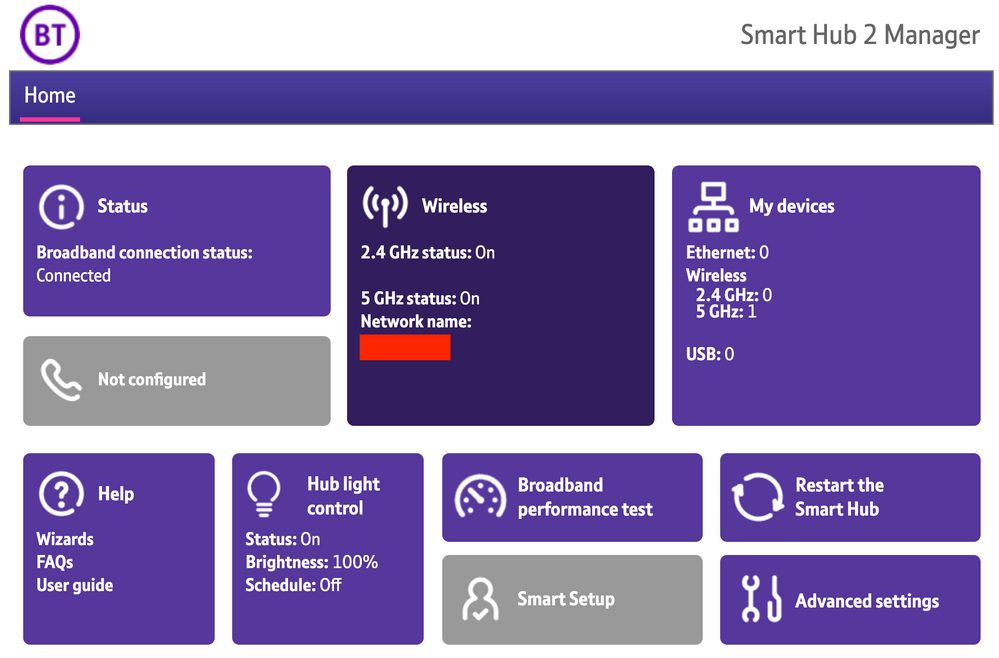
1) Open a new web browser on a device connected to your Hub and type 192.168.1.254 in the address bar. This will open the Hub Manager.
​


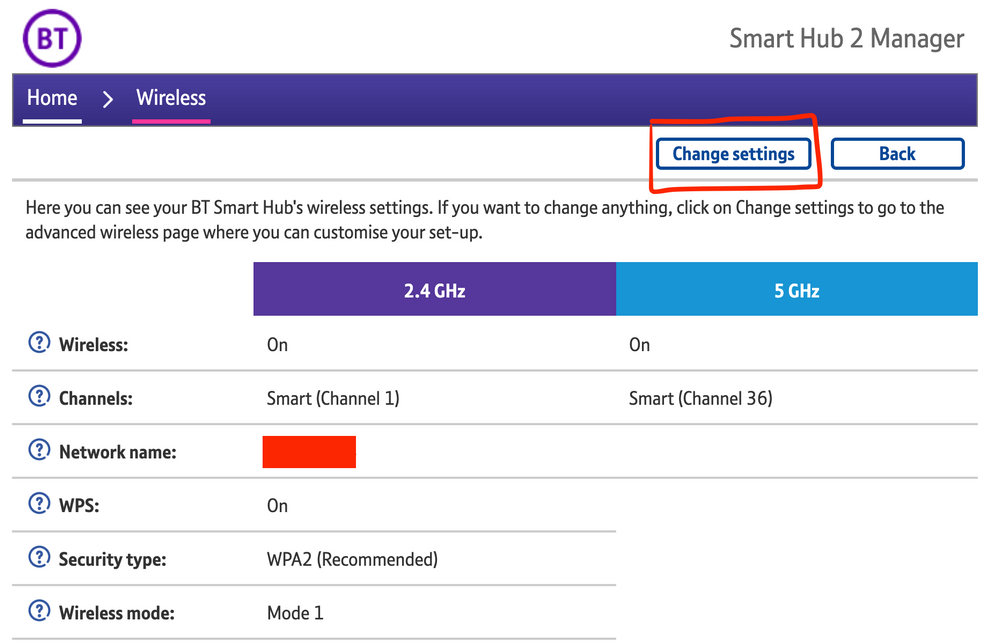
2) Click Wireless. This will open the Wireless Settings page.


3) Select ‘Change settings’
​


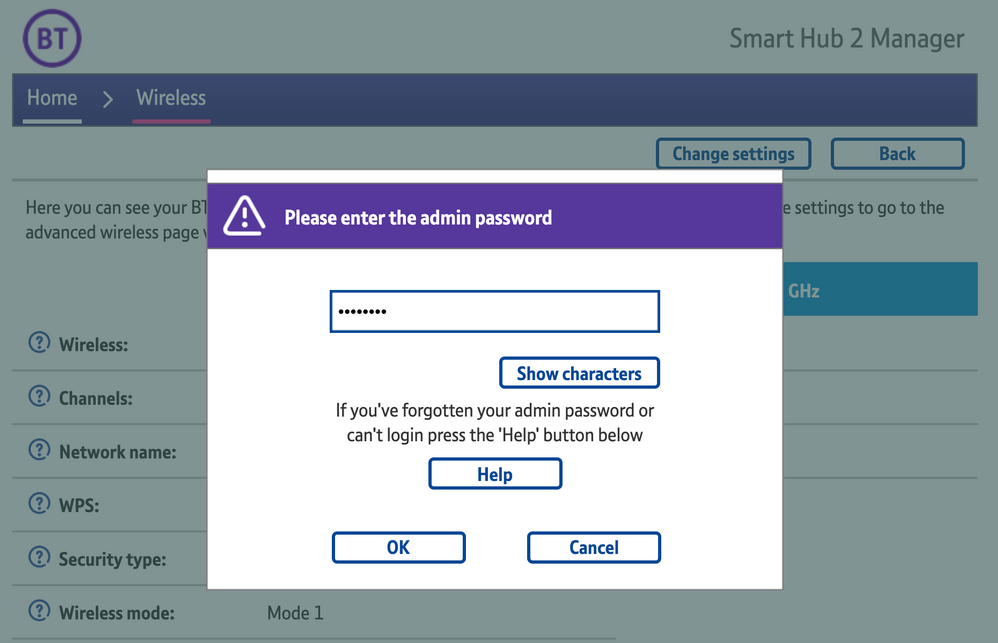
4) Enter the Admin password. This is found on the back of the router and on the removable card. Click ‘OK’
​


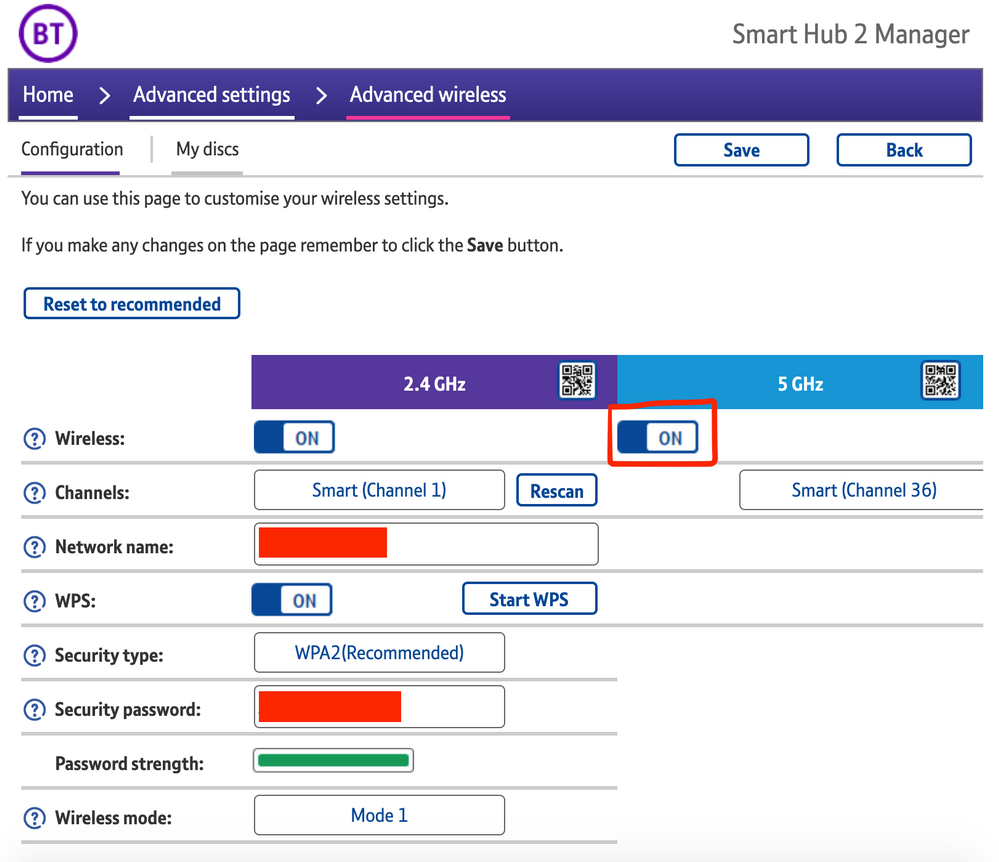
5) Toggle 5GHz OFF

​

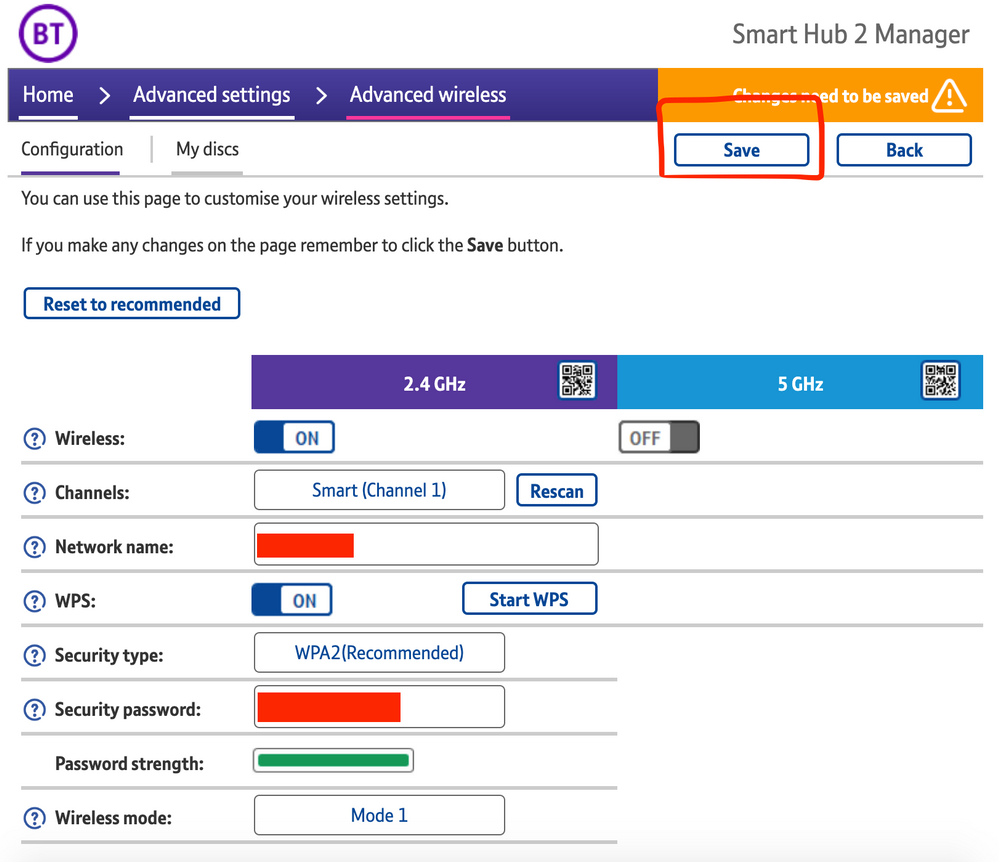
6) Click 'Save'

​


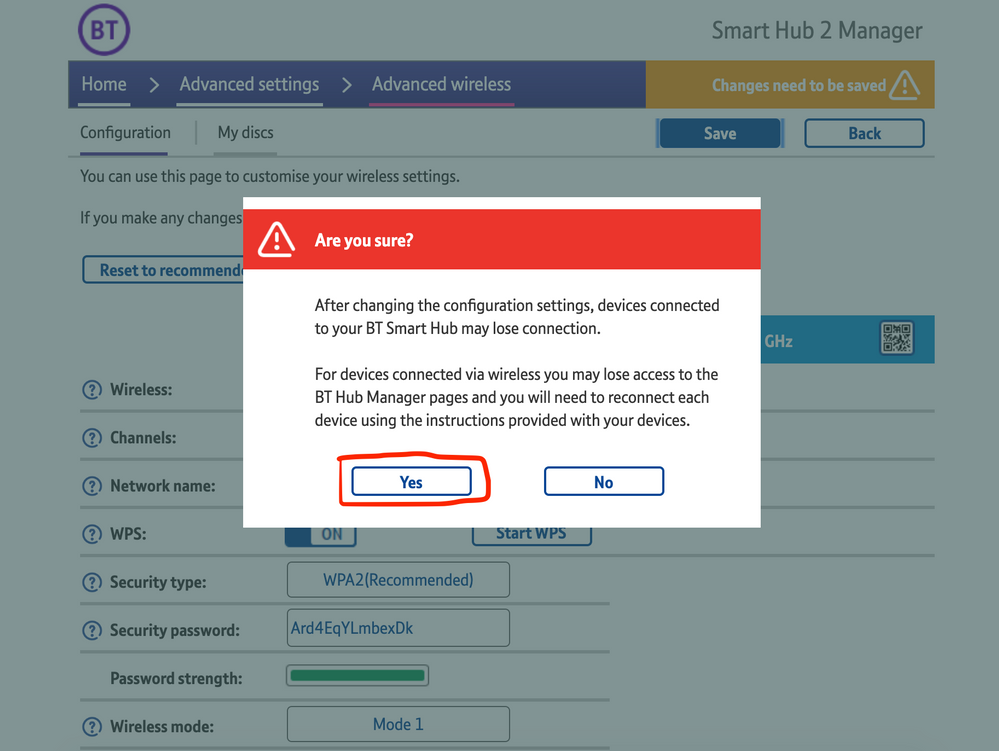
7) Click 'Yes' at the warning prompt.
8) Wait for your devices to reconnect. You may need to reboot your Sonos devices by powering them down for 30 seconds and powering them back up.

​


Alternatively, some users have been able to work around the issue by wiring a player directly to the router, though this doesn’t work in every case. Systems that have a Sonos Move or Roam on them will also not be helped by this change, so disabling 5GHz would be best for those households.


 We recommend that you report this issue to BT with the following information:


“Devices connected to the 5GHz band are not able to communicate with devices connected to the 2.4GHz band and it appears the connections are being erroneously isolated.”


You don’t need to specifically mention Sonos devices when reporting this issue to BT as the information alone will be enough for them to recognize the issue you’re facing.
 

BT are indeed aware of this issue and are actively investigating and working to resolve it as quickly as possible. We’ll update this post with any further news as and when we receive it.

This topic has been closed for further comments. You can use the search bar to find a similar topic, or create a new one by clicking Create Topic at the top of the page.

261 replies

Contributor I
April 27, 2021

Evening all..

Just to let you know after saying all was working ok after getting on to BT.. ITs back to its usual here one minute gone the next!

S2 works ok (have a boost) but move and roam disappear from some devices.. if I switch Wi-fi off then back on, sometimes they come back briefly.

S1 is the same.. I remember though S1 was a pig to set up… my old BT Hub I had to turn off 5ghz, (even though it had its own SSID) to set up and once all sorted I could put 5ghz back on and all was ok.

This new SM2 I can’t do that so screwed!

come on SONOS surely you can sort this… some one is at fault…?!?!

controlav
Lead Maestro
April 27, 2021

I’ve tried disabling 5ghz and I know it resolves this specific issue, but it’s like solving one problem by creating another one - causing issues for my experience using the internet on other devices. It moves my speed from 150MB down to less than 30MB. This is rubbish when working from home or trying to watch content on the TV. 
 

Has there been anything occur like this with BT historically and if so, how quick are they to respond? I’m considering temporarily moving a speaker into the utility cupboard, I won’t be able to use it, but at least it will help with the connection issues. 


30Mbps is more than enough to stream 4k UHD. You should be able to stream at least three of those simultaneously over 30Mbps, probably more depending on the compression level.

Yes, historically BT have released firmware updates every few years that borked Sonos compatibility. Their QA department leaves a lot to be desired. (Although they probably just ODM a cheap router from China and skip the QA entirely).

Author of the leading independent Sonos apps for Android, MacOS, iOS, Windows and Xbox.
Lyricist I
April 28, 2021

As you are all finding out, any reboot, factory reset, turning 5GHZ off all appears to be temporary fixes. I also have nanoleaf smart lights that are unresponsive whenever Sonos is also. Because like the Sonos, the lights live on the 2.4ghz network. Here one minute, gone the next. 

Lyricist I
April 28, 2021

Update from BT complaints, acknowledging it’s a an issue with the firmware (yay). Priority 1 issue and should be fixed in the coming days. Only affects devices connected directly to the SH2 apparently and devices connected to the wifi discs would be unaffected. Was already looking to replace it myself with a Ubiquity UniFi Dream Machine. 

Enthusiast I
April 28, 2021

Update from BT complaints, acknowledging it’s a an issue with the firmware (yay). Priority 1 issue and should be fixed in the coming days. Only affects devices connected directly to the SH2 apparently and devices connected to the wifi discs would be unaffected. Was already looking to replace it myself with a Ubiquity UniFi Dream Machine. 

Wonderful news, thanks

I always told my kids that “pestering wouldn't get you anywhere” but i was proved wrong in this case! 

Contributor I
April 28, 2021

Update from BT complaints, acknowledging it’s a an issue with the firmware (yay). Priority 1 issue and should be fixed in the coming days. Only affects devices connected directly to the SH2 apparently and devices connected to the wifi discs would be unaffected. Was already looking to replace it myself with a Ubiquity UniFi Dream Machine. 

Thanks for the update, this makes sense as I can still use the one speaker that uses a disc

Lyricist I
April 28, 2021

Lets hope BT keep their word and sort the firmware out quick. Just has them install FTTP yesterday, I’m sitting there thinking this is all going to be singing and dancing but can’t connect my 3 play 1s. £600 of speakers practically bricked by BT and me wishing I’d stuck with Sky! Yes I can get it working with an ethernet cable but I don’t want a thick piece of yellow wire connecting up a wireless system straddling my shelves.

Lyricist I
April 28, 2021

Hiya. Another fed up BT customer with SH2 and was unable to keep connected my new SONOS kit. 
On Monday I raised a complaint with BT as suggested. I’ve just tried my Sonos and fingers crossed seems to be connecting! 
 

Trending Lyricist I
April 28, 2021

Hiya. Another fed up BT customer with SH2 and was unable to keep connected my new SONOS kit. 
On Monday I raised a complaint with BT as suggested. I’ve just tried my Sonos and fingers crossed seems to be connecting! 
 

The BT firmware hasn’t been update yet. If you’re connecting it’s likely because your smart phone has dropped on to the 2.4ghz frequency. 

Lyricist III
April 28, 2021

I’m also just off the phone with BT complaints department. They have confirmed known issue being treated as a Priority, they are ‘HOPING’ it will be sorted by mid part of next week.