James L.
Retired Community Staff
April 22, 2021
F.A.Q.

BT Smart Hub 2 - Connection Issues (April 2021)
  • April 22, 2021
  • 261 replies
  • 54358 views
BT Smart Hub 2 - Connection Issues (April 2021)

Update - 11th June 2021:

BT have confirmed that the firmware update that contains a fix for this original issue has been rolled out to the majority of users. Therefore, we can consider this issue closed. 

If your BT Smart Hub 2 router is still running the affected firmware (V0.26.03.01286) then please get in touch with BT directly.

Anyone that still experiences issues on the latest firmware, please create a new topic or get in touch with Sonos Customer Care.


Update - 7th May 2021:

BT have issued a new statement:

“We’re aware that a very small number of customers are experiencing an issue with their BT Smart Hub 2 connecting with multiple streaming devices on their Wi-Fi network. Any customer who experiences this should get in touch with BT who will update their device remotely as soon as possible. BT will be rolling out an update to all devices later this month. We’re sorry for any inconvenience caused.”


Original post - 22nd April 2021:

Hey everyone,


We’re aware of an issue affecting Sonos users with BT Smart Hub 2 routers that causes problems with connecting to players in a wireless configuration. This is caused by a bug in the BT Smart Hub 2’s firmware (version V0.26.03.01286) which prevents devices on the 5GHz band from communicating with devices on the 2.4GHz band, and vice versa. Most of the affected users have iPhones running iOS version 14.4.2, but we have seen other types of controller, such as Android devices, affected by this issue as well.


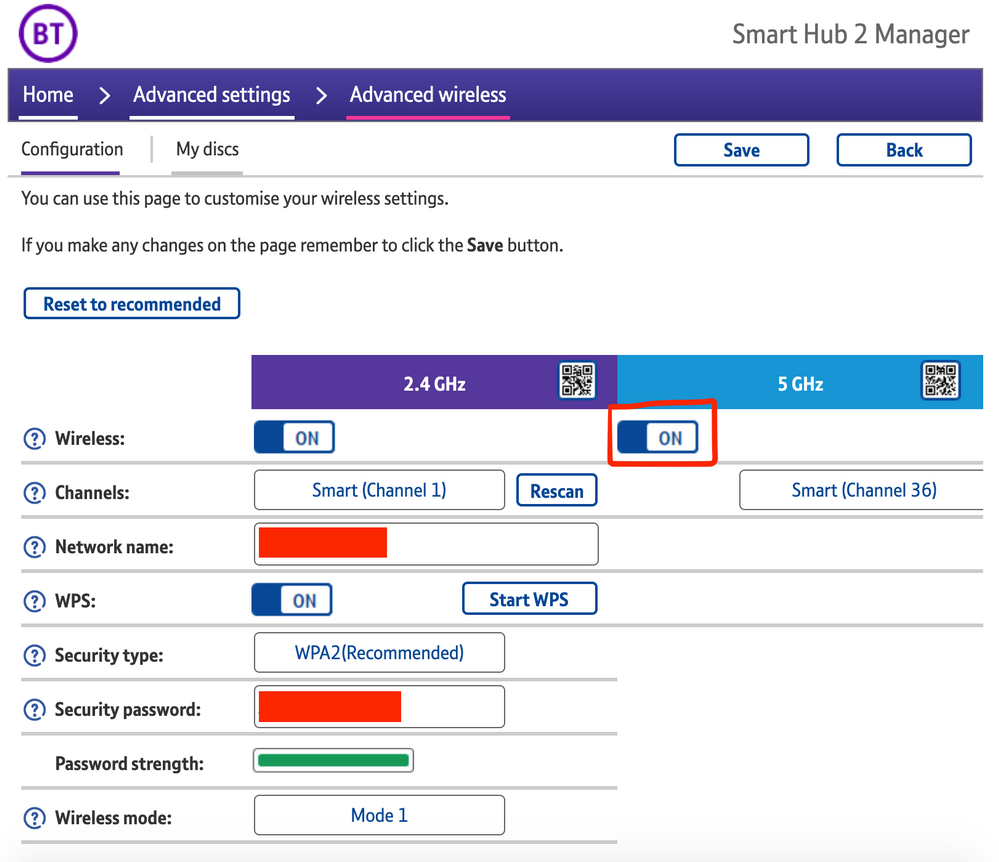
The most consistent workaround we have discovered is to disable the 5GHz band on the BT Smart Hub 2. You can learn more about how to do this using these steps:

Please be aware, turning off 5GHz could affect the speed at which other devices connect through the network and should only be considered a temporary workaround.


Steps taken from a post on the BT Community.


1) Open a new web browser on a device connected to your Hub and type 192.168.1.254 in the address bar. This will open the Hub Manager.
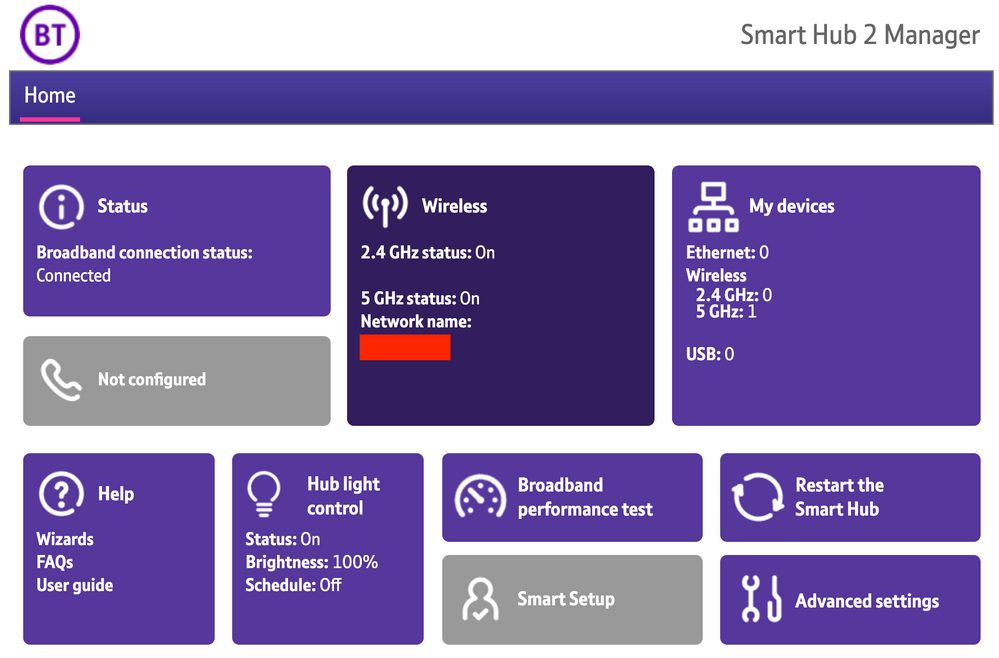
​


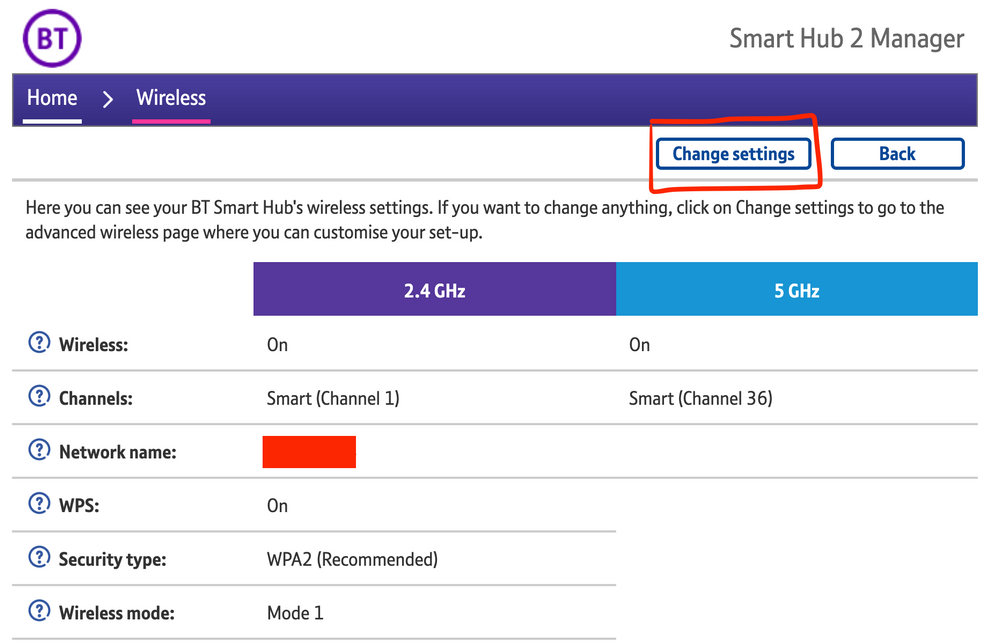
2) Click Wireless. This will open the Wireless Settings page.


3) Select ‘Change settings’
​


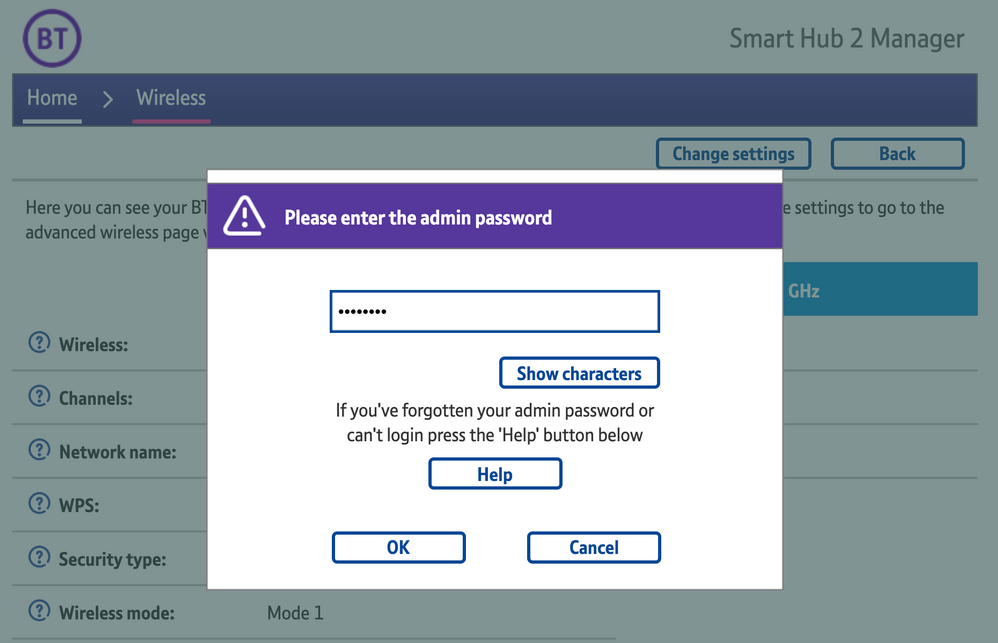
4) Enter the Admin password. This is found on the back of the router and on the removable card. Click ‘OK’
​


5) Toggle 5GHz OFF

​

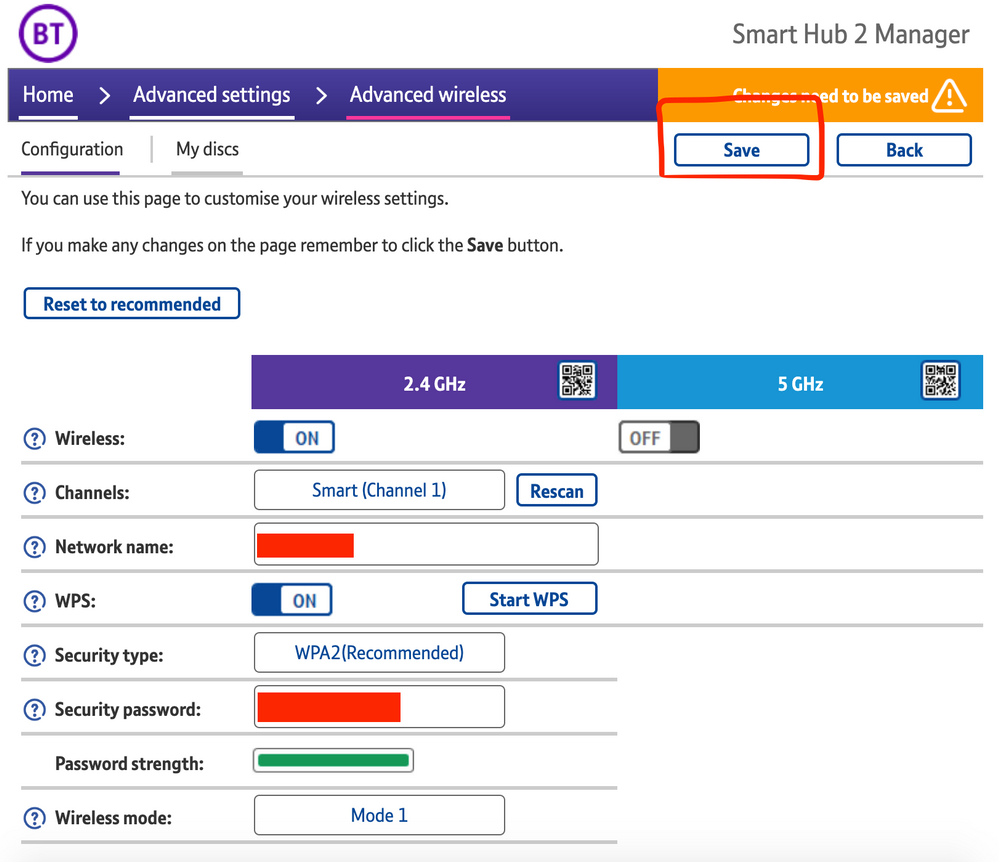
6) Click 'Save'

​


7) Click 'Yes' at the warning prompt.
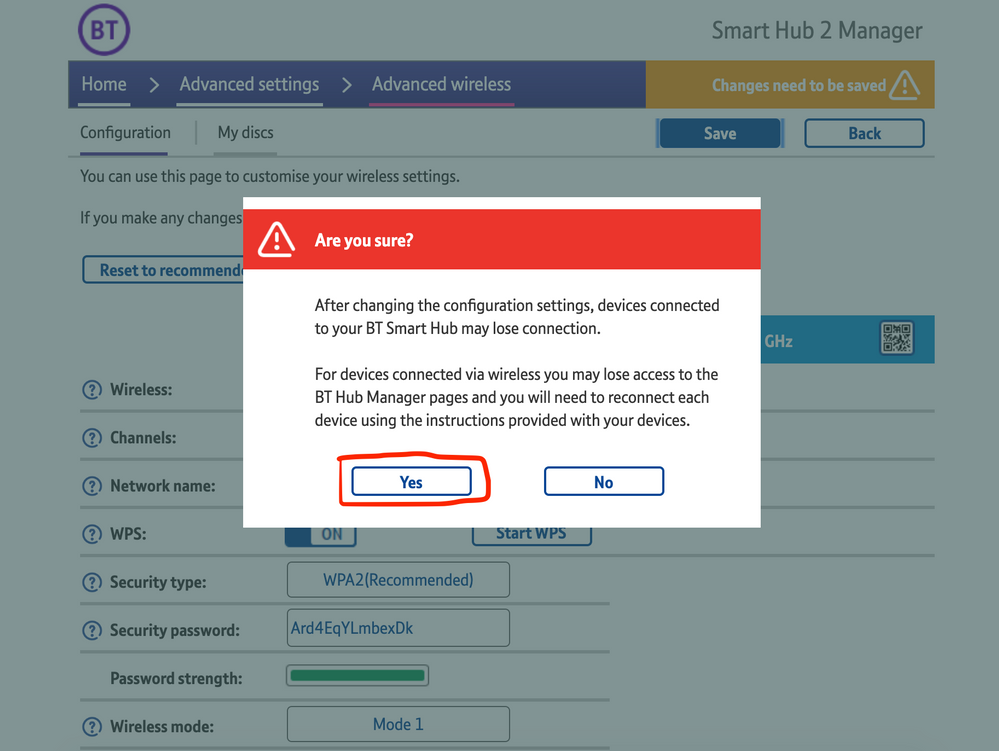
8) Wait for your devices to reconnect. You may need to reboot your Sonos devices by powering them down for 30 seconds and powering them back up.

​


Alternatively, some users have been able to work around the issue by wiring a player directly to the router, though this doesn’t work in every case. Systems that have a Sonos Move or Roam on them will also not be helped by this change, so disabling 5GHz would be best for those households.


 We recommend that you report this issue to BT with the following information:


“Devices connected to the 5GHz band are not able to communicate with devices connected to the 2.4GHz band and it appears the connections are being erroneously isolated.”


You don’t need to specifically mention Sonos devices when reporting this issue to BT as the information alone will be enough for them to recognize the issue you’re facing.
 

BT are indeed aware of this issue and are actively investigating and working to resolve it as quickly as possible. We’ll update this post with any further news as and when we receive it.

This topic has been closed for further comments. You can use the search bar to find a similar topic, or create a new one by clicking Create Topic at the top of the page.

261 replies

Contributor I
May 14, 2021

My router was updated this week & all seems ok at present. The Sonos speakers have been working quite well the last few days….


I don’t want to tempt fate, but hopefully the latest firmware update has done the trick for me….🤞


The new firmware is v0.26.04.04227-BT…. 🤞

Thanks Leigh,

i was on the phone earlier to them and they said the end of the month. My issue appears to be the mesh conflicting with BT routers Wi-fi. 

Avid Contributor III
May 14, 2021

An update on the latest firmware update, is that it’s no better for me….🤦‍♂️
 

My Arc/Sub/SL combination have been switching on & off all night.


The only way I could get the to work again, was rebooting the router, yet again….🤬


I’ve given up for tonight…. I’ll give BT another call tomorrow….

Lyricist I
May 15, 2021

Just had a long E-chat with BT support.  They acknowledge the issue (albeit hinting it’s a Sonos generated problem).  They say the new update that resolves the problem will be ready by the end of May!

Contributor I
May 15, 2021

Just had a long E-chat with BT support.  They acknowledge the issue (albeit hinting it’s a Sonos generated problem).  They say the new update that resolves the problem will be ready by the end of May!

Yes, that’s what I was advised, but luckily I no longer have issues. 

Lyricist II
May 16, 2021

My firmware has been updated to v0.26.04.04227-BT

All seems to be working fine for now. 

Contributor I
May 16, 2021

Hi, all, interesting, I’ve been struggling with this as well, continually disconnecting and reconnecting my Bt hub, I’ve now disconnected the 5Ghz (switched it off) as per the above and it seems to be back on my phone and iPad, hopefully if Bt fix the issue someone will let us all know.


regards, johnny boy

Lyricist II
May 17, 2021

Yeah I just gave up and went out and bought an Eero . Best decision I've made in a long time! 

Contributor I
May 17, 2021

Yeah I just gave up and went out and bought an Eero . Best decision I've made in a long time! 

Yeh, I’ve switched the 5Ghz back on my Bt hub, and am now using Alexa, sad really, 

Lyricist III
May 18, 2021

Well things have become even worse for me. 


Can no longer connect to the Sonos speakers at all now other than by Alexa directly on the Ones or using Alexa on the Echos to control the Symfonisks, but ultimately its limited control compared to using Airplay for me and my general usage. 


(Is it related to the Sonos App (iOS) update version 13.1 with the ever helpful “Bug fixes and improved performance”)


Anyway...

Just spent 45 minutes on phone with BT and mentioned the firmware update several times including routing the actual number as detailed in the thread but got nowhere in that regard so am currently still running V0.26.03.01286


How do you get through to someone who can action the update?


Only thing I got was another WiFi Disc is being sent out free of charge so that I can try plugging the speakers in directly and leaving them like that. Also booked an engineer to visit later in month but feel thats fruitless and stated as much but obviously they have a procedure to follow and in fairness the operative was trying to help.

If BT are being open about this issue they are keeping it hidden from those that can potentially help as they couldn't find anything on the update. 

Not impressed really. For us its a rock solid service but this has really let them down. 

Contributor I
May 18, 2021

What cracks me up is the fact they they, that is, Sonos and the likes of BT want us to use there products but leave you dangling over the cliff of frustration not knowing which way to jump, I’m so fed up of it all I feel like dumping the lot and going back to hard wired.