James L.
Retired Community Staff
April 22, 2021
F.A.Q.

BT Smart Hub 2 - Connection Issues (April 2021)
  • April 22, 2021
  • 261 replies
  • 54358 views
BT Smart Hub 2 - Connection Issues (April 2021)

Update - 11th June 2021:

BT have confirmed that the firmware update that contains a fix for this original issue has been rolled out to the majority of users. Therefore, we can consider this issue closed. 

If your BT Smart Hub 2 router is still running the affected firmware (V0.26.03.01286) then please get in touch with BT directly.

Anyone that still experiences issues on the latest firmware, please create a new topic or get in touch with Sonos Customer Care.


Update - 7th May 2021:

BT have issued a new statement:

“We’re aware that a very small number of customers are experiencing an issue with their BT Smart Hub 2 connecting with multiple streaming devices on their Wi-Fi network. Any customer who experiences this should get in touch with BT who will update their device remotely as soon as possible. BT will be rolling out an update to all devices later this month. We’re sorry for any inconvenience caused.”


Original post - 22nd April 2021:

Hey everyone,


We’re aware of an issue affecting Sonos users with BT Smart Hub 2 routers that causes problems with connecting to players in a wireless configuration. This is caused by a bug in the BT Smart Hub 2’s firmware (version V0.26.03.01286) which prevents devices on the 5GHz band from communicating with devices on the 2.4GHz band, and vice versa. Most of the affected users have iPhones running iOS version 14.4.2, but we have seen other types of controller, such as Android devices, affected by this issue as well.


The most consistent workaround we have discovered is to disable the 5GHz band on the BT Smart Hub 2. You can learn more about how to do this using these steps:

Please be aware, turning off 5GHz could affect the speed at which other devices connect through the network and should only be considered a temporary workaround.


Steps taken from a post on the BT Community.


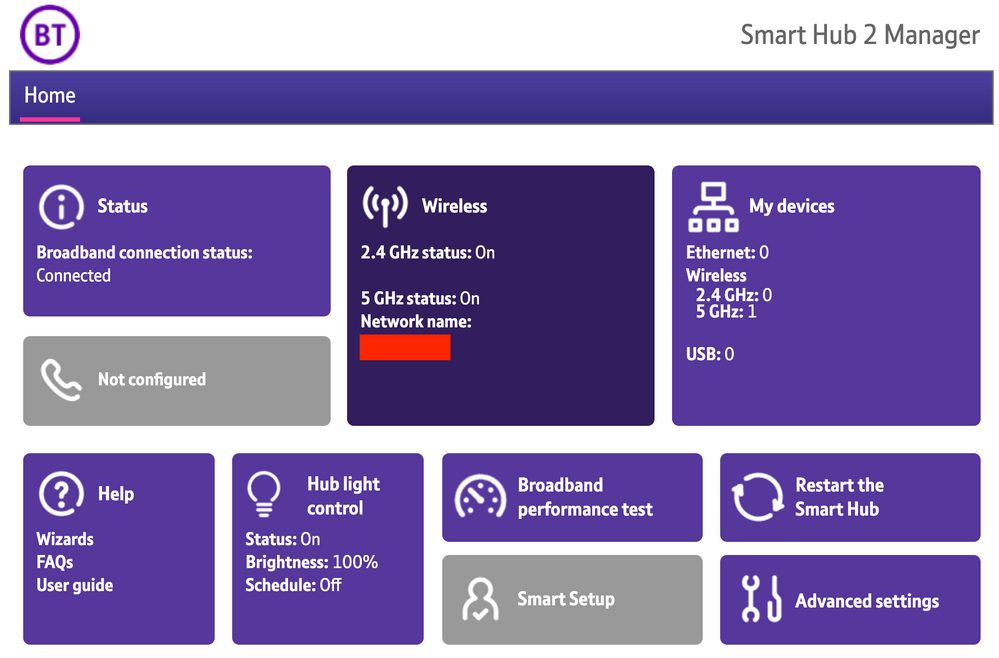
1) Open a new web browser on a device connected to your Hub and type 192.168.1.254 in the address bar. This will open the Hub Manager.
​


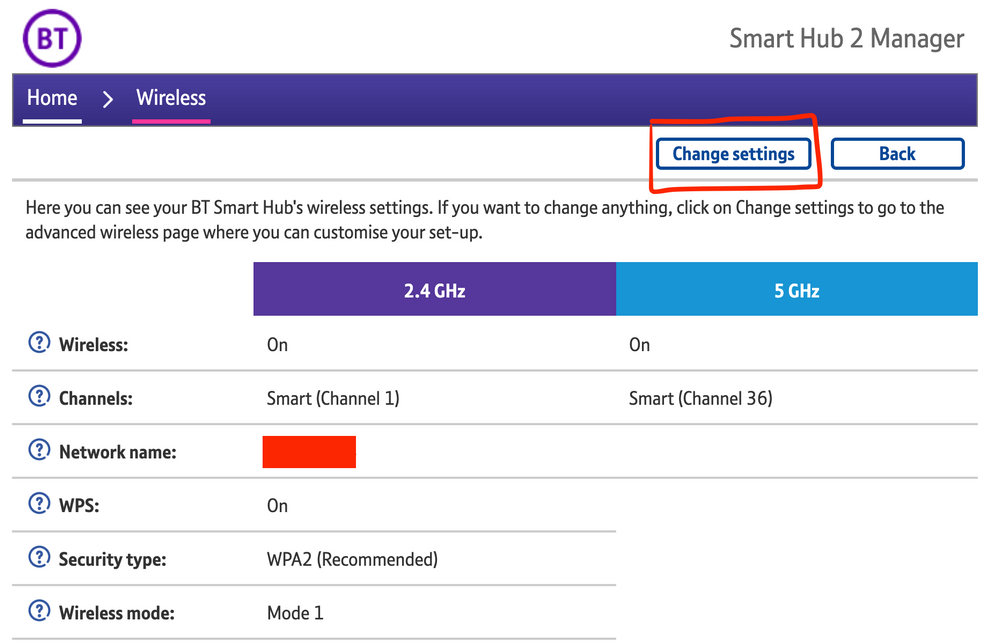
2) Click Wireless. This will open the Wireless Settings page.


3) Select ‘Change settings’
​


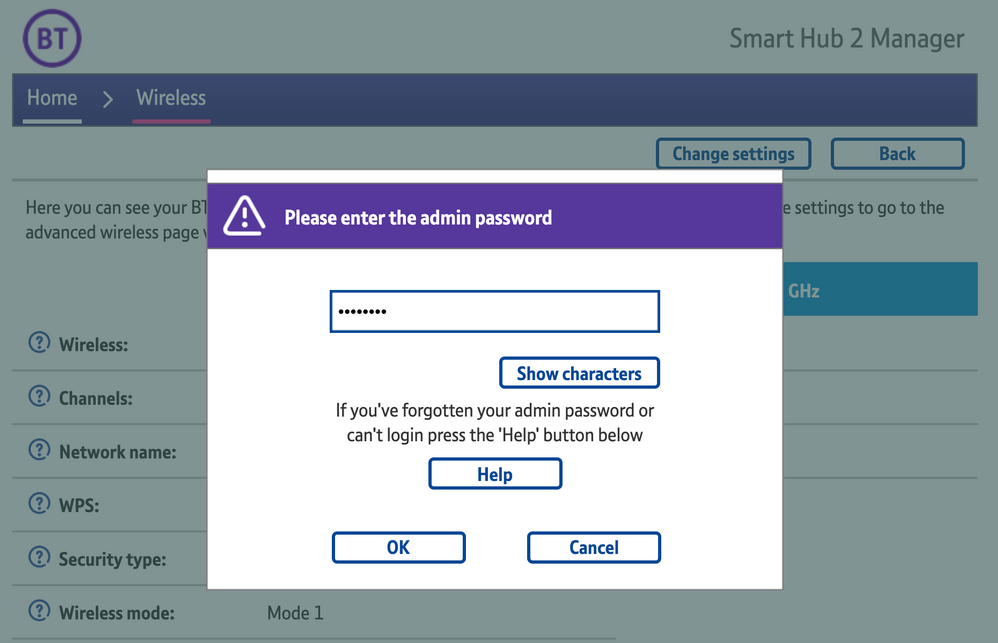
4) Enter the Admin password. This is found on the back of the router and on the removable card. Click ‘OK’
​


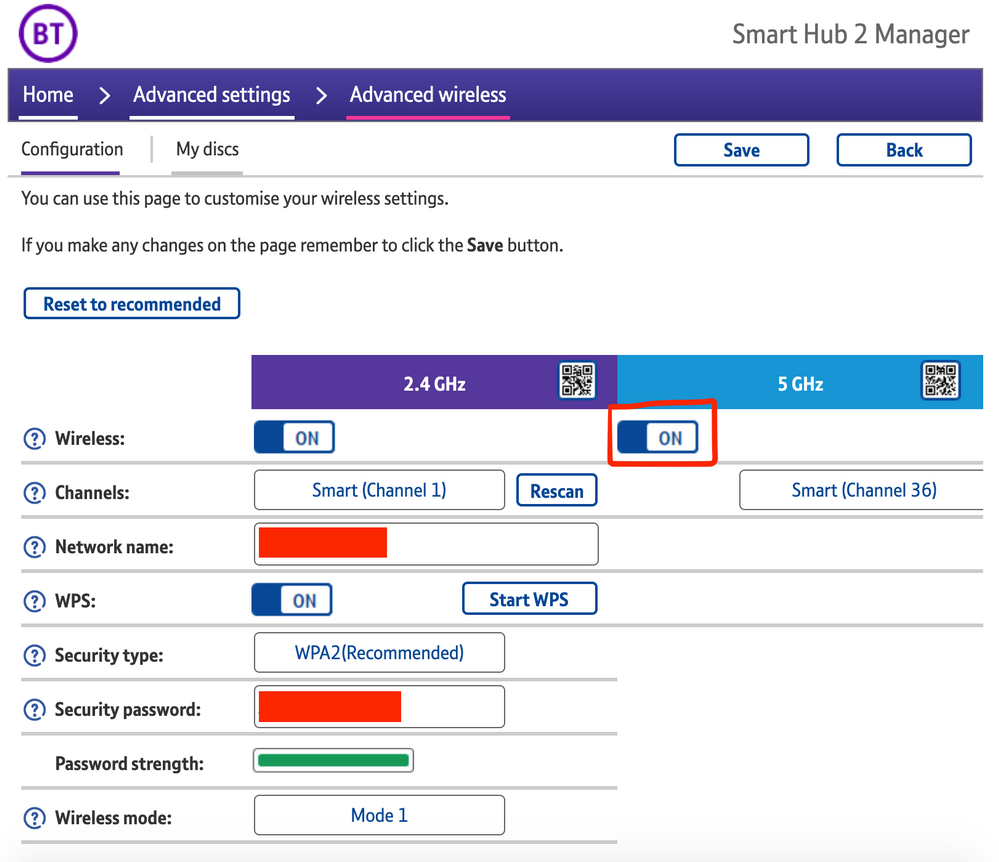
5) Toggle 5GHz OFF

​

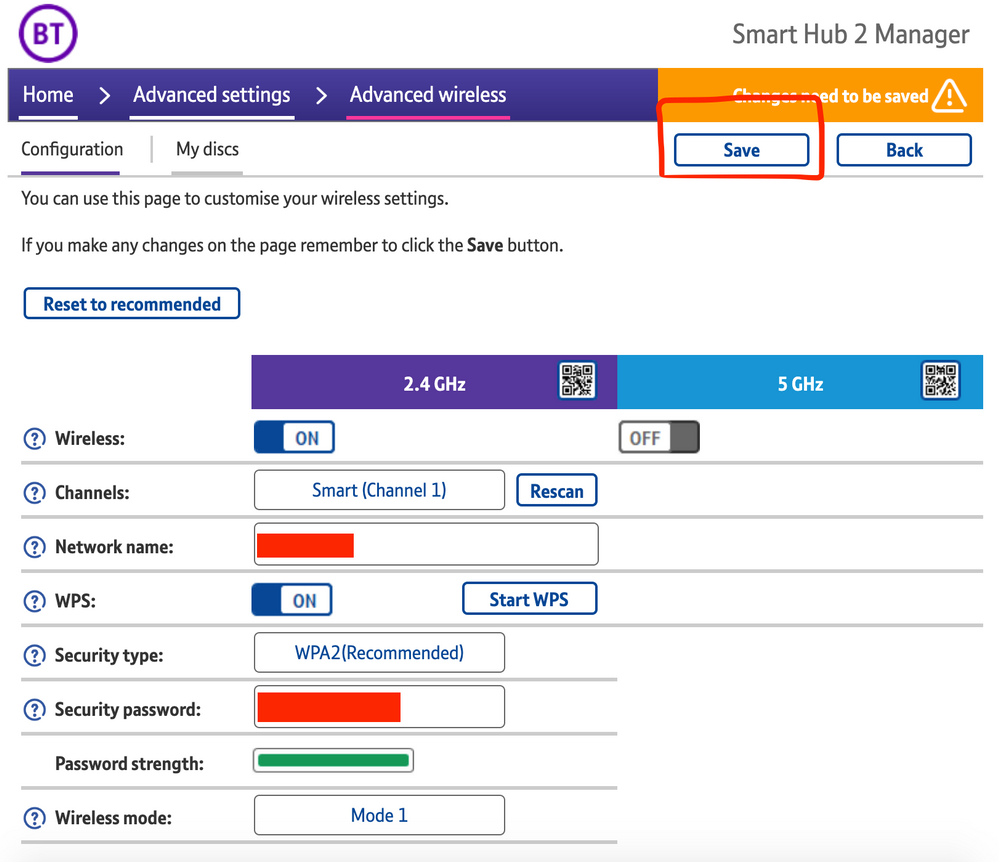
6) Click 'Save'

​


7) Click 'Yes' at the warning prompt.
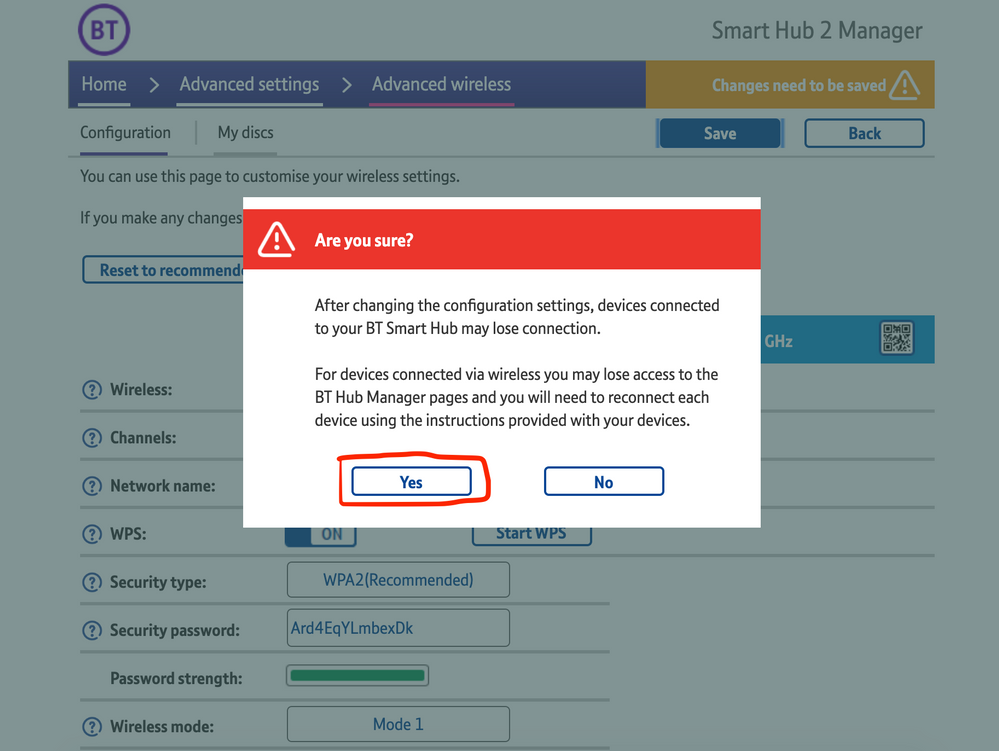
8) Wait for your devices to reconnect. You may need to reboot your Sonos devices by powering them down for 30 seconds and powering them back up.

​


Alternatively, some users have been able to work around the issue by wiring a player directly to the router, though this doesn’t work in every case. Systems that have a Sonos Move or Roam on them will also not be helped by this change, so disabling 5GHz would be best for those households.


 We recommend that you report this issue to BT with the following information:


“Devices connected to the 5GHz band are not able to communicate with devices connected to the 2.4GHz band and it appears the connections are being erroneously isolated.”


You don’t need to specifically mention Sonos devices when reporting this issue to BT as the information alone will be enough for them to recognize the issue you’re facing.
 

BT are indeed aware of this issue and are actively investigating and working to resolve it as quickly as possible. We’ll update this post with any further news as and when we receive it.

This topic has been closed for further comments. You can use the search bar to find a similar topic, or create a new one by clicking Create Topic at the top of the page.

261 replies

Lyricist I
May 19, 2021

I called BT on 17 May to report it.  I noticed today my software has been updated today to v0.26.04.04227.


Problem seems solved.  I am rather happy, as my Sonos 3 is now connected for the first time in about a month.

Lyricist III
May 19, 2021

I called BT on 17 May to report it.  I noticed today my software has been updated today to v0.26.04.04227.


Problem seems solved.  I am rather happy, as my Sonos 3 is now connected for the first time in about a month.

Likewise. 
 

Received an email late last night telling me my case has been resolved/closed but on checking the reference number it doesn’t exist in the system as I can see it. 
 

Checked the hub this morning and showing v0.26.04.04227 now.


So either I wasted my time on the phone yesterday and should have just waited or after the call it was picked up by someone else who actioned the update or whatever needed to be done. 
Either way everything currently working as it should. Let’s hope it stays that way now. 
 

Will leave it a week before cancelling the engineer that was booked to ‘check everything’

controlav
Lead Maestro
May 19, 2021

What cracks me up is the fact they they, that is, Sonos and the likes of BT want us to use there products but leave you dangling over the cliff of frustration not knowing which way to jump, I’m so fed up of it all I feel like dumping the lot and going back to hard wired.


Hard-wired may not help as your mobile device still needs wireless, and if your router interferes with inter-device communication between wired/wireless then your problems will remain. You need a router that does not interfere with local network traffic if you want Sonos to work reliably.

Oh and Sonos are not leaving you dangling anywhere: this is 100% BT’s problem.

Author of the leading independent Sonos apps for Android, MacOS, iOS, Windows and Xbox.
Lyricist I
May 20, 2021

I reported the issue a few weeks ago to BT - only solution they had was to switch off 5Ghz connection and wait for a fix and or update. They did this remotely i.e. switched off 5Ghz. Yesterday I reset my BT Smart Hub (I have done this umpteen times recently) and noticed in doing this the Hub was updated to firmware version v 0.26.04.04227. That’s new I thought - so restarted 5Ghz connection myself. Sonos worked like a dream. 24 hours later and (say it quietly) Sonos is still working perfectly. Early days perhaps but recently Sonos only worked on 5 Ghz for a few hours at a time before crashing. Anyway, it seems to be working now. I appreciate everyone’s situation is different. I’ll keep you posted on progress. 

Trending Lyricist I
May 20, 2021

Received the new firmware v 0.26.04.04227 yesterday and results are mixed.  iPad seems ok, the Sonos app works.  iPhone seems a bit more intermittent, works sometimes, not others. which is better than it never working with the previous firmware.  Airplay to the Sonos is still very broken, disconnects after a few minutes

Trending Lyricist I
May 21, 2021

I recently started having the same issue with a Ubiquiti EdgeRouter X and an AC Lite setup. Are you aware of this?

Senior Virtuoso
May 21, 2021

I recently started having the same issue with a Ubiquiti EdgeRouter X and an AC Lite setup. Are you aware of this?

You might be better starting a new topic and leave this thread specifically for BT Smart Hub 2 comments. 

Lyricist II
May 22, 2021

I reported this to BT last week and they remotely upgraded firmware to v0.26.04.04227-BT

Switched 5ghz back on and initially worked like a charm.  However after 24 hours back to same problem - can’t see Sonos, plus various other devices using 2.4ghz can’t be seen by items on 5ghz.  Only option is to switch off 5ghz.  Hopefully new firmware being launched by BT fixes this quickly as very very frustrated right now.

Sonosjunkie
Prodigy III
May 22, 2021

Glad I stumbled across this thread. I have the same router, but had not noticed any issues with Sonos (probably not noticed as I use Boost and Sonosnet) But had been having problems with a HP wireless printer which was resolved by disabling the 2.4Ghz network. I’ve noticed that the router has since updated to the v0.26.04.04227-BT firmware mentioned. I’ll test to see if that has resolved the issue. 

Lounge: 5.1 Arc HT (2x Subs and 2xP5 rears) with LGOLED77CX. Kitchen: 2xOneW, 2xP3w with SubW. Bedroom: 2xP1s. Office/Studio: 2xP5w. Snug 2xP1s. Garage: 2xOneW. Also 3x Moves.
Trending Lyricist I
May 24, 2021

So, my comment 5 posts ago was a bit premature^ after only just having received the update, 4 days later and everything now works, all the time.  The new firmware does fix the issue but there may be some short term issues before it settles down.