James L.
Retired Community Staff
April 22, 2021
F.A.Q.

BT Smart Hub 2 - Connection Issues (April 2021)
  • April 22, 2021
  • 261 replies
  • 54358 views
BT Smart Hub 2 - Connection Issues (April 2021)

Update - 11th June 2021:

BT have confirmed that the firmware update that contains a fix for this original issue has been rolled out to the majority of users. Therefore, we can consider this issue closed. 

If your BT Smart Hub 2 router is still running the affected firmware (V0.26.03.01286) then please get in touch with BT directly.

Anyone that still experiences issues on the latest firmware, please create a new topic or get in touch with Sonos Customer Care.


Update - 7th May 2021:

BT have issued a new statement:

“We’re aware that a very small number of customers are experiencing an issue with their BT Smart Hub 2 connecting with multiple streaming devices on their Wi-Fi network. Any customer who experiences this should get in touch with BT who will update their device remotely as soon as possible. BT will be rolling out an update to all devices later this month. We’re sorry for any inconvenience caused.”


Original post - 22nd April 2021:

Hey everyone,


We’re aware of an issue affecting Sonos users with BT Smart Hub 2 routers that causes problems with connecting to players in a wireless configuration. This is caused by a bug in the BT Smart Hub 2’s firmware (version V0.26.03.01286) which prevents devices on the 5GHz band from communicating with devices on the 2.4GHz band, and vice versa. Most of the affected users have iPhones running iOS version 14.4.2, but we have seen other types of controller, such as Android devices, affected by this issue as well.


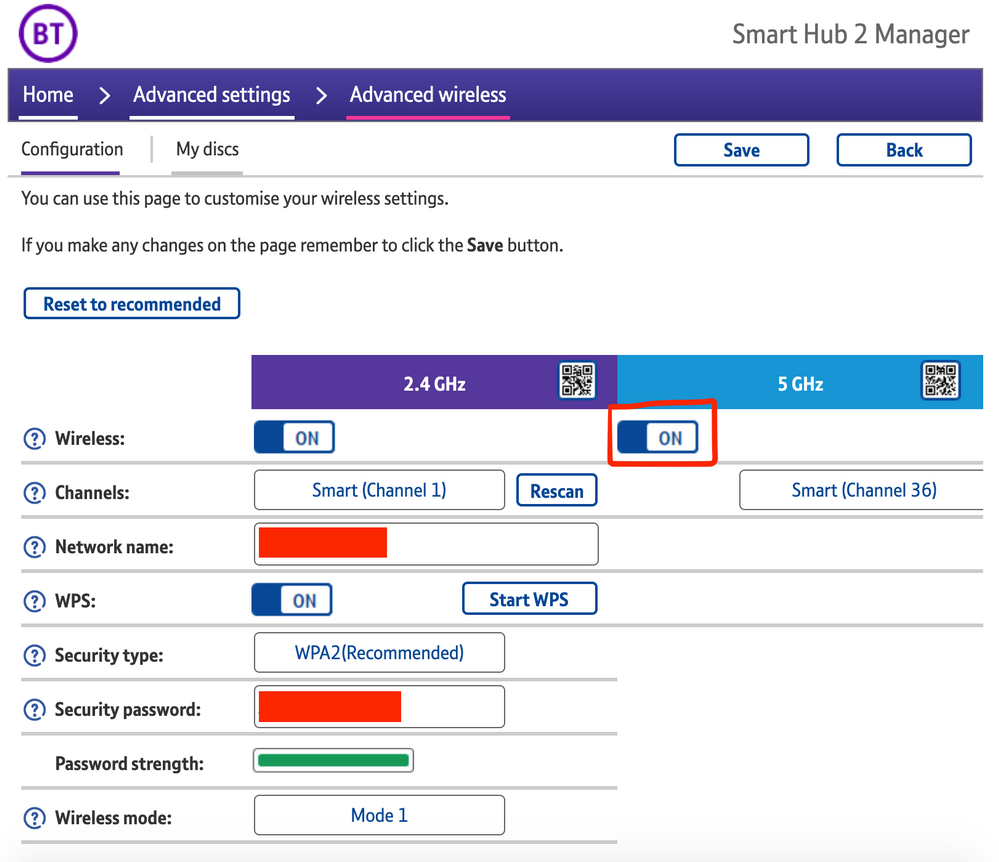
The most consistent workaround we have discovered is to disable the 5GHz band on the BT Smart Hub 2. You can learn more about how to do this using these steps:

Please be aware, turning off 5GHz could affect the speed at which other devices connect through the network and should only be considered a temporary workaround.


Steps taken from a post on the BT Community.


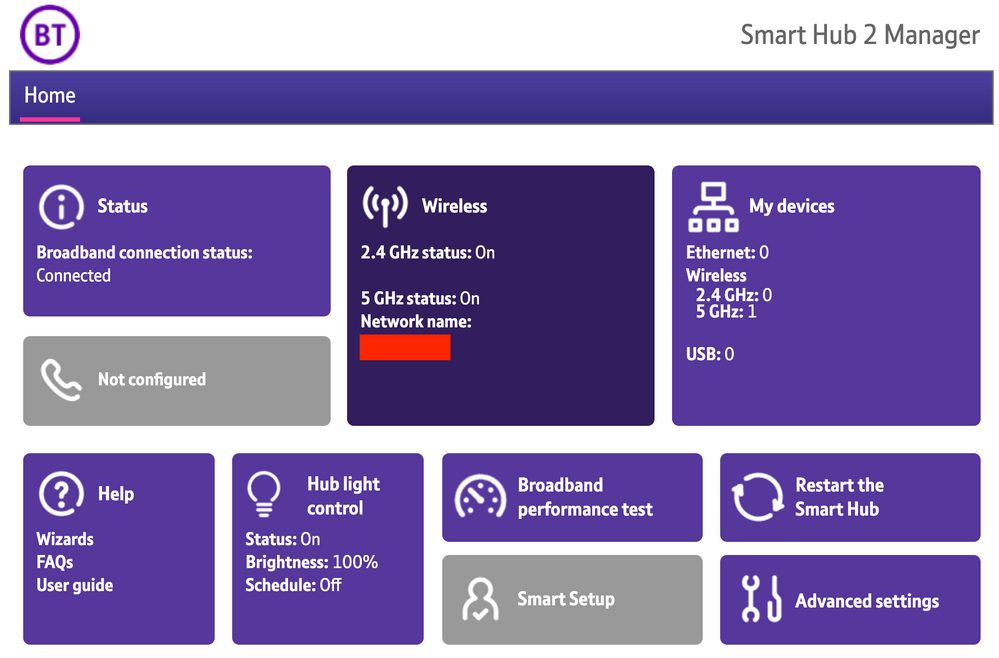
1) Open a new web browser on a device connected to your Hub and type 192.168.1.254 in the address bar. This will open the Hub Manager.
​


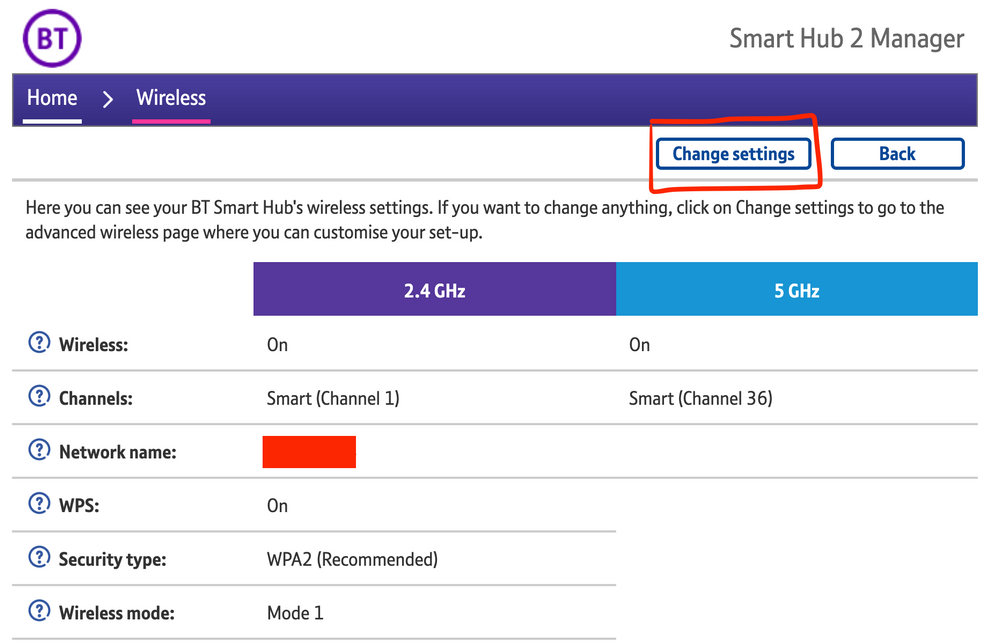
2) Click Wireless. This will open the Wireless Settings page.


3) Select ‘Change settings’
​


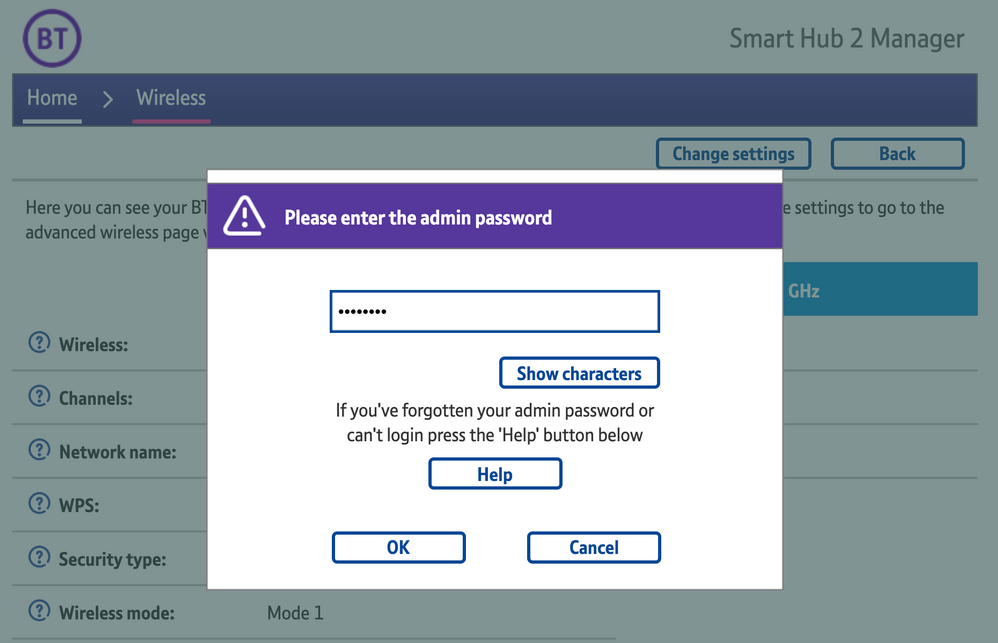
4) Enter the Admin password. This is found on the back of the router and on the removable card. Click ‘OK’
​


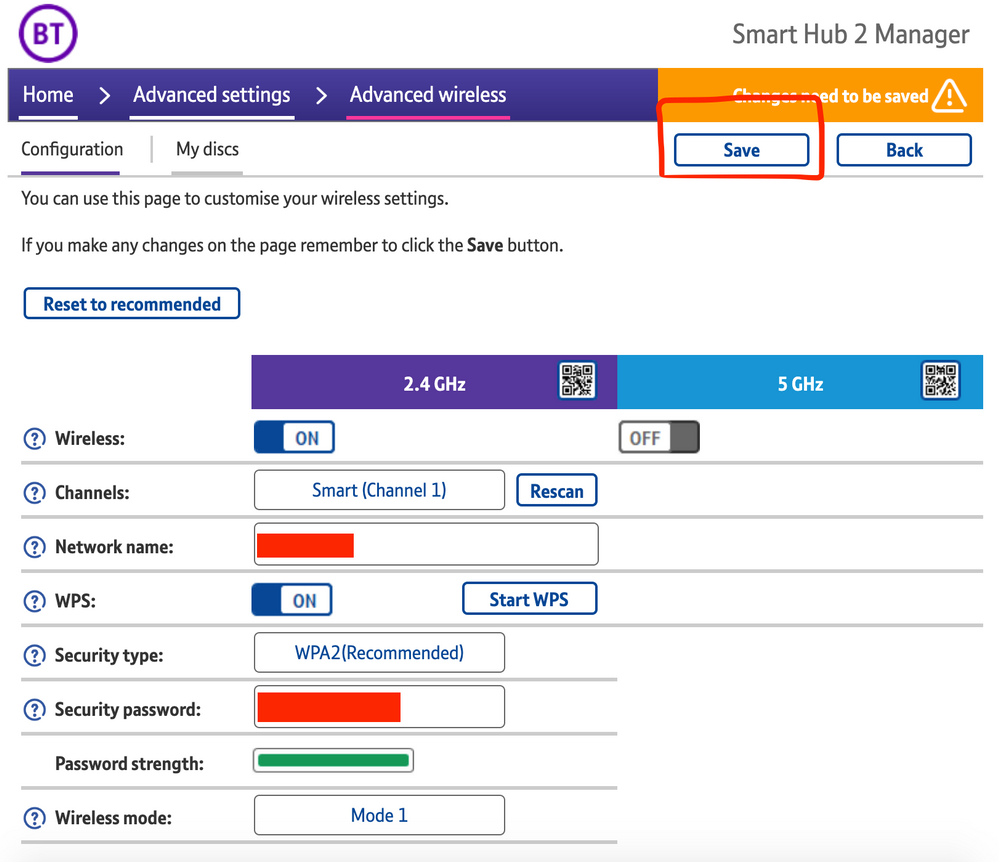
5) Toggle 5GHz OFF

​

6) Click 'Save'

​


7) Click 'Yes' at the warning prompt.
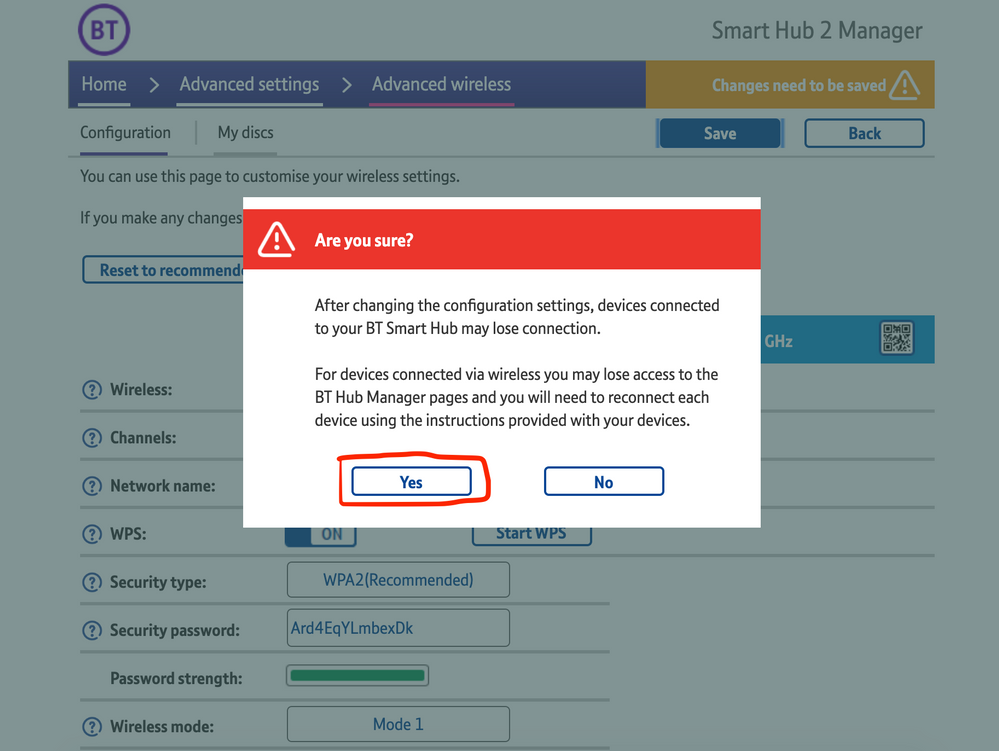
8) Wait for your devices to reconnect. You may need to reboot your Sonos devices by powering them down for 30 seconds and powering them back up.

​


Alternatively, some users have been able to work around the issue by wiring a player directly to the router, though this doesn’t work in every case. Systems that have a Sonos Move or Roam on them will also not be helped by this change, so disabling 5GHz would be best for those households.


 We recommend that you report this issue to BT with the following information:


“Devices connected to the 5GHz band are not able to communicate with devices connected to the 2.4GHz band and it appears the connections are being erroneously isolated.”


You don’t need to specifically mention Sonos devices when reporting this issue to BT as the information alone will be enough for them to recognize the issue you’re facing.
 

BT are indeed aware of this issue and are actively investigating and working to resolve it as quickly as possible. We’ll update this post with any further news as and when we receive it.

This topic has been closed for further comments. You can use the search bar to find a similar topic, or create a new one by clicking Create Topic at the top of the page.

261 replies

Lyricist I
May 11, 2021

My BT complaint has also been closed even though I didn’t close it??


I contacted help, but couldn’t really get anywhere.


I have all of my Sonos speakers linked to a Boost, apart from my Move, which can’t attach to a Boost.


The Sonos speakers that are attached to the Boost are ok, but the Move is pretty much unusable.


It doesn’t show up on my iPhone app & responds to my ‘Alexa’ prompt, but doesn’t complete the task I ask?


For example, tonight I asked Alexa on the Move to “Play 5Live” it responds with “Playing 5Live” only to not play anything???


I have tried this 4 times with no luck….


I noticed that every time I asked Alexa, the white light on top of the unit flashes a few times, but nothing happens???


Even weirder is that the Move shows up on my Wife’s Android S2 app, but not the iPhones S2 app??


I am at a loss with the poor connection issues I am experiencing with Sonos….🤦‍♂️


sounds like exactly what’s been happening since the firmware update. The wireless devices can’t see each other properly. Nothing you can do until BT fix it. I raised a complaint with them following the link given above and after a couple of days they got in touch and updated it. Too early to say whether it’s fixed things yet but so far so good.


Avid Contributor III
May 11, 2021

My BT complaint has also been closed even though I didn’t close it??


I contacted help, but couldn’t really get anywhere.


I have all of my Sonos speakers linked to a Boost, apart from my Move, which can’t attach to a Boost.


The Sonos speakers that are attached to the Boost are ok, but the Move is pretty much unusable.


It doesn’t show up on my iPhone app & responds to my ‘Alexa’ prompt, but doesn’t complete the task I ask?


For example, tonight I asked Alexa on the Move to “Play 5Live” it responds with “Playing 5Live” only to not play anything???


I have tried this 4 times with no luck….


I noticed that every time I asked Alexa, the white light on top of the unit flashes a few times, but nothing happens???


Even weirder is that the Move shows up on my Wife’s Android S2 app, but not the iPhones S2 app??


I am at a loss with the poor connection issues I am experiencing with Sonos….🤦‍♂️


sounds like exactly what’s been happening since the firmware update. The wireless devices can’t see each other properly. Nothing you can do until BT fix it. I raised a complaint with them following the link given above and after a couple of days they got in touch and updated it. Too early to say whether it’s fixed things yet but so far so good.


I thought as much….


The whole system has gone off again tonight, with only a full reset getting them back working.


I think I might switch them off until this update has been issued, as it’s getting beyond frustrating to live with….🤬

controlav
Lead Maestro
May 12, 2021

I thought as much….


The whole system has gone off again tonight, with only a full reset getting them back working.


I think I might switch them off until this update has been issued, as it’s getting beyond frustrating to live with….🤬

Did you actually read the initial post at all? Disable 5GHz. That’s it. Quit blaming Sonos for BT’s mess.

Author of the leading independent Sonos apps for Android, MacOS, iOS, Windows and Xbox.
Avid Contributor III
May 12, 2021

I thought as much….


The whole system has gone off again tonight, with only a full reset getting them back working.


I think I might switch them off until this update has been issued, as it’s getting beyond frustrating to live with….🤬

Did you actually read the initial post at all? Disable 5GHz. That’s it. Quit blaming Sonos for BT’s mess.

I have read all the posts & calm down, aren’t forums made for venting your anger??


Plus, if you read my post properly I’m not directly blaming Sonos for anything….🤦‍♂️

Avid Contributor I
May 12, 2021

I put this in another thread about the same issue but TLDR I contacted BT and they said my router had refused the update they tried to send (?) so I needed a new router. 

Set it up today and everything is going perfectly, just as it did before this mess started. Got my 5Ghz band on, no Sonos units wired, and everything works in the apps on pc, phone and tablets.

I assumed it had an advanced firmware preinstalled on it, but looking at it, it’s actually a really old firmware v0.24.04.11017-BT so I’m hoping it doesn’t do an update overnight and bork itself again…

Looking at the update date it was today, 12th May, so maybe they have removed the recent firmwares from the update process?


Corry P
Sonos Staff
May 13, 2021

Hi @nomadski 

Thanks for sharing your experience!

Looking at the update date it was today, 12th May, so maybe they have removed the recent firmwares from the update process?

I think this is a safe bet.

"Common sense is the collection of prejudices acquired by age eighteen." - Albert Einstein
Lyricist II
May 13, 2021

I’m also suffering this BT Hub 2 issue. Firmare wv0.26.03.01286-BT  

My iPhone will not connect although my iPad and MacBook are more reliable with the Sonos app. The phone (11 pro)  though has so many issues. The only thing I’ve not tried is the switching off of 5ghz. If I reboot everything it works for 24 hours and then all starts again. 

Avid Contributor I
May 13, 2021

I’m also suffering this BT Hub 2 issue. Firmare wv0.26.03.01286-BT  

My iPhone will not connect although my iPad and MacBook are more reliable with the Sonos app. The phone (11 pro)  though has so many issues. The only thing I’ve not tried is the switching off of 5ghz. If I reboot everything it works for 24 hours and then all starts again. 

That was the firmware my router that got replaced was on. Your router may have similarly ‘refused’ the recent update. 
 

Short term - don’t bother with router reboots as it just comes back, turn off the 5ghz band which does work but will slow your WiFi devices somewhat. 
 

Proper fix - contact BT directly, tell them your router is suffering the same problem the bbc article mentioned and your WiFi devices are not talking to each other on both bands. They will either force an update or see that an update was sent but failed and send you out a new router. 
 

Doesn’t cost anything and they provide a return label for you to post old router back to them.
 

Takes about 3 days for new router to arrive. 

Contributor I
May 14, 2021

I’ve had this problem and it now seems to be resolved 🤞

ive just upgraded to S2 because I’ve just got a Roam..

I wanted to then set up a separate S1 system for my play 5 gen1

on completing, one minute it would work then the next minute it wouldn’t.. roam and move would disappear on some iOS devices but be visible on others..

anyway did as suggested and spoke to BT.. They said they have made some changes and I would have to now reboot the smart hub 2.. they didn’t actually say what they have done..?

Anyway all is working as it should do at the moment 🤞just to confirm during this process I’ve not touched any of the speakers.. hub was just rebooted and once it came on I opened both apps and all was as it should be 👍

I am so glad I found this on here otherwise I’d still be messing about now trying all sorts of different things!

🤞all is ok come morning 😬

Hi Nick,

just to clarify did BT update your firmware or did you just disable tye 5ghz?

Cheers

Matt

Avid Contributor III
May 14, 2021

My router was updated this week & all seems ok at present. The Sonos speakers have been working quite well the last few days….


I don’t want to tempt fate, but hopefully the latest firmware update has done the trick for me….🤞


The new firmware is v0.26.04.04227-BT…. 🤞