James L.
Retired Community Staff
April 22, 2021
F.A.Q.

BT Smart Hub 2 - Connection Issues (April 2021)
  • April 22, 2021
  • 261 replies
  • 54367 views
BT Smart Hub 2 - Connection Issues (April 2021)

Update - 11th June 2021:

BT have confirmed that the firmware update that contains a fix for this original issue has been rolled out to the majority of users. Therefore, we can consider this issue closed. 

If your BT Smart Hub 2 router is still running the affected firmware (V0.26.03.01286) then please get in touch with BT directly.

Anyone that still experiences issues on the latest firmware, please create a new topic or get in touch with Sonos Customer Care.


Update - 7th May 2021:

BT have issued a new statement:

“We’re aware that a very small number of customers are experiencing an issue with their BT Smart Hub 2 connecting with multiple streaming devices on their Wi-Fi network. Any customer who experiences this should get in touch with BT who will update their device remotely as soon as possible. BT will be rolling out an update to all devices later this month. We’re sorry for any inconvenience caused.”


Original post - 22nd April 2021:

Hey everyone,


We’re aware of an issue affecting Sonos users with BT Smart Hub 2 routers that causes problems with connecting to players in a wireless configuration. This is caused by a bug in the BT Smart Hub 2’s firmware (version V0.26.03.01286) which prevents devices on the 5GHz band from communicating with devices on the 2.4GHz band, and vice versa. Most of the affected users have iPhones running iOS version 14.4.2, but we have seen other types of controller, such as Android devices, affected by this issue as well.


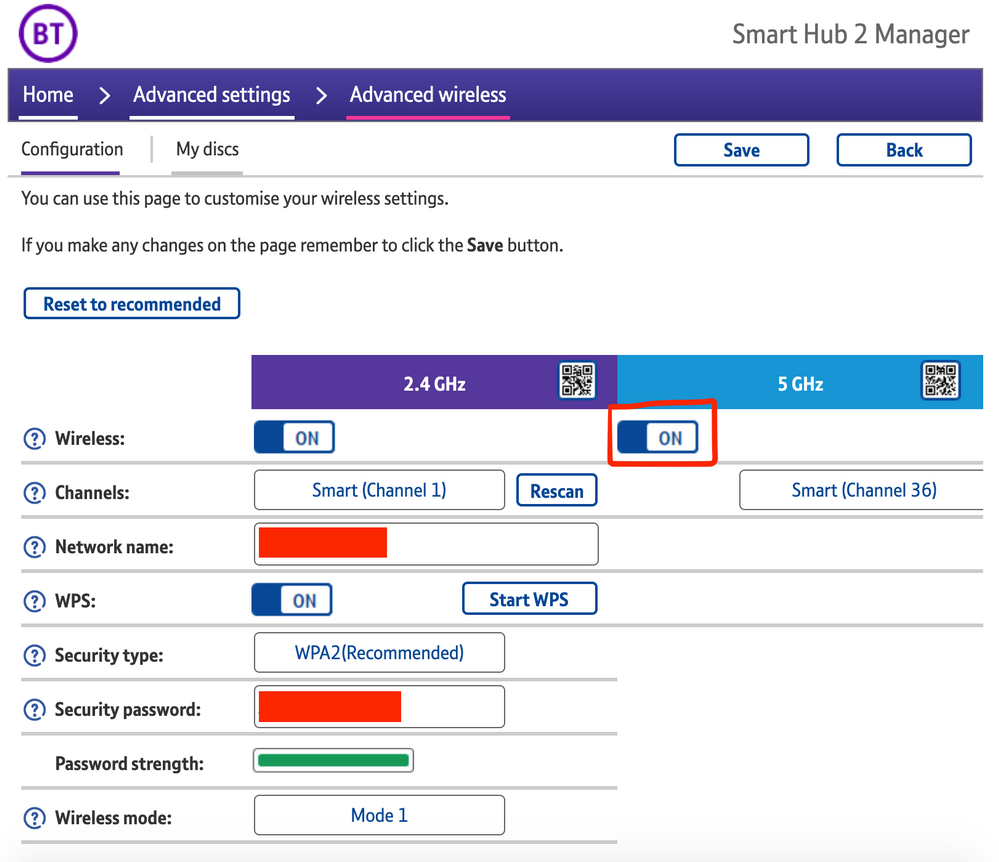
The most consistent workaround we have discovered is to disable the 5GHz band on the BT Smart Hub 2. You can learn more about how to do this using these steps:

Please be aware, turning off 5GHz could affect the speed at which other devices connect through the network and should only be considered a temporary workaround.


Steps taken from a post on the BT Community.


1) Open a new web browser on a device connected to your Hub and type 192.168.1.254 in the address bar. This will open the Hub Manager.
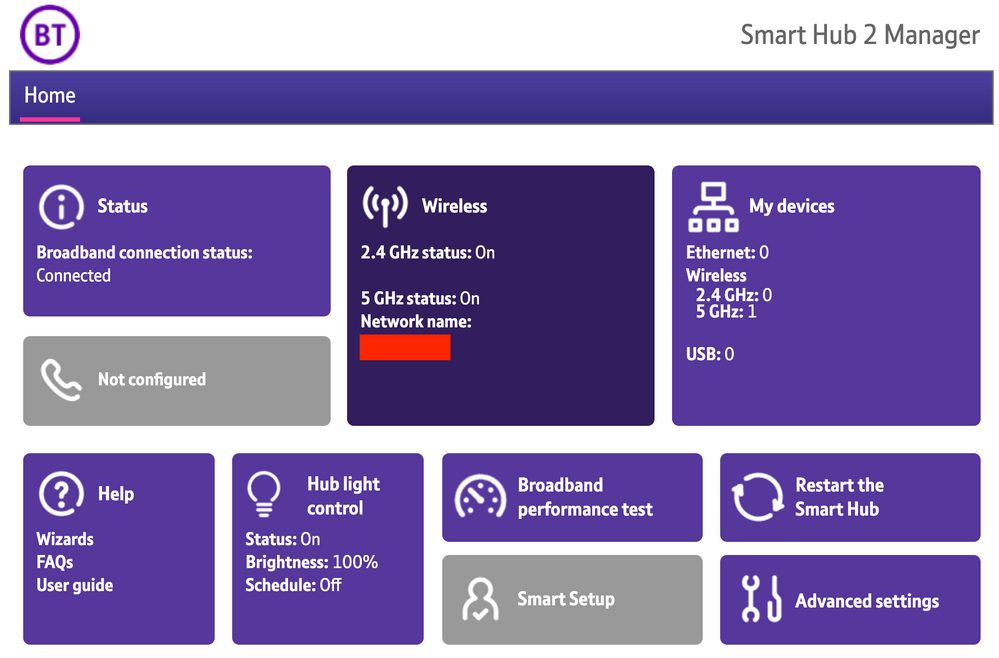
​


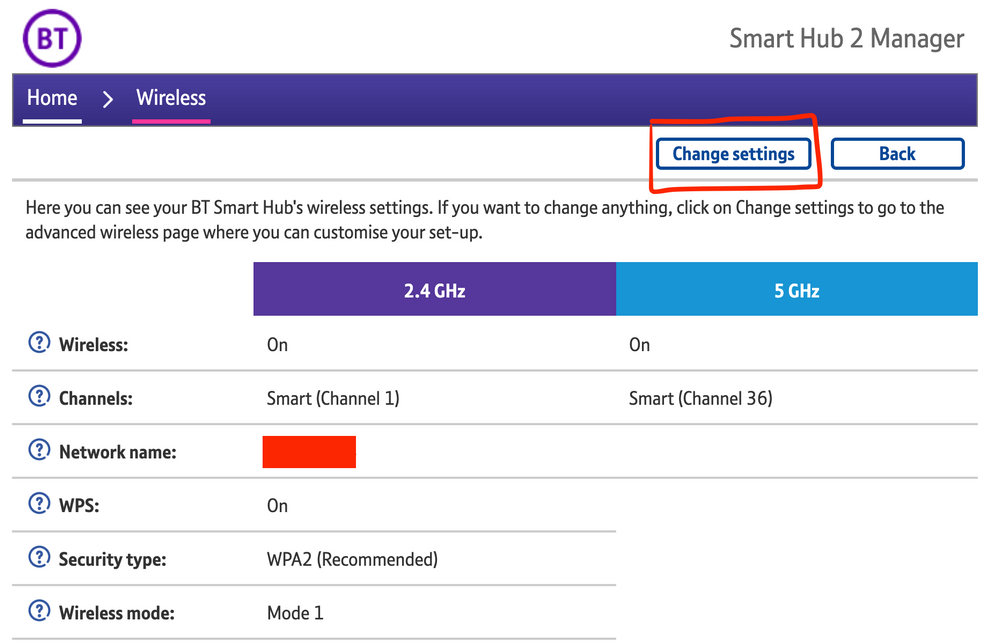
2) Click Wireless. This will open the Wireless Settings page.


3) Select ‘Change settings’
​


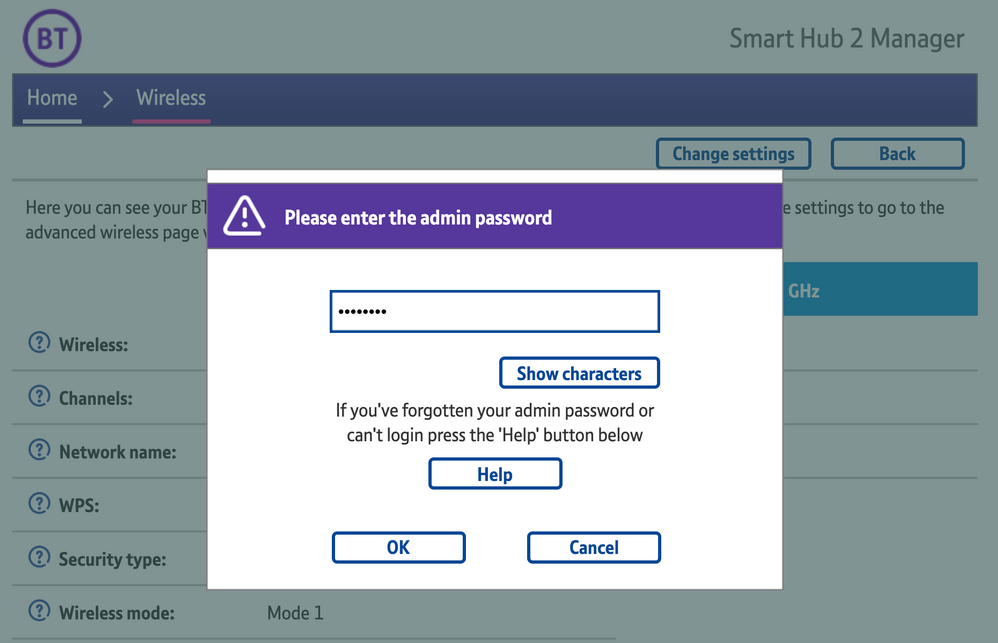
4) Enter the Admin password. This is found on the back of the router and on the removable card. Click ‘OK’
​


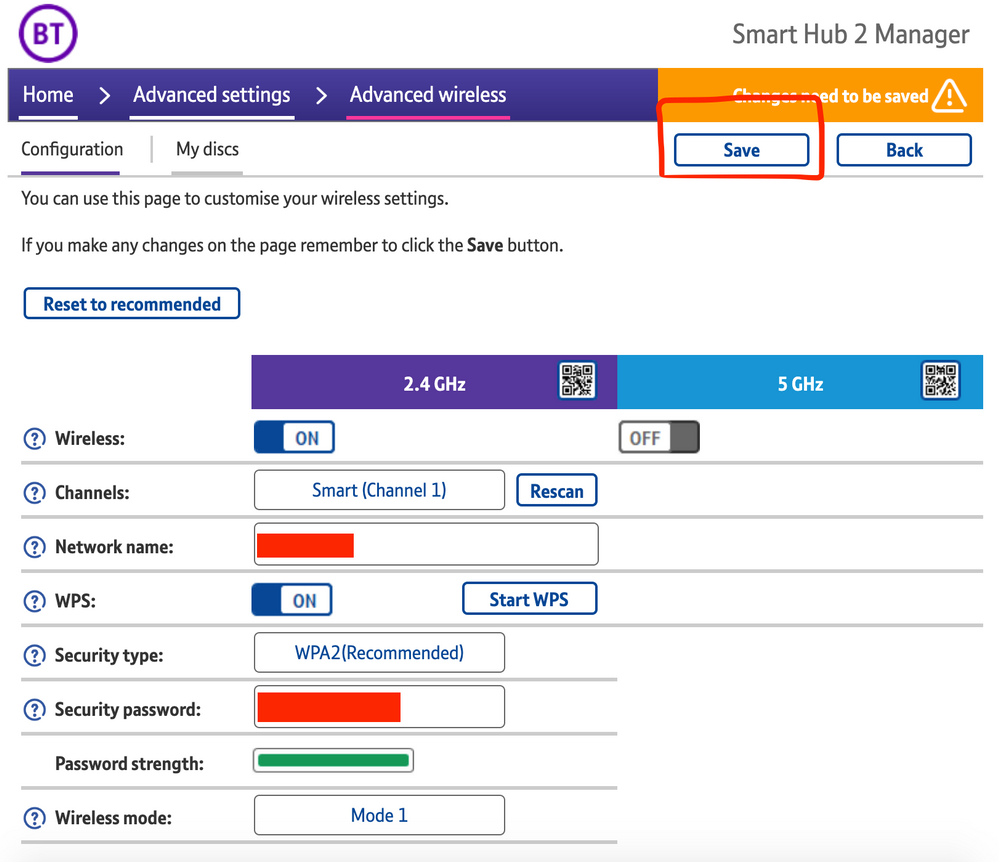
5) Toggle 5GHz OFF

​

6) Click 'Save'

​


7) Click 'Yes' at the warning prompt.
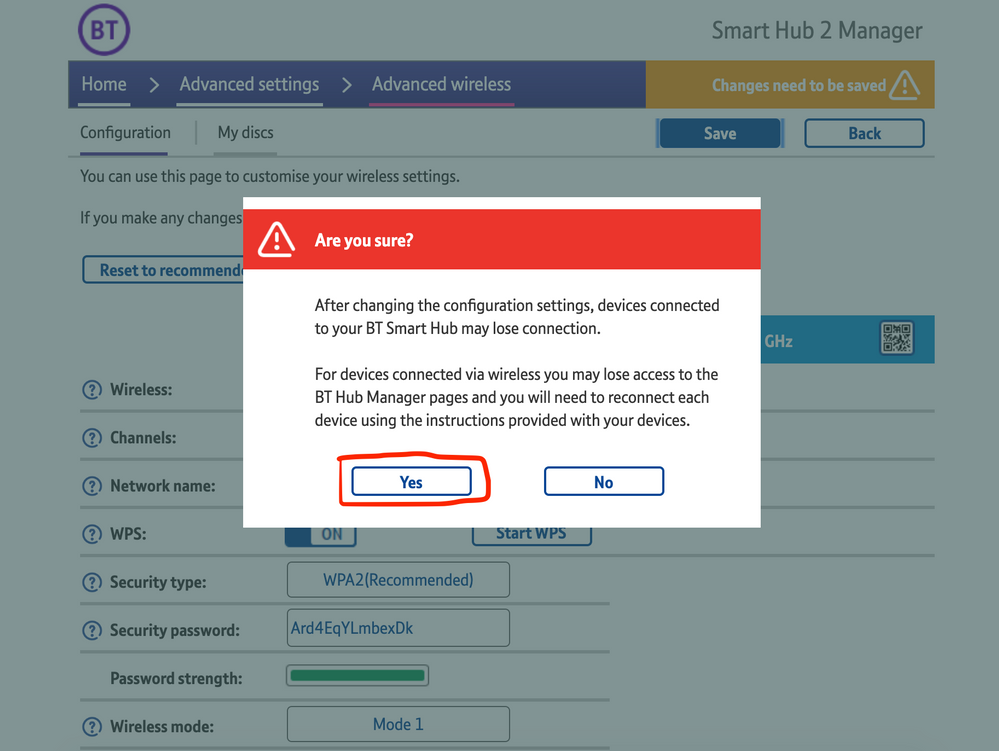
8) Wait for your devices to reconnect. You may need to reboot your Sonos devices by powering them down for 30 seconds and powering them back up.

​


Alternatively, some users have been able to work around the issue by wiring a player directly to the router, though this doesn’t work in every case. Systems that have a Sonos Move or Roam on them will also not be helped by this change, so disabling 5GHz would be best for those households.


 We recommend that you report this issue to BT with the following information:


“Devices connected to the 5GHz band are not able to communicate with devices connected to the 2.4GHz band and it appears the connections are being erroneously isolated.”


You don’t need to specifically mention Sonos devices when reporting this issue to BT as the information alone will be enough for them to recognize the issue you’re facing.
 

BT are indeed aware of this issue and are actively investigating and working to resolve it as quickly as possible. We’ll update this post with any further news as and when we receive it.

This topic has been closed for further comments. You can use the search bar to find a similar topic, or create a new one by clicking Create Topic at the top of the page.

261 replies

Lyricist I
May 3, 2021

I've been following this thread ever since I had issues. I have raised a complaint with BT as MacBook works fine, but app does not. Sonos tried to do a workaround but lasted an hour or so. I saw the post about the public/private. Switched it off on iPhone, instantly worked for the app. MacBook then doesn't work. The app then stopped working. Clearly there is both and issue with BT and the Sonos app for iPhone on this.

Lyricist II
May 3, 2021

Still having trouble with this. My router is getting blocked despite following all the advice above and anything I could find online. I’ve got a man from BT ringing me during the week so I will report back what happens.

At least I’ve got Sonos working now even though it is at the expense of 5ghz

Lyricist III
May 3, 2021

Hi all,


I believe I was one of the first to flag this issue up to BT around 3-4 weeks ago. Quite a long story how we got to the below but in short the way the issue was resolved for me was the below:

  • factory reset all speakers. 
  • buy a sonos boost (BT refunded me the cost of this when I logged a complaint)
  • Turn off 5ghz and install the boost followed by all speakers. 
  • ensure Sonos all working correctly via boost with 5ghz still turned off. 
  • turn on 5ghz again
  • all fixed. Been running flawlessly for 2weeks now since running the system in this set up. 

Three other work colleagues (all with BT) have since done the above and all their systems are working ok now also. 
 

Yes, turning off 5ghz will also resolve the issue but my Wi-fi speeds went from 280mbps to around 60mbps so that to me wasn’t a solution I’d have been happy with. 

Lyricist II
May 3, 2021

Hi all,


I believe I was one of the first to flag this issue up to BT around 3-4 weeks ago. Quite a long story how we got to the below but in short the way the issue was resolved for me was the below:

  • factory reset all speakers. 
  • buy a sonos boost (BT refunded me the cost of this when I logged a complaint)
  • Turn off 5ghz and install the boost followed by all speakers. 
  • ensure Sonos all working correctly via boost with 5ghz still turned off. 
  • turn on 5ghz again
  • all fixed. Been running flawlessly for 2weeks now since running the system in this set up. 

Three other work colleagues (all with BT) have since done the above and all their systems are working ok now also. 
 

Yes, turning off 5ghz will also resolve the issue but my Wi-fi speeds went from 280mbps to around 60mbps so that to me wasn’t a solution I’d have been happy with. 

That’s great to here. I’ll ask my man at BT. I would still prefer to just hook my superior router . Although a free Sonos Boost sounds like a great thing. Thanks 

Lyricist III
May 3, 2021

Forgot to mention the third solution is hard wire a speaker to create the Network. This wasn’t an option for me however as my router isn’t near any of the speakers. 
 

I think the key is to set it all up with 5ghz turned off then turn on when you are happy sonos is working correctly. 
 

BT did originally try playing it down until the customer service advisor tried her system while on the phone and got the same error. Was quite easy to get the money credited to my account after that : )

Lyricist I
May 3, 2021

My system keeps failing to connect to the app, I can connect it after turning everything off and the router back on, then the next day it can not connect again. 

Lyricist I
May 3, 2021

I too have just discovered this thread, having tried to sort things out for the last week. Whilst switching off the Private Address setting on my iPad gave a short lived reconnection, this too failed the next day. Most of the time my Mac would connect. I have got fed up trying to clear the problem using the instructions given by the app as has my wife! 🤦‍♀️

Having switched off the 5GHz band I was immediately reconnected and I have lodged a complaint with BT. Hopefully a further update will sort the problem shortly as I do not see why I should have to use a slower WiFi band in perpetuity. 🙏  I may try the hardwired solution if things do not move fast.

Lyricist III
May 3, 2021

I found only devices that left the house i.e my iPhone and my wife’s iPhone had the issue. Two iPads, a Mac book and a surface pro didn’t have the connection issues even when put in airplane mode or turned off and on. 
 

To be honest the whole process of connecting 9 speakers was far easier through the boost than when I used to set up directly through the router so long term it’s  made the Sonos adding speakers process better. 

Trending Lyricist I
May 3, 2021

UPDATE


After raising a complaint with BT I had yet to hear anything from BT.  So I decided to direct message them on Twitter. Almost instance response. The handler switched off 5ghz frequency remotely. Everything now works, so again it confirm the issue is with BT. This isn’t a viable long term solution though for me. 

Gooner
Lyricist I
May 3, 2021

Well that didn't last for long!! 

Changing Wireless Mode to 2 didn't fix the problem. Had to resort to switching off 5GHz