James L.
Retired Community Staff
April 22, 2021
F.A.Q.

BT Smart Hub 2 - Connection Issues (April 2021)
  • April 22, 2021
  • 261 replies
  • 54367 views
BT Smart Hub 2 - Connection Issues (April 2021)

Update - 11th June 2021:

BT have confirmed that the firmware update that contains a fix for this original issue has been rolled out to the majority of users. Therefore, we can consider this issue closed. 

If your BT Smart Hub 2 router is still running the affected firmware (V0.26.03.01286) then please get in touch with BT directly.

Anyone that still experiences issues on the latest firmware, please create a new topic or get in touch with Sonos Customer Care.


Update - 7th May 2021:

BT have issued a new statement:

“We’re aware that a very small number of customers are experiencing an issue with their BT Smart Hub 2 connecting with multiple streaming devices on their Wi-Fi network. Any customer who experiences this should get in touch with BT who will update their device remotely as soon as possible. BT will be rolling out an update to all devices later this month. We’re sorry for any inconvenience caused.”


Original post - 22nd April 2021:

Hey everyone,


We’re aware of an issue affecting Sonos users with BT Smart Hub 2 routers that causes problems with connecting to players in a wireless configuration. This is caused by a bug in the BT Smart Hub 2’s firmware (version V0.26.03.01286) which prevents devices on the 5GHz band from communicating with devices on the 2.4GHz band, and vice versa. Most of the affected users have iPhones running iOS version 14.4.2, but we have seen other types of controller, such as Android devices, affected by this issue as well.


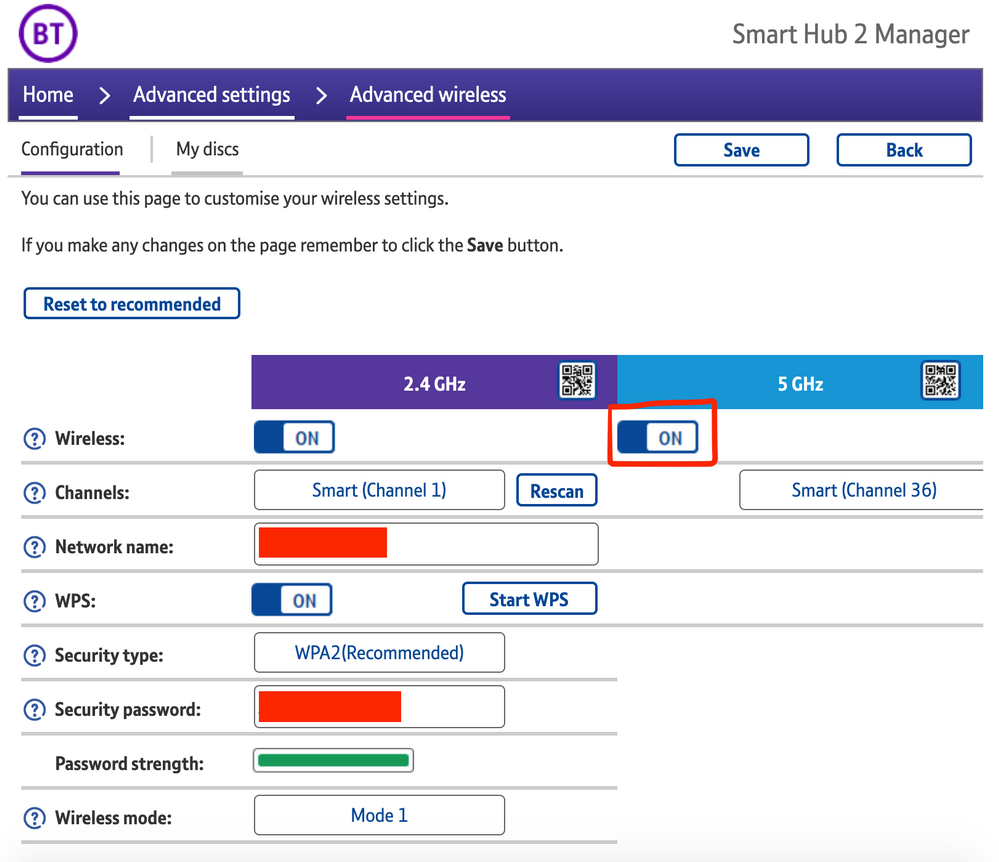
The most consistent workaround we have discovered is to disable the 5GHz band on the BT Smart Hub 2. You can learn more about how to do this using these steps:

Please be aware, turning off 5GHz could affect the speed at which other devices connect through the network and should only be considered a temporary workaround.


Steps taken from a post on the BT Community.


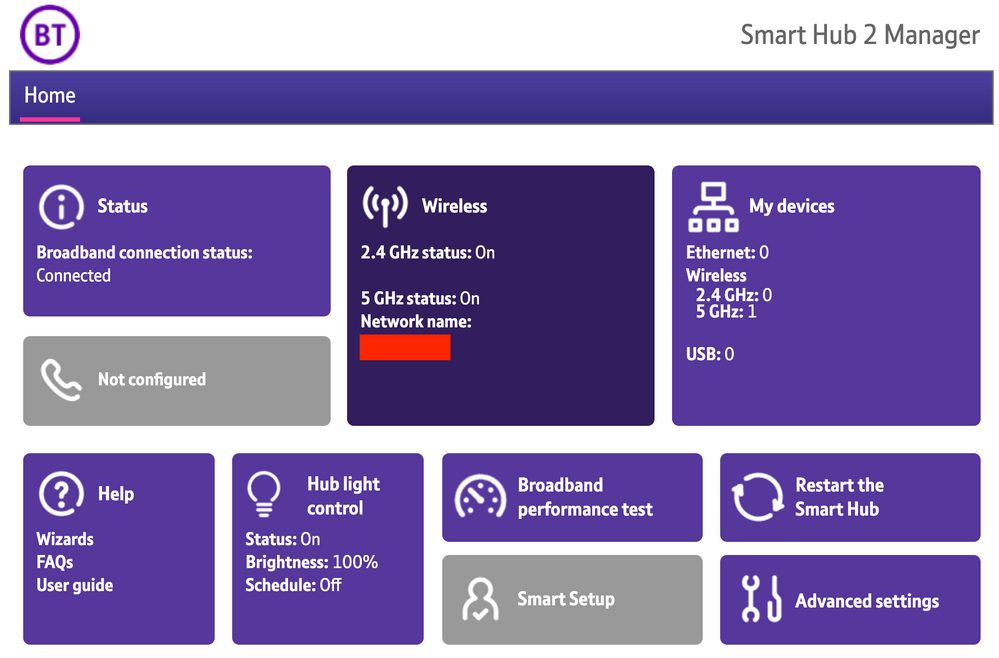
1) Open a new web browser on a device connected to your Hub and type 192.168.1.254 in the address bar. This will open the Hub Manager.
​


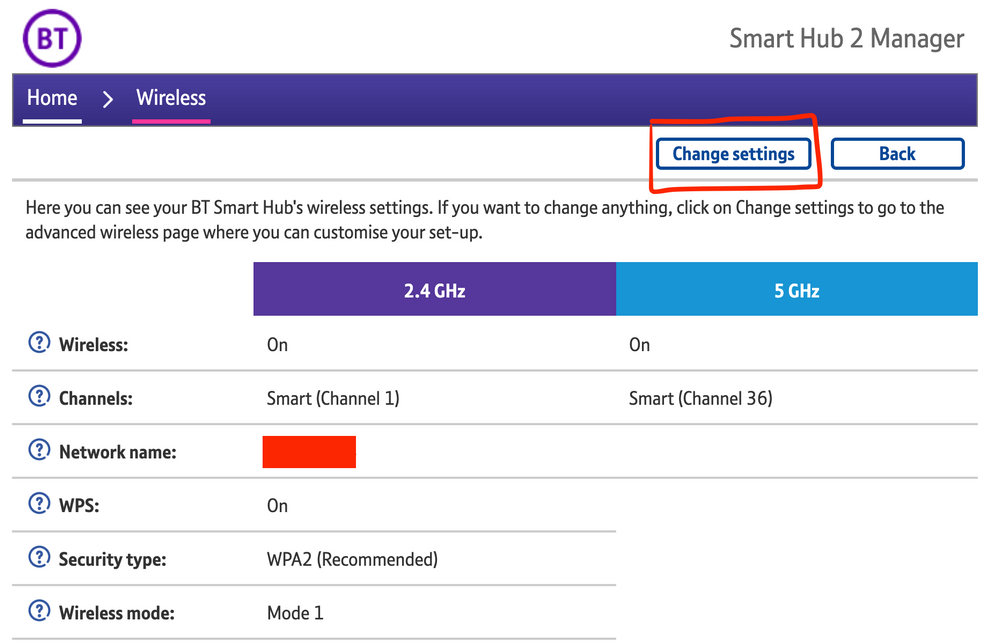
2) Click Wireless. This will open the Wireless Settings page.


3) Select ‘Change settings’
​


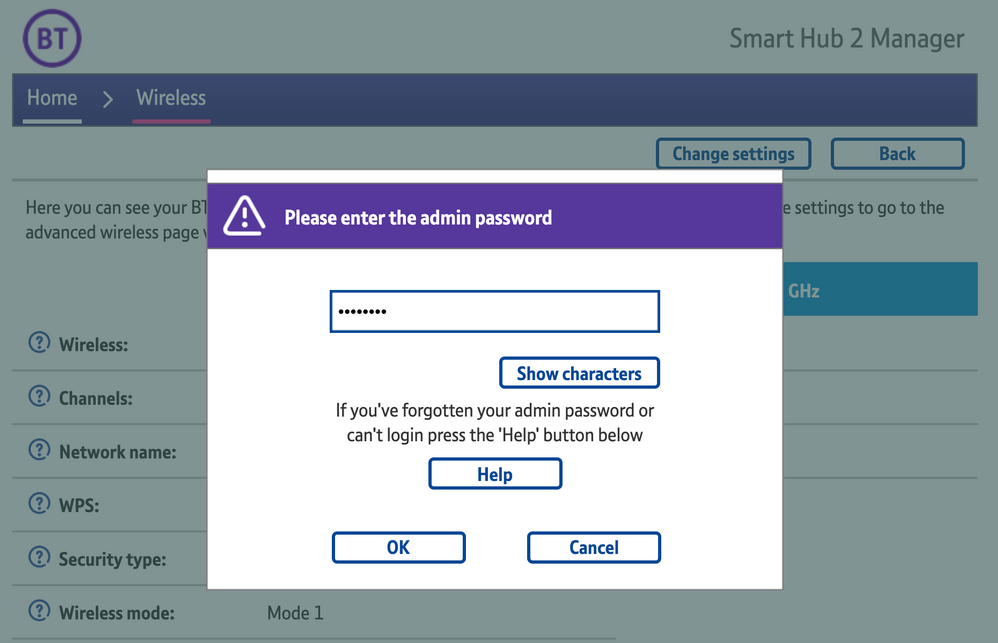
4) Enter the Admin password. This is found on the back of the router and on the removable card. Click ‘OK’
​


5) Toggle 5GHz OFF

​

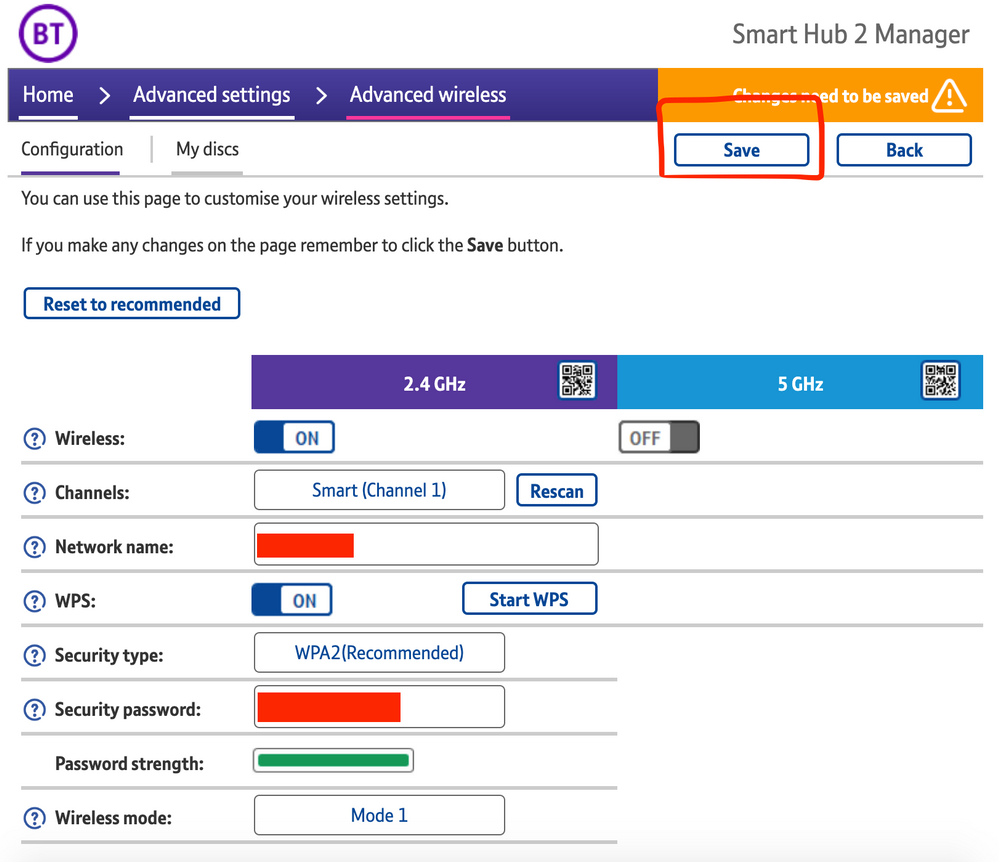
6) Click 'Save'

​


7) Click 'Yes' at the warning prompt.
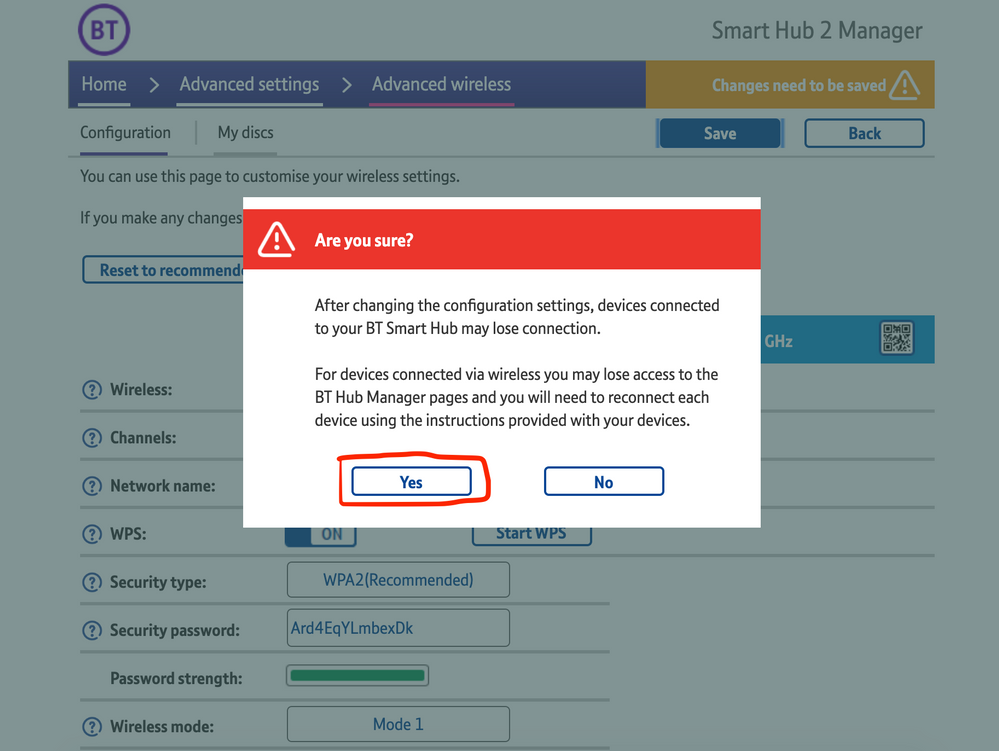
8) Wait for your devices to reconnect. You may need to reboot your Sonos devices by powering them down for 30 seconds and powering them back up.

​


Alternatively, some users have been able to work around the issue by wiring a player directly to the router, though this doesn’t work in every case. Systems that have a Sonos Move or Roam on them will also not be helped by this change, so disabling 5GHz would be best for those households.


 We recommend that you report this issue to BT with the following information:


“Devices connected to the 5GHz band are not able to communicate with devices connected to the 2.4GHz band and it appears the connections are being erroneously isolated.”


You don’t need to specifically mention Sonos devices when reporting this issue to BT as the information alone will be enough for them to recognize the issue you’re facing.
 

BT are indeed aware of this issue and are actively investigating and working to resolve it as quickly as possible. We’ll update this post with any further news as and when we receive it.

This topic has been closed for further comments. You can use the search bar to find a similar topic, or create a new one by clicking Create Topic at the top of the page.

261 replies

Belly M
May 2, 2021

Great. My download speeds are now too low to stream things on my Apple TV with 5ghz turned off so I’ve had to turn it back on, and now of course my Roam is no longer showing up in the Sonos app. 🙄 


What? 2.4GHz runs at least 30 Mbps, are you streaming five 4k UHD streams at the same time or something? No idea how 2.4GHz can be too slow for any video streaming. Xbox binary downloads, sure, I saw the difference there on a gigabit fiber connection, but video streaming should be fine.

I don’t know how crap the BT router is feature-wise (I could take a guess), but can you make a separate SSID for 5GHz and put your Apple TV on that, while leaving your Sonos gear and phone on the existing 2.4GHz SSID? You would not need to connect between the two wireless networks then, avoiding the broken code in the router.


Crappier than crap… you cannot split the SSID’s on the Smart Hub 2 nor set alternative DNS servers.

Gooner
Lyricist I
May 2, 2021

I’ve had the can’t find Sonos problem for a couple of weeks. Also problems connecting to my wireless Canon  scanner printer

a very helpful tech support person from Sonos suggested going into the Smart Hub settings page, Advanced and changing Wireless Mode from mode  1 to mode  2. Rebooted Smart Hub and both my Sonos speakers and everything is back working (as is my scanner).
 

Time will tell if this is a permanent fix but it’s worked this evening

phlash
Lyricist II
May 3, 2021

Read this thread with growing frustration as disabling the 5 GHz band really is not an option and waiting for BT to issue new firmware is too uncertain. Issue affects both Sonos Move and Epson airprinter - what was really strange was that both iPhones were hit but neither of the iPads despite the fact they all use the 5 GHz network. Will give this suggestion a try.

BHD
Lyricist I
May 3, 2021

We’ve been experiencing the same frustration with this issue. I have now switched the 5GHz option off, which immediately sorted the problem. However, I agree with some of the comments. It can only be a temporary solution as the BT Smart Hub 2 is an upgrade. Therefore, it costs more money and we’re stuck in the contract till 2023! Also, it took a number of days for me to find this thread of communication online. So some transparency is needed so customers like myself know that this is a common issue. 

phlash
Lyricist II
May 3, 2021

Maybe this is a shoal of red herrings! ? I saw another suggestion to disable the “private address” under Wi-fi on iOS and this has cured the problem for me whereas putting hub into wireless mode 2 and re-setting router made no difference. Clearly BT need to sort the router firmware but if you can live with downgraded security, the iPhone “fix” seems to work.

Corry P
Sonos Staff
May 3, 2021

Hi @phlash 

I’m glad you got a fix, but that’s a completely different issue that results in the same symptom. In addition, not all Smart Hub 2 owners will have received the firmware update that caused the problems.

"Common sense is the collection of prejudices acquired by age eighteen." - Albert Einstein
Contributor I
May 3, 2021

I have this issue - I can confirm a cable into a Sonos Arc means my 4x Sonos Play:1 devices now work and the whole system is much quicker. 

It means I have a redundant Sonos Move which is incredibly frustrating. Turning off 5GhZ on the router is indeed a workaround but the WiFi speed was pathetically slow so this isn’t a solution. 

Does anyone know if a Sonos Boost would resolve the issue?

James L.
James L.Author
Retired Community Staff
May 3, 2021

I have this issue - I can confirm a cable into a Sonos Arc means my 4x Sonos Play:1 devices now work and the whole system is much quicker. 

It means I have a redundant Sonos Move which is incredibly frustrating. Turning off 5GhZ on the router is indeed a workaround but the WiFi speed was pathetically slow so this isn’t a solution. 

Does anyone know if a Sonos Boost would resolve the issue?

No, wiring a Sonos Boost would achieve the same effect that wiring any other Sonos player would. I do not suggest purchasing a Boost to work around this issue if wiring other devices doesn’t fix it for you. Move and Roam do not connect to SonosNet so wiring a Boost wouldn’t do anything that your Arc isn’t doing at the moment.

Mark good posts by pressing the like button, and select the best answer on questions you've asked to help others find solutions.
phlash
Lyricist II
May 3, 2021

Hi @phlash 

I’m glad you got a fix, but that’s a completely different issue that results in the same symptom. In addition, not all Smart Hub 2 owners will have received the firmware update that caused the problems.

Thanks (I think) but not really addressing the point that there are several clearly linked issues created by one or both the BT hub firmware change and the iOS upgrade designed to increase security and reduce tracking. How are people to fault trace if they don’t know all of the possible scenarios? Instead of responding individually it would be better if someone in a position to offer an overview could post a useful summary of where we are and what does/doesn’t work. Navigating one’s way through these conflicting accounts is not easy.

Corry P
Sonos Staff
May 3, 2021

Hi @phlash 

The BT Smart Hub 2 firmware update issue is only related to the Private Address on iPhones issue in the way that they both result in a Can’t Connect to Sonos situation. There are at least a dozen other things that also result in the same situation. This thread exists to explain to customers the details of this particular issue, but it doesn’t claim that every person with a Smart Hub 2 that Can’t Connect to Sonos is a victim of the firmware update - only those with the firmware version reported in the original post.

I have written a Troubleshooting Sonos on WiFi article - and I think I’ll now add the Local Network permissions and Private Addresses issues to that article as they do relate. Thanks.

"Common sense is the collection of prejudices acquired by age eighteen." - Albert Einstein