James L.
Retired Community Staff
April 22, 2021
F.A.Q.

BT Smart Hub 2 - Connection Issues (April 2021)
  • April 22, 2021
  • 261 replies
  • 54365 views
BT Smart Hub 2 - Connection Issues (April 2021)

Update - 11th June 2021:

BT have confirmed that the firmware update that contains a fix for this original issue has been rolled out to the majority of users. Therefore, we can consider this issue closed. 

If your BT Smart Hub 2 router is still running the affected firmware (V0.26.03.01286) then please get in touch with BT directly.

Anyone that still experiences issues on the latest firmware, please create a new topic or get in touch with Sonos Customer Care.


Update - 7th May 2021:

BT have issued a new statement:

“We’re aware that a very small number of customers are experiencing an issue with their BT Smart Hub 2 connecting with multiple streaming devices on their Wi-Fi network. Any customer who experiences this should get in touch with BT who will update their device remotely as soon as possible. BT will be rolling out an update to all devices later this month. We’re sorry for any inconvenience caused.”


Original post - 22nd April 2021:

Hey everyone,


We’re aware of an issue affecting Sonos users with BT Smart Hub 2 routers that causes problems with connecting to players in a wireless configuration. This is caused by a bug in the BT Smart Hub 2’s firmware (version V0.26.03.01286) which prevents devices on the 5GHz band from communicating with devices on the 2.4GHz band, and vice versa. Most of the affected users have iPhones running iOS version 14.4.2, but we have seen other types of controller, such as Android devices, affected by this issue as well.


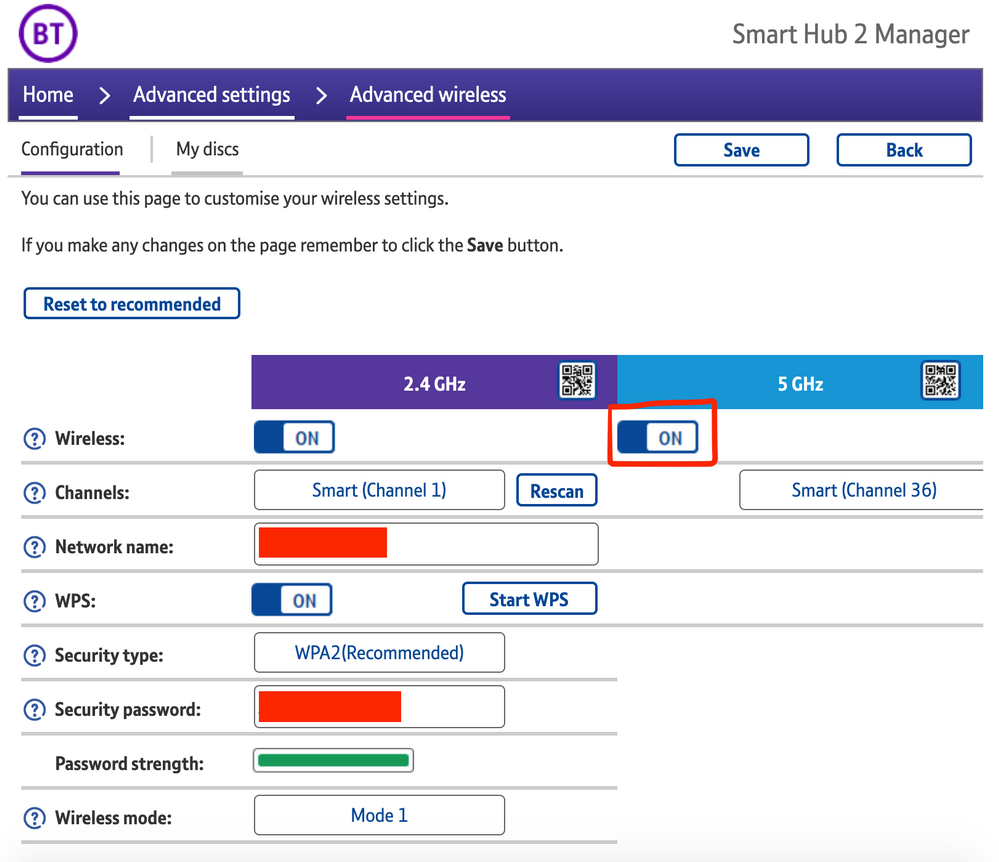
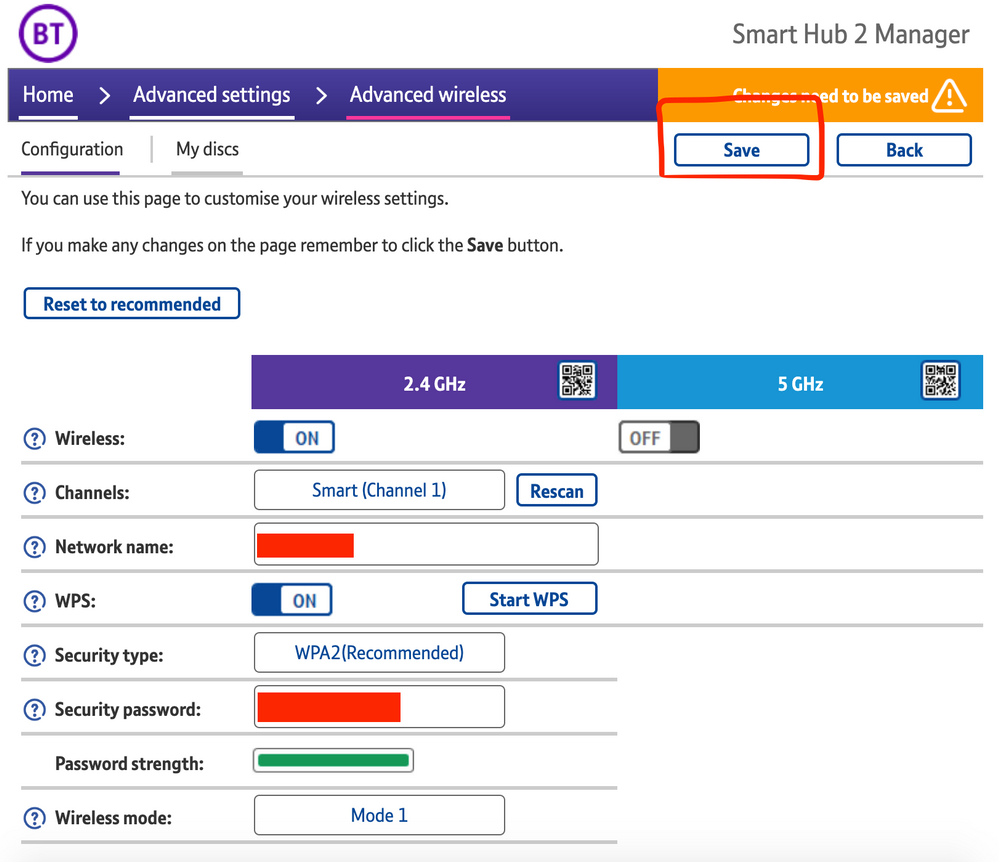
The most consistent workaround we have discovered is to disable the 5GHz band on the BT Smart Hub 2. You can learn more about how to do this using these steps:

Please be aware, turning off 5GHz could affect the speed at which other devices connect through the network and should only be considered a temporary workaround.


Steps taken from a post on the BT Community.


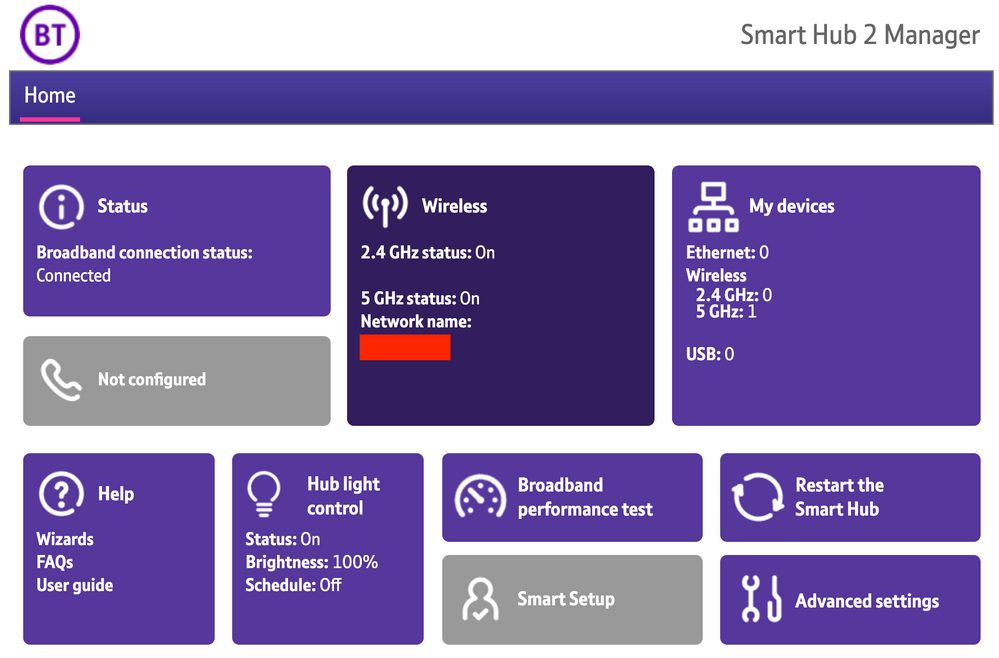
1) Open a new web browser on a device connected to your Hub and type 192.168.1.254 in the address bar. This will open the Hub Manager.
​


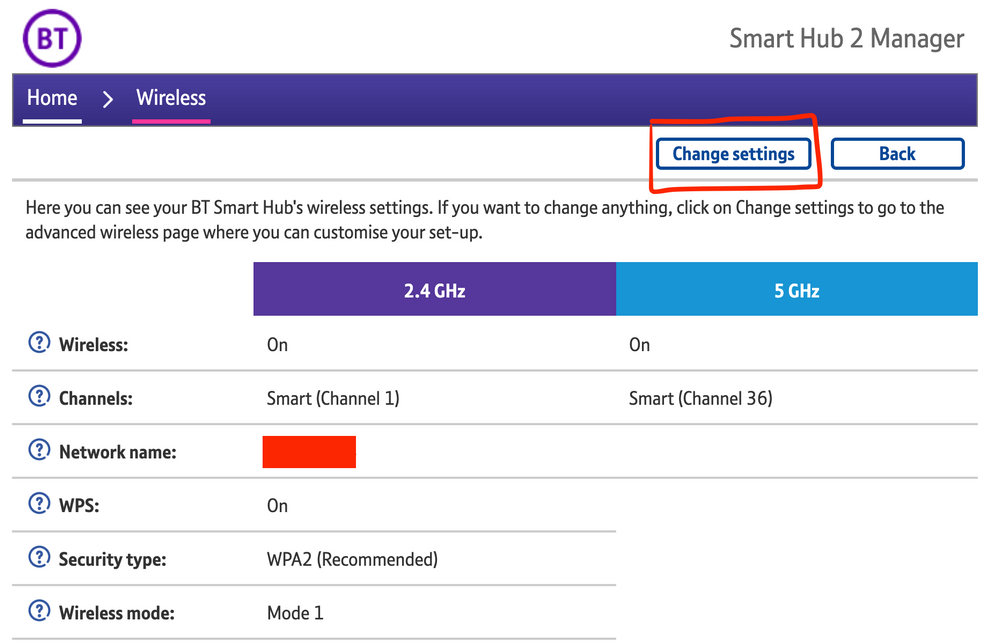
2) Click Wireless. This will open the Wireless Settings page.


3) Select ‘Change settings’
​


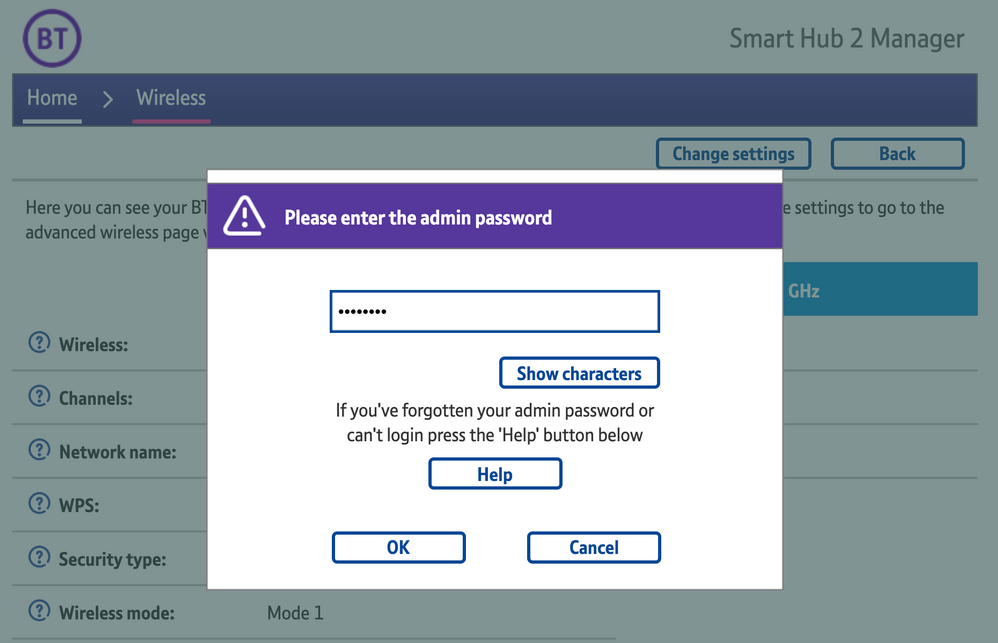
4) Enter the Admin password. This is found on the back of the router and on the removable card. Click ‘OK’
​


5) Toggle 5GHz OFF

​

6) Click 'Save'

​


7) Click 'Yes' at the warning prompt.
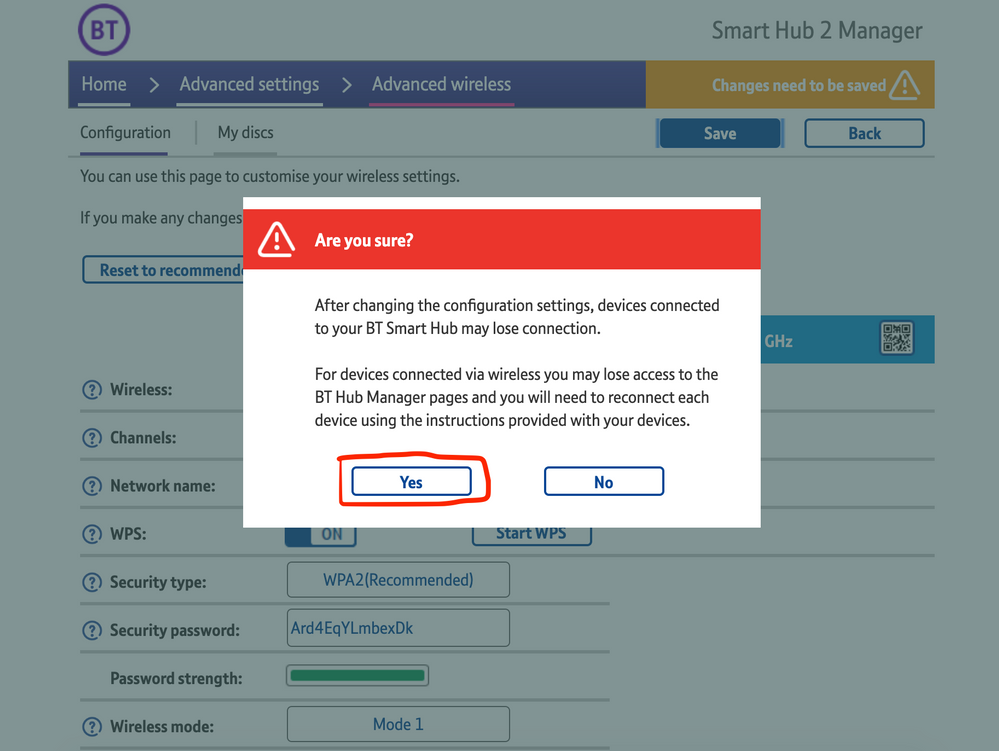
8) Wait for your devices to reconnect. You may need to reboot your Sonos devices by powering them down for 30 seconds and powering them back up.

​


Alternatively, some users have been able to work around the issue by wiring a player directly to the router, though this doesn’t work in every case. Systems that have a Sonos Move or Roam on them will also not be helped by this change, so disabling 5GHz would be best for those households.


 We recommend that you report this issue to BT with the following information:


“Devices connected to the 5GHz band are not able to communicate with devices connected to the 2.4GHz band and it appears the connections are being erroneously isolated.”


You don’t need to specifically mention Sonos devices when reporting this issue to BT as the information alone will be enough for them to recognize the issue you’re facing.
 

BT are indeed aware of this issue and are actively investigating and working to resolve it as quickly as possible. We’ll update this post with any further news as and when we receive it.

This topic has been closed for further comments. You can use the search bar to find a similar topic, or create a new one by clicking Create Topic at the top of the page.

261 replies

Trending Lyricist I
May 3, 2021

UPDATE


After raising a complaint with BT I had yet to hear anything from BT.  So I decided to direct message them on Twitter. Almost instance response. The handler switched off 5ghz frequency remotely. Everything now works, so again it confirm the issue is with BT. This isn’t a viable long term solution though for me. 

What the BT handler said to me when I questioned losing 5ghz

”👍The 5 Ghz band is only faster  than the 2.4 Ghz band when in the same room as the hub and this is  only really  above  135Mbps for most applications you would not notice any difference ,The 2,4 Ghz is a stronger signal penetrating walls etc. better”


I’m paying for faster broadband than 135Mbps and I expect full functionality of my BT smart hub. This complaint isn’t resolved for me. I shouldn’t have to have 5Ghz permanently switched off. 

Contributor I
May 4, 2021

UPDATE


After raising a complaint with BT I had yet to hear anything from BT.  So I decided to direct message them on Twitter. Almost instance response. The handler switched off 5ghz frequency remotely. Everything now works, so again it confirm the issue is with BT. This isn’t a viable long term solution though for me. 

What the BT handler said to me when I questioned losing 5ghz

”👍The 5 Ghz band is only faster  than the 2.4 Ghz band when in the same room as the hub and this is  only really  above  135Mbps for most applications you would not notice any difference ,The 2,4 Ghz is a stronger signal penetrating walls etc. better”


I’m paying for faster broadband than 135Mbps and I expect full functionality of my BT smart hub. This complaint isn’t resolved for me. I shouldn’t have to have 5Ghz permanently switched off. 


I didn’t find this to be the case - with 5GhZ turned off my BT service was virtually unuseable.

Lyricist I
May 4, 2021

BT have advised me this a fix should be out this week. They also advised if you are connecting to things like BT discs then you won't be affected (links into the boost post above). It’s only when you connect direct to the Hub. 

Trending Lyricist I
May 4, 2021

UPDATE


After raising a complaint with BT I had yet to hear anything from BT.  So I decided to direct message them on Twitter. Almost instance response. The handler switched off 5ghz frequency remotely. Everything now works, so again it confirm the issue is with BT. This isn’t a viable long term solution though for me. 

What the BT handler said to me when I questioned losing 5ghz

”👍The 5 Ghz band is only faster  than the 2.4 Ghz band when in the same room as the hub and this is  only really  above  135Mbps for most applications you would not notice any difference ,The 2,4 Ghz is a stronger signal penetrating walls etc. better”


I’m paying for faster broadband than 135Mbps and I expect full functionality of my BT smart hub. This complaint isn’t resolved for me. I shouldn’t have to have 5Ghz permanently switched off. 


I didn’t find this to be the case - with 5GhZ turned off my BT service was virtually unuseable.


Yes it’s not ideal. My speed has dropped to 40Mbps on my wifi devices. 

James L.
James L.Author
Retired Community Staff
May 4, 2021

Hey everyone,


I have an update to share with you all regarding this issue.


BT have let us know that they are working towards pushing a fix to affected routers over the next 4-5 weeks. This will be rolled out in waves due to the high number of BT Smart Hub 2 units in customers homes, as well as making sure that the new firmware has no further issues and correctly resolves this problem. 

Mark good posts by pressing the like button, and select the best answer on questions you've asked to help others find solutions.
Lyricist I
May 4, 2021

I have just spoke to BT and they have said this issue will be sorted by 12th May - Here’s Hoping!!

Contributor I
May 4, 2021

On the phone with BT now.  Unfortunately my advisor doesn’t know anything of the issue and has put me on hold.  update … they have suggested a roll out this week.  They have added my hub to an escalation list to get patch/fixed first.


Lyricist III
May 4, 2021

I’ve just noticed that my firmware number is the same but firmware date is now dated today. Can anyone else confirm the same. Haven’t tested the sonos issues etc yet as not home from work

Lyricist III
May 4, 2021

BT complaints called today and whilst there wasn’t an update on when things would be resolved, the guidance was it was being treated as an unprecedented situation and there was teams working on a fix. They were unable to give an estimate timescale for resolution. However they did agree to a bill credit towards the cost of purchasing a Sonos Boost. I don’t have an option to wire any of my speakers, as the router is in the top of a utility cupboard. 
 

Seperately, Sonos support emailed today to say they had had an update from BT that they were anticipating a fix in 4-5 weeks time. They asked for details of my router firmware version, when it was updated, and the serial. They advised they were passing this on directly to BT to ensure Sonos users could be prioritised for a fix being pushed out.
 

Interestingly seeing the same, date of last firmware update has changed from 8-Apr-2021 to 4-May-2021, however the version is still unchanged. The issues also persists, so I don’t think anything has changed. 

Guyincognito76
Prominent Collaborator I
May 4, 2021

4-5 weeks?! Can I just be the first to say, ‘where’s my bloody update’ 🙄