James L.
Retired Community Staff
April 22, 2021
F.A.Q.

BT Smart Hub 2 - Connection Issues (April 2021)
  • April 22, 2021
  • 261 replies
  • 54365 views
BT Smart Hub 2 - Connection Issues (April 2021)

Update - 11th June 2021:

BT have confirmed that the firmware update that contains a fix for this original issue has been rolled out to the majority of users. Therefore, we can consider this issue closed. 

If your BT Smart Hub 2 router is still running the affected firmware (V0.26.03.01286) then please get in touch with BT directly.

Anyone that still experiences issues on the latest firmware, please create a new topic or get in touch with Sonos Customer Care.


Update - 7th May 2021:

BT have issued a new statement:

“We’re aware that a very small number of customers are experiencing an issue with their BT Smart Hub 2 connecting with multiple streaming devices on their Wi-Fi network. Any customer who experiences this should get in touch with BT who will update their device remotely as soon as possible. BT will be rolling out an update to all devices later this month. We’re sorry for any inconvenience caused.”


Original post - 22nd April 2021:

Hey everyone,


We’re aware of an issue affecting Sonos users with BT Smart Hub 2 routers that causes problems with connecting to players in a wireless configuration. This is caused by a bug in the BT Smart Hub 2’s firmware (version V0.26.03.01286) which prevents devices on the 5GHz band from communicating with devices on the 2.4GHz band, and vice versa. Most of the affected users have iPhones running iOS version 14.4.2, but we have seen other types of controller, such as Android devices, affected by this issue as well.


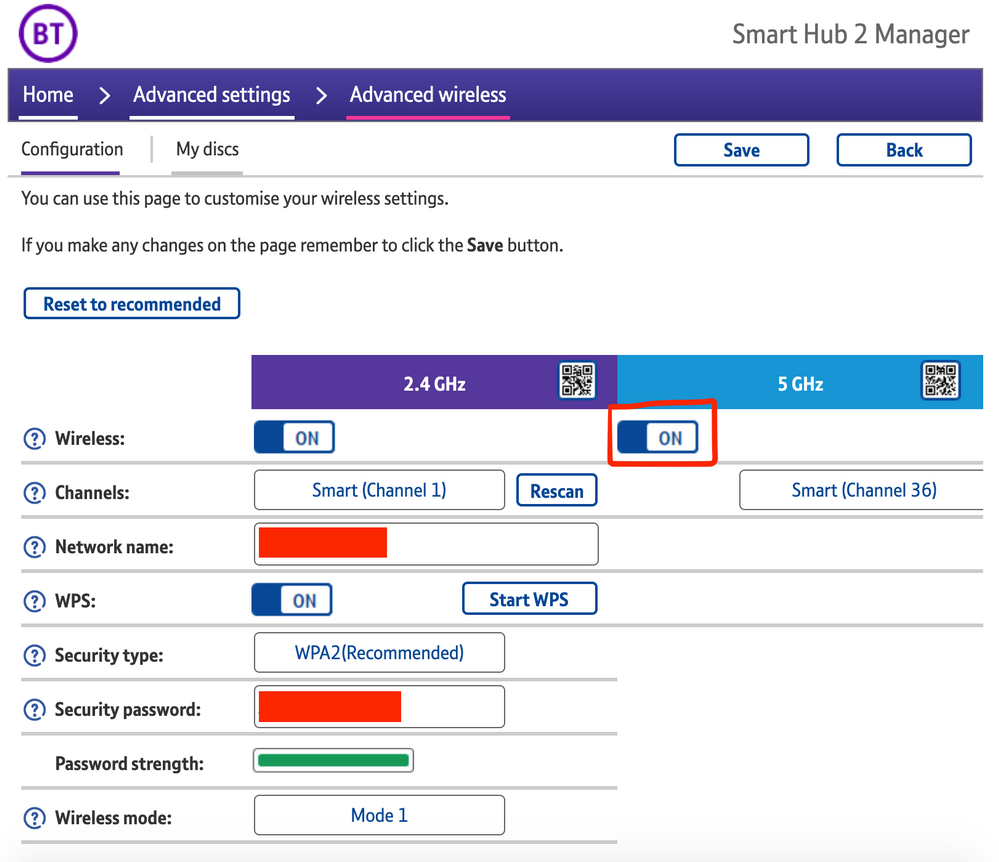
The most consistent workaround we have discovered is to disable the 5GHz band on the BT Smart Hub 2. You can learn more about how to do this using these steps:

Please be aware, turning off 5GHz could affect the speed at which other devices connect through the network and should only be considered a temporary workaround.


Steps taken from a post on the BT Community.


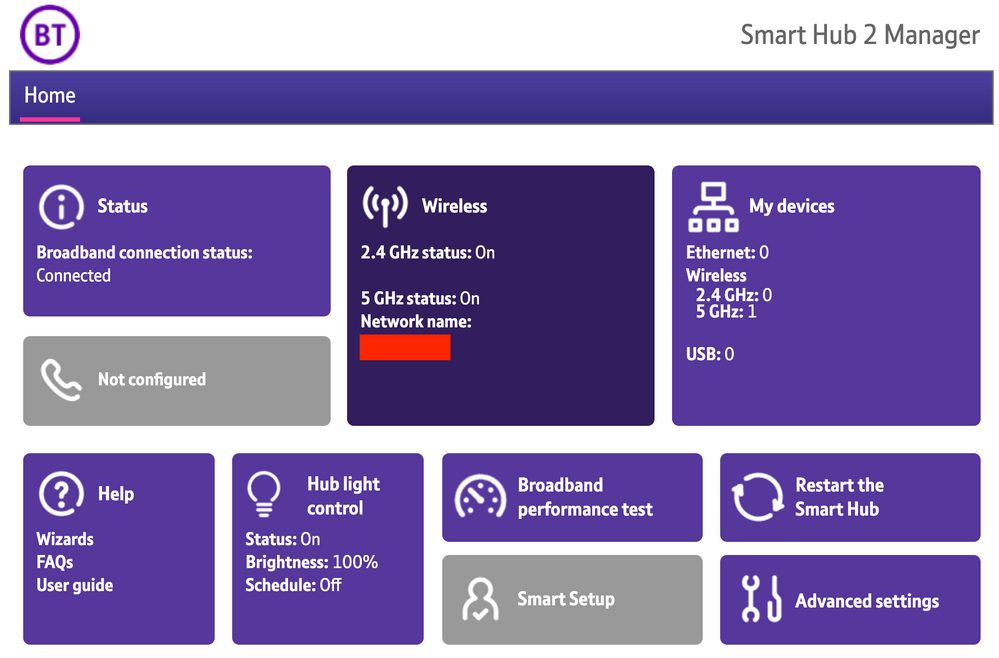
1) Open a new web browser on a device connected to your Hub and type 192.168.1.254 in the address bar. This will open the Hub Manager.
​


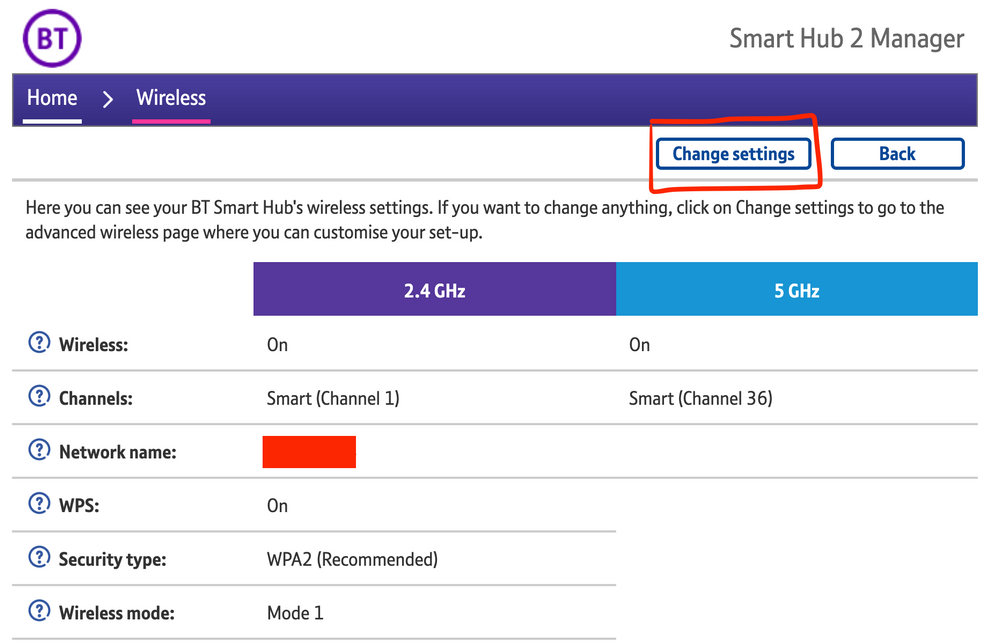
2) Click Wireless. This will open the Wireless Settings page.


3) Select ‘Change settings’
​


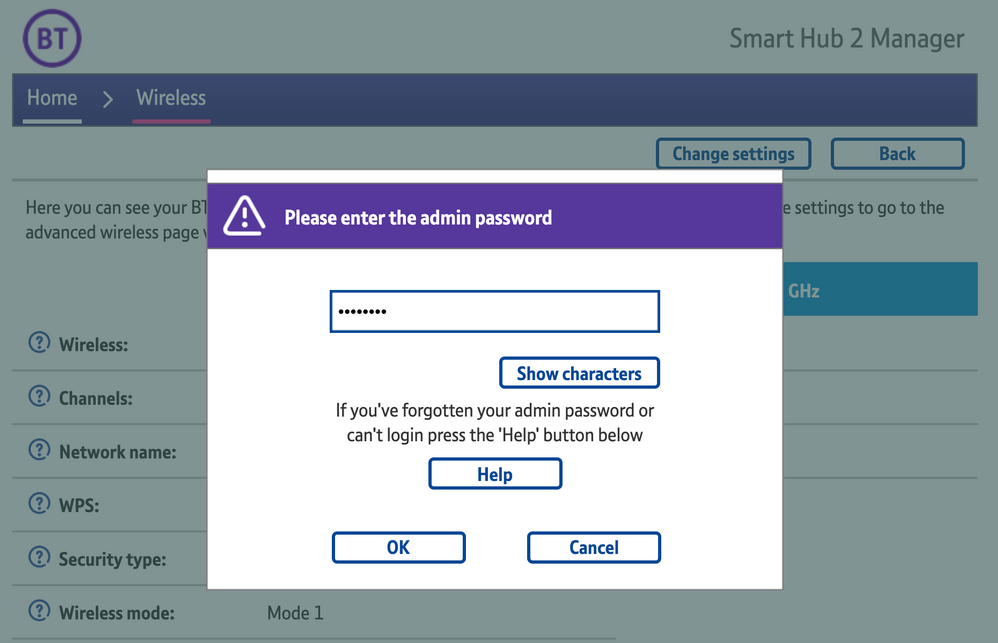
4) Enter the Admin password. This is found on the back of the router and on the removable card. Click ‘OK’
​


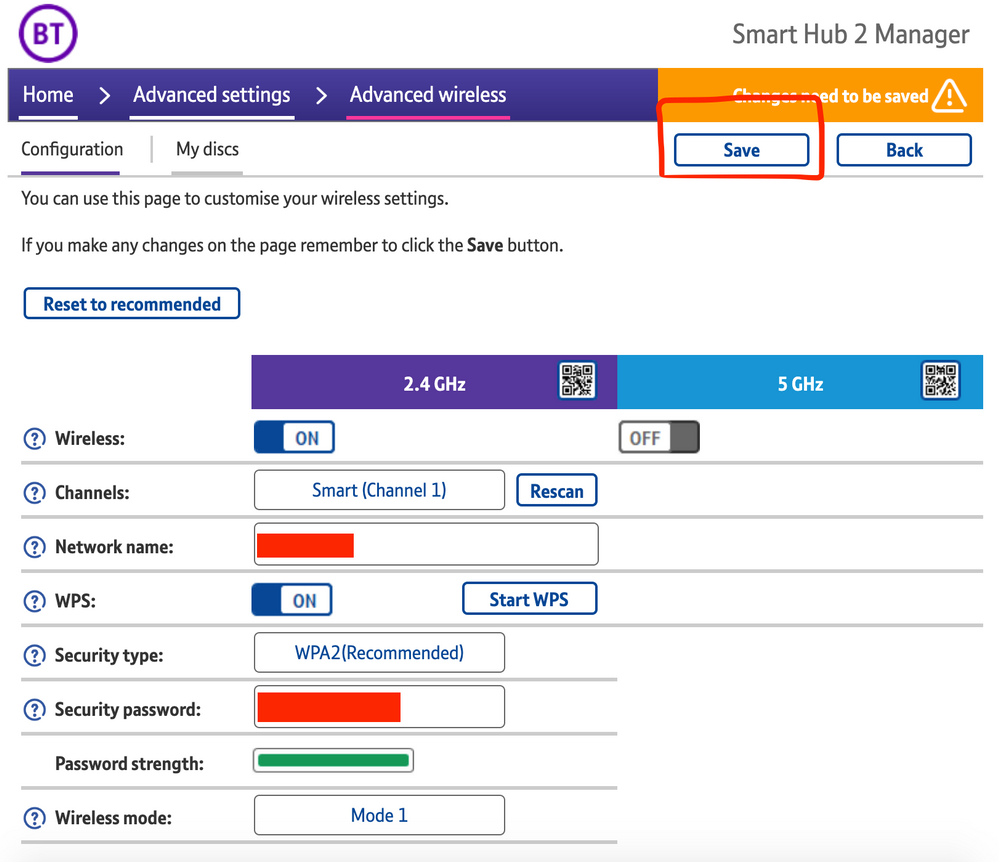
5) Toggle 5GHz OFF

​

6) Click 'Save'

​


7) Click 'Yes' at the warning prompt.
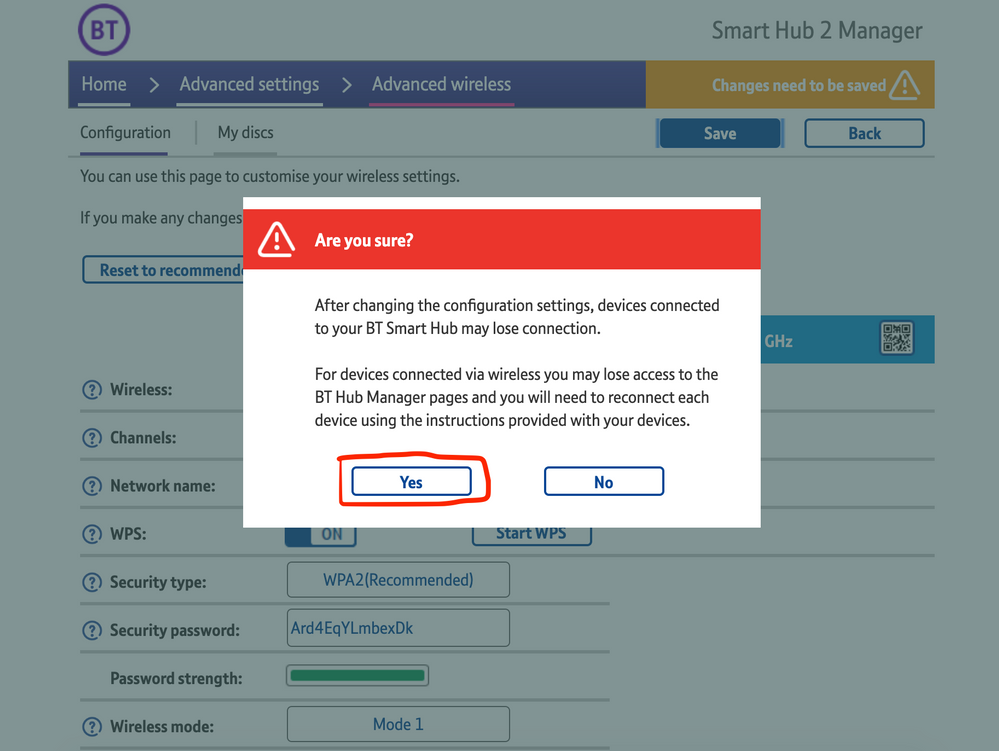
8) Wait for your devices to reconnect. You may need to reboot your Sonos devices by powering them down for 30 seconds and powering them back up.

​


Alternatively, some users have been able to work around the issue by wiring a player directly to the router, though this doesn’t work in every case. Systems that have a Sonos Move or Roam on them will also not be helped by this change, so disabling 5GHz would be best for those households.


 We recommend that you report this issue to BT with the following information:


“Devices connected to the 5GHz band are not able to communicate with devices connected to the 2.4GHz band and it appears the connections are being erroneously isolated.”


You don’t need to specifically mention Sonos devices when reporting this issue to BT as the information alone will be enough for them to recognize the issue you’re facing.
 

BT are indeed aware of this issue and are actively investigating and working to resolve it as quickly as possible. We’ll update this post with any further news as and when we receive it.

This topic has been closed for further comments. You can use the search bar to find a similar topic, or create a new one by clicking Create Topic at the top of the page.

261 replies

Avid Contributor III
April 29, 2021

I have a BT engineer due tomorrow to look at our broadband, as it is very slow & poor.…


I’ll ask him if he has anymore info on the 5Ghz issue while he is here….👍

Lyricist I
April 30, 2021

Tricky one. Do I value Sonos over slow internet for every other device. 
We need this update! 

72 hours (if that’s a timetable that BT can stick-to) isn’t too long to run devices on a 2.4Ghz connection.
 

I don’t know the BT router, personally speaking, but some routers have a device exclusion list for each of their WiFi bands (I know VirginMedia Superhubs have this option) so if that’s available, then you could add your Sonos MAC addresses to that ‘exclusion list’ instead. 

I’ve plugged one in with a Ethernet cable directly to the router and that has allowed my phone to see both speakers. 
Will just use it like this until the firmware update is released. 

Lyricist II
April 30, 2021

I also join the list of people having issues with Sonos/Bt software. I am more annoyed with Sonos for not informing their customers about the problem, I almost thought out my system thinking that it had packed up. But I found that turning on/off the BT hub resets the Sonos app. I have a mix of Apple ,Sonos and Amazon speakers and I must admit that Apple is our go to speakers as anyone in the family with Apple device can play there music without downloading extra apps. I am reluctant to invest any more money into Sonos speakers. If I dig out my old Sonos bridge would that help ?????

James L.
James L.Author
Retired Community Staff
April 30, 2021

I also join the list of people having issues with Sonos/Bt software. I am more annoyed with Sonos for not informing their customers about the problem, I almost thought out my system thinking that it had packed up. But I found that turning on/off the BT hub resets the Sonos app. I have a mix of Apple ,Sonos and Amazon speakers and I must admit that Apple is our go to speakers as anyone in the family with Apple device can play there music without downloading extra apps. I am reluctant to invest any more money into Sonos speakers. If I dig out my old Sonos bridge would that help ?????

We have informed customers who have experienced this issue, both in this very thread and through our support channels when affected users have contacted us. We can’t personally inform the millions of users with BT Hubs that may or may not be experiencing issues in any other way, I'm afraid. This isn’t a Sonos specific issue, and has the potential to affect many other devices connected to these networks. It’s a bug in the BT Smart Hub 2's firmware that has been acknowledged by BT and a fix is being worked on. 
 

If you’re still using S1 then wiring the Bridge back into your network may help mitigate the issue, but isn’t guaranteed to work. If you're on S2, then the Bridge isn’t compatible with your system and wouldn’t do anything to work around it. Please, read of the first post in this topic to learn about the workaround for this issue.

Mark good posts by pressing the like button, and select the best answer on questions you've asked to help others find solutions.
Lyricist III
April 30, 2021

Hardwiring a play:1 to create sonosnet has largely sorted me out for now and allowed me to keep both my bands running on my SH2… though I do intermittently lose my Move and Roam as my phone switches between 5/2.4 now and again.

My problem now, and proving this is a BT SH2 firmware issue once and for all is that I can’t print as my printer is on 2.4 and everything else is on 5 (and who has a printer cable these days? :joy: ), my Sons’ Nanoleafs aren’t working and my Hue Sync Box.. well just forget about that.

On the phone to BT now and will be raising a complaint; why didn’t they just roll the firmware back?! 

Might look in to a new router though.. I’ve not bought a techy gadget in a while.. oh.. except the Roam..

Lyricist I
April 30, 2021

I (had) the same issues as reported and have been monitoring this post for the past few days. This morning my Sonos system and other affected Wi-fi devices burst back into life. Has BT solved the issue.? 
 

Anyone else had their system/s reappear today?

James L.
James L.Author
Retired Community Staff
April 30, 2021

I (had) the same issues as reported and have been monitoring this post for the past few days. This morning my Sonos system and other affected Wi-fi devices burst back into life. Has BT solved the issue.? 
 

Anyone else had their system/s reappear today?

Could you check the firmware version on your BT Smart Hub 2 to see if it’s different from the one in my first post? It would be interesting to know if BT have begun rolling out a fix already.

Mark good posts by pressing the like button, and select the best answer on questions you've asked to help others find solutions.
ratty
April 30, 2021

For customers with the BT FTTC/VDSL service they may feel the hassle of finding a alternative, compatible router is too much, especially if they make use of the Youview/BT TV service.

Personally I’d just get a third party dual band WiFi access point (or mesh) and disable the router’s WiFi. 

Lyricist I
April 30, 2021

Confirming my hub firmware- I took a photo on Wednesday of my hub software info page and it’s still the same this morning - v0.26.03.1286


Lyricist III
April 30, 2021

I (had) the same issues as reported and have been monitoring this post for the past few days. This morning my Sonos system and other affected Wi-fi devices burst back into life. Has BT solved the issue.? 
 

Anyone else had their system/s reappear today?

Could you check the firmware version on your BT Smart Hub 2 to see if it’s different from the one in my first post? It would be interesting to know if BT have begun rolling out a fix already.

Experienced the same from late last night. 
Same firmware as in OP and still same today. All speakers be they the Sonos One’s or the IKEA Symfonisks (which are the main issue since reconnecting the WiFi disc which the Ones pretty much live on) have worked absolutely perfectly. 

Something has definitely changed. 
 

Could BT adjust something without it changing the firmware? 
Either way, fingers crossed, things are currently working. 
 

EDIT: just realised and no doubt someone might want to shoot me down for this but just before everything started to work as expected I updated my iPhone to the latest IOS 14.5

I’ll charge the iPad later and see if that still works whilst on the last OS.

Could it be in some way related?


EDIT to the EDIT!:

It’s gone again. Even the Ones connected to the WiFi discs. No idea what’s going on now.