James L.
Retired Community Staff
April 22, 2021
F.A.Q.

BT Smart Hub 2 - Connection Issues (April 2021)
  • April 22, 2021
  • 261 replies
  • 54367 views
BT Smart Hub 2 - Connection Issues (April 2021)

Update - 11th June 2021:

BT have confirmed that the firmware update that contains a fix for this original issue has been rolled out to the majority of users. Therefore, we can consider this issue closed. 

If your BT Smart Hub 2 router is still running the affected firmware (V0.26.03.01286) then please get in touch with BT directly.

Anyone that still experiences issues on the latest firmware, please create a new topic or get in touch with Sonos Customer Care.


Update - 7th May 2021:

BT have issued a new statement:

“We’re aware that a very small number of customers are experiencing an issue with their BT Smart Hub 2 connecting with multiple streaming devices on their Wi-Fi network. Any customer who experiences this should get in touch with BT who will update their device remotely as soon as possible. BT will be rolling out an update to all devices later this month. We’re sorry for any inconvenience caused.”


Original post - 22nd April 2021:

Hey everyone,


We’re aware of an issue affecting Sonos users with BT Smart Hub 2 routers that causes problems with connecting to players in a wireless configuration. This is caused by a bug in the BT Smart Hub 2’s firmware (version V0.26.03.01286) which prevents devices on the 5GHz band from communicating with devices on the 2.4GHz band, and vice versa. Most of the affected users have iPhones running iOS version 14.4.2, but we have seen other types of controller, such as Android devices, affected by this issue as well.


The most consistent workaround we have discovered is to disable the 5GHz band on the BT Smart Hub 2. You can learn more about how to do this using these steps:

Please be aware, turning off 5GHz could affect the speed at which other devices connect through the network and should only be considered a temporary workaround.


Steps taken from a post on the BT Community.


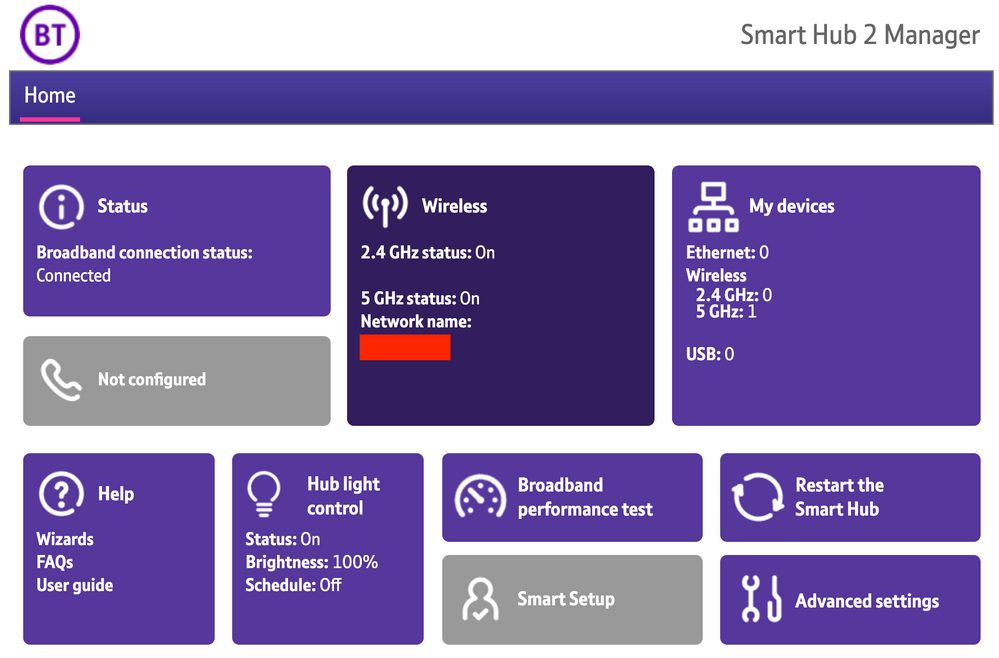
1) Open a new web browser on a device connected to your Hub and type 192.168.1.254 in the address bar. This will open the Hub Manager.
​


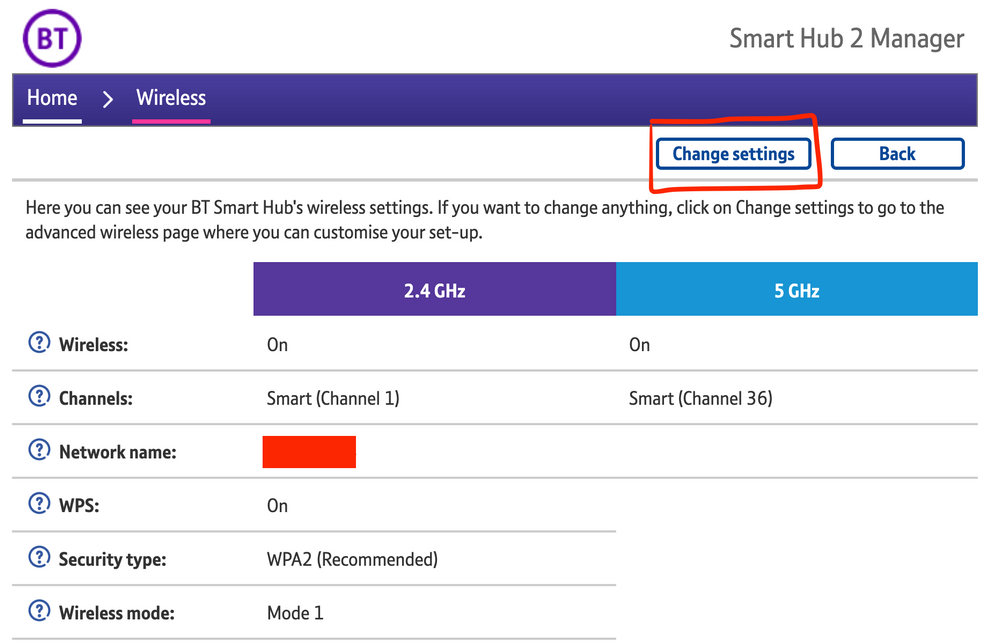
2) Click Wireless. This will open the Wireless Settings page.


3) Select ‘Change settings’
​


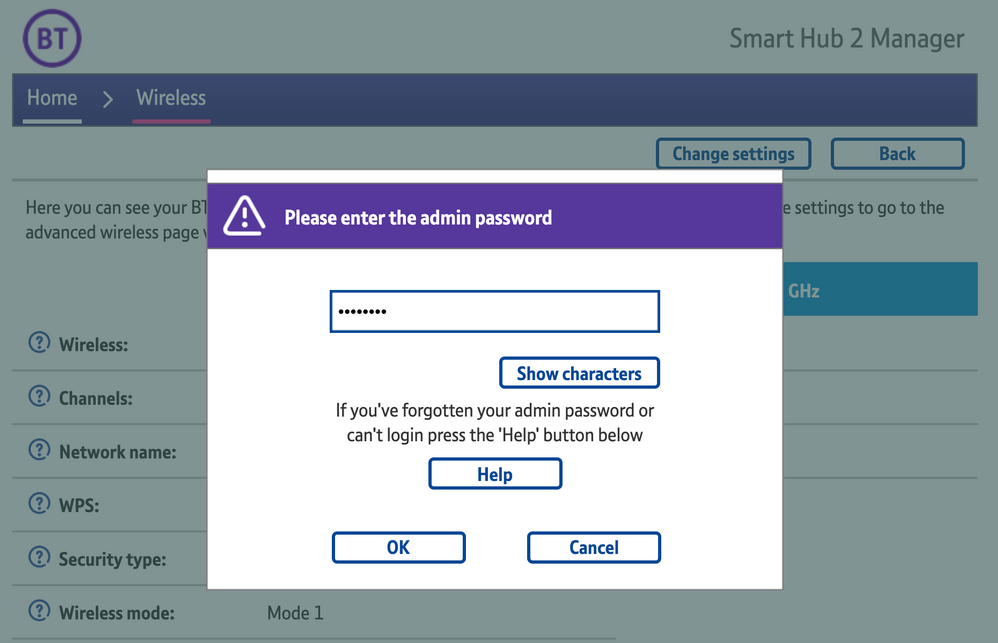
4) Enter the Admin password. This is found on the back of the router and on the removable card. Click ‘OK’
​


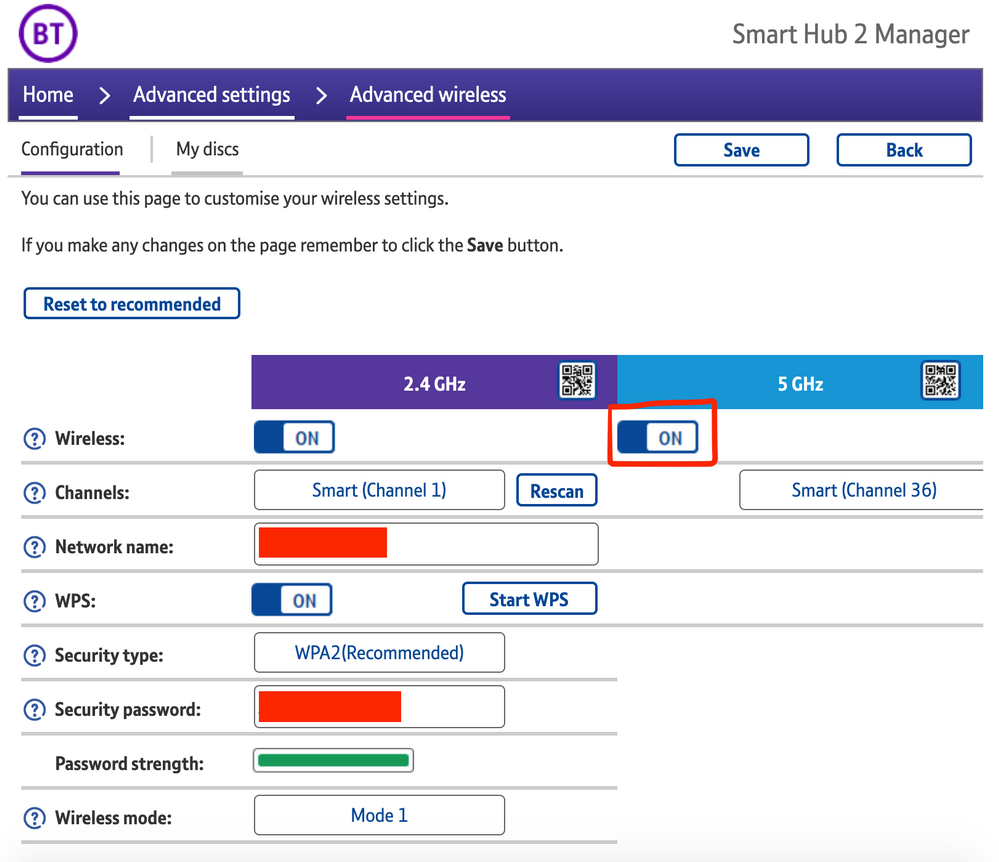
5) Toggle 5GHz OFF

​

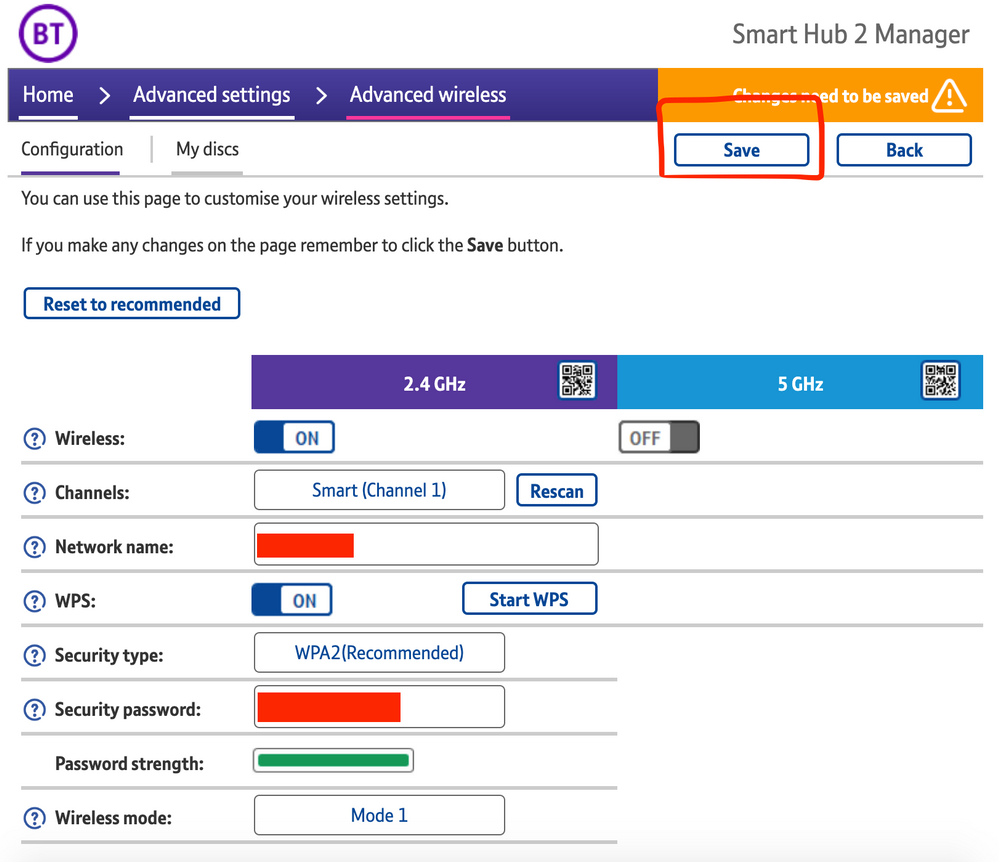
6) Click 'Save'

​


7) Click 'Yes' at the warning prompt.
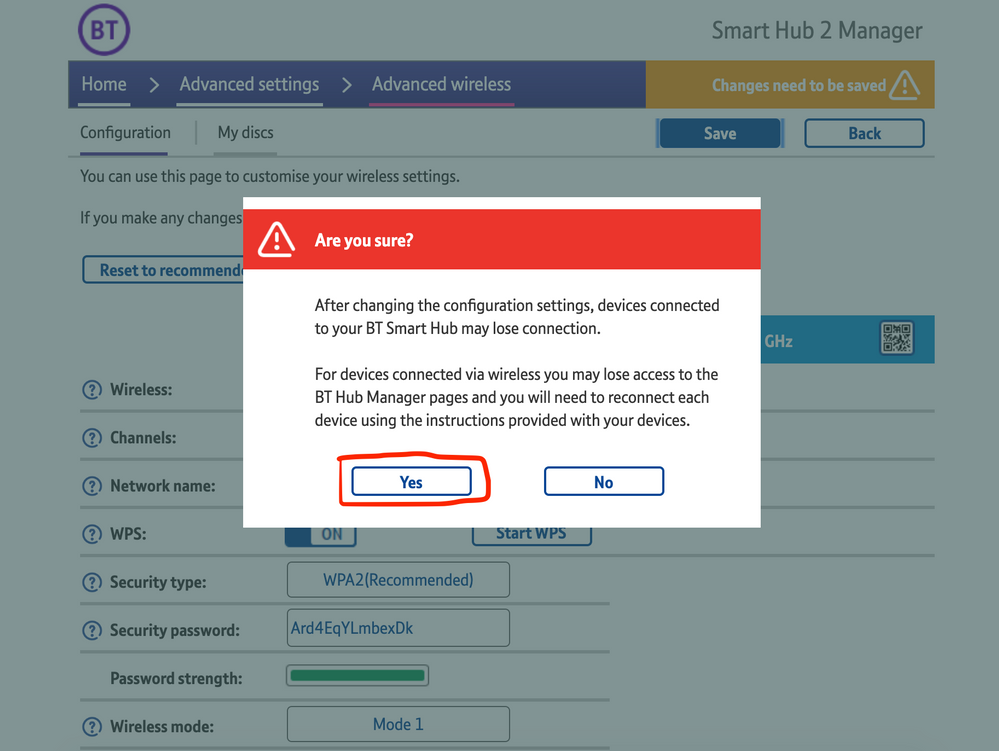
8) Wait for your devices to reconnect. You may need to reboot your Sonos devices by powering them down for 30 seconds and powering them back up.

​


Alternatively, some users have been able to work around the issue by wiring a player directly to the router, though this doesn’t work in every case. Systems that have a Sonos Move or Roam on them will also not be helped by this change, so disabling 5GHz would be best for those households.


 We recommend that you report this issue to BT with the following information:


“Devices connected to the 5GHz band are not able to communicate with devices connected to the 2.4GHz band and it appears the connections are being erroneously isolated.”


You don’t need to specifically mention Sonos devices when reporting this issue to BT as the information alone will be enough for them to recognize the issue you’re facing.
 

BT are indeed aware of this issue and are actively investigating and working to resolve it as quickly as possible. We’ll update this post with any further news as and when we receive it.

This topic has been closed for further comments. You can use the search bar to find a similar topic, or create a new one by clicking Create Topic at the top of the page.

261 replies

Enthusiast I
April 30, 2021

I (had) the same issues as reported and have been monitoring this post for the past few days. This morning my Sonos system and other affected Wi-fi devices burst back into life. Has BT solved the issue.? 
 

Anyone else had their system/s reappear today?

Could you check the firmware version on your BT Smart Hub 2 to see if it’s different from the one in my first post? It would be interesting to know if BT have begun rolling out a fix already.

Still on v0.26.03.01286-BT

Lyricist III
April 30, 2021

I (had) the same issues as reported and have been monitoring this post for the past few days. This morning my Sonos system and other affected Wi-fi devices burst back into life. Has BT solved the issue.? 
 

Anyone else had their system/s reappear today?

Could you check the firmware version on your BT Smart Hub 2 to see if it’s different from the one in my first post? It would be interesting to know if BT have begun rolling out a fix already.

Experienced the same from late last night. 
Same firmware as in OP and still same today. All speakers be they the Sonos One’s or the IKEA Symfonisks (which are the main issue since reconnecting the WiFi disc which the Ones pretty much live on) have worked absolutely perfectly. 

Something has definitely changed. 
 

Could BT adjust something without it changing the firmware? 
Either way, fingers crossed, things are currently working. 
 

EDIT: just realised and no doubt someone might want to shoot me down for this but just before everything started to work as expected I updated my iPhone to the latest IOS 14.5

I’ll charge the iPad later and see if that still works whilst on the last OS.

Could it be in some way related?


EDIT to the EDIT!:

It’s gone again. Even the Ones connected to the WiFi discs. No idea what’s going on now. 

I’ve had issues since 10th April (when my router firmware was updated), and I was on 14.4.x at the time… now on 14.5 and still the same. It probably burst back in to life because your phone won’t exclusively live on 5ghz - it will dynamically switch to 2.4ghz if it thinks that’s a more reliable connection. When your phone/controller is on 2.4, you will see your Sonos system.

Lyricist III
April 30, 2021

I (had) the same issues as reported and have been monitoring this post for the past few days. This morning my Sonos system and other affected Wi-fi devices burst back into life. Has BT solved the issue.? 
 

Anyone else had their system/s reappear today?

Could you check the firmware version on your BT Smart Hub 2 to see if it’s different from the one in my first post? It would be interesting to know if BT have begun rolling out a fix already.

Experienced the same from late last night. 
Same firmware as in OP and still same today. All speakers be they the Sonos One’s or the IKEA Symfonisks (which are the main issue since reconnecting the WiFi disc which the Ones pretty much live on) have worked absolutely perfectly. 

Something has definitely changed. 
 

Could BT adjust something without it changing the firmware? 
Either way, fingers crossed, things are currently working. 
 

EDIT: just realised and no doubt someone might want to shoot me down for this but just before everything started to work as expected I updated my iPhone to the latest IOS 14.5

I’ll charge the iPad later and see if that still works whilst on the last OS.

Could it be in some way related?


EDIT to the EDIT!:

It’s gone again. Even the Ones connected to the WiFi discs. No idea what’s going on now. 

I’ve had issues since 10th April (when my router firmware was updated), and I was on 14.4.x at the time… now on 14.5 and still the same. It probably burst back in to life because your phone won’t exclusively live on 5ghz - it will dynamically switch to 2.4ghz if it thinks that’s a more reliable connection. When your phone/controller is on 2.4, you will see your Sonos system.

Sorry to spam the thread.. something you can try that is hours of fun and entertainment: Open your Sonos S2 app; note that your system doesn’t show… turn your wifi toggle on your phone on/off/on/off… after a couple of tries (maybe many), at some point your Sonos system will pop up when your phone drops on to the 2.4Ghz band.

Lyricist III
April 30, 2021

...

I’ve had issues since 10th April (when my router firmware was updated), and I was on 14.4.x at the time… now on 14.5 and still the same. It probably burst back in to life because your phone won’t exclusively live on 5ghz - it will dynamically switch to 2.4ghz if it thinks that’s a more reliable connection. When your phone/controller is on 2.4, you will see your Sonos system.

Sorry to spam the thread.. something you can try that is hours of fun and entertainment: Open your Sonos S2 app; note that your system doesn’t show… turn your wifi toggle on your phone on/off/on/off… after a couple of tries (maybe many), at some point your Sonos system will pop up when your phone drops on to the 2.4Ghz band.

Well the iPad is currently still on 14.4.1 whilst I checked and is currently sat on 5ghz as is my iPhone 11 which is now on iOS 14.5. 
Both are currently able to ‘see’ the whole system and control it. 
My partner (iPhone 11 iOS 14.5) can only see the Sonos Ones which are connected to the WiFi disc but not the Symfonisks connected to the Smart Hub 2. 
My daughter (iPhone 11 iOS 14.5) can’t see anything of the system other than under Airplay but fails to connect. 
 

I fully expect them to drop from my devices soon as well. 
 

It’s all rather annoying. Beyond this I’ve no complaints with BT and the service. My Symfonisks whilst great value considering (bought on a whim whilst in IKEA) have for the last few months been very hit and miss compared to the Ones hence my initial scepticism on it being just BT at fault and were hit and miss whilst on the Home Hub (FTTC) not the Smart Hub 2 (FTTP). 

At this point I’m now beyond caring who’s at fault and just want the system working reliably again. 

ratty
April 30, 2021

Devices will be discoverable, or not, depending on the local traffic path. Different mobiles on different access points, connecting to different speakers on different access points, may see different results. If something blocks all the traffic, or merely multicast traffic, then speakers could go missing.

Lyricist II
April 30, 2021

James, 

Thanks for your advice on the Smart Hub 2 problems.  I had a similar helpful discussion with one of the Sonos agents a few days ago and have since taken your advice and raised a complaint with BT.

I’ve just had a rather useful chat with regard to that complaint that may help other people.  First of all, the problem has definitely been added to their issue log so, hopefully, we will see a fix for the underlying problem at some point.

Perhaps more usefully, I was made aware of another workaround.  It wasn’t convenient for me to plug a device into the router itself long-term as I need my Sonos devices in other rooms; however, if any customers with this router have one of the BT complete wifi discs, it’s possible to plug a Sonos device into that with an ethernet cable. The system then seems to form a Sonos net connection and the connection problems disappear.  This is far more convenient for me as I’m able to site my wired device in the room I want it.  I’ve only tried it for a short time but it’s been stable so far.

I hope this helps.

ratty
April 30, 2021

It wasn’t convenient for me to plug a device into the router itself long-term as I need my Sonos devices in other rooms; however, if any customers with this router have one of the BT complete wifi discs, it’s possible to plug a Sonos device into that with an ethernet cable. The system then seems to form a Sonos net connection and the connection problems disappear.

This will work, as with any other WiFi mesh, but don’t be tempted to wire to more than the one node. The Sonos system will or course depend on the mesh backhaul for internet connection, but mostly this shouldn’t cause problems.

Lyricist II
April 30, 2021

Why am I always loosing my system connection? After turning all my products off then on again and everything connecting I turn my app off and it loses connection so I get this message every time. Please help me, 


Lead Maestro
April 30, 2021

What router are you using?

"Receive with simplicity everything that happens to you." - Rashi
Lyricist II
April 30, 2021

BT halo