James L.
Retired Community Staff
April 22, 2021
F.A.Q.

BT Smart Hub 2 - Connection Issues (April 2021)
  • April 22, 2021
  • 261 replies
  • 54365 views
BT Smart Hub 2 - Connection Issues (April 2021)

Update - 11th June 2021:

BT have confirmed that the firmware update that contains a fix for this original issue has been rolled out to the majority of users. Therefore, we can consider this issue closed. 

If your BT Smart Hub 2 router is still running the affected firmware (V0.26.03.01286) then please get in touch with BT directly.

Anyone that still experiences issues on the latest firmware, please create a new topic or get in touch with Sonos Customer Care.


Update - 7th May 2021:

BT have issued a new statement:

“We’re aware that a very small number of customers are experiencing an issue with their BT Smart Hub 2 connecting with multiple streaming devices on their Wi-Fi network. Any customer who experiences this should get in touch with BT who will update their device remotely as soon as possible. BT will be rolling out an update to all devices later this month. We’re sorry for any inconvenience caused.”


Original post - 22nd April 2021:

Hey everyone,


We’re aware of an issue affecting Sonos users with BT Smart Hub 2 routers that causes problems with connecting to players in a wireless configuration. This is caused by a bug in the BT Smart Hub 2’s firmware (version V0.26.03.01286) which prevents devices on the 5GHz band from communicating with devices on the 2.4GHz band, and vice versa. Most of the affected users have iPhones running iOS version 14.4.2, but we have seen other types of controller, such as Android devices, affected by this issue as well.


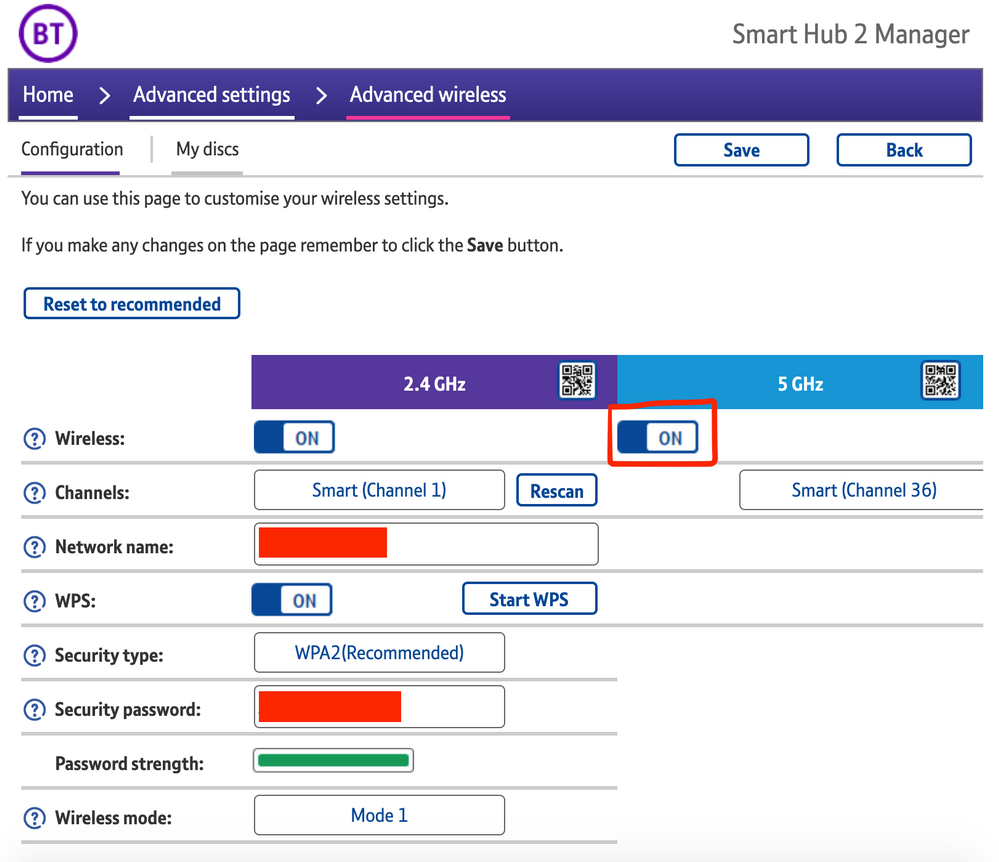
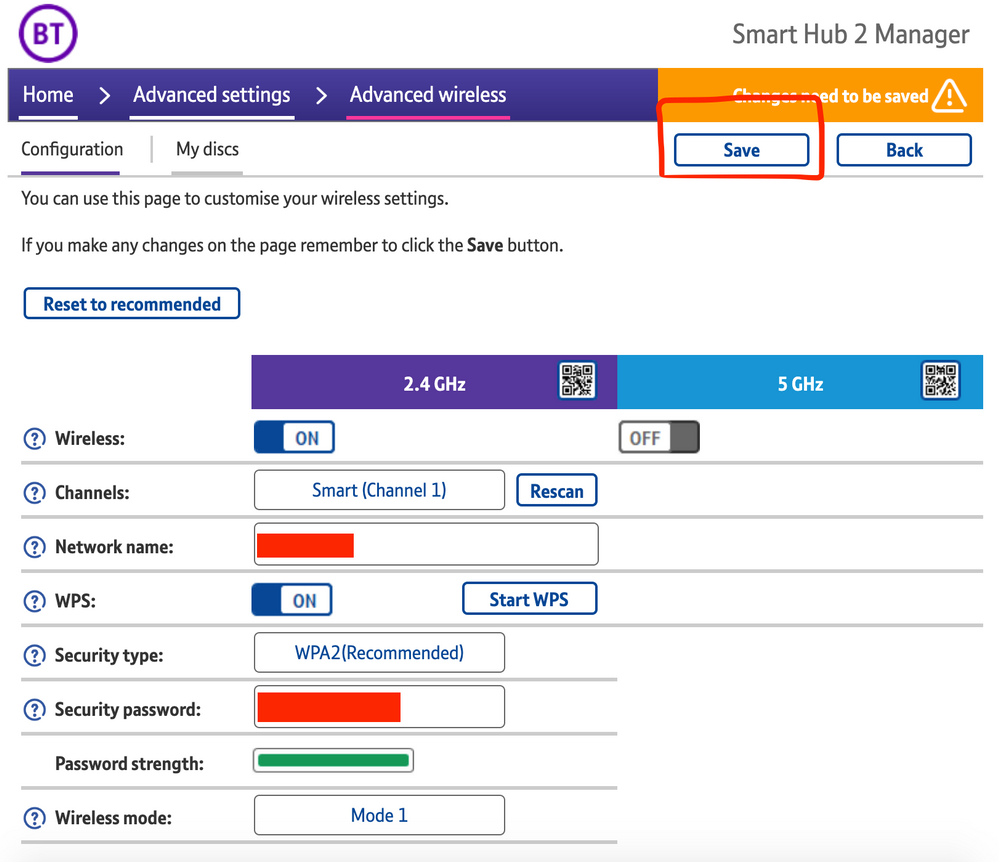
The most consistent workaround we have discovered is to disable the 5GHz band on the BT Smart Hub 2. You can learn more about how to do this using these steps:

Please be aware, turning off 5GHz could affect the speed at which other devices connect through the network and should only be considered a temporary workaround.


Steps taken from a post on the BT Community.


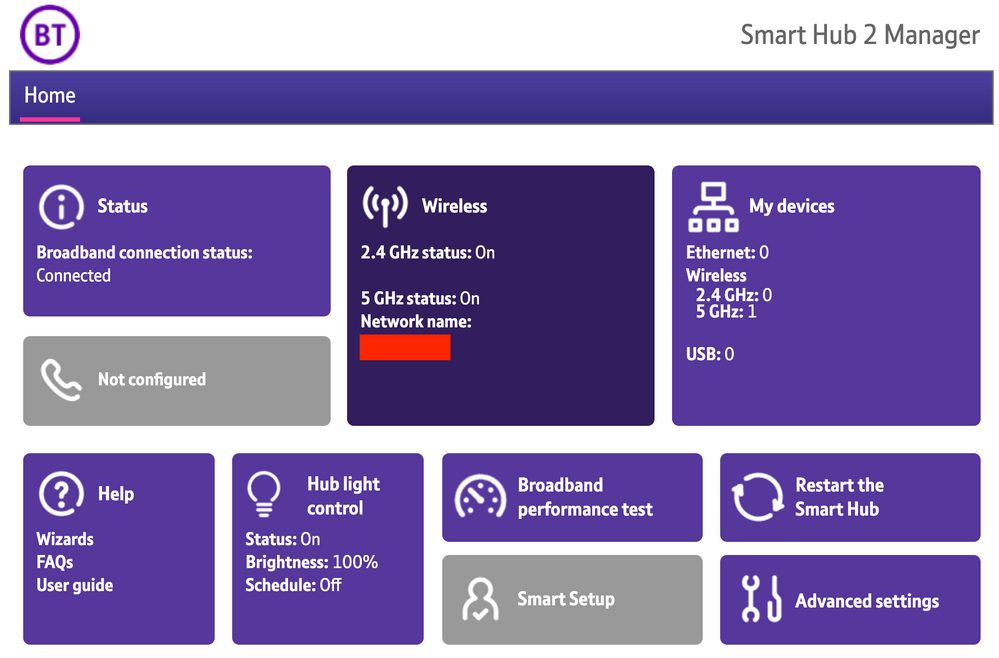
1) Open a new web browser on a device connected to your Hub and type 192.168.1.254 in the address bar. This will open the Hub Manager.
​


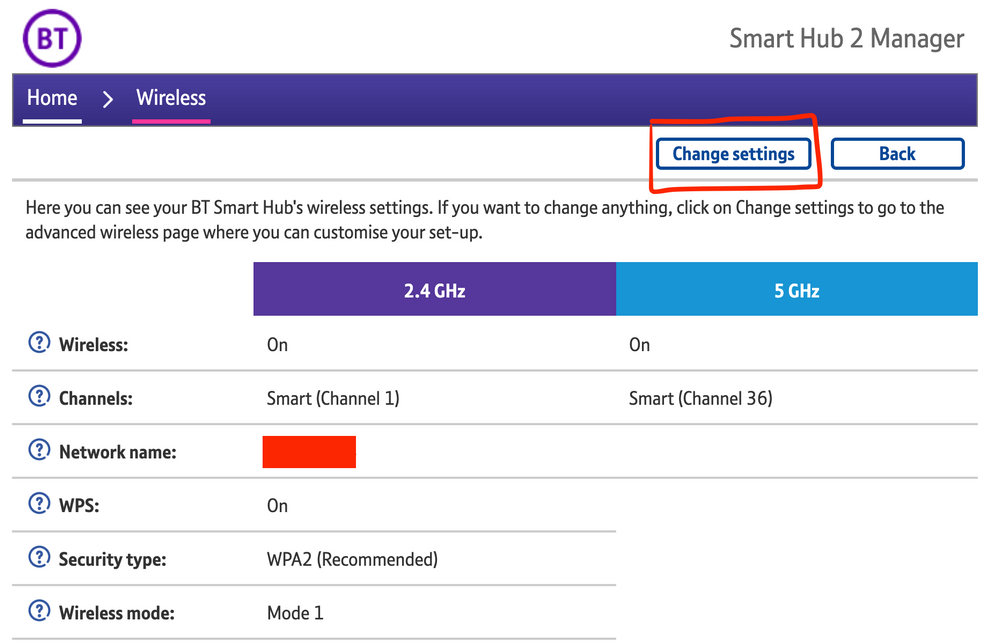
2) Click Wireless. This will open the Wireless Settings page.


3) Select ‘Change settings’
​


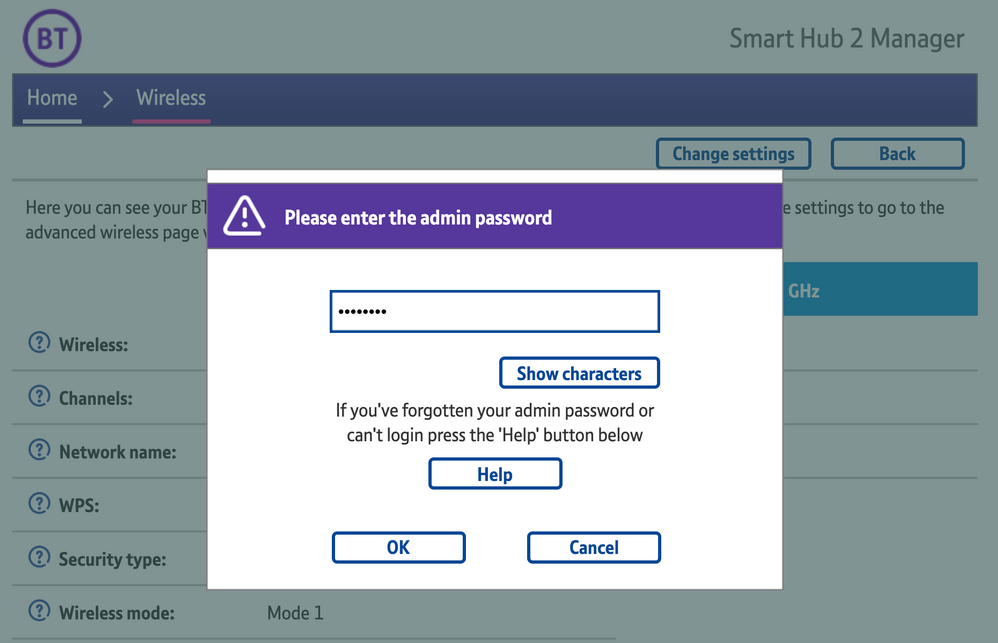
4) Enter the Admin password. This is found on the back of the router and on the removable card. Click ‘OK’
​


5) Toggle 5GHz OFF

​

6) Click 'Save'

​


7) Click 'Yes' at the warning prompt.
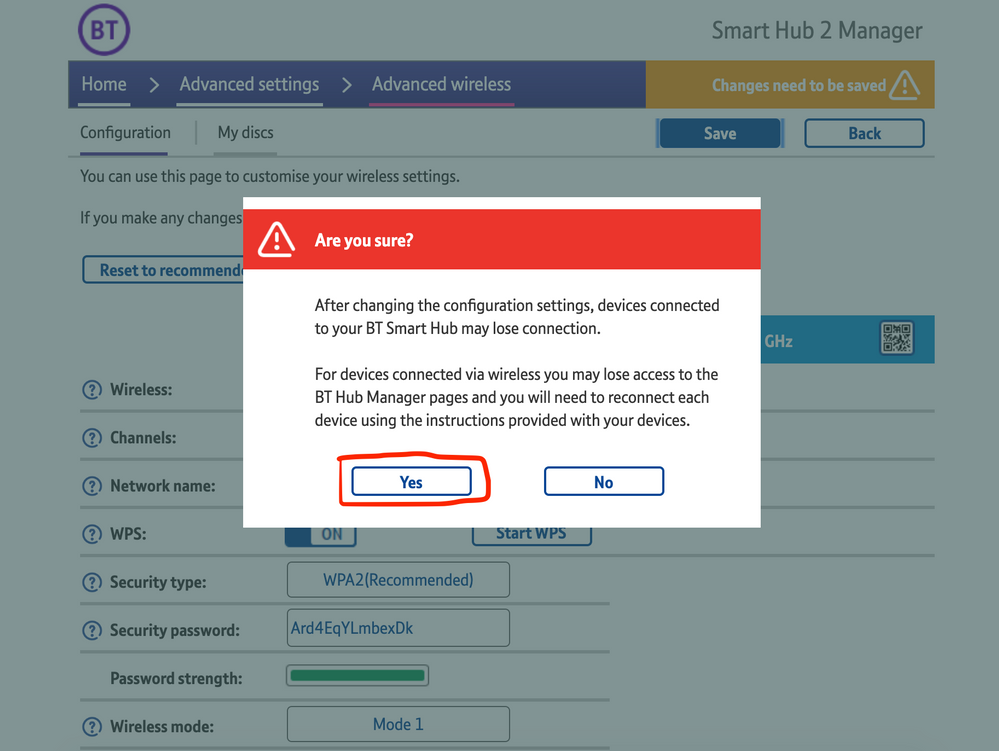
8) Wait for your devices to reconnect. You may need to reboot your Sonos devices by powering them down for 30 seconds and powering them back up.

​


Alternatively, some users have been able to work around the issue by wiring a player directly to the router, though this doesn’t work in every case. Systems that have a Sonos Move or Roam on them will also not be helped by this change, so disabling 5GHz would be best for those households.


 We recommend that you report this issue to BT with the following information:


“Devices connected to the 5GHz band are not able to communicate with devices connected to the 2.4GHz band and it appears the connections are being erroneously isolated.”


You don’t need to specifically mention Sonos devices when reporting this issue to BT as the information alone will be enough for them to recognize the issue you’re facing.
 

BT are indeed aware of this issue and are actively investigating and working to resolve it as quickly as possible. We’ll update this post with any further news as and when we receive it.

This topic has been closed for further comments. You can use the search bar to find a similar topic, or create a new one by clicking Create Topic at the top of the page.

261 replies

Ken_Griffiths
April 29, 2021

Same boat here. Have been losing my mind over it. My wife is fed up with me trying to fix it. 

Spoke to Sonos support and they confirm the issue with the BT Hub. Said as a work around to plug one device in with a ethernet cable and then they should all be viewable on the 5ghz band (iphone app).


BT Support have just told me the issue ‘will be fixed in 72 hours’. Not sure how/why. Then I was told to do a factory reset. Then offered a new hub. I think its safe to say the person didn’t have a clue. 


So I’m not fixed at all and eagerly await some actual tech support. 

If not done already, you can try temporarily disabling your routers 5GHz radio until BT release the fix.

Lyricist I
April 29, 2021

Same boat here. Have been losing my mind over it. My wife is fed up with me trying to fix it. 

Spoke to Sonos support and they confirm the issue with the BT Hub. Said as a work around to plug one device in with a ethernet cable and then they should all be viewable on the 5ghz band (iphone app).


BT Support have just told me the issue ‘will be fixed in 72 hours’. Not sure how/why. Then I was told to do a factory reset. Then offered a new hub. I think its safe to say the person didn’t have a clue. 


So I’m not fixed at all and eagerly await some actual tech support. 

If not done already, you can try temporarily disabling your routers 5GHz radio until BT release the fix.

Tricky one. Do I value Sonos over slow internet for every other device. 
We need this update! 

Ken_Griffiths
April 29, 2021

Tricky one. Do I value Sonos over slow internet for every other device. 
We need this update! 

72 hours (if that’s a timetable that BT can stick-to) isn’t too long to run devices on a 2.4Ghz connection.
 

I don’t know the BT router, personally speaking, but some routers have a device exclusion list for each of their WiFi bands (I know VirginMedia Superhubs have this option) so if that’s available, then you could add your Sonos MAC addresses to that ‘exclusion list’ instead. 

Avid Contributor III
April 29, 2021

I recently replaced my router - BT Smart Hub 2 for what seemed like a faulty one.  We’d had a broadband fault which was traced to dodgy connection in the street cabinet. After that was fixed, our router gave us notably reduced speed so I talked to BT and they offered to swap with no quibble.

I went through the rigmarole of using the iOS S2 app to get my Sonos system on to the new WiFi network.  That was tortuous, but eventually I battled through.  There are two of us in the house both with iPhones and the iOS app on both our phones now keeps losing the Sonos system.  This is happening at least once/day.  Each time, the app first tells me to make sure all the Sonos components are switched on, then the app fails to find them so it asks me to switch them all off and back on, then try again.  Once more it fails and it asks me to unplug the router and power it back on.  So, I power it down and back up, then the app ponders for a few more minutes and finds the system.


Since the Sonos system was moved to the new router, the Sonos S2 app on my Windows 10 laptop has been able to see the Sonos system.


I suspect the iOS app, which has also been intermittently losing Sonos playlists for some time, predating the router swap.


Does anyone have any ideas what’s happening? 


Hopefully...

James L.
James L.Author
Retired Community Staff
April 29, 2021

Hi @shed53,


Was your BT Smart Hub 2 swapped for another Smart Hub 2? If so, there’s a current issue in the BT Hub firmware and we’ve detailed the issue in its own dedicated thread:


Mark good posts by pressing the like button, and select the best answer on questions you've asked to help others find solutions.
Avid Contributor III
April 29, 2021

Thanks, James.

Avid Contributor III
April 29, 2021

I’ve just reported this to BT, along with a slow speed from my router which I also suspect is firmware related. When the engineer fixed the line fault, he tested our WiFi. Our router gave 15.7Mbps while his own device (when acting in place of the router) yielded 47.2Mbps.

BT is sending an engineer to look at both issues - though of course if the firmware is the culprit for either or both, it may be a wasted journey.

Watch this space...

Contributor I
April 29, 2021

Anyone experiencing similar problems with other devices such as wireless printers ?

Our HP Envy 5030 is refusing to operate but says connected to router but remains invisible to laptop iPads and iPhones.

Lyricist I
April 29, 2021

Ever since Sonos s2 was introduced my Sonos system has been inconsistent. I have invested heavily in the products at home and my business and not a day goes by where I don’t regret it. It’s a case of “can we listen to music today?” Never ever again!

Lyricist I
April 29, 2021

Hi there 

my router is is a BY smart hub 2 and all my smart TVs and the rest are running seamlessly from it. I can reset the entire system but Sonos continues to be inconsistent. 
I can’t connect any of the speakers directly to the router. It used to work well but after S2 it’s been a total mess. I have the same problem in my business so not related to my home