James L.
Retired Community Staff
April 22, 2021
F.A.Q.

BT Smart Hub 2 - Connection Issues (April 2021)
  • April 22, 2021
  • 261 replies
  • 54358 views
BT Smart Hub 2 - Connection Issues (April 2021)

Update - 11th June 2021:

BT have confirmed that the firmware update that contains a fix for this original issue has been rolled out to the majority of users. Therefore, we can consider this issue closed. 

If your BT Smart Hub 2 router is still running the affected firmware (V0.26.03.01286) then please get in touch with BT directly.

Anyone that still experiences issues on the latest firmware, please create a new topic or get in touch with Sonos Customer Care.


Update - 7th May 2021:

BT have issued a new statement:

“We’re aware that a very small number of customers are experiencing an issue with their BT Smart Hub 2 connecting with multiple streaming devices on their Wi-Fi network. Any customer who experiences this should get in touch with BT who will update their device remotely as soon as possible. BT will be rolling out an update to all devices later this month. We’re sorry for any inconvenience caused.”


Original post - 22nd April 2021:

Hey everyone,


We’re aware of an issue affecting Sonos users with BT Smart Hub 2 routers that causes problems with connecting to players in a wireless configuration. This is caused by a bug in the BT Smart Hub 2’s firmware (version V0.26.03.01286) which prevents devices on the 5GHz band from communicating with devices on the 2.4GHz band, and vice versa. Most of the affected users have iPhones running iOS version 14.4.2, but we have seen other types of controller, such as Android devices, affected by this issue as well.


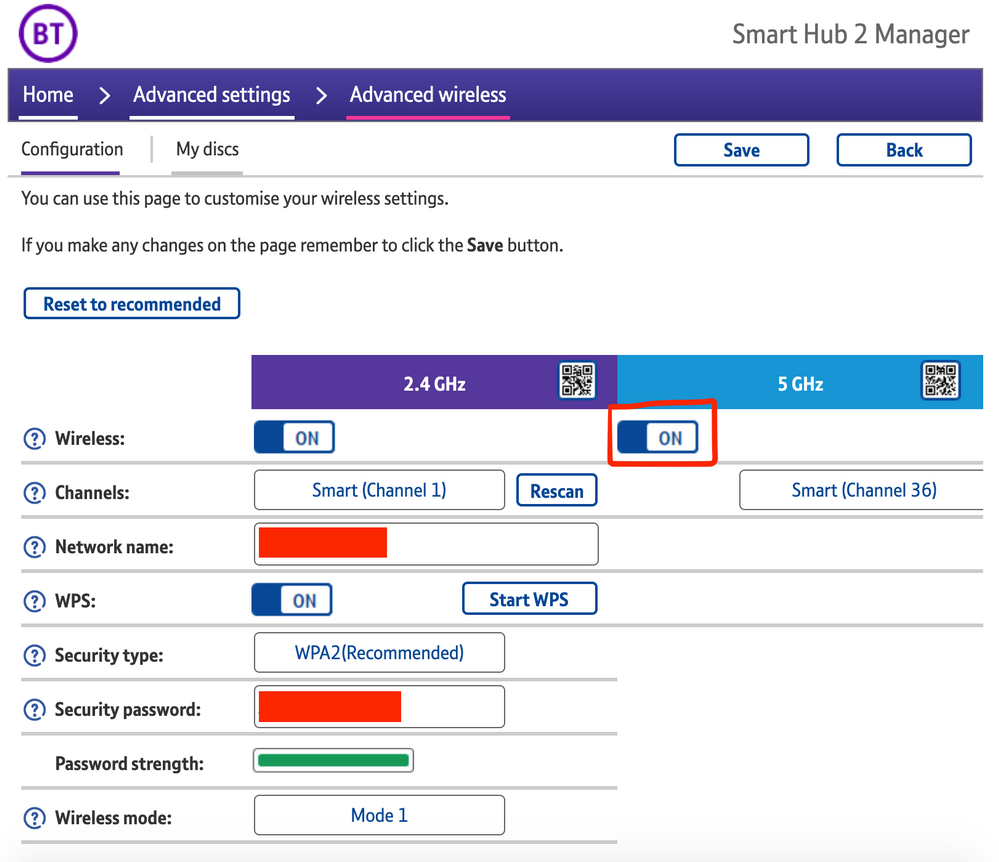
The most consistent workaround we have discovered is to disable the 5GHz band on the BT Smart Hub 2. You can learn more about how to do this using these steps:

Please be aware, turning off 5GHz could affect the speed at which other devices connect through the network and should only be considered a temporary workaround.


Steps taken from a post on the BT Community.


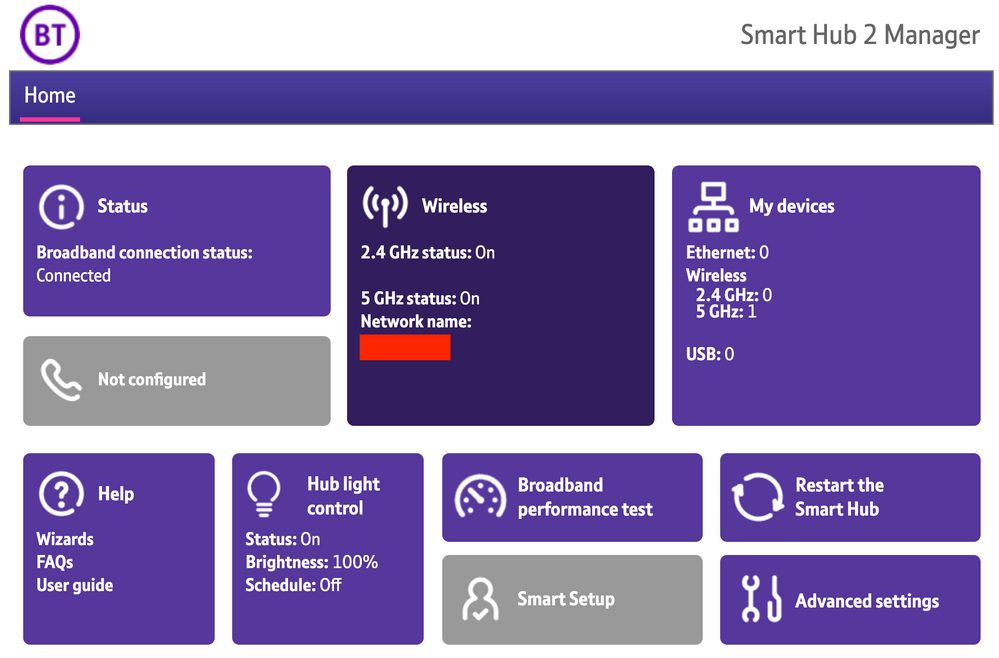
1) Open a new web browser on a device connected to your Hub and type 192.168.1.254 in the address bar. This will open the Hub Manager.
​


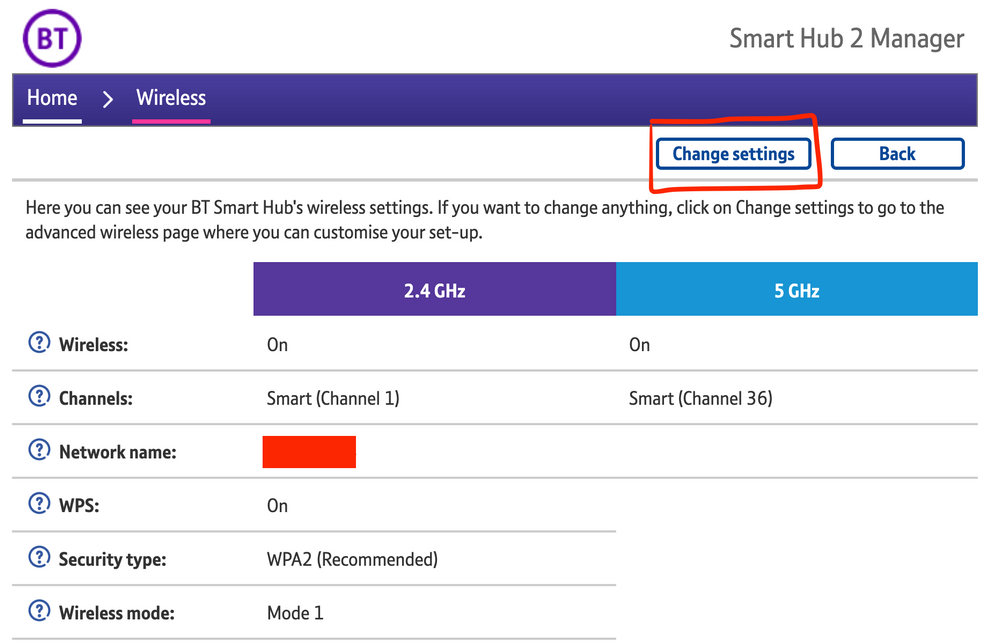
2) Click Wireless. This will open the Wireless Settings page.


3) Select ‘Change settings’
​


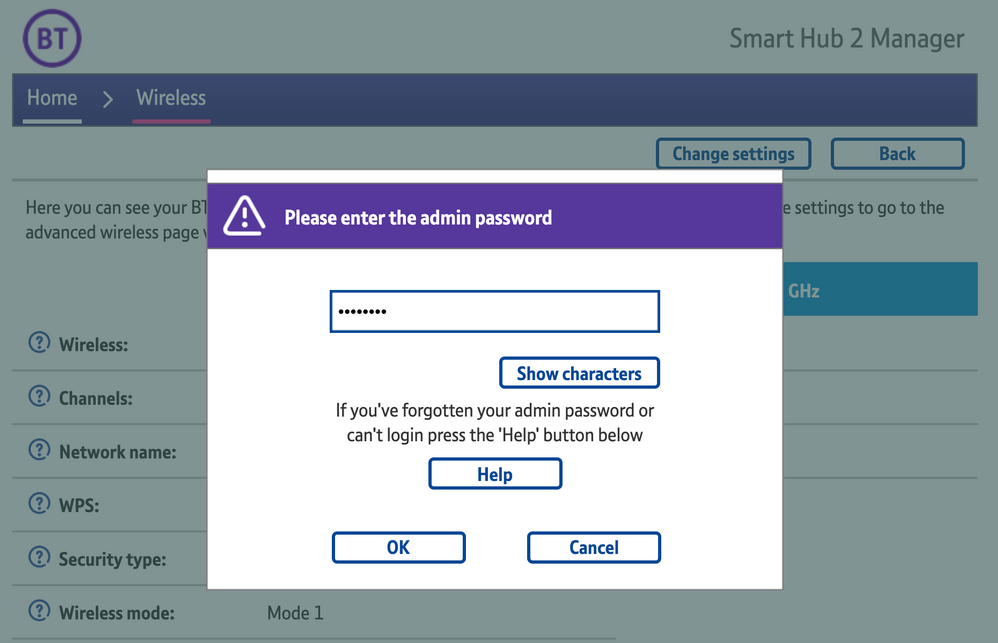
4) Enter the Admin password. This is found on the back of the router and on the removable card. Click ‘OK’
​


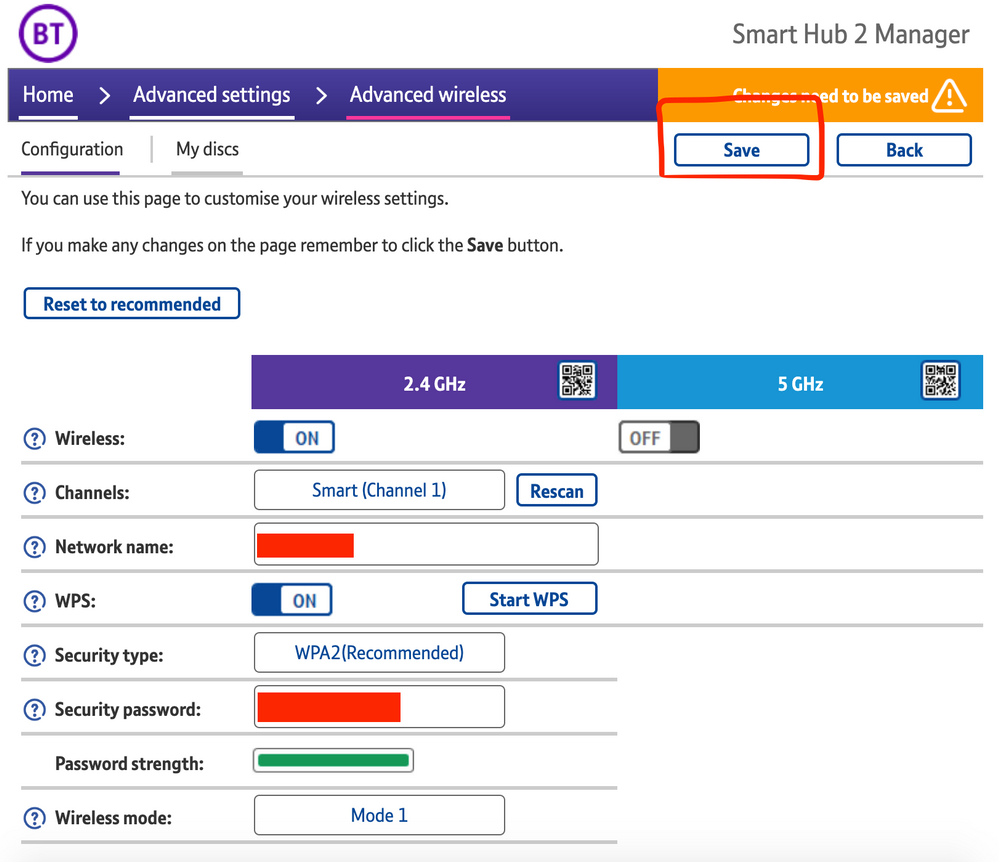
5) Toggle 5GHz OFF

​

6) Click 'Save'

​


7) Click 'Yes' at the warning prompt.
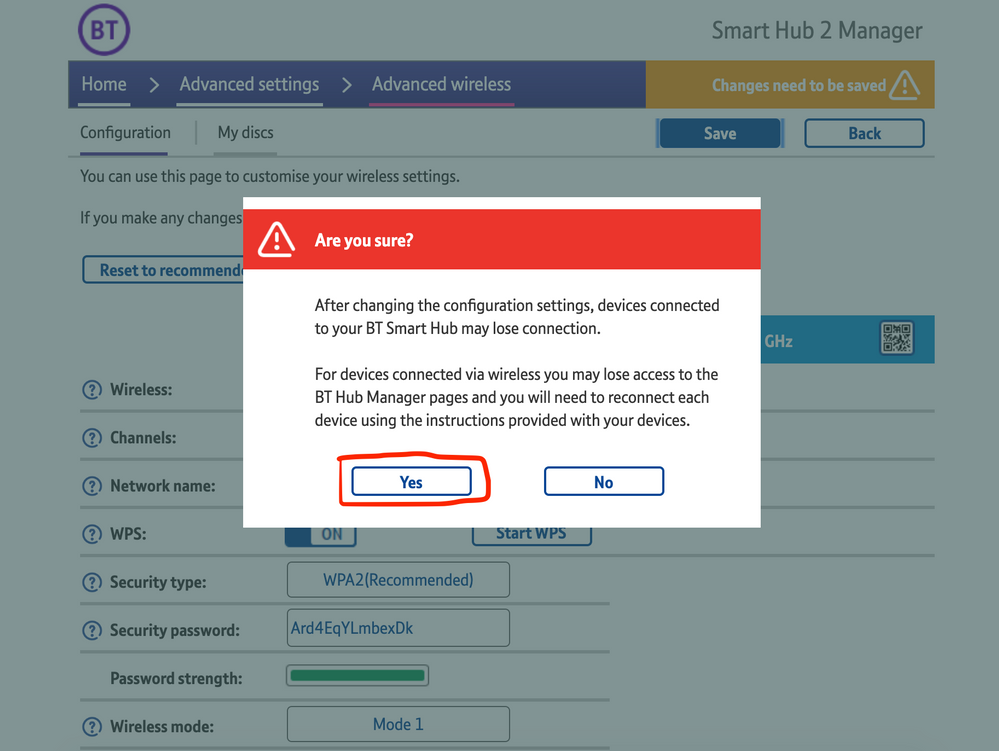
8) Wait for your devices to reconnect. You may need to reboot your Sonos devices by powering them down for 30 seconds and powering them back up.

​


Alternatively, some users have been able to work around the issue by wiring a player directly to the router, though this doesn’t work in every case. Systems that have a Sonos Move or Roam on them will also not be helped by this change, so disabling 5GHz would be best for those households.


 We recommend that you report this issue to BT with the following information:


“Devices connected to the 5GHz band are not able to communicate with devices connected to the 2.4GHz band and it appears the connections are being erroneously isolated.”


You don’t need to specifically mention Sonos devices when reporting this issue to BT as the information alone will be enough for them to recognize the issue you’re facing.
 

BT are indeed aware of this issue and are actively investigating and working to resolve it as quickly as possible. We’ll update this post with any further news as and when we receive it.

This topic has been closed for further comments. You can use the search bar to find a similar topic, or create a new one by clicking Create Topic at the top of the page.

261 replies

Lyricist I
April 18, 2021

Our Sonos system comprises four Sonos:Play1s, a Sonos:Play3 and a Sonos Soundbar. They have all worked fine for nearly 4 years. Now everytime my wife and I try to connect via our Android and iOS Sonos2 apps the system cannot be found. We've followed all advice through the app, managing to temporarily reconnect Sonos to our home WiFi network only for it to fail again and lose connection a couple if hours later.


Every other device in the home runs fine off our WiFi. There have been no updates to our WiFi network or router and we have submitted multiple diagnostic reports without reply.


Now at a loss with what to do and finding the situation and lack of support incredibly bad for the amount of money spent over the years in Sonos products. 


Please help. 


Here is the confirmation number for one of our recent diagnostic reports: 870734868

Lead Maestro
April 18, 2021

Are you able to connect any of your Sonos speakers directly to your router with an ethernet cable?

"Receive with simplicity everything that happens to you." - Rashi
Ken_Griffiths
April 18, 2021

Our Sonos system comprises four Sonos:Play1s, a Sonos:Play3 and a Sonos Soundbar. They have all worked fine for nearly 4 years. Now everytime my wife and I try to connect via our Android and iOS Sonos2 apps the system cannot be found. We've followed all advice through the app, managing to temporarily reconnect Sonos to our home WiFi network only for it to fail again and lose connection a couple if hours later.

Are you perhaps using the BT Smart Hub 2 router by any chance? There are some reports that a recent firmware update to that router has been causing issues with 2.4Ghz/5Ghz WiFi isolation, which could account for what you are seeing with your Sonos devices.

If so, then perhaps try disabling the 5Ghz WiFi band and see if that fixes your issue. If not, then perhaps ignore my post here.

edit: also see this thread.

Contributor I
April 22, 2021

I’ve had this problem and it now seems to be resolved 🤞

ive just upgraded to S2 because I’ve just got a Roam..

I wanted to then set up a separate S1 system for my play 5 gen1

on completing, one minute it would work then the next minute it wouldn’t.. roam and move would disappear on some iOS devices but be visible on others..

anyway did as suggested and spoke to BT.. They said they have made some changes and I would have to now reboot the smart hub 2.. they didn’t actually say what they have done..?

Anyway all is working as it should do at the moment 🤞just to confirm during this process I’ve not touched any of the speakers.. hub was just rebooted and once it came on I opened both apps and all was as it should be 👍

I am so glad I found this on here otherwise I’d still be messing about now trying all sorts of different things!

🤞all is ok come morning 😬

Lyricist III
April 22, 2021

I’m a full sufferer of this issue.. whole system not appearing in the S2 app on 14.4.2 iOS. Disabling 5ghz works fine and all speakers available.. but streaming services on TV downgrade to very low bitrate over 2.4ghz so not workable.

Have hardwired a Play:1 but my Move won’t appear (assume it must be on 2.4 and not sonosnet and my phone is on 5).

Let’s hope BT get this sorted! I’ll be ringing and seeing if they can roll my firmware back.

Contributor I
April 23, 2021

I’m a full sufferer of this issue.. whole system not appearing in the S2 app on 14.4.2 iOS. Disabling 5ghz works fine and all speakers available.. but streaming services on TV downgrade to very low bitrate over 2.4ghz so not workable.

Have hardwired a Play:1 but my Move won’t appear (assume it must be on 2.4 and not sonosnet and my phone is on 5).

Let’s hope BT get this sorted! I’ll be ringing and seeing if they can roll my firmware back.

Sorry to hear of your problems.. have you been in touch with Sonos and sent a diag report to them? If not I would… could be something simple!

All is still working perfectly for me this morning.. and like I’ve said above I touched nothing on my system.. chatted to BT… who reset the hub (as it went back to original factory settings) it interestingly uses the same firmware as mentioned! Once the hub was back on, I changed my network Id and password to what we use here at home so all would connect (tv, iPad, phones etc) and a few minutes later all was good 👍

hope you get it all sorted 🤞

Lyricist III
April 23, 2021

Thanks Nick.. man I was hoping against a whole router factory restore >.< I’ve got SmartHome devices coming out my ears and I think even if I change the SSID back to what it was, everything will need set up again from scratch… there goes my weekend :-D

Contributor I
April 23, 2021

Thanks Nick.. man I was hoping against a whole router factory restore 😣 I’ve got SmartHome devices coming out my ears and I think even if I change the SSID back to what it was, everything will need set up again from scratch… there goes my weekend :-D

How have you got on?

I take it you updated to s2 FROM the s1 app? And it asked you to remove the s1 only speakers?

Lyricist III
April 23, 2021

G’day; at the moment my Move has appeared back in the system list with everything else (somehow.. no idea why as it’s on 5ghz with my phone whilst everything else is on 2.4.. so this problem is full whacky!)..

Since all is currently well, I’m going to wait it out until it drops or something else ends up happening before I go with the nuclear option of completely resetting everything/calling BT.

I did upgrade to S2 from S1 when it launched.. all my kit is S2 compatible.. well; except for a bridge that I wasn’t using anyway!

I’m hoping that, since ‘BT know about this and are working on a fix’, they will release a further router firmware update that will solve the issue completely.

I also have a Hue Sync box that is too suffering from the issue of 5ghz controllers not reaching it on the 2.4ghz band.

Lyricist I
April 24, 2021

This issue has garbaged my Sonos for weeks- extremely disappointing. It can only have been caused by a Sonos app update. How can Sonos blame BT?! 

I finally solved it by turning off Smart Setup on the Home Hub then resetting it. This keeps 5gz.