Trending Lyricist I
December 2, 2022
Answered

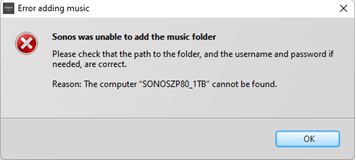
S1 controller unable to add linkstation NAS with error: Reason: The Computer "SONOSZP80_1TB" cannot be found

  • December 2, 2022
  • 32 replies
  • 641 views

Hardware/Software:    Windows 11 with all updates installed, S1 controller, Sonos ZP80, Buffalo Linkstation live 1TB NAS

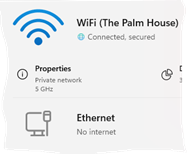
Network Profile Type: Private (VPN via high-speed Wi-Fi - No ethernet access to router)

Connectivity:              ZP80 connects to my VPN via Wi-Fi and the two ports from the ZP80 run ethernet cables to a desktop mini and NAS


I was able to play music from my NAS, with the above connectivity till about Sept/Oct 2022, when a windows 11 update caused the NAS to disappear.  This has now been fixed and I'm once again able to see my ancient 2010 Buffalo Linkstation Live (LS-CHL-V2 series) NAS. 


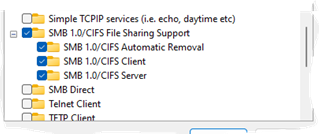
Advanced sharing settings and SMB settings under windows features have all been checked by Sonos and all look fine and I’ve also posted screen grabs below.


When I try and add my NAS share in the S1 Controller I get the following error:

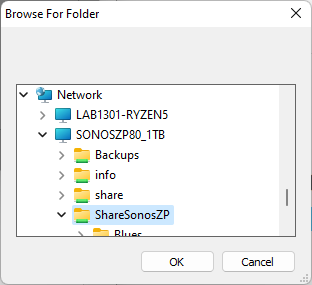
S1 -> Manage tab -> Music Library Settings -> Add -> Networked device -> Browse and select NAS and share from Network tab -> OK -> Next > admin/password -> Error message is - Reason: The Computer "SONOSZP80_1TB" cannot be found


If I manually add the NAS via IP I get the error:

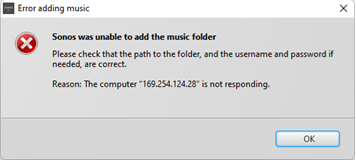
Reason: The Computer "169.XXX.XXX.28" is not responding


Hopefully the screenshots will be more descriptive than the text above:


1) The SONOSZP80_1TB NAS and the ShareSonosZP share are detected by the Sonos S1 app as shown below:
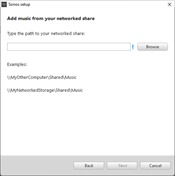


2) NAS added via previous screen
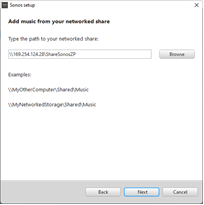
 

3) Why am I getting the following error when the NAS is detected by S1? 
 

4) Via IP address of NAS the error message is different!


Windows 11 firewall settings

SMB Settings


Wi Fi is a private network


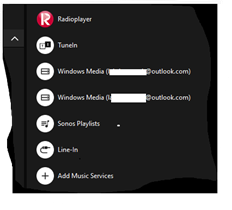
5)  Another thing I noticed, after being able to access the NAS again is that the S1 controller has two entries for Windows Media (xxxx@outlook.com) even though I’ve removed the NAS library.  Previously the NAS was not Windows Media.  I’m tempted to do a clean install of S1 to resolve this particular issue.  Or maybe the two rogue entries will disappear when I add the NAS and update the music library? Any thoughts would be most welcome on this front.


Mod edit: removed case number

This topic has been closed for further comments. You can use the search bar to find a similar topic, or create a new one by clicking Create Topic at the top of the page.
Best answer by Corry P

Hi @Belly M 

You are correct - I forgot about that detail!

There probably is a way to bridge the connections on the PC, but I sure don’t know what it is.

@lab1301, I think it might be best to just buy a router that will provide you with your own subnet. Some routers do allow you to use another WiFi for internet access, while still creating a subnet for you.

32 replies

Corry P
Sonos Staff
December 12, 2022

Hi @lab1301 

I still think the fact that the NAS has an IP address starting with 169 is an issue, though I confess I do not understand why you are able to connect to the NAS’s configuration web portal via your browser.

Do you have manual IPv4 configuration on the NAS, or are you using Automatic (DHCP)? If your NAS’s IP doesn’t match 172.17.5.X, Sonos will not be able to connect to it.

"Common sense is the collection of prejudices acquired by age eighteen." - Albert Einstein
December 12, 2022

Has the 169 address been set as a static address on the NAS device (rather than reserved in the router)?

(That may be the same question as @Corry P ‘s final question)

lab1301Author
Trending Lyricist I
December 12, 2022

Hi @lab1301 

I still think the fact that the NAS has an IP address starting with 169 is an issue, though I confess I do not understand why you are able to connect to the NAS’s configuration web portal via your browser.

Do you have manual IPv4 configuration on the NAS, or are you using Automatic (DHCP)? If your NAS’s IP doesn’t match 172.17.5.X, Sonos will not be able to connect to it.


WINDOWS:  Windows 11, version 22H2

Hi Corry,

DHCP is enabled on the NAS as per screenshot below.  I also think that this is something to do with the DHCP server on the router and I’ve emailed the network team. 


June to September, I bridged the WiFi with the ethernet adapter and that was when I was last able to use the NAS with  Sonos.  Now when I try and create a network bridge I get The network bridge doesn't have a valid IP configuration and I lose all internet connectivity and the S1.


Oh and very strangely, I had to re-login into S1 and re-register my Sonos products late last night and this was when I was investigating/testing the network bridge issue but all that was resolved before I went to bed.   


If I hear back from the network team, I’ll update the post.


lab1301Author
Trending Lyricist I
December 12, 2022

Has the 169 address been set as a static address on the NAS device (rather than reserved in the router)?

(That may be the same question as @Corry P ‘s final question)

The 169.254 address is called an APIPA address. It means the NAS/device cannot connect to the router.  Basically, the device was unable to  obtain an IP address from the router's DHCP server. 


The router here is communal and non of the residents have access to it.  The only connectivity I have is via highspeed Wi Fi.  If I want ethernet connectivity, then,  I will need to bridge the Wi Fi and ethernet adapters to create a network bridge.  Will update this post when I hear back from the network guys with regards to the DHCP server on the router.

Corry P
Sonos Staff
December 12, 2022

Hi @lab1301 

I have no idea why I didn’t see that in the screenshot, considering I was looking at the line directly underneath it. It sounds like it is the DHCP server that needs to be reconfigured - note there’s no DNS servers listed, or a gateway.

I think I may have misinterpreted exactly what a 169 IP address means, but I am still suspicious of it. 169 addresses will not connect to the internet - only to local addresses - so, in theory, the Sonos devices should be able to connect.

Are you able to successfully ping 169.254.124.28?

"Common sense is the collection of prejudices acquired by age eighteen." - Albert Einstein
Ken_Griffiths
December 12, 2022

@lab1301,

Looking at the left panel in your screenshot, it looks to me like you ‘may’ have a DHCP server running on the NAS (if I’m reading it correctly?) - if that is the case, you need to disable that server within the NAS configuration, let it use the routers DHCP server to acquire its network connection.

lab1301Author
Trending Lyricist I
December 12, 2022

Hi @lab1301 

I have no idea why I didn’t see that in the screenshot, considering I was looking at the line directly underneath it. It sounds like it is the DHCP server that needs to be reconfigured - note there’s no DNS servers listed, or a gateway.

I think I may have misinterpreted exactly what a 169 IP address means, but I am still suspicious of it. 169 addresses will not connect to the internet - only to local addresses - so, in theory, the Sonos devices should be able to connect.

Are you able to successfully ping 169.254.124.28?


Yes, I’m able to ping the NAS. 

If you look at my very first post, there is a screenshot of where the S1 does see my NAS and displays the share ShareSonosZP and the folders in the share.  But I get the error shown in the initial post when I try and add the share.   But I’ve posted a fresh set of screenshots below.  I was hoping that there would be a Sonos log somewhere that would give more details on the failure. 


C:\Users\lab1301>ping 169.254.124.28

Pinging 169.254.124.28 with 32 bytes of data:
Reply from 169.254.124.28: bytes=32 time<1ms TTL=64

Ping statistics for 169.254.124.28:
    Packets: Sent = 4, Received = 4, Lost = 0 (0% loss),
Approximate round trip times in milli-seconds:
    Minimum = 0ms, Maximum = 0ms, Average = 0ms


I enter the NAS login details here (admin/password)


Corry P
Sonos Staff
December 12, 2022

Hi @lab1301 

There might be something useful in the logs - please submit a support diagnostic and reply here with the number given, and I’ll take a look. The problem is that they will probably tell us that a connection could not be made, but not why. It is worth checking, however.


"Common sense is the collection of prejudices acquired by age eighteen." - Albert Einstein
Belly M
December 12, 2022

Just to reiterate what Corry is saying a 169….. network address gets assigned by the device itself when it cannot reach a DHCP server, this needs to be fixed as in its current state is not fully routable without having the gateway and DNS entries. 

Ken_Griffiths
December 12, 2022

Just to reiterate what Corry is saying a 169….. network address gets assigned by the device itself when it cannot reach a DHCP server, this needs to be fixed as in its current state is not fully routable without having the gateway and DNS entries. 

As the NAS is wired to the LAN. might it just be a faulty Ethernet connection? Maybe wire PC/laptop to the LAN using the same cable and see if that acquires an IP address from the router, just to check the cable is okay.