Trending Lyricist I
December 2, 2022
Answered

S1 controller unable to add linkstation NAS with error: Reason: The Computer "SONOSZP80_1TB" cannot be found

  • December 2, 2022
  • 32 replies
  • 642 views

Hardware/Software:    Windows 11 with all updates installed, S1 controller, Sonos ZP80, Buffalo Linkstation live 1TB NAS

Network Profile Type: Private (VPN via high-speed Wi-Fi - No ethernet access to router)

Connectivity:              ZP80 connects to my VPN via Wi-Fi and the two ports from the ZP80 run ethernet cables to a desktop mini and NAS


I was able to play music from my NAS, with the above connectivity till about Sept/Oct 2022, when a windows 11 update caused the NAS to disappear.  This has now been fixed and I'm once again able to see my ancient 2010 Buffalo Linkstation Live (LS-CHL-V2 series) NAS. 


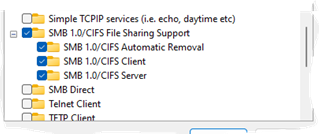
Advanced sharing settings and SMB settings under windows features have all been checked by Sonos and all look fine and I’ve also posted screen grabs below.


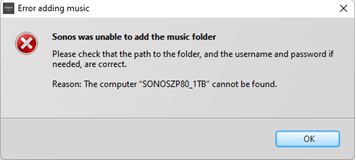
When I try and add my NAS share in the S1 Controller I get the following error:

S1 -> Manage tab -> Music Library Settings -> Add -> Networked device -> Browse and select NAS and share from Network tab -> OK -> Next > admin/password -> Error message is - Reason: The Computer "SONOSZP80_1TB" cannot be found


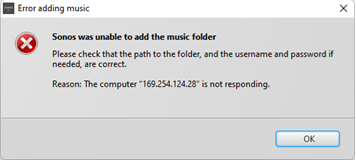
If I manually add the NAS via IP I get the error:

Reason: The Computer "169.XXX.XXX.28" is not responding


Hopefully the screenshots will be more descriptive than the text above:


1) The SONOSZP80_1TB NAS and the ShareSonosZP share are detected by the Sonos S1 app as shown below:
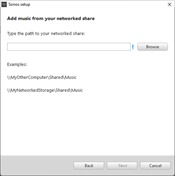
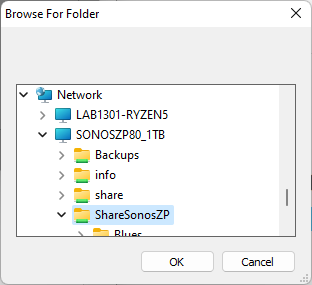


2) NAS added via previous screen
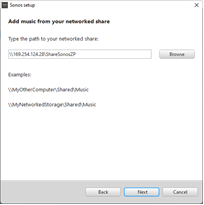
 

3) Why am I getting the following error when the NAS is detected by S1? 
 

4) Via IP address of NAS the error message is different!


Windows 11 firewall settings

SMB Settings


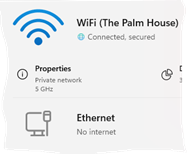
Wi Fi is a private network


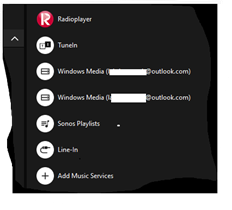
5)  Another thing I noticed, after being able to access the NAS again is that the S1 controller has two entries for Windows Media (xxxx@outlook.com) even though I’ve removed the NAS library.  Previously the NAS was not Windows Media.  I’m tempted to do a clean install of S1 to resolve this particular issue.  Or maybe the two rogue entries will disappear when I add the NAS and update the music library? Any thoughts would be most welcome on this front.


Mod edit: removed case number

This topic has been closed for further comments. You can use the search bar to find a similar topic, or create a new one by clicking Create Topic at the top of the page.
Best answer by Corry P

Hi @Belly M 

You are correct - I forgot about that detail!

There probably is a way to bridge the connections on the PC, but I sure don’t know what it is.

@lab1301, I think it might be best to just buy a router that will provide you with your own subnet. Some routers do allow you to use another WiFi for internet access, while still creating a subnet for you.

32 replies

lab1301Author
Trending Lyricist I
December 2, 2022

The missing screenshots from above are as below:


Corry P
Sonos Staff
December 6, 2022

Hi @lab1301 

Welcome to the Sonos Community!

Unfortunately, if you reply to yourself, your topic is no longer “in need of a reply”.

If I manually add the NAS via IP I get the error:

Reason: The Computer "169.XXX.XXX.28" is not responding


4) Via IP address of NAS the error message is different!


The missing screenshots from above are as below:


An IP address starting with the number 169 is one that a device will assign to itself when it doesn’t get supplied one by the router, as should happen. No device will ever respond when it’s IP starts with that number - it’s not connected.

Why this is happening, I don’t know for sure, but I would assume that the DHCP server on your router has been disabled, or the router is in Bridge mode (which amounts to the same thing). If you don’t know why this is, I recommend you contact your Internet Service Provider for assistance - our ability to assist will be limited, and hampered by our need to connect remotely.

I hope this helps.

"Common sense is the collection of prejudices acquired by age eighteen." - Albert Einstein
lab1301Author
Trending Lyricist I
December 9, 2022

Hi @lab1301 

Welcome to the Sonos Community!

Unfortunately, if you reply to yourself, your topic is no longer “in need of a reply”.

If I manually add the NAS via IP I get the error:

Reason: The Computer "169.XXX.XXX.28" is not responding


4) Via IP address of NAS the error message is different!


The missing screenshots from above are as below:


An IP address starting with the number 169 is one that a device will assign to itself when it doesn’t get supplied one by the router, as should happen. No device will ever respond when it’s IP starts with that number - it’s not connected.

Why this is happening, I don’t know for sure, but I would assume that the DHCP server on your router has been disabled, or the router is in Bridge mode (which amounts to the same thing). If you don’t know why this is, I recommend you contact your Internet Service Provider for assistance - our ability to assist will be limited, and hampered by our need to connect remotely.

I hope this helps.

Thanks Corry.  All worked fine when I had a router but I’ve now moved to a co-living place and that is why I don’t have access to the router and yes, they’ve probably disabled the DHCP server.  I was able to access the NAS via Sonos for a few months till September though at the co-living place. 


Anyway, thanks for the response and I’ll be moving out of here soon and the problem will resolve its self then. 


PS 

The output of my ipconfig is below. 


C:\Users\lab1301>ipconfig /all

Mod edit: removed.

Corry P
Sonos Staff
December 9, 2022

Hi @lab1301 

That’s not the kind of thing you want to share on a public space - I’ve removed it for you. MAC addresses are best kept private.

It was all relating to the PC anyway, and it’s the NAS’s IP address that’s incorrect for a device on a network. The best place to find the correct IP is your router, but as you don’t have access, you can try the following in Command Prompt:

  • ping the broadcast address on the network - replace last number on the PC’s IP with 255 and ping it with the ping command (I now wish I had waited before removing the info above, but the command will be along the lines of “ping 127.xxx.xxx.255”
  • <CTRL> + C to end the ping loop
  • “arp -a” and see if you can find the MAC for the NAS - I can only hope it is written on a sticker on the device somewhere, or you can check by typing the manufacture’s name into https://www.wireshark.org/tools/oui-lookup.html to see how their MAC addresses start.

An option might be to get your own router that connects to the network available, but gives you your own private subnet to use and configure as you see fit.

I hope this helps.

"Common sense is the collection of prejudices acquired by age eighteen." - Albert Einstein
lab1301Author
Trending Lyricist I
December 9, 2022

Thanks for deleting MAC details promptly Corry.  I should have known better. 


Anyway, here is a screenshot of the ping command.  The ping terminated normally without need for a Cntrl-C.  The NAS has a label with the MAC and I can find it in the output of arp -a. 


Microsoft Windows [Version 10.0.22000.1281]
(c) Microsoft Corporation. All rights reserved.

C:\Users\lab1301>ping 172.17.3.255

Pinging 172.17.3.255 with 32 bytes of data:
Reply from 172.17.3.218: Destination host unreachable.

Ping statistics for 172.17.3.255:
    Packets: Sent = 4, Received = 4, Lost = 0 (0% loss),

C:\Users\lab1301>arp -a | grep -i "24-XX-XX"
  169.254.124.28        00-24-XX-XX-XX-XX     dynamic

C:\Users\lab1301>


Airgetlam
December 9, 2022

Sorry, scanning some of the data above, and what I see is SMB v1 turned on in windows, but what I don’t see it is turned on (or off, either way) on the Buffalo Linkstation’s firmware. Sonos doesn’t go through Windows to access the library, the Unix computer in the Sonos device reads that data directly from the NAS, without involving Windows.

Or is the clip under the label SMB Settings from the Buffalo Linkstation’s software/firmware? It’s listed under the Windows 11  firewall settings, but that could just be a format thing. I’m afraid it’s been quite a few years since I retired my Buffalo device, so I’m unfamiliar with their settings page. 

Bruce
December 10, 2022

I have known special characters in computer names to cause problems on Macs. Maybe also applies here? So lose the underscore? 

lab1301Author
Trending Lyricist I
December 10, 2022

I have known special characters in computer names to cause problems on Macs. Maybe also applies here? So lose the underscore? 

Thanks, John.  I’m not using a Mac.  I’ve been using this NAS with the same settings/naming conventions for more than ten years so that is unlikely to be a factor.  The issue started in September 2022 after windows update disabled SMB and the NAS disappeared.


PS

I’ve provided more information to Bruce below.

lab1301Author
Trending Lyricist I
December 10, 2022

Sorry, scanning some of the data above, and what I see is SMB v1 turned on in windows, but what I don’t see it is turned on (or off, either way) on the Buffalo Linkstation’s firmware. Sonos doesn’t go through Windows to access the library, the Unix computer in the Sonos device reads that data directly from the NAS, without involving Windows.

Or is the clip under the label SMB Settings from the Buffalo Linkstation’s software/firmware? It’s listed under the Windows 11  firewall settings, but that could just be a format thing. I’m afraid it’s been quite a few years since I retired my Buffalo device, so I’m unfamiliar with their settings page. 


NAS Model: LS-CH1.0TL-EU

Hi Bruce,

Or is the clip under the label SMB Settings from the Buffalo Linkstation’s software/firmware? It’s listed under the Windows 11  firewall settings, but that could just be a format thing. I’m afraid it’s been quite a few years since I retired my Buffalo device, so I’m unfamiliar with their settings page.


Didn’t quite understand the above paragraph but I’ve posted a screenshot that displays the firmware and network settings.

The link to the user manual of my 2010’ish NAS is below.

LinkStation User Manual (buffalo.jp)

On page 180, under the Appendix, I found the following under Specifications in the above spec:

File Sharing CIFS/SMB, AFP, HTTP/HTTPS, FTP, SFTP*, FTPS* *LS-QVL, LS-WVL, LS-WXL, LS-VL series LinkStations only Management HTTP/HTTPS


When I googled, LS-CH1.0TL-EU, I found:  Specs Buffalo LinkStation Live 1.0TB NAS & Storage Servers (LS-CH1.0TL-EU) (icecat.biz)


The firmware was last updated a few years ago to 1.75.  The only NAS settings that has been fiddled with or changed in the last 10 years has been this firmware update and that was years ago.  The shareSonosZP was created around 2010’ish and everything was working fine till September 2022.  It is unlikely that the issue is going to be in the NAS end because apart from it being turned on and off, nothing has changed on the NAS end.

It is possible that this is a network issue that will disappear when I move on from my current co-living place.  And the reason I think it could be a network issue is because the network guys here have made changes to the network in the last month when the NAS was down so it is possible that’s where the issue is.  The Sonos S1 controller was able to access the NAS from June to September in my current location till that Windows update changed the SMB settings around September.  The network configuration in my current co-living place was changed in November 2022.   


I’m reasonably techy and know my way around Unix better than Windows even though I’m capable of posting MAC addresses on a public forum but Corry fixed that issue!  If you need any further information, please let me know.


Airgetlam
December 10, 2022

Sigh. Thanks, Apple, for erasing three paragraphs of commentary. I’ll try to summarize, but fair warning, the page numbers may be off by one or two pages.

First, this manual is old, and likely written before there were multiple versions of SMB to choose from. Id be tempted to contact Buffalo’s CS group for more information on exactly where you can set which version of SMB is in use.

There are a couple of pages (148, 156 I think) where there is further discussion about SMB, although the latter is if you’ve delegated that to an external device, and I hope that you haven’t, and even if you have, I think the data you cut and pasted above would handle that correctly.

Beyond that, I think id be relying on Sonos support, in the hopes that a diagnostic would reflect a useful error when the Sonos system running on the speaker tries to reach out, using SMB, to the NAS. 

I’ll keep watching this thread, hopefully I can learn a bit more. Best of luck!

Bruce