
Contributor I
November 24, 2017
Answered

How to connect Sonos Connect to receiver

  • November 24, 2017
  • 24 replies
  • 41217 views
How do I connect a Sonos Connect to a receiver so that I can listen to CDs on my Play 1 speakers? I’ve connected the audio out on the Connect to the CD audio in on the receiver - nothing plays. I’ve hooked it up to the Tape audio in on the receiver, tuned the receiver to Tape, again nothing happens. As best I can tell, the Connect was successfully hooked up through the Sonos app at the beginning of this process which, I assume, means Connect and Play 1 speakers will work together once I get receiver hooked up appropriately. Help! Thanks.
This topic has been closed for further comments. You can use the search bar to find a similar topic, or create a new one by clicking Create Topic at the top of the page.
Best answer by pwt
It's a little hard to figure out what you've connected where without a picture or connectivity diagram. It's rather unlikely that the CONNECT is defective, so it's more likely to be a connection or configuration issue.

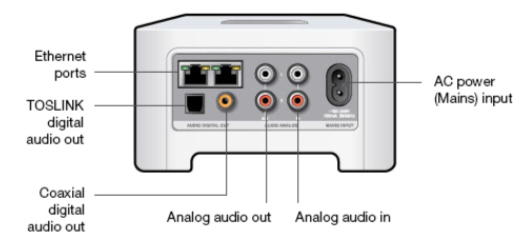
If you haven't already done so, I suggest you simplify the device connections just for now by leaving the receiver completely out of the picture and connecting the CD Player analog outputs to the CONNECT Analog audio in Inputs (identified in the picture below), using standard phono/RCA cables. Connect the mains cable and the Ethernet cable if applicable, and nothing else.


Then try it again.

24 replies

Susan LAuthor
Contributor I
November 27, 2017
Thanks so much for your help!
Lyricist III
November 28, 2017
By the way, if the only input you'd be using is the CD, and not anything else, you could just connect the CD player directly to the analog audio-in jacks on the connect, and ditch the receiver. But that's only if the CD is the only thing you're listening to.

I was told that you can not connect a CD changer to a connect or a connect AMP. Has anyone done this and gotten it to work ? My Sony CD Changer is not powered, it used to be connected to my Sony amp/receiver but I have since sold that amp and speakers and wanted to use the CD changer to listen to my CD's thru my SONOS speakers. Will this in fact work ?
Airgetlam
November 28, 2017
I can't see why the Sonos CONNECT would care what the source of the input is, as long as it is of the correct volume. Which is why when connecting a turntable, it needs to have a pre-amp, but sure, it should absolutely take a CD player's input.

You'd get lots of people, including me, suggesting that it might make more sense to "rip" the CDs to a hard drive, and play from that instead, which would keep you from having to get up every 40 minutes to swap out CDs. 🙂 But I can't think of any technical reason why a CD player can't be plugged in to a CONNECT.
Bruce
Lyricist III
November 28, 2017
Thanks Airgetlam ! I would do the same thing, but it would take a long time to Load all the CD's to my hard drive. The CD player I have is actually a 10 Disc Changer so I could load 10 CD's at once in a magazine, hit random and let it go.
Airgetlam
November 28, 2017
Laugh. No worries. Time and effort are relative. To me, it would be worth spending the time once, so I wouldn't have to do it again, but I also understand your viewpoint. Give it a try, I think you'll end up being pleased either way. And if you can't make it work, come back here and yell at me :)

You're most welcome.
Bruce
Lyricist III
November 28, 2017
By the way, does the connect have to be physically connected to my router ?
November 28, 2017
I would do the same thing, but it would take a long time to Load all the CD's to my hard drive. The CD player I have is actually a 10 Disc Changer so I could load 10 CD's at once in a magazine, hit random and let it go.
On a NAS, you can load all your CDs into one playlist, hit random and let it go! I have some playlists that have 4000 songs in them.
And once you discover streamed services like Apple/Google, you don't even need to rip music to a NAS - nor buy any CDs.
Airgetlam
November 28, 2017
No, not technically. Everything can hang off of your wifi.

But I prefer to keep one device connected to the router, so that the system creates SonosNet, and keeps the music off of my own wifi and on Sonos'. Keeps lag on my systems at a minimum. But that device doesn't have to be the CONNECT, it could be any Sonos speaker, or a BRIDGE/BOOST.
Bruce
Lyricist III
November 28, 2017
Thanks again Airgetlam ! My Sonos bridge is physically connected to the router. I didnt want to have the connect and therefore the CD changer in the room where the router is if i didnt have to.
Airgetlam
November 28, 2017
Nope, you're absolutely fine with the BRIDGE connected. You can put the CONNECT and the CD changer anywhere within normal wifi range.

The fact that you have the BRIDGE connected means that all of your devices should be on SonosNet, which is, in my most humble opinion, the best option. Go forth, and enjoy music 🙂
Bruce