
Contributor I
November 24, 2017
Answered

How to connect Sonos Connect to receiver

  • November 24, 2017
  • 24 replies
  • 41217 views
How do I connect a Sonos Connect to a receiver so that I can listen to CDs on my Play 1 speakers? I’ve connected the audio out on the Connect to the CD audio in on the receiver - nothing plays. I’ve hooked it up to the Tape audio in on the receiver, tuned the receiver to Tape, again nothing happens. As best I can tell, the Connect was successfully hooked up through the Sonos app at the beginning of this process which, I assume, means Connect and Play 1 speakers will work together once I get receiver hooked up appropriately. Help! Thanks.
This topic has been closed for further comments. You can use the search bar to find a similar topic, or create a new one by clicking Create Topic at the top of the page.
Best answer by pwt
It's a little hard to figure out what you've connected where without a picture or connectivity diagram. It's rather unlikely that the CONNECT is defective, so it's more likely to be a connection or configuration issue.

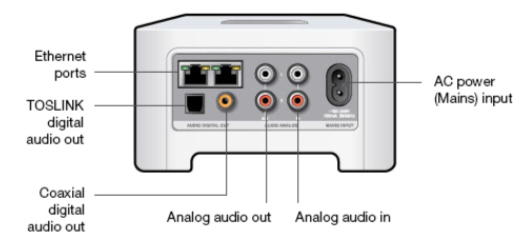
If you haven't already done so, I suggest you simplify the device connections just for now by leaving the receiver completely out of the picture and connecting the CD Player analog outputs to the CONNECT Analog audio in Inputs (identified in the picture below), using standard phono/RCA cables. Connect the mains cable and the Ethernet cable if applicable, and nothing else.


Then try it again.

24 replies

Airgetlam
November 24, 2017
I think you may have connected it backwards. The audio out from the receiver (often a tape out jack) goes to the analog audio in on the Connect. Then, when you play the CD on the receiver, it will go to the CONNECT as well, and when you turn on the line-in in the Sonos controller app, and adjust it properly, the music should play through the PLAY:1s.

Note that all analog line-ins on Sonos devices do incur at least an approximate 70ms delay, for processing, so the Sonos speakers will be in sync with each other, but not with the speakers on the receiver.
Bruce
Airgetlam
November 24, 2017
By the way, if the only input you'd be using is the CD, and not anything else, you could just connect the CD player directly to the analog audio-in jacks on the connect, and ditch the receiver. But that's only if the CD is the only thing you're listening to.
Bruce
Susan LAuthor
Contributor I
November 25, 2017
Hi Bruce - thanks for your responses. I reversed as you suggested, and used the tape out, and still no sound. Then I connected directly to the CD player and still nothing. I contacted Sonos and they tell me the Connect and Play 1s are working.

Above you mentioned going into the Sonos app to the in-line, and “adjusting it properly”. What did you mean? Are you talking about ensuring I’m going through the Rooms, in my case family room as this is where I initially connected the Connect? I know I can get to Portable or Family Room in this section and I am tapping on the Family Room. Sorry if this doesn’t make sense but it’s what the Sonos folks asked me to do.

I’ve confirmed the CD player is working. I’ve tried a different set of analog jacks. If you have any other suggestions, please let me know. Thanks again!
Susan
pwt
Virtuoso
November 25, 2017
- Connect the CDP analog outputs to the CONNECT analog inputs. Sounds like you’ve done that.
- Choose the ‘Room’ you want the music to play in via the Sonos controller
- Go to ‘Browse’, Line In, select the CONNECT’s input
- Your chosen Room will now play the CDP’s output.

I’d say it’s most likely you’re omitting the third step above.
4 x P:5 | Sub | 4 x P:1 | 3 x Connect | 2 x Boost | Connect:Amp | 2 x One | Amp | Move | Port | Era 300
November 25, 2017
Good advice already given. I would like to check one additional thing. You said '..... family room as this is where I initially connected the Connect'. Can you confirm that when you added the Connect you gave it a unique room name, and did not name it the same as an existing speaker? It sounded a bit like you had named it the same as an existing room, but I may be completely misinterpreting your words. If I am wrong, please ignore this post!
Susan LAuthor
Contributor I
November 25, 2017
Hi everyone. Thanks so much for all of the responses but it just doesn’t work. It knows it’s connected to an AV component (through Browse, line-in, and tap on family room). The little bars next to Family Room are changing in height (assume this means music is being played). In family room box, there’s a Group box and assume this means speakers and Connect are in sync. Also a Family Room is a unique name (speakers alone is called Portable).

I am going directly into CD player as this seemed simplest. I’ve tried using the optical line from Connect to CD, as this is how I had it set up to receiver originally and know this line works (Sonos thought the analog jacks they sent may not be working), I’ve tried other analog jacks which Sonos confirmed worked through diagnostic. I even tried to reconnect Connect but Sonos app knew it was connected. I’m thinking it shouldn’t be this hard.

So before I box it up and send it back, any additional thoughts? THANKS!
pwt
pwtAnswer
Virtuoso
November 25, 2017
It's a little hard to figure out what you've connected where without a picture or connectivity diagram. It's rather unlikely that the CONNECT is defective, so it's more likely to be a connection or configuration issue.

If you haven't already done so, I suggest you simplify the device connections just for now by leaving the receiver completely out of the picture and connecting the CD Player analog outputs to the CONNECT Analog audio in Inputs (identified in the picture below), using standard phono/RCA cables. Connect the mains cable and the Ethernet cable if applicable, and nothing else.


Then try it again.
4 x P:5 | Sub | 4 x P:1 | 3 x Connect | 2 x Boost | Connect:Amp | 2 x One | Amp | Move | Port | Era 300
November 25, 2017
Very good advice again from @pwt. Just to emphasise... please remove the optical connection - it cannot do anything for you and may be sabotaging things. The optical connection on the Connect is an OUTPUT and so connecting it to the CD player's output is doomed to failure.

For now, please ensure that Family Room and Portable are NOT grouped. You need Portable to be the room that is playing, with line-in as the selected source.
Susan LAuthor
Contributor I
November 25, 2017
Success!! Reconnected everything again and ensured I tapped inline in Browse (think this was my problem as you suggested). Thanks so much for your help.

It may take a village to raise a child, but it clearly takes a global community to help me. Thanks again!!
November 25, 2017
Excellent. If you haven't done so already you can now connect the optical from the Connect to the receiver, or analog out from the Connect to an input on the receiver (e.g. aux or CD or tape in) and listen through your hifi not just the Play speakers.