Contributor I
Nov 24, 2017 9:38 PM UTC
Answered

How to connect Sonos Connect to receiver

How do I connect a Sonos Connect to a receiver so that I can listen to CDs on my Play 1 speakers? I’ve connected the audio out on the Connect to the CD audio in on the receiver - nothing plays. I’ve hooked it up to the Tape audio in on the receiver, tuned the receiver to Tape, again nothing happens. As best I can tell, the Connect was successfully hooked up through the Sonos app at the beginning of this process which, I assume, means Connect and Play 1 speakers will work together once I get receiver hooked up appropriately. Help! Thanks.
This topic has been closed for further comments. You can use the search bar to find a similar topic, or create a new one by clicking Create Topic at the top of the page.
pwt
pwtAnswer
Virtuoso
Nov 25, 2017 3:06 PM UTC
It's a little hard to figure out what you've connected where without a picture or connectivity diagram. It's rather unlikely that the CONNECT is defective, so it's more likely to be a connection or configuration issue.

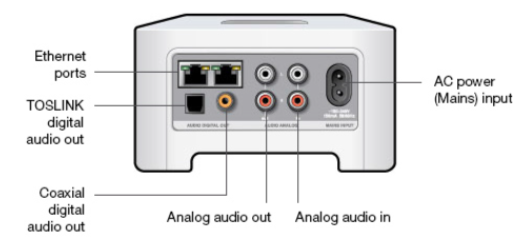
If you haven't already done so, I suggest you simplify the device connections just for now by leaving the receiver completely out of the picture and connecting the CD Player analog outputs to the CONNECT Analog audio in Inputs (identified in the picture below), using standard phono/RCA cables. Connect the mains cable and the Ethernet cable if applicable, and nothing else.


Then try it again.
4 x P:5 | Sub | 4 x P:1 | 3 x Connect | 2 x Boost | Connect:Amp | 2 x One | Amp | Move | Port | Era 300

24 replies

Contributor I
Mar 14, 2018 4:58 PM UTC
The best way is to plug your CONNECT into the router to create SONOSNet which gets it off of your Router and communication goes through a separate SONOS network.
Translate
Airgetlam
Mar 14, 2018 5:42 PM UTC
Just a note. The music still is traveling on your router, just not on your WiFi. It gets moved to a parallel WiFi signal (SonosNet), so any of the devices you use aren’t impacted by the more restrictive bandwidth. But you will alway be limited by what your router can handle...albeit unlikely to hit that limit.
Translate
Bruce
Contributor I
Mar 14, 2018 6:17 PM UTC
Thanks for clarification on this. Appreciate it.
Translate
Airgetlam
Mar 14, 2018 6:26 PM UTC
Happy to point it out. You were essentially on the right track, but the terminology was slightly off, and want people who find this thread later on to be clear. I think I said what you meant.
Translate
Bruce