Answered

ZP90 cracking up sound when Play5 linked up

  • May 3, 2026
  • 20 replies
  • 129 views

Hi all.
I have a Sonos ZP90 zone player that works fine in our bar - outhouse, also linked play5 1st generation that I use sometimes outside in summer months.

The ZP90 works fine in the bar, but when the Play5 is connected, it also works fine and audio is stable, but then the ZP90 in the bar starts cracking up – intermittent – hiccup sound like a lose wire like on a microphone eg, the play 5 outside (only 6 meters away from the ZP90) works perfectly and audio is stable with no issues.

The Zone player ZP90 is connected to the routed via ethernet cable, the Play 5 is working via wifi.

This problem occurs both from my laptop and also same thing from my iPhone.
I wondered if anyone could suggest a reason for this, or a solution to this issue as it is now doing my head in!


Best answer by Schlumpf

Please confirm that the wired ZP has wifi disabled on the internal settings.

If it isn't it will create a 2.4 gHz Sonosnet and pull your Play 5 off your home Wi-Fi. 

On the other hand a disabled wifi on the zp90 could cause the issue, because the play5 has bad router wifi connection and SonosNet to the just 6 meters away zp90 can’t work. 
Another reason (if wifi is enabled on both devices) could be the zp90 lan connection, if the zp90 isn’t connected directly to the router but to an ethernet switch that doesn’t support igmp snooping. 

20 replies

MoPac
Forum|alt.badge.img+19
  • Headliner III
  • May 3, 2026

What happens if you put them both on WiFi?


Stanley_4
  • Grand Maestro
  • May 3, 2026

Please confirm that the wired ZP has wifi disabled on the internal settings.

If it isn't it will create a 2.4 gHz Sonosnet and pull your Play 5 off your home Wi-Fi. 


Schlumpf
Forum|alt.badge.img+18
  • Virtuoso
  • Answer
  • May 3, 2026

Please confirm that the wired ZP has wifi disabled on the internal settings.

If it isn't it will create a 2.4 gHz Sonosnet and pull your Play 5 off your home Wi-Fi. 

On the other hand a disabled wifi on the zp90 could cause the issue, because the play5 has bad router wifi connection and SonosNet to the just 6 meters away zp90 can’t work. 
Another reason (if wifi is enabled on both devices) could be the zp90 lan connection, if the zp90 isn’t connected directly to the router but to an ethernet switch that doesn’t support igmp snooping. 


Stanley_4
  • Grand Maestro
  • May 3, 2026

Please confirm that the wired ZP has wifi disabled on the internal settings.

If it isn't it will create a 2.4 gHz Sonosnet and pull your Play 5 off your home Wi-Fi. 

On the other hand a disabled wifi on the zp90 could cause the issue, because the play5 has bad router wifi connection and SonosNet to the just 6 meters away zp90 can’t work. 
Another reason (if wifi is enabled on both devices) could be the zp90 lan connection, if the zp90 isn’t connected directly to the router but to an ethernet switch that doesn’t support igmp snooping. 

Yes lots of possible guesses - all depending on the disable-wifi setting.

Rather than speculating on the multiple possibilities I was trying to narrow the field.

I'll leave this topic to you to avoid confusing the OP.


Schlumpf
Forum|alt.badge.img+18
  • Virtuoso
  • May 3, 2026

@Stanley_4 

I‘m sorry if my post might be confusing… I just tried to show some additional possible reasons. So please don’t leave me alone. 😘


What happens if you put them both on WiFi?

Tried that also & same thing happens?


Please confirm that the wired ZP has wifi disabled on the internal settings.

If it isn't it will create a 2.4 gHz Sonosnet and pull your Play 5 off your home Wi-Fi. 

I would assume that my ZP90 would have wifi enabled as I tried using via wifi (pulling out the ethernet cable) and still works fine that way, but yeah same thing happens once the Play 5 connected??
I will try what you said however & disable wifi in settings, the router only 2 ft away from the ZP90 so no drama there.
Many thanks for your reply Stanley_4
Phil


MoPac
Forum|alt.badge.img+19
  • Headliner III
  • May 8, 2026

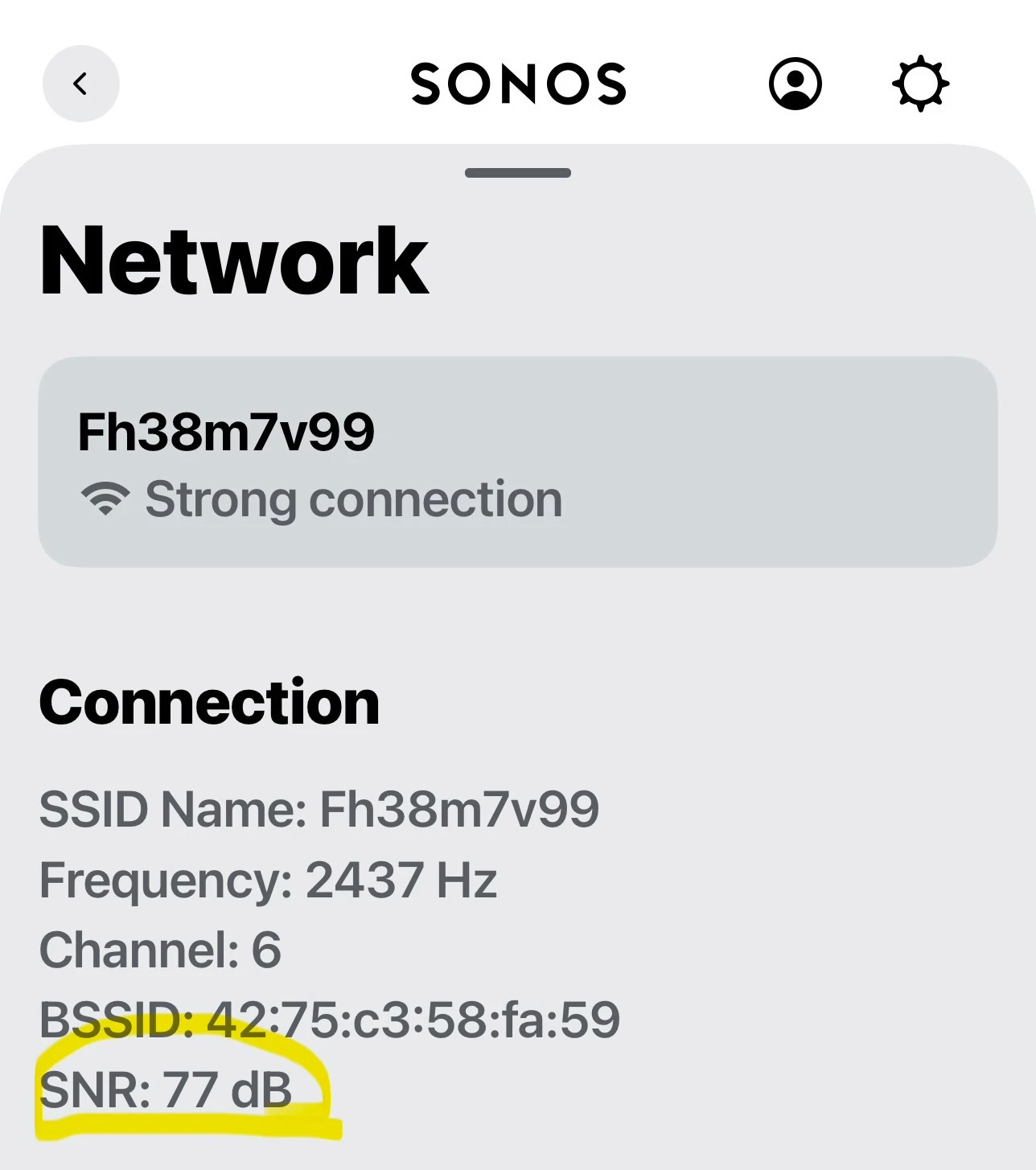
When both the ZP90 & Play5 are on WiFi what are their signal strength readings.  45 and above is excellent.


When both the ZP90 & Play5 are on WiFi what are their signal strength readings.  45 and above is excellent.

Not a clue? How the heck to check this? I have had Sonos in my house for about 12 years and never had to go through any settings ever before this annoying issue occured.
I have another spare ZP80 that I will try this weekend as a just in case etc, but don’t think it’s a hardware issue, it’s maybe a router-wifi config issue - confliction.
Just more info for you. The Bar is 60 meters from the house and have long ago routed a cat5 cable from
House to bar, with another router, as I said all fine with 280mbps wifi speed and the zone player and everything working fine.
Only when I introduce the Play5 unit outside (that performs perfectly) does it upset the ZP functionality
& music in the bar, if I unplug the play 5 it works fine again? Never had this issue before ever with Sonos.
Obviously a confliction going on eh!


Stanley_4
  • Grand Maestro
  • May 8, 2026

2 feet may be too or almost too close, 3 to 5 feet is a safer distance. Older wifi radios are more susceptible to a too strong external signal disrupting the internal radio.

I haven't used the horribly named disable-wifi (actually radio disable) for a while now and can't recall if it is a persistent setting or not. In any case it should auto-disable when the Ethernet is disconnected, just not sure what happens if you reconnect it.


MoPac
Forum|alt.badge.img+19
  • Headliner III
  • May 8, 2026

When both the ZP90 & Play5 are on WiFi what are their signal strength readings.  45 and above is excellent.

Not a clue? How the heck to check this? I have had Sonos in my house for about 12 years and never had to go through any settings ever before this annoying issue occured.
I have another spare ZP80 that I will try this weekend as a just in case etc, but don’t think it’s a hardware issue, it’s maybe a router-wifi config issue - confliction.
Just more info for you. The Bar is 60 meters from the house and have long ago routed a cat5 cable from
House to bar, with another router, as I said all fine with 280mbps wifi speed and the zone player and everything working fine.
Only when I introduce the Play5 unit outside (that performs perfectly) does it upset the ZP functionality
& music in the bar, if I unplug the play 5 it works fine again? Never had this issue before ever with Sonos.
Obviously a confliction going on eh!

In the Sonos app: Settings - ZP90 room name - ZP90 under Products - Network.


Rajpriye
Forum|alt.badge.img+1
  • Lyricist III
  • May 13, 2026

That honestly sounds more like a SonosNet/wireless interference issue than a hardware fault, especially since the Play:5 itself stays stable while the ZP90 starts breaking up when grouped. Older Sonos gear can get pretty sensitive to Wi-Fi congestion or mixed wired/wireless topology, so I’d first try changing the SonosNet channel (1/6/11), reboot both units, and temporarily wire the Play:5 via Ethernet to see if the issue disappears.


Thanks Rajpriye for reply and that info. 
I did as suggested from others last weekend, disabled wifi on the ZP90 & tested when grouped to the Play:5, all was fine thereafter I thought “Bingo” all solved, but then after about 5 minutes the ZP90 started cracking up & hickuping again Argh! yet the play 5  outside was working fine..?
In all the years I have had sonos, I have never had this problem before, hence I have never had to go into settings and change or fiddle with anything before now, they have just worked fine.
Just to recap, it’s only when I plug in the play 5 to use outside does this issue happen, when not, the zp90 works fine?
I just remembered I have another spare Play:5 and also a spare ZP80 that I will setup and try this weekend when I there.
Also first I will attempt to do what you have suggested and see what happens, if I can get my head around how to do
Thanks again

Phil


Stanley_4
  • Grand Maestro
  • May 14, 2026

Since so much information is hidden from users submitting a diagnostic and calling Sonos support is often the only way to see what is happening internally.


Since so much information is hidden from users submitting a diagnostic and calling Sonos support is often the only way to see what is happening internally.

I hardly think Sonos support will be at all interested with old product, maybe the cause in the first place
built in sw obsolecence etc


Airgetlam
  • May 14, 2026

Seems like an odd stance, Sonos continues to support all of their audio products. The only three devices that have been ‘retired’ by Sonos are two physical remotes and an Apple 30 pin connector. 


Stanley_4
  • Grand Maestro
  • May 14, 2026

Yet Sonos has support people still answering S1 / old hardware questions and reviewing diagnostic data.


106rallye
Forum|alt.badge.img+18
  • May 15, 2026

Using the "built in obsolescence” argument when using a ZP90 seems very odd to me. The ZP90 was introiduced in 2008 according to Throwback Thursday. The Early Innovations of Sonos: 2005-2009 | Sonos Community For a connected device this is the stone age - and it is still supplied with (security) updates…..


Stanley_4
  • Grand Maestro
  • May 15, 2026

Still supporting the Zone Player 80 too.

https://www.amazon.com/Sonos-ZonePlayer-ZP80-Discontinued-Manufacturer/dp/B000F8HDAW


jgatie
  • May 15, 2026

I hardly think Sonos support will be at all interested with old product, maybe the cause in the first place
built in sw obsolecence etc


The main complaint about Sonos used to be their obsession with supporting legacy equipment prevented them from implementing new features. This changed when they were forced to split S1/S2, but the irony of that change is not lost on those who know the history of Sonos and the complaints thereof.  Either way, waiting 15 years to finally split off older, less capable units, and still supporting them with security and bug updates, not to mention the full support of their staff, is hardly what one would call “built in sw obsolecence (sic)”.

But you, with your 5 total posts, probably aren’t aware of that history, so I’ll cut you some slack . . . 😉