The system has been mostly functional, but last night—of course, with a house full of people—it completely fell apart. The standard Sonos response was the predictable “it’s your network,” which is nonsense. It has never been my network. This is a small-business-grade enterprise system running security (including cameras and door entry), HVAC, lighting, and general Wi-Fi without a single issue. Sonos is the only thing that consistently struggles.
I’m then told that multiple Port units need to be registered. Fine. I follow that path and immediately hit the requirement for precise location services to be enabled. For a wired streaming device. Completely unacceptable—but at this point I just want the system functional and don’t feel like sacrificing an entire weekend to troubleshooting. Even then, each unit takes multiple attempts before it finally registers.
To make matters worse, the system only identifies devices by serial number, not by name or location. These units are installed across several racks around the property, so I’m forced to physically hunt them down one by one just to figure out which device the app is complaining about.
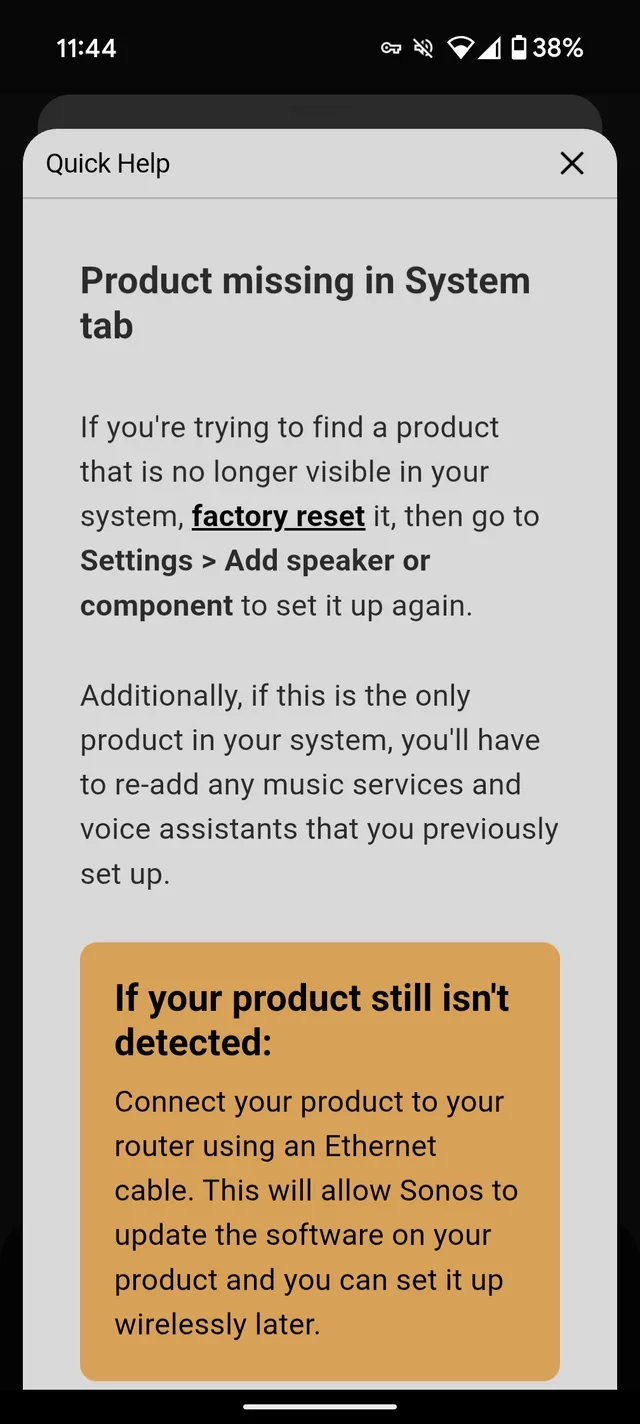
After completing the Port units, I’m then informed that all other devices—Plays, Connects, etc.—must be factory reset. Again, no names, no locations, no guidance. Just serial numbers. So now I’m walking room to room, resetting devices, renaming them, and effectively rebuilding the entire system from scratch.
After getting several devices reconfigured, I stopped to check whether any of this actually resolved the original issue. It has not. Zero improvement.
If anyone has a reasonable, non-destructive solution to fix this, I’m all ears.
Sonos, this is absolute bulls***. How did anyone at your company think this was an acceptable user experience—especially for customers with larger, distributed systems who have spent a significant amount of money on your products?
I’m sorry to hear of the issues you’ve had with operating your Sonos system.
The system has been mostly functional, but last night—of course, with a house full of people—it completely fell apart.
Please be aware that a large group of people can significantly affect the performance of your Wi-Fi network - it’s entirely possible that a Sonos system will work perfectly when there is no large group of people present, then fail when there is one. Keeping speakers and the router/Access Points above head height can help with this, but if you plan to have regular large parties, I’d recommend at least looking into the option of wiring as many speakers/players as possible to Ethernet
The standard Sonos response was the predictable “it’s your network,” which is nonsense. It has never been my network. This is a small-business-grade enterprise system running security (including cameras and door entry), HVAC, lighting, and general Wi-Fi without a single issue. Sonos is the only thing that consistently struggles.
Generally, most devices look to connect to the internet and don’t really care about communicating with each other much. Sonos operates differently - the speakers are in constant communication with other local devices (controllers or other speakers) and therefore often highlight networking issues that other systems do not.
I’m then told that multiple Port units need to be registered. Fine. I follow that path and immediately hit the requirement for precise location services to be enabled. For a wired streaming device. Completely unacceptable—but at this point I just want the system functional and don’t feel like sacrificing an entire weekend to troubleshooting. Even then, each unit takes multiple attempts before it finally registers.
“Precise Location Services” is what your device calls giving an app access to the list of Wi-Fi networks available - without this list, we cannot get a Sonos device connected to the network.
Your Port should not have needed re-registering, however - this is on us, and I’m not sure why that happened.
To make matters worse, the system only identifies devices by serial number, not by name or location. These units are installed across several racks around the property, so I’m forced to physically hunt them down one by one just to figure out which device the app is complaining about.
This is a fair point, but if the app cannot identify a device, it does not know how it is configured. All it knows is that there used to be a device with a certain identifier on the network (the hardware MAC address is the same as the serial number) and that it is missing. Technically, in fact, it does not even know this much - it is informed by the other speakers.
After completing the Port units, I’m then informed that all other devices—Plays, Connects, etc.—must be factory reset. Again, no names, no locations, no guidance. Just serial numbers. So now I’m walking room to room, resetting devices, renaming them, and effectively rebuilding the entire system from scratch.
After getting several devices reconfigured, I stopped to check whether any of this actually resolved the original issue. It has not. Zero improvement.
If anyone has a reasonable, non-destructive solution to fix this, I’m all ears.
Sonos, this is absolute bulls***. How did anyone at your company think this was an acceptable user experience—especially for customers with larger, distributed systems who have spent a significant amount of money on your products?
I am very sorry to hear that the app led you in this direction. For anyone else reading this, I do not recommend factory resetting your Sonos products for any reason other than if you are selling or giving it away, unless instructed to by Sonos support. In all other circumstances, I’d recommend getting in touch with our support team prior to factory resetting any devices - a factory reset rarely fixes anything, and often just creates more work. For you, @Designer, I recommend that you get in touch with our support team before going any further - they will advise on how to actually resolve the issue you were having and on how to minimise the chance of you erasing all your preferences.
I hope this helps.
Edit: Added “unless instructed to by Sonos support”
This topic has been closed for further comments. You can use the search bar to find a similar topic, or create a new one by clicking Create Topic at the top of the page.
I’m sorry to hear of the issues you’ve had with operating your Sonos system.
The system has been mostly functional, but last night—of course, with a house full of people—it completely fell apart.
Please be aware that a large group of people can significantly affect the performance of your Wi-Fi network - it’s entirely possible that a Sonos system will work perfectly when there is no large group of people present, then fail when there is one. Keeping speakers and the router/Access Points above head height can help with this, but if you plan to have regular large parties, I’d recommend at least looking into the option of wiring as many speakers/players as possible to Ethernet
The standard Sonos response was the predictable “it’s your network,” which is nonsense. It has never been my network. This is a small-business-grade enterprise system running security (including cameras and door entry), HVAC, lighting, and general Wi-Fi without a single issue. Sonos is the only thing that consistently struggles.
Generally, most devices look to connect to the internet and don’t really care about communicating with each other much. Sonos operates differently - the speakers are in constant communication with other local devices (controllers or other speakers) and therefore often highlight networking issues that other systems do not.
I’m then told that multiple Port units need to be registered. Fine. I follow that path and immediately hit the requirement for precise location services to be enabled. For a wired streaming device. Completely unacceptable—but at this point I just want the system functional and don’t feel like sacrificing an entire weekend to troubleshooting. Even then, each unit takes multiple attempts before it finally registers.
“Precise Location Services” is what your device calls giving an app access to the list of Wi-Fi networks available - without this list, we cannot get a Sonos device connected to the network.
Your Port should not have needed re-registering, however - this is on us, and I’m not sure why that happened.
To make matters worse, the system only identifies devices by serial number, not by name or location. These units are installed across several racks around the property, so I’m forced to physically hunt them down one by one just to figure out which device the app is complaining about.
This is a fair point, but if the app cannot identify a device, it does not know how it is configured. All it knows is that there used to be a device with a certain identifier on the network (the hardware MAC address is the same as the serial number) and that it is missing. Technically, in fact, it does not even know this much - it is informed by the other speakers.
After completing the Port units, I’m then informed that all other devices—Plays, Connects, etc.—must be factory reset. Again, no names, no locations, no guidance. Just serial numbers. So now I’m walking room to room, resetting devices, renaming them, and effectively rebuilding the entire system from scratch.
After getting several devices reconfigured, I stopped to check whether any of this actually resolved the original issue. It has not. Zero improvement.
If anyone has a reasonable, non-destructive solution to fix this, I’m all ears.
Sonos, this is absolute bulls***. How did anyone at your company think this was an acceptable user experience—especially for customers with larger, distributed systems who have spent a significant amount of money on your products?
I am very sorry to hear that the app led you in this direction. For anyone else reading this, I do not recommend factory resetting your Sonos products for any reason other than if you are selling or giving it away, unless instructed to by Sonos support. In all other circumstances, I’d recommend getting in touch with our support team prior to factory resetting any devices - a factory reset rarely fixes anything, and often just creates more work. For you, @Designer, I recommend that you get in touch with our support team before going any further - they will advise on how to actually resolve the issue you were having and on how to minimise the chance of you erasing all your preferences.
I hope this helps.
Edit: Added “unless instructed to by Sonos support”
"For anyone else reading this, I do not recommend factory resetting your Sonos products for any reason other than if you are selling or giving it away."
Maybe this should mentioned in the app.?
I just purchased my system last week, and I'm having issues with speakers dropping off.
Saw the the "factory reset" option, glad I didn't try it now.
"For anyone else reading this, I do not recommend factory resetting your Sonos products for any reason other than if you are selling or giving it away."
Maybe this should mentioned in the app.?
I just purchased my system last week, and I'm having issues with speakers dropping off.
Saw the the "factory reset" option, glad I didn't try it now.
There is no “factory reset” option in the Sonos app. There is a “Reset App” option under App Preferences, but that is not a factory reset. It merely resets the app on the device, which unlike a factory reset of the hardware, doesn’t erase any data.
The system has been mostly functional, but last night—of course, with a house full of people—it completely fell apart. The standard Sonos response was the predictable “it’s your network,” which is nonsense. It has never been my network.
Humans are essentially bags of water. Water absorbs WiFi energy. This is why an empty room can have good WiFi while a room full of water bags does not. As suggested, raising the access points above the crowd is the first step towards the solution.
With respect to your other issues, network defaults sometimes assume that it will only be used for basic outgoing Internet access, such as web browsing and email. If these services work OK, it is assumed that the network is “perfect”. SONOS requires a more robust setup because its units are constantly chatting with each other and the controllers over the local network. Tight connections are required.
I made such a mess (long ago) when I got the not-found error and started with factory resetting speakers. What was actually needed was a simple network refresh that would have taken minutes not many hours.
The reset would take less time today as I have remote power switches on any hard to unplug Sonos.
The system has been mostly functional, but last night—of course, with a house full of people—it completely fell apart. The standard Sonos response was the predictable “it’s your network,” which is nonsense. It has never been my network. This is a small-business-grade enterprise system running security (including cameras and door entry), HVAC, lighting, and general Wi-Fi without a single issue.
Are you guests connecting their phones to your Wi-Fi when the house is full, and/or do they have ‘hotspots’ enabled on their phones?
To make matters worse, the system only identifies devices by serial number, not by name or location. These units are installed across several racks around the property, so I’m forced to physically hunt them down one by one just to figure out which device the app is complaining about.
When network devices are installed in racks and/or hidden away, its best practice to provide documentation of the installation and configuration. If this has not been provided, I would recommend documenting, this will save time when trying to diagnose potential issues.