
sonos connect amp sub output not powered

  • October 16, 2023
  • 14 replies
  • 685 views

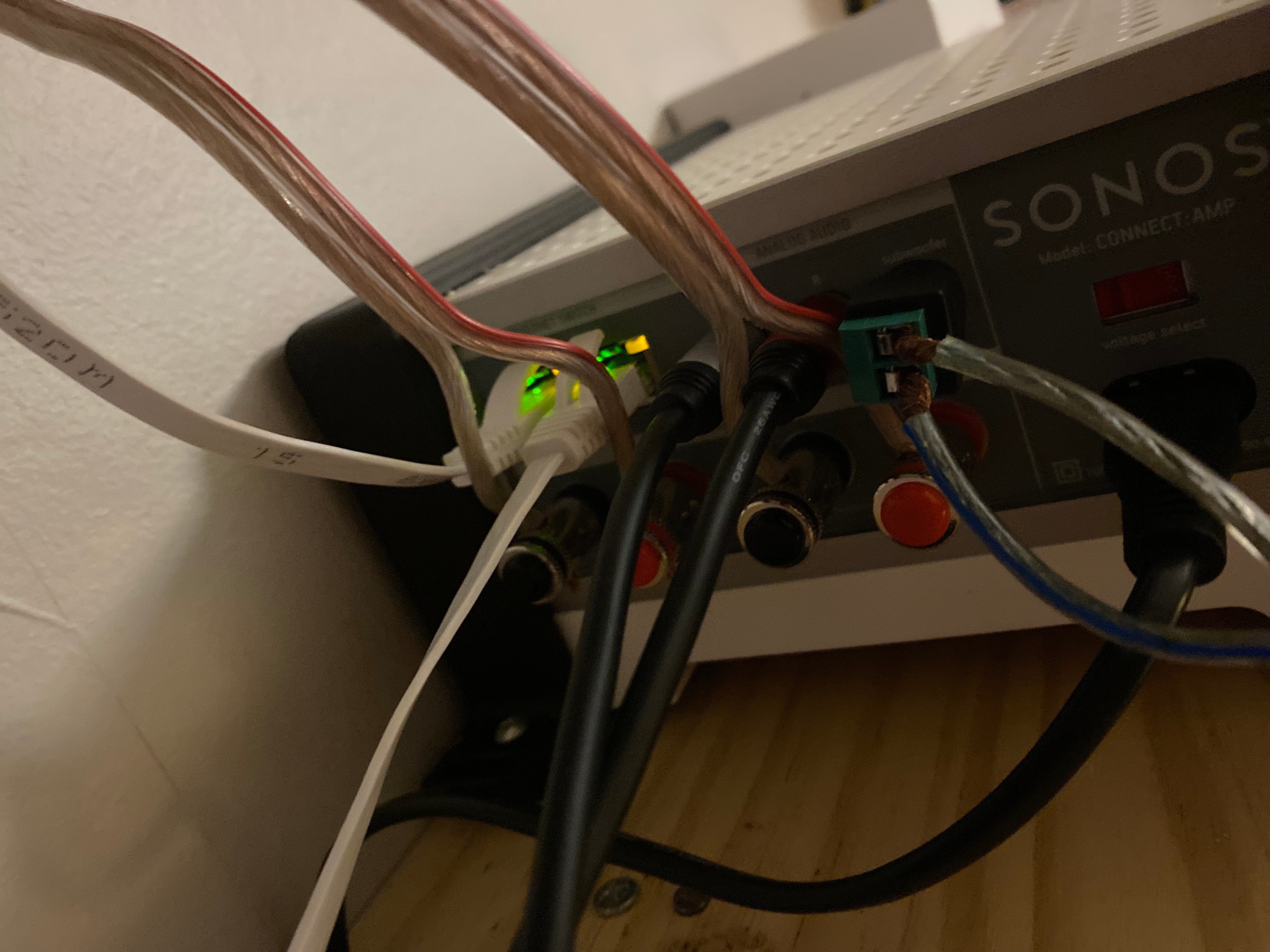
I recently bought a gen 1 sonos connect amp and after using it for a few weeks with 2 ceiling speakers I decided I needed a subwoofer. So I bought a Samsung wireless subwoofer and took it apart down to the speaker wire ports under the cover I then connected this to an rca adapter and plugged it into the sub output on my amp. I waited for a wile for it to show up and I also rebooted my system but no sub appeared on the app and the sub did not make any sound when playing music. Please help me make my sub work

This topic has been closed for further comments. You can use the search bar to find a similar topic, or create a new one by clicking Create Topic at the top of the page.

14 replies

Airgetlam
  • October 16, 2023

Is this CONNECT:AMP being used to drive surround speakers? If so, the subwoofer output is automatically disable via software, and can’t be turned back on while in use as a surround driver. 
 

I’m also concerned about your connection. How can you connect a wireless Samsung speaker to a line level output? Are there line in level inputs that you can plug in to?


The Samsung sub is connected using a line in connection


Then connected to a rca adapter into the back of the connect amp

I have no other Sonos accessories and don’t think im using any surround sound speakers


106rallye
Forum|alt.badge.img+18
  • October 16, 2023

From the “out” labelled sub on the Connect:amp to your self fabricated ins on the Samsung? There probably a lot of ways this could go wrong…..


Airgetlam
  • October 16, 2023

If you’re not using it as a driver for your surround speakers (and nothing appears to be connected to the speaker posts), I’m not sure what’s happening. Equally concerning is the fact that you purchased the device, so you’re unsure if the subwoofer output was already broken.

I think, at this point, I would recommend that you submit a system diagnostic and call Sonos Support to discuss it.

There may be information included in the diagnostic that will help Sonos pinpoint the issue and help you find a solution.

When you speak directly to the phone folks, they have tools at their disposal that will allow them to give you advice specific to your Sonos system and network.


buzz
  • October 16, 2023

Based in your photo, it seems that the CONNECT:AMP’s subwoofer output is directly connected to the speaker terminals. CONNECT:AMP does not support this. You’ll need to connect a 3rd party power amplifier to CONNECT;AMP’s subwoofer output and wire the speaker terminals to the amplifier output.


Airgetlam
  • October 17, 2023

Interesting,I don’t see anything connected to the speaker terminals.


buzz
  • October 17, 2023

Speaker wires come in from above -- to the right of the network cable.


Airgetlam
  • October 17, 2023

Thanks. I think I may need to turn up the brightness on my iPad, I didn’t see that originally.


I’m curently out for the day but when I get back I will submit a system diagnostic and call Sonos support


106rallye
Forum|alt.badge.img+18
  • October 17, 2023

Ah right, the connection labelled Sub is for active subwoofers, not passive subwoofers. If @William Etherington-Smith really connected that to “the speaker wire ports under the cover” and not to the amp in the Samsung, that’s the first of his problems.


Thanks I’ll do that


I’ll connect it to the amp input unposed to the speaker wire inputs


