music auto plays at midnight every day

  • November 7, 2021
  • 15 replies
  • 245 views

Every night at midnight my Sonos system plays music. 
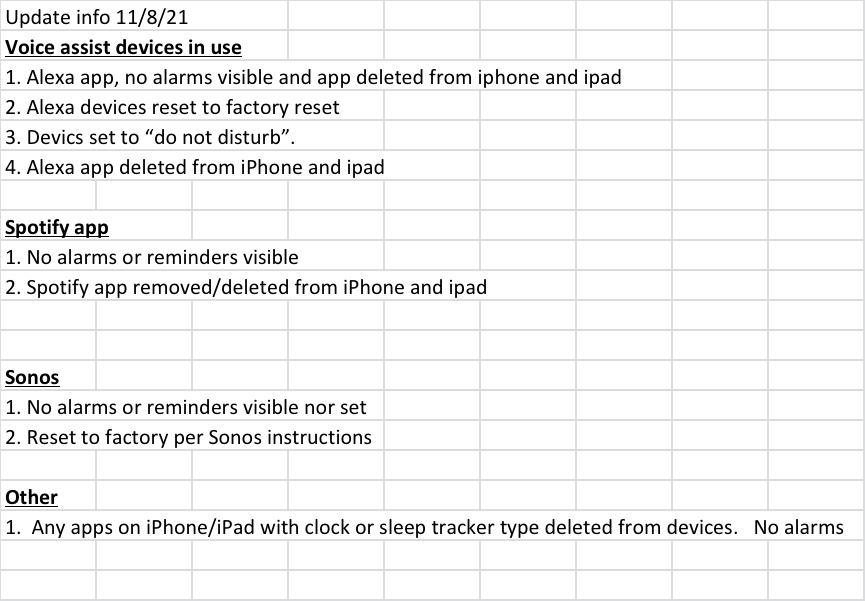
I’ve factory reset every device and looked for alarms that might exist. No success to date.  I’ve removed Spotify as well. Alexa is not connected to my Sonos 

what is likely cause?

This topic has been closed for further comments. You can use the search bar to find a similar topic, or create a new one by clicking Create Topic at the top of the page.

15 replies

UKMedia
  • November 7, 2021

Is it exactly the same time?  What is the source?


  • Author
  • Contributor I
  • November 7, 2021

Exactly the same time.  Can’t identify the source 


UKMedia
  • November 7, 2021

And you don’t use any voice assistants? And you checked for Alarms in the Sonos App: https://support.sonos.com/s/article/452?language=en_US


UKMedia
  • November 7, 2021

  • November 7, 2021

Run a Sonos system diagnostic immediately after this occurs and contact Sonos Support with the confirmation number.


  • Author
  • Contributor I
  • November 8, 2021


Ken_Griffiths

I used to have one of those speakers… ha ha:grin:

John’s suggestion of submitting a diagnostic report and contacting the Support Staff is usually the best way to resolve the matter.


  • Author
  • Contributor I
  • November 8, 2021

And you don’t use any voice assistants? And you checked for Alarms in the Sonos App: https://support.sonos.com/s/article/452?language=en_US

No voice assistants and no alarms visible in Sonos either. 


  • Author
  • Contributor I
  • November 8, 2021

No voice assistants and no alarms visible.  Did factory reset on every Sonos device and Alexa.  Did reset on iPhone and iPad as well.  


  • Author
  • Contributor I
  • November 8, 2021

Will call Sonos when they open.  Ran diagnostic and will see what they can advise. 


James L.
Forum|alt.badge.img+17
  • Retired Community Staff
  • November 8, 2021

Hey @Goose7024,


You can post the diagnostic number here and I can take a look in the meantime :slight_smile:


  • Author
  • Contributor I
  • November 8, 2021

Diagnostic 1409985466 and I submitted one again 193363005 


James L.
Forum|alt.badge.img+17
  • Retired Community Staff
  • November 8, 2021

Thanks.


It looks like there’s a routine set up somewhere outside of Sonos that’s queueing up a radio station. Have you ever used IFTTT? I think it might be a recipe on there causing this.


controlav
Forum|alt.badge.img+24
  • Lead Maestro
  • November 9, 2021

Ideally you would go to the Sonos account page and revoke all third-party permissions, for services such as IFTTT. Oh wait, Sonos have yet to implement an permissions revocation page...


  • Author
  • Contributor I
  • November 12, 2021

Thanks 

I had played with IFTTT about a Month ago.
 

Deleted the app while I was trying to eliminate possible causes, but apparently the routine kept running.  
 

Just logged back in to IFTTT and removed that routine.

thanks so much for the input and help!!