Question

How do I get my 2 Sonos Connect Amps back onto the Sonos S1 app after accidentally resetting system

  • July 9, 2026
  • 16 replies
  • 101 views

Forum|alt.badge.img

I am hoping someone can lead me in the right direction.  I have had the Sonos S1 app for about 8 years now. The Sonos S1 app controls 2 Sonos connect amps.  One amp controls the speakers in the outdoor seating area and the other amp controls the in ceiling speakers inside of the house.  While away in my vacation home where I use the Sonos app to control Era 300, Era 100 and One SL, I accidently opened the Sonos S1 app instead of the Sonos app to control the Era 300, Era 100 and One SL speakers.  Because it wasn’t working, and it shouldn’t have been because I opened the wrong app, I ended up resetting the entire system on the Sonos S1 app.  Immediately after resetting the Sonos S1 app I realized I totally screwed up because I was using the wrong app to control the Era 300, Era 100 and One SL speakers.  I should have been using the Sonos app which would have worked but was using the Sonos S1 app.  When I got back home I tried to use the Sonos S1 app and there is no system to use. When I tried to connect to an existing system via the app, I get an error saying the existing system could not be found.  How can I get the app to recognize the amps again so that it is useable?

16 replies

  • July 9, 2026

jgatie
  • July 9, 2026

Did you reset the app, or factory reset the Connect:Amps?  If the former, you only have to start the S1 app and choose to connect to an existing system.  If the latter, you need to start the S1 app and choose to setup a new system and follow the prompts to add the Connect:Amps to your system.


AjTrek1
  • July 9, 2026

I’m confused…

First your use of terms is miss leading as there is no such thing in “Sonos speak” as “reset a system” as you seem to be indicating.

  1. You can “Factory Reset” your Sonos devices individually which takes them back to a state wherein you have to set them up as new. After doing so you merely select “Add a product or component” in the app.
  2. You can delete the Sonos app and reinstall install it. Upon opening the app you would select “Join an existing system”

Doing either of the above cannot be done remotely as you indicated you were in your vacation home. Adding Sonos products and/or joining a system requires that your device and Sonos products be on the same network. You could not possibly reach your Home network from your vacation home as it pertains to Sonos. *

Furthermore opening the S1 app should have found no compatible products. Even if you deleted the S1 app and finally realized you had opened it in error you should have been able to reinstall it when you returned home and join your existing system as indicated in #2 above.

So, what else did you do to cause your issues?


 * Just to be clear a tech savvy person can view their network structure remotely via an app typically designed for their particular router. That still does not give access to Sonos.


Forum|alt.badge.img
  • Author
  • Contributor II
  • July 9, 2026


Did you reset the app, or factory reset the Connect:Amps?  If the former, you only have to start the S1 app and choose to connect to an existing system.  If the latter, you need to start the S1 app and choose to setup a new system and follow the prompts to add the Connect:Amps to your system.

@jgatie I reset the app while I was away.  When I got back to my house I started the S1 app and choose to connect to an existing system but when I did that the app was unable to find an existing system.


AjTrek1
  • July 9, 2026


Did you reset the app, or factory reset the Connect:Amps?  If the former, you only have to start the S1 app and choose to connect to an existing system.  If the latter, you need to start the S1 app and choose to setup a new system and follow the prompts to add the Connect:Amps to your system.

@jgatie I reset the app while I was away.  When I got back to my house I started the S1 app and choose to connect to an existing system but when I did that the app was unable to find an existing system.

Just exactly what did you do to as you say “reset the app”?  As it still doesn’t make Sonos-sense 🤔


  • July 9, 2026

Just exactly what did you do to as you say “reset the app”?  As it still doesn’t make Sonos-sense 🤔

In S1, there is Settings → App Preferences → Reset App. Looks like it’s also in S2. Never looked for it before.


Pools-3015
Forum|alt.badge.img+17
  • Prodigy I
  • July 9, 2026

I am hoping someone can lead me in the right direction.  I have had the Sonos S1 app for about 8 years now. The Sonos S1 app controls 2 Sonos connect amps.  One amp controls the speakers in the outdoor seating area and the other amp controls the in ceiling speakers inside of the house.  While away in my vacation home where I use the Sonos app to control Era 300, Era 100 and One SL, I accidently opened the Sonos S1 app instead of the Sonos app to control the Era 300, Era 100 and One SL speakers.  Because it wasn’t working, and it shouldn’t have been because I opened the wrong app, I ended up resetting the entire system on the Sonos S1 app.  Immediately after resetting the Sonos S1 app I realized I totally screwed up because I was using the wrong app to control the Era 300, Era 100 and One SL speakers.  I should have been using the Sonos app which would have worked but was using the Sonos S1 app.  When I got back home I tried to use the Sonos S1 app and there is no system to use. When I tried to connect to an existing system via the app, I get an error saying the existing system could not be found.  How can I get the app to recognize the amps again so that it is useable?

Do you know which version Connect:Amps you have? Do they have a pause/play button on the front?

If they do, you can upgrade them to the S2 app and then you would have no reason to use both apps. You would just have to join the systems at each home whenever you arrive at them.


Forum|alt.badge.img
  • Author
  • Contributor II
  • July 9, 2026

I’m confused…

First your use of terms is miss leading as there is no such thing in “Sonos speak” as “reset a system” as you seem to be indicating.

  1. You can “Factory Reset” your Sonos devices individually which takes them back to a state wherein you have to set them up as new. After doing so you merely select “Add a product or component” in the app.
  2. You can delete the Sonos app and reinstall install it. Upon opening the app you would select “Join an existing system”

Doing either of the above cannot be done remotely as you indicated you were in your vacation home. Adding Sonos products and/or joining a system requires that your device and Sonos products be on the same network. You could not possibly reach your Home network from your vacation home as it pertains to Sonos. *

Furthermore opening the S1 app should have found no compatible products. Even if you deleted the S1 app and finally realized you had opened it in error you should have been able to reinstall it when you returned home and join your existing system as indicated in #2 above.

So, what else did you do to cause your issues?


 * Just to be clear a tech savvy person can view their network structure remotely via an app typically designed for their particular router. That still does not give access to Sonos.

Sorry...wasn’t my intention at all to be confusing.  While away from my home network I mistakenly tried using the S1 app instead of the Sonos app to play Sonos on the Era 300, etc speakers.  Absolutely my fault for choosing the wrong app.  I then did a reset on the S1 app hoping that it would fix the problem.  I no sooner the reset and realized that I was using the wrong app.  When I got back home to the network that the S1 app is associated with I tried to Join an existing system.  When I tried doing that the S1 app could not find any system.  So should I try deleting the S1 app and reinstalling the S1 app and then Join and existing system?


Forum|alt.badge.img
  • Author
  • Contributor II
  • July 9, 2026

I am hoping someone can lead me in the right direction.  I have had the Sonos S1 app for about 8 years now. The Sonos S1 app controls 2 Sonos connect amps.  One amp controls the speakers in the outdoor seating area and the other amp controls the in ceiling speakers inside of the house.  While away in my vacation home where I use the Sonos app to control Era 300, Era 100 and One SL, I accidently opened the Sonos S1 app instead of the Sonos app to control the Era 300, Era 100 and One SL speakers.  Because it wasn’t working, and it shouldn’t have been because I opened the wrong app, I ended up resetting the entire system on the Sonos S1 app.  Immediately after resetting the Sonos S1 app I realized I totally screwed up because I was using the wrong app to control the Era 300, Era 100 and One SL speakers.  I should have been using the Sonos app which would have worked but was using the Sonos S1 app.  When I got back home I tried to use the Sonos S1 app and there is no system to use. When I tried to connect to an existing system via the app, I get an error saying the existing system could not be found.  How can I get the app to recognize the amps again so that it is useable?

Do you know which version Connect:Amps you have? Do they have a pause/play button on the front?

If they do, you can upgrade them to the S2 app and then you would have no reason to use both apps. You would just have to join the systems at each home whenever you arrive at them.

I’m not sure which I have.  They are close to 8 years old.  Will check tonight and see.


  • July 9, 2026

So should I try deleting the S1 app and reinstalling the S1 app and then Join and existing system?

Try Settings → System → Find Missing Products. Make sure you’re on the same network as the amps. But join an existing system on a freshly installed app should work.


Forum|alt.badge.img
  • Author
  • Contributor II
  • July 9, 2026

thank you ​@kdowling .  Will try tonight and see how it goes.


User117655
Forum|alt.badge.img+9
  • Prodigy II
  • July 9, 2026


Post deleted... Wrong thread!


buzz
  • July 9, 2026

The first four numbers in the serial number gives the manufacturing date. “1501” or greater is S2 compatible.


Forum|alt.badge.img
  • Author
  • Contributor II
  • July 10, 2026

The first four numbers in the serial number gives the manufacturing date. “1501” or greater is S2 compatible.

The first 4 numbers in the serial number are 1401.


Forum|alt.badge.img
  • Author
  • Contributor II
  • July 10, 2026

I am hoping someone can lead me in the right direction.  I have had the Sonos S1 app for about 8 years now. The Sonos S1 app controls 2 Sonos connect amps.  One amp controls the speakers in the outdoor seating area and the other amp controls the in ceiling speakers inside of the house.  While away in my vacation home where I use the Sonos app to control Era 300, Era 100 and One SL, I accidently opened the Sonos S1 app instead of the Sonos app to control the Era 300, Era 100 and One SL speakers.  Because it wasn’t working, and it shouldn’t have been because I opened the wrong app, I ended up resetting the entire system on the Sonos S1 app.  Immediately after resetting the Sonos S1 app I realized I totally screwed up because I was using the wrong app to control the Era 300, Era 100 and One SL speakers.  I should have been using the Sonos app which would have worked but was using the Sonos S1 app.  When I got back home I tried to use the Sonos S1 app and there is no system to use. When I tried to connect to an existing system via the app, I get an error saying the existing system could not be found.  How can I get the app to recognize the amps again so that it is useable?

Do you know which version Connect:Amps you have? Do they have a pause/play button on the front?

If they do, you can upgrade them to the S2 app and then you would have no reason to use both apps. You would just have to join the systems at each home whenever you arrive at them.

I’m not sure which I have.  They are close to 8 years old.  Will check tonight and see.

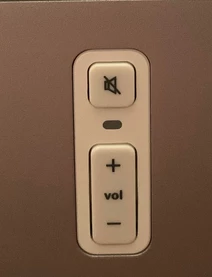
the front of it has the mute and volume up and down buttons.  I ended up deleting the app and reinstalling the Sonos app.  Did a factory reset on both amps.  I was able to get both Spotify and SiriusXM working but I do not have any sound coming from any of the speakers.  It was late last night so I didn’t try messing around with it.  Will attempt to do so over the weekend.  Any ideas for why there is no sound coming from the speakers?  Spotify shows that music is playing, I just don’t hear anything.  I have a russound amp and all of the green lights turn on when I tried to play something on Spotify but I don’t hear any music from the speakers.


AjTrek1
  • July 10, 2026

How to determine the generation and/or model of your Sonos speaker or component. 

  • Go to sonos.com (preferably on a computer or tablet with larger screen vs a phone)
  • Login with your credentials by clicking on the Human Head icon (upper right of page)
  • Click on the Human Head icon again 
  • Click on system
  • See your Sonos products

How to upgrade compatible Sonos S1 products to S2 (Sonos App) *

 * Since you have factory reset your speakers’ numerous times and reset the App the process may be a bit convoluted at this stage. I suggest you call Sonos Tech Support to explain your situation and allow them to assit getting your system up and running again. They will also (if applicable) be able to assist to upgrade your amps to S2.