
Question

Setup validation: Home Cinema + Desk Area (Radio) – Need advice on Sonos placement

  • June 12, 2026
  • 11 replies
  • 67 views

Hi everyone,

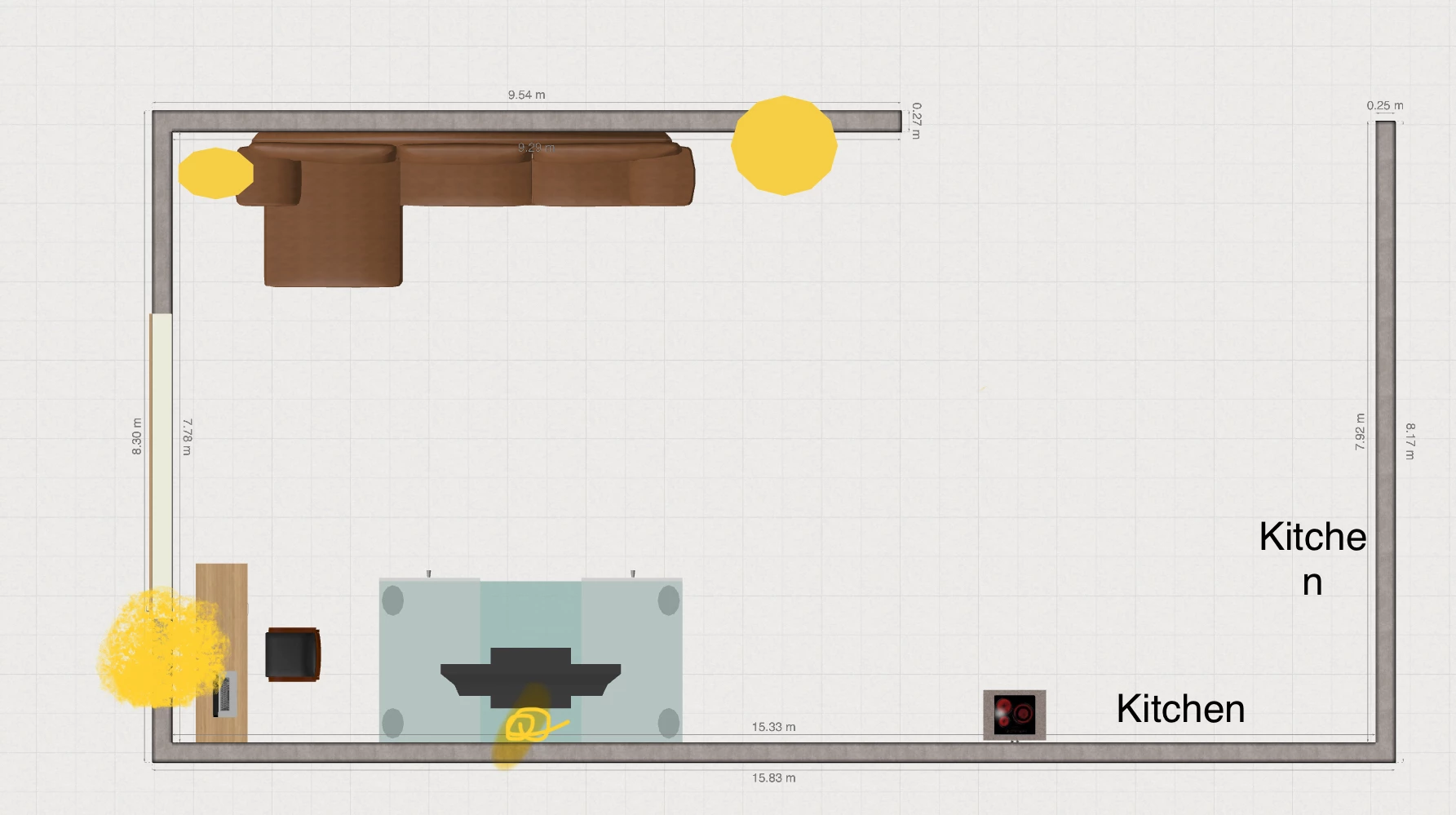
I’m looking for some feedback from the community to confirm my future Sonos setup in my open-space living room. Please find the detailed layout attached (image_3.png).

Here is my current layout on the plan:

Top: My sofa facing the bottom wall.

Bottom center: The TV stand and television.

Left (near the window): My desk area and office chair.

Yellow Dots: I have marked yellow dots on the plan to show the exact locations of my available power outlets.

My needs:

1 Home Cinema: Getting a great immersive experience when sitting on the sofa watching TV.

2 Desk Area: I listen to streaming radio all day long while working at my desk.

The hardware I selected:

I'm planning to get the following setup: 1x Sonos Beam (Gen 2) under the TV, 1x Sonos Sub Mini for the bass, and 2x Sonos Era 100 as rear surrounds on each side of the sofa (which means the left surround speaker will be right next to my desk).

My questions to confirm this setup:

1 Radio Management at the Desk: Can you confirm that the Sonos app will easily allow me, during work hours, to turn off the soundbar in front of me and play my radio only on the rear pair of Era 100s (or even just one of them) to create a quiet listening bubble without flooding the whole room?

2 Placement and Outlets: Based on my power outlet locations (the yellow dots) and my desk position, would you recommend wall-mounting the Era 100s with adjustable brackets, or using floor stands instead?

Thanks a lot for your confirmation and advice!
 

11 replies

AjTrek1
  • June 12, 2026

The most important question for your peace of mind during work…..

Sorry, if the Era 100’s are bonded to the Beam as surrounds you can’t turn the Beam off. The surrounds are actually  being sent the audio they play via the Beam.

Also, removing the Era 100’s temporarily to act as a stereo pair divorced from the  Beam is possible but assigning them as surrounds again gets old very quickly. It’s a labor intensive task. There is no switch to remove surrounds temporarily and quickly re-bond them as surrounds.

Have two alternatives

  1. Purchase a second pair of Era 100’s (or just one) for music only 
  2. Set the Beam and the Era 100’s as separate rooms in the the same space

Option #2 is great for grouping for music but will cause a 75ms delay to the Era 100’s for movies.

Wall mounts or stands will work for the Era 100’s. I personally prefer stands as long as they aren’t subject to being knocked over on a constant basis.

If you are concerned about a surround being close to your ear it may or may not be a problem. My situation is similar and I have Era 300’s and it doesn’t bother me. However’ everyone is different. You might consider locally investing temporarily in ladders that are about 32-35 inches in height to see how the sound affects you before investing in wall mounts and/or stands. Just return the ladders when you’re done. 😊


Stanley_4
  • Grand Maestro
  • June 12, 2026

I'd look at several options for a desk.

An Era-100 or if voice control isn't wanted the SL. A pair would be nice considering the time you spend there.

Play, smaller than the 100 and sounds very good, again a pair would be worth it. Also they are portable for use elsewhere. 

My desk situation went through multiple options, each a nice improvement, the current one a pair of Era-300s. Kinda big but with multiple mounting options very doable. The Atmos delivery is well worth the compromises and as more Atmos content becomes available it is even better. 


MoPac
Forum|alt.badge.img+19
  • Headliner III
  • June 12, 2026

If the ERA 100 speakers are Bonded as surrounds don’t aim them directly at the listening position.  Experiment with positions starting with facing straight out into the room then toe out & toe in until it sounds best for you.


  • Author
  • Contributor I
  • June 13, 2026

Thanks a lot for your answers and advice! Everyone agrees it's better to have the Era 100s in front of the desk, as that's where I spend most of my day.

I will install two Era 100s in front of the desk, two in the back of the sofa, the Sub Mini to the right of the sofa, and the Beam under the TV


AjTrek1
  • June 13, 2026

Glad you have decided on your ideal setup….

However, I want to present another option regarding having two Era 100’s on your desk. Those speakers will be for lack of a better phrase “in-your-face”. 😁 Sonos just released a new speaker called the Play (see it here). 

The Play has been liken to a slightly smaller Era 100. If you were doing an A/B test of the Era 100 vs the Play with your back turned to the speakers after awhile of back n’ forth between the two you’d be hard pressed to readily hear a difference playing the same track. Upon switching tracks the process would start again meaning the Era 100 would sound slightly better than the Play in the beginning; but that difference would soon be hard to place after awhile.

I have a pair of Play’s in stereo pair. Playing them produces an excellent sound stage. As they auto-tune to your space the result is incredibly balanced. As I mentioned earlier with the Play’s being sort of in-your-face I fill confident to say you wont’s be disappointed. You also have a unique opportunity to A/B test two Play’s against the Era 100’s before you bond them to the Beam. Return the Play’s if not satisfied.

There are two major differences between the Era 100 and Play. Everything else is (IMO) on par between the two minus the slight increase in sound for the Era 100’s:

  • Era 100 can be used as surrounds where's as the Play’s cannot
  • The Play is a battery operated and portable the Era 100 is not

Click the link above to read all about the Sonos Play. There are more attributes specific to the Play as a portable that were not designed into the Era 100.

One more tip...you may want to experiment with the placement of the Sub to determine where it produces the best low-end.

That’s all...Enjoy your Sonos!


  • Author
  • Contributor I
  • June 13, 2026

Glad you have decided on your ideal setup….

However, I want to present another option regarding having two Era 100’s on your desk. Those speakers will be for lack of a better phrase “in-your-face”. 😁 Sonos just released a new speaker called the Play (see it here). 

The Play has been liken to a slightly smaller Era 100. If you were doing an A/B test of the Era 100 vs the Play with your back turned to the speakers after awhile of back n’ forth between the two you’d be hard pressed to readily hear a difference playing the same track. Upon switching tracks the process would start again meaning the Era 100 would sound slightly better than the Play in the beginning; but that difference would soon be hard to place after awhile.

I have a pair of Play’s in stereo pair. Playing them produces an excellent sound stage. As they auto-tune to your space the result is incredibly balanced. As I mentioned earlier with the Play’s being sort of in-your-face I fill confident to say you wont’s be disappointed. You also have a unique opportunity to A/B test two Play’s against the Era 100’s before you bond them to the Beam. Return the Play’s if not satisfied.

There are two major differences between the Era 100 and Play. Everything else is (IMO) on par between the two minus the slight increase in sound for the Era 100’s:

  • Era 100 can be used as surrounds where's as the Play’s cannot
  • The Play is a battery operated and portable the Era 100 is not

Click the link above to read all about the Sonos Play. There are more attributes specific to the Play as a portable that were not designed into the Era 100.

One more tip...you may want to experiment with the placement of the Sub to determine where it produces the best low-end.

That’s all...Enjoy your Sonos!

like this option, but compared to the price of the era, there are cheaper options than the play


Stanley_4
  • Grand Maestro
  • June 13, 2026

An additional benefit of the Play is that it has real push-buttons, no fumbling for hard to hit touch controls or needing to use the app to pause your music when the phone rings.

The price really makes the 100SL a good deal if you don't need voice control.

100SL - $189

100 -  $219

Play - $299


  • Author
  • Contributor I
  • June 13, 2026

Someone suggested another configuration to me, and I’m thinking about a different trade-off. Instead of getting 4 Era 100s, I might upgrade the soundbar to a Sonos Arc and drop the two desk speakers completely.
>So, the match is between these two setups (both with a Sub Mini):
>  * **Option A (Beam Setup):** Sonos Beam (Gen 2) + 2x Era 100s at the back of the sofa + 2x Era 100s on the desk for work.
>  * **Option B (Arc Setup):** Sonos Arc + 2x Era 100s at the back of the sofa... and nothing on the desk.
> Since the TV is off while I work, if I go with Option B (Arc), I would have to group the Arc and its surrounds to listen to the radio during the day.
which option would you choose for the best balance between daytime radio comfort and movie nights?
I am realy confusing


AjTrek1
  • June 13, 2026

Well…

The Beam is a better match for the Era 100’s.

The Arc Ultra is better matched with Era 300’s as they complete the dynamics of the ArcUltra and provide the total immersive effect with Dolby Atmos content. Although the Era 100’s and ArcUltra will work (IMO) it’s like getting only half of what a full ArcUltra system can provide. Then there always the price point of the Era 300’s being more expensive.

Whoa...I forgot that you plan on keeping the Sonos Beam and/or the ArcUltra separate from the rears that will be used as a stereo pair. In that case IMO it comes down to the more expensive ArcUltra vs the less expensive Beam 2.

The other consideration is the size of your TV. If under 55 inches the Beam 2 is the better choice ...again IMO.

All said….I’d plan for the future. If you at some point will want the best Dolby Atmos experience for Music and Movies...then go with the ArcUltra. If you will never use the rears as surrounds then the Era 100’s are a good choice for Stereo music.


MoPac
Forum|alt.badge.img+19
  • Headliner III
  • June 13, 2026

I would still want something at the desk.  At least for me imaging is very important.  If you have the home theater setup as the only source of music the sound at the desk will be unbalanced.  If the music is only background sound while you’re working at the desk you might be able to listen to the Home Theater setup and be perfectly happy with that.

At my desk I can use the Squeezebox Touch to a pair of AudioEngine A2 speakers which sounds really good.  Imaging is awesome.  Since Sonos has more music options I tried a pair of Sonos Move speakers on a bookcase behind me.  Gave that up because the music is not supposed to come from behind me.

Don’t know if you would ever be interested in Dolby Atmos music, but if you ever want to listen to Atmos get the Arc & ERA 300s.  The immersion effect is awesome.

It would be unnecessary to “Group” the Arc and its surrounds to listen to radio during the day.  The 100s or 300s would already be “Bonded” to the Arc as surrounds and would play regardless of weather the TV is on or off.


Stanley_4
  • Grand Maestro
  • June 13, 2026

Just keep in mind Grouping works perfectly for music but there is an echo, a 75 ms delay, in the Grouped speakers compared to the soundbar.

I have a Beam, Sub and surrounds in my office, great for TV  when I move ,y chair to watch it but not so great a stereo image for music when I'm at the computer. My 300 pair, and an earlier One pair on the desk sounded far better and I feel worth the cost given how many hours I'm using them.


