
Question

Setup validation: Home Cinema + Desk Area (Radio) – Need advice on Sonos placement

  • June 12, 2026
  • 3 replies
  • 30 views

Hi everyone,

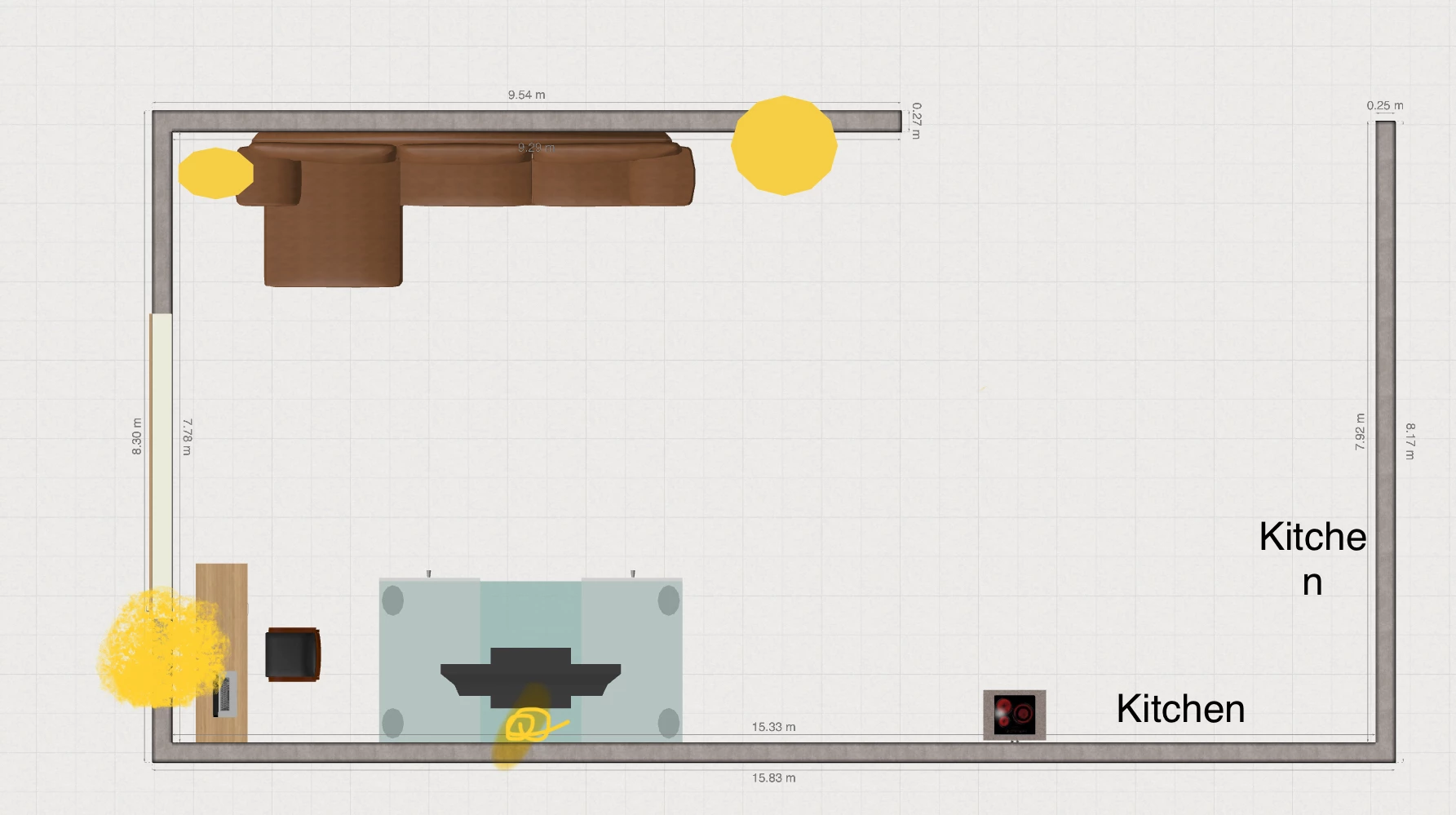
I’m looking for some feedback from the community to confirm my future Sonos setup in my open-space living room. Please find the detailed layout attached (image_3.png).

Here is my current layout on the plan:

Top: My sofa facing the bottom wall.

Bottom center: The TV stand and television.

Left (near the window): My desk area and office chair.

Yellow Dots: I have marked yellow dots on the plan to show the exact locations of my available power outlets.

My needs:

1 Home Cinema: Getting a great immersive experience when sitting on the sofa watching TV.

2 Desk Area: I listen to streaming radio all day long while working at my desk.

The hardware I selected:

I'm planning to get the following setup: 1x Sonos Beam (Gen 2) under the TV, 1x Sonos Sub Mini for the bass, and 2x Sonos Era 100 as rear surrounds on each side of the sofa (which means the left surround speaker will be right next to my desk).

My questions to confirm this setup:

1 Radio Management at the Desk: Can you confirm that the Sonos app will easily allow me, during work hours, to turn off the soundbar in front of me and play my radio only on the rear pair of Era 100s (or even just one of them) to create a quiet listening bubble without flooding the whole room?

2 Placement and Outlets: Based on my power outlet locations (the yellow dots) and my desk position, would you recommend wall-mounting the Era 100s with adjustable brackets, or using floor stands instead?

Thanks a lot for your confirmation and advice!
 

3 replies

AjTrek1
  • June 12, 2026

The most important question for your peace of mind during work…..

Sorry, if the Era 100’s are bonded to the Beam as surrounds you can’t turn the Beam off. The surrounds are actually  being sent the audio they play via the Beam.

Also, removing the Era 100’s temporarily to act as a stereo pair divorced from the  Beam is possible but assigning them as surrounds again gets old very quickly. It’s a labor intensive task. There is no switch to remove surrounds temporarily and quickly re-bond them as surrounds.

Have two alternatives

  1. Purchase a second pair of Era 100’s (or just one) for music only 
  2. Set the Beam and the Era 100’s as separate rooms in the the same space

Option #2 is great for grouping for music but will cause a 75ms delay to the Era 100’s for movies.

Wall mounts or stands will work for the Era 100’s. I personally prefer stands as long as they aren’t subject to being knocked over on a constant basis.

If you are concerned about a surround being close to your ear it may or may not be a problem. My situation is similar and I have Era 300’s and it doesn’t bother me. However’ everyone is different. You might consider locally investing temporarily in ladders that are about 32-35 inches in height to see how the sound affects you before investing in wall mounts and/or stands. Just return the ladders when you’re done. 😊


Stanley_4
  • Grand Maestro
  • June 12, 2026

I'd look at several options for a desk.

An Era-100 or if voice control isn't wanted the SL. A pair would be nice considering the time you spend there.

Play, smaller than the 100 and sounds very good, again a pair would be worth it. Also they are portable for use elsewhere. 

My desk situation went through multiple options, each a nice improvement, the current one a pair of Era-300s. Kinda big but with multiple mounting options very doable. The Atmos delivery is well worth the compromises and as more Atmos content becomes available it is even better. 


MoPac
Forum|alt.badge.img+19
  • Headliner III
  • June 12, 2026

If the ERA 100 speakers are Bonded as surrounds don’t aim them directly at the listening position.  Experiment with positions starting with facing straight out into the room then toe out & toe in until it sounds best for you.


