Question

No sound from Roam even after factory reset

  • June 20, 2026
  • 13 replies
  • 75 views

Forum|alt.badge.img

All of a sudden no sound is some out of my Roam. Sonos app ‘sees’ it and shows audio coming from it, but I hear nothing. Factory Reset twice with no luck. During Reset I hear audio.

Play/Sound controls on Roam don’t appear to do anything either.

Controlling system via iPad OS27 app.

13 replies

Mr. T
  • June 20, 2026

The Sonos app may not function properly when launched in a beta OS.

Try using another device that does not have beta OS installed.


Airgetlam
  • June 20, 2026

Try a Bluetooth connection, instead. or perhaps AirPlay 2.

As has been explained many times, Sonos, like many other software companies, doesn’t spend effort chasing the ‘changes’ made in beta releases of operating systems, they shift around rather frequently, and end up wasting resources.

If it’s still not ‘playing’, you may want to call Sonos Support to discuss it. But given you’re running an unsupported OS, they may not be able to assist as much as you’d like. 

When you speak directly to the Support staff, they have tools at their disposal that will allow them to give you advice specific to your network and Sonos system.


Forum|alt.badge.img
  • Author
  • Contributor I
  • June 20, 2026

Thanks. Get same issue on iOS26


AjTrek1
  • June 20, 2026

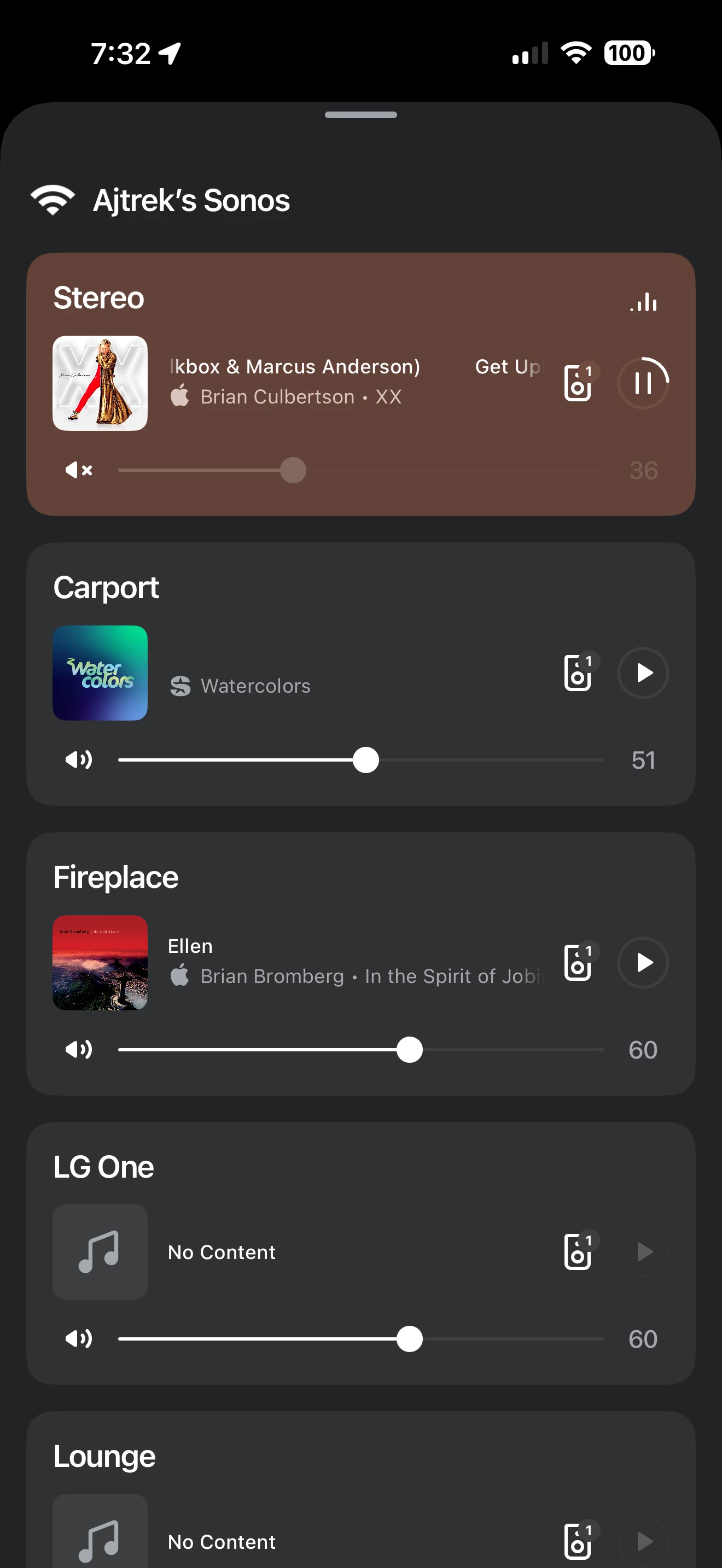
As you can see the speakers labeled as Stereo show that music is playing as indicated by the “wave bars”in the upper right corner. However the speakers are actually muted as indicated by the “x” to the left on the Volume Slider. If you see the same images you need to unmute your Roam.

EDIT:

The latest approved iOS is 26.5.1

Also, stop factory resetting your Roam as it erases critical information that can be useful in a diagnostic submitted to Sonos Tech Support.


Airgetlam
  • June 20, 2026

I don’t think those ‘wave’ bars show anything other than the fact that Sonos is ‘sending’ / ‘connected to’ the speaker. There’s zero relationship between those ‘lines’ and the actual music being sent. 


AjTrek1
  • June 20, 2026

I don’t think those ‘wave’ bars show anything other than the fact that Sonos is ‘sending’ / ‘connected to’ the speaker. There’s zero relationship between those ‘lines’ and the actual music being sent. 

I have to disagree. If I stop the music the wave bars stop. However, muting the speaker does not stop the stream and the wave bars still fluctuate. If you mute the speakers on your TV the picture still shows.

That’s the case whether I’m playing a local Playlist or streaming content via Apple Music, Amazon, Spotify or Tidal.

Either way the OP will have to tell us if what I submitted is the case. Some times the solution is just that simple (unmute the speaker). Heck, I’ve been wrong before.


Airgetlam
  • June 20, 2026

Is there any connection between the music and those bars? Other than you’re sending music? I’ve never seen them respond to either volume or pitch, or actually vary in any way. They only seem to be a recognition that a signal is being received. From my perspective…


AjTrek1
  • June 20, 2026

No…TMK there is no relationship to volume or pitch. It’s not intended to be representative as such as might be with a graphic equalizer display. The waves are just an indication that the speaker is receiving audio whether the volume is audible or muted. Stopping the audio via the App stops the Wave bars. I’m not trying to read anymore into my hypothesis than I indicated in my original response to the OP. 


Stanley_4
  • Grand Maestro
  • June 20, 2026

The bar icon seems to be animated, a repetitive pattern, activated or deactivated based on the play/pause state, not a response to the content being played.


Airgetlam
  • June 20, 2026

I think it’s common to associate those bars (which I’ve long called badoobie doobies…goes back to at least high school, and cassette tape machines with the new LEDs, rather than VU meters) as ‘true’ indicators of music, rather than just an animated graphic to indicate connection. 


Forum|alt.badge.img
  • Author
  • Contributor I
  • June 20, 2026

Thanks but the Roam isn’t muted


Forum|alt.badge.img
  • Author
  • Contributor I
  • June 20, 2026

I think I may have figured it out. Restarted router and controlled music via iOS26 device and Roam worked. Seems controlling via iOS27 device not only doesn’t work (understandable) but stops other devices from controlling it. Restarting router clears some sort of cache to get it working again??


Airgetlam
  • June 21, 2026

Seems odd, but who yet knows what iOS 27 does? And how frequently it will change, as it is apparently a bug. I’d certainly be reporting it to Apple, since you’re using their beta software.