Question

Error: this library's device may not be powered on

  • July 31, 2026
  • 10 replies
  • 100 views

So…

A week ago I could listen to my music collection. Now I cannot.

I can add a single artist to my collection at a time (Can - OK, Peter Hammill - OK, Captain Beefheart - OK), but only for certain artists it seems (Frank Zappa - Nope, Jethro Tull - Nope).

From searches it seems this is some sort of metadata issue and nothing to do with the power status or location of the library: what an incredibly unhelpful error message - so much time wasted checking other devices and all possible user/password combinations when my settings were fine in the first place.

You cannot tell me I have just tripped over some magical number, because my entire library (approx 30k tracks) was available a week or so ago. Now the machine struggles to load a single artist.

This equipment is no longer fit for the purpose it was sold for. I am truly disgusted by the Sonos system. Supposedly so good, but within my first month of use I was no longer able to connect to it with older devices due to an “upgrade”, so I only have one way to use the thing now. I cannot believe I once thought I might have these things all around the house.

As for the mess that is the ios app… 

 

10 replies

  • July 31, 2026

I’m not sure why that is happening, but Sonos Support should be able to help. Try submitting a diagnostic (Submit Diagnostics) within 10 minutes of getting the error. Then call Sonos Support (Sonos Support) to discuss it. They may be able to see why it’s not accessing your library correctly. Don’t post the diagnostic number here.


AjTrek1
  • August 1, 2026

For the sake of argument..,

Is your library on a NAS device or computer? Check the path to the library as they can become corrupted. Also check all concerned device for updates.

Check out the link as it may be of help 🤔. If nothing helps you can always follow the advice of ​@kdowling 


For the sake of argument..,

Is your library on a NAS device or computer? Check the path to the library as they can become corrupted. Also check all concerned device for updates.

Check out the link as it may be of help 🤔. If nothing helps you can always follow the advice of ​@kdowling 


It’s on a NAS. There is nothing wrong with the path, since I can create a library using (some) sub-folders of the main library (artist folders). It seems to be something with some specific tracks.


AjTrek1
  • August 1, 2026

OK…let’s try to narrow this issue a bit…

Are most of the songs that won't play recent downloads within a few months?

From where did you obtain most of them (Apple, Spotify Amazon or other).


MoPac
Forum|alt.badge.img+19
  • Headliner III
  • August 1, 2026

What are the sample rates of the Frank Zappa & Jethro Tull albums?  What codec ( FLAC, WAV, MP3, M4A etc ).?


controlav
Forum|alt.badge.img+24
  • Lead Maestro
  • August 1, 2026

Try the Desktop app, its more reliable for local library operations than mobile.


AjTrek1
  • August 2, 2026

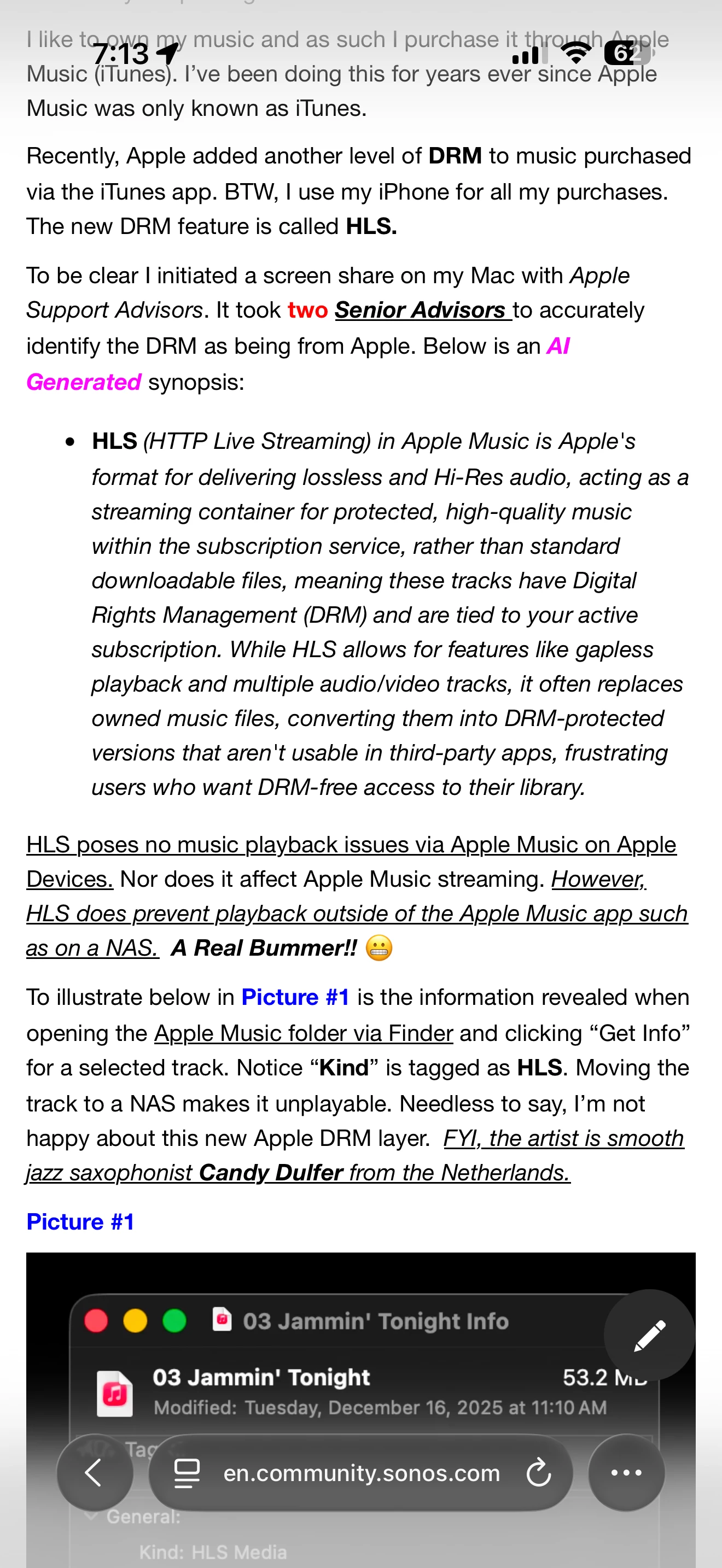
Also, if music is downloaded via Apple some songs are encoded with HLS which is not NAS friendly.  Below is an excerpt from a thread I created.


OK…let’s try to narrow this issue a bit…

Are most of the songs that won't play recent downloads within a few months?

From where did you obtain most of them (Apple, Spotify Amazon or other).

None are downloads. All are FLACs ripped from CDs using XLD, all with the same settings as the rest of the collection. New tracks play fine in Swinsian, Jellyfin and Volumio.


  • August 2, 2026

I can add a single artist to my collection at a time (Can - OK, Peter Hammill - OK, Captain Beefheart - OK), but only for certain artists it seems (Frank Zappa - Nope, Jethro Tull - Nope).

I’m confused by what you mean by adding artists to your collection. Are you creating multiple shares on your NAS, one for each artist?

On my NAS (named nas3), I have one share named Music. In Sonos’ Music Library settings “Your Folders” it’s listed as //nas3/Music.

On the NAS, in that music folder are sub-folders, one for each artist. In each artist folder, a folder for each album. In each album folder, the tracks for that album...

“//nas3/Music/Allman Brothers Band, The/At Fillmore East/01 - Statesboro Blues.flac”

Every ripped cd follows the same pattern. I don’t add artists to my collection. I rip cds and add the album to my NAS following that pattern. Same with downloaded files. They are added to the NAS in the same manner.

The tags I use are “Artist”, “Album”, “Title”, “Tracknumber”, “Date”, & “Genre”. If it’s a multiple artist album, then I use the “Album Artist” tag = “Various Artists” and the Artist tag is the track artist.

Every time I add music to the NAS, I tell sonos to “Scan for New Content”.

Nowhere in this process would I describe something as “add an artist to my collection”. So, if you can describe what that means, the NAS your using, how your share is set up etc, that would go a long way toward giving us information we could use to help.

Otherwise, I would suggest doing what I wrote in the very first reply.


AjTrek1
  • August 2, 2026

Also what do you mean by “the machine struggles to load an artist”? What machine and how does it involve Sonos?