
Contributor I
March 28, 2023

Unable to set Sonos Era 100 as Alexa-enabled device in room/group using Alexa app

  • March 28, 2023
  • 102 replies
  • 7852 views

Today I’ve upgraded my two Sonos Ones with Sonos Era 100s. After adding Alexa to the speakers, I tried to go into the Alexa app to associate them with their respective rooms. I’m able to add them as the room speaker, but I am unable to set them as the Alexa device for that room (allowing for room-specific commands like “Alexa, turn off the lights”, etc).

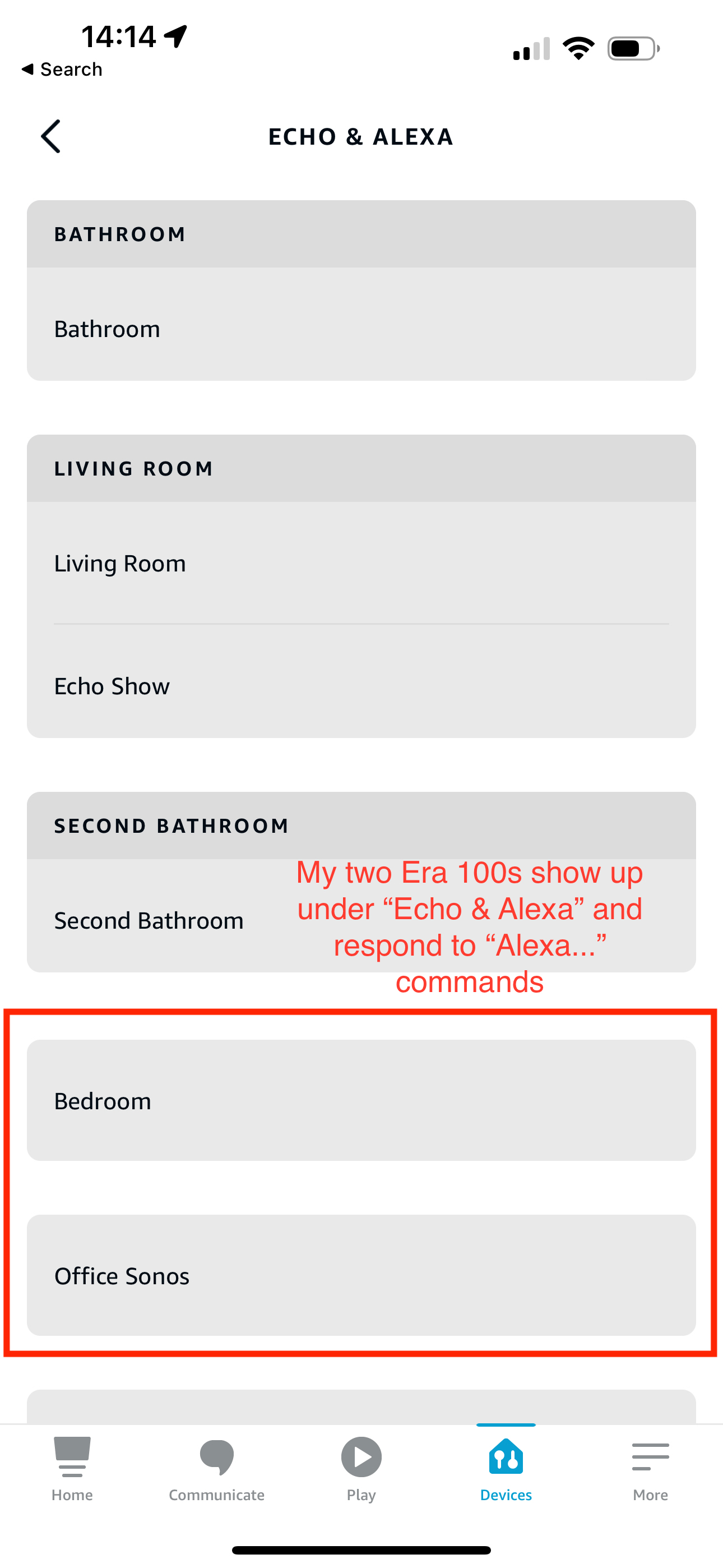
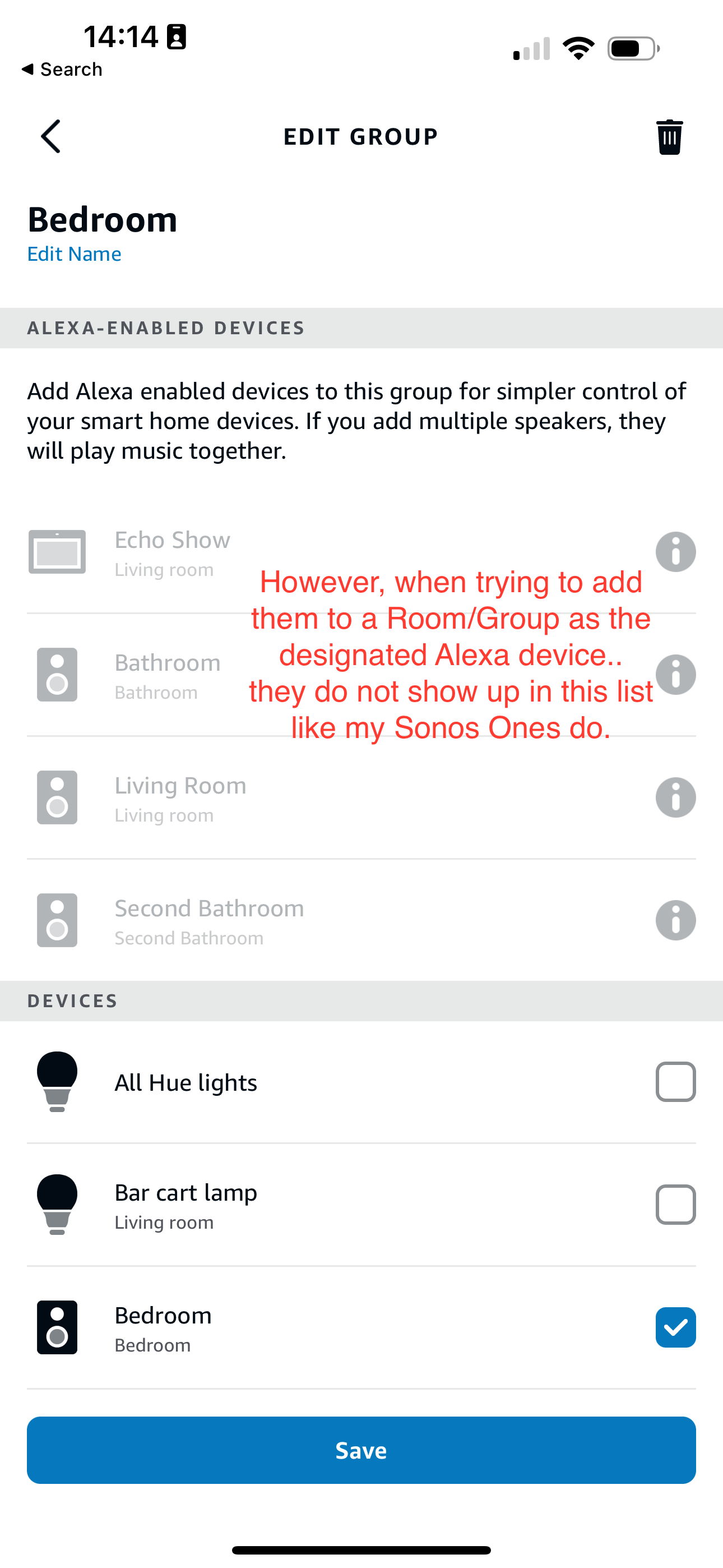
What’s weird is my Era 100s will show up under the Echo & Alexa devices section in the Alexa app, but they do not show up under Alexa-enabled devices when editing a room/group (see attached screenshots).

I’ve reached out to Alexa support and they were largely unhelpful, they claimed that from their resources Alexa isn’t supported on the Sonos Era 100 (maybe their documentation hasn’t been updated since this is a brand new product?). So they left the conversation there even after showing them that Sonos clearly states Alexa built-in support for the Era 100.

Has anyone else experienced this issue? Seems like a bug in the Alexa app, and their support team is unwilling to report the issue up their chain.
 

This topic has been closed for further comments. You can use the search bar to find a similar topic, or create a new one by clicking Create Topic at the top of the page.
Pinned Reply By Corry P

Hi Everyone

If you are still experiencing this issue (which we believed had stopped happening outside of Germany) please submit a support diagnostic and post the given number along with a screenshot of the Alexa app showing a lack of Era units under “Alexa-enabled Devices”, as above. Thank you.

102 replies

Ken_Griffiths
January 11, 2024

@planigan,

I was initially a little confused by your screenshots, but think I have most of the detail now. There are two components for your Era 100..

  • Office Sonos - which is the actual speaker device itself
  • Office Sonos Era 100 (which I assume you renamed yourself) - this is the Alexa component part of your Era 100 speaker.  Renaming it did slightly confuse me - I tend to rename mine too, but would have personally called it "Sonos Office Alexa” to show it was the Office Alexa component. 

Anyhow, it is correct that the Alexa component is embedded within the speaker device in the Alexa App, although there are now options in the new Alexa App to change views and see the Alexa device list in a variety of different ways, which perhaps adds to the complication.

I don’t think your Era Alexa  ‘control’ for a group is correctly working here, but what would help is to provide a screenshot first of all showing all your Alexa groups… to do that see the photo below:


It would be helpful to see all the groups you have in the Alexa App. Just carry on then and go into each group and just make sure that "Office Sonos” is not enabling/controlling any of your groups that you have… If it is, then remove it from the group.

Note you are looking for the speaker component only here, not the Alexa component that you called ‘Office Sonos Era 100’ because that is embedded inside the speaker component.

So, if found, remove "Office Sonos" from the first ‘enabling’ section of any group and then see if it will appear as an Alexa enabling device that you can then add to your Office group. If it still will not let you do that, then try removing/reinstalling the ‘Sonos Skill’ in the Alexa App and then give it another go.

Finally, if after doing these things it still will not work for you, then it maybe best to submit a Sonos system diagnostic report from within the Sonos App, note it’s reference and then contact/chat with Sonos Support Staff via this LINK and see what the Staff can perhaps suggest to resolve the matter… and refer them to your post here too.

Hope the above assists.👍

Lyricist I
January 11, 2024

Ken,

Thanks for the suggestions! I just had a long reply typed out with screenshots and everything, but the site errored when I hit send and lost everything. Rather than re-type all the details, I’ll just summarize.

I checked each of the Groups in the Alexa app, and neither “Office Sonos” nor “Office Sonos Era 100” were selected as an enabling device in any of them. You’ll just need to take my word for that 😉

I then went ahead and removed the Sonos Skill as suggested. In order to ensure a clean slate, I also:

  • Removed the Amazon Alexa voice assistant integration via the Sonos app
  • De-registered all of my Sonos speakers via the “Manage Your Content and Data” portal in my Amazon account

With all traces of my Sonos speakers removed, I re-added them via the Alexa app. During that process I was also able to successfully add the Office Sonos speakers to the Office group. Small win!

I returned to the Sonos app to re-enable the Alexa Assistant integration, which completed successfully as well. My Era 100 played a cheerful “Hello” from Alexa, and I’m able to control it with my voice. 

Back in the Alexa app, “planigan’s Sonos Era 100” (default name this time) is again listed in the Devices tab and the Echo & Alexa page. However, neither “Office Sonos” nor “planigan’s Sonos Era 100” are available as Alexa-enabled devices in the Office group or any other.

It seems like me and the rest of the Yanks might be stuck without proper Alexa integration, at least until Sonos develops a fix.

Ken_Griffiths
January 11, 2024

@planigan,

Oh well it was worth trying those things. I could see from you initial screenshots that ‘Office Sonos’ was not enabling the group, but hoped that checking/removing it from all your groups and removing/reinstalling the ‘Sonos Skill’ might have perhaps corrected the issue. Looking at your last post you’ve done all you can, but I would still report this to Sonos Support with a diagnostic report and a reference to your posts here. I suspect it’s more-likely down to Amazon to resolve this issue so it maybe worth reporting the matter to them too, but see what Sonos Support say first.

Anyhow, I hope it gets resolved for you and everyone else affected by the issue aswell.

Lyricist I
February 27, 2024

Still not addressed in the US

Contributor I
March 6, 2024

Hi Everyone

If you are still experiencing this issue (which we believed had stopped happening outside of Germany) please submit a support diagnostic and post the given number along with a screenshot of the Alexa app showing a lack of Era units under “Alexa-enabled Devices”, as above. Thank you.

Like so many others I’m having the same issue in the US with a new Era 300. Has there been a solution yet? Diagnostic number: *************. The Era300 works with Alexa, but it’s not showing up in the Alexa app as an “Alexa-enabled device” in the Alexa app so I can’t say general commands for the room/group like “Alexa turn on the lights” I have to use the room name. Has this been solved yet? Screenshots below.

When listing all devices in the Alexa app it shows the Era 300 twice. The first is a default name I didn’t make with the wifi logo, and the 2nd is the era 300 named “New Master Bedroom”


  Neither device name for the Era 300 shows up for Alexa Enabled devices: 


But the Speaker does show up so I can add it as the speaker in the room/group, just not the Alexa enabled device in the room.

Moderator edit: diagnostic recorded and removed

Lyricist III
March 15, 2024

This is such a crazy limitation (that also exists for the Move 2). It really undercuts Sonos’ Alexa integration story, to the point where you should really market these products as being only somewhat compatible on the Sonos website, so that people understand the limitations before spending quite a bit of money on something being somewhat falsely-advertised.

It’s mind-boggling that Sonos doesn’t have the ability to escalate to Amazon to fix something like this. I understand that it takes some time but this thread was opened almost a year ago at this point. Many of us, myself included, have gone all-in on Sonos in large part due to the Alexa integration. It seems like partnership is unsupported at best, and really hard to assume will continue to exist.

Please help make this right.

Lyricist I
April 11, 2024

Joining the group here to say I am also experiencing this problem in the US. Haven’t pulled a diagnostic ID, but I have my office Arc showing up as an Alexa enabled device whereas my living room and master bedroom Era 100s are not. 

Lyricist I
April 18, 2024

Just added an Era 300 and it has the same issue. Calling into Sonos support and will be returning all my Era speakers if this can’t be solved. Bummer because I love them otherwise.

Contributor I
May 4, 2024

Unfortunately this still is a problem for me. My Sonos Roam works perfectly, but none of my Era 100s show up as Alexa enabled devices. 
 

Diagnostic ID: 1751975722


Lyricist II
May 5, 2024

Diagnostics ID: 1265494006

Have the same issue in the US today.  I have updated the firmware on first setup to make sure everything is updated.  I have also reset the device to factory and tried the setup from scratch with the same result.

Era 100 entry in Alexa app doesn’t show any built-in speaker capability whereas Beam does.  This is what I found to be the main difference that’s causing inability to add Era 100 (its speaker equivalent is Main Bedroom whereas Beam’s speaker equivalent is Family Room in the app) as an Alexa-enabled device.  See screenshots.