
Contributor I
March 28, 2023

Unable to set Sonos Era 100 as Alexa-enabled device in room/group using Alexa app

  • March 28, 2023
  • 102 replies
  • 7852 views

Today I’ve upgraded my two Sonos Ones with Sonos Era 100s. After adding Alexa to the speakers, I tried to go into the Alexa app to associate them with their respective rooms. I’m able to add them as the room speaker, but I am unable to set them as the Alexa device for that room (allowing for room-specific commands like “Alexa, turn off the lights”, etc).

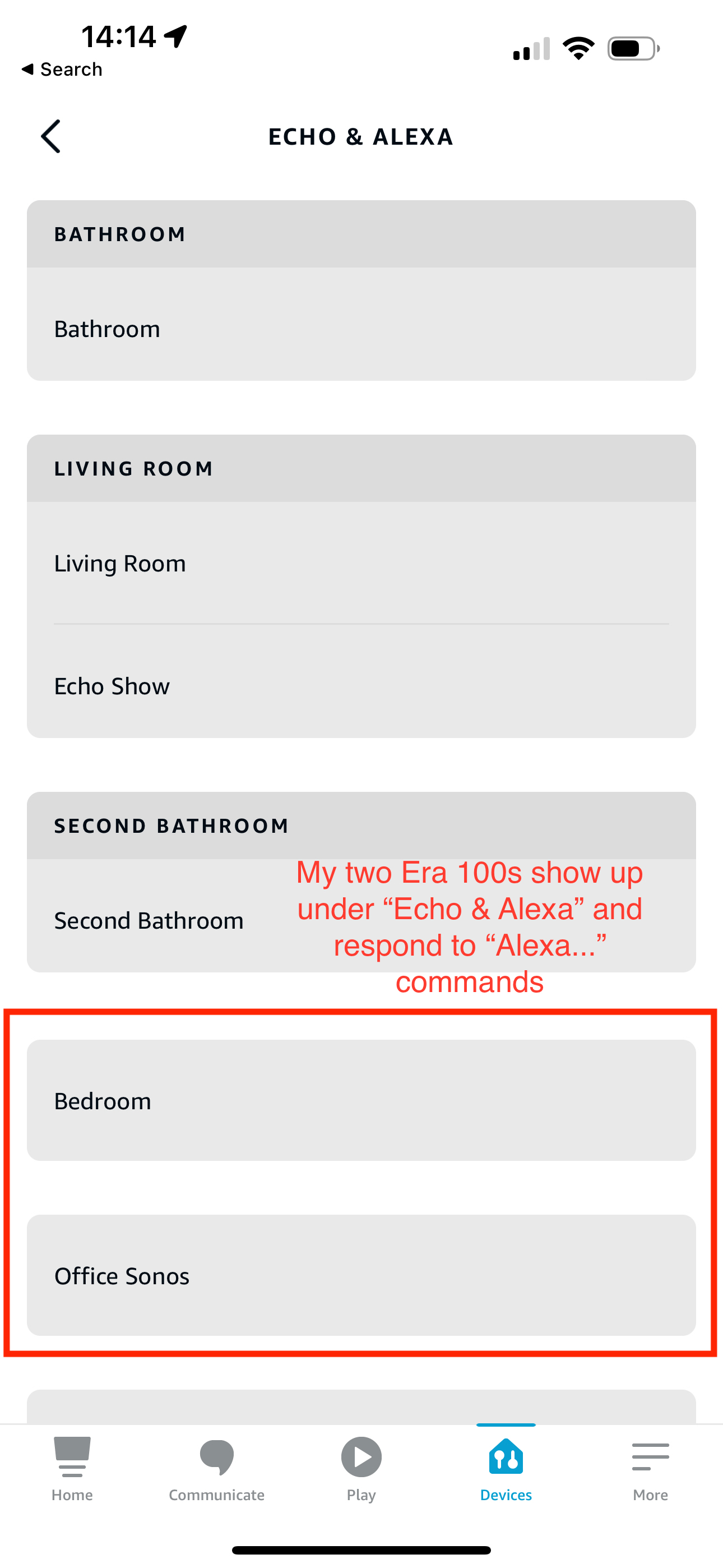
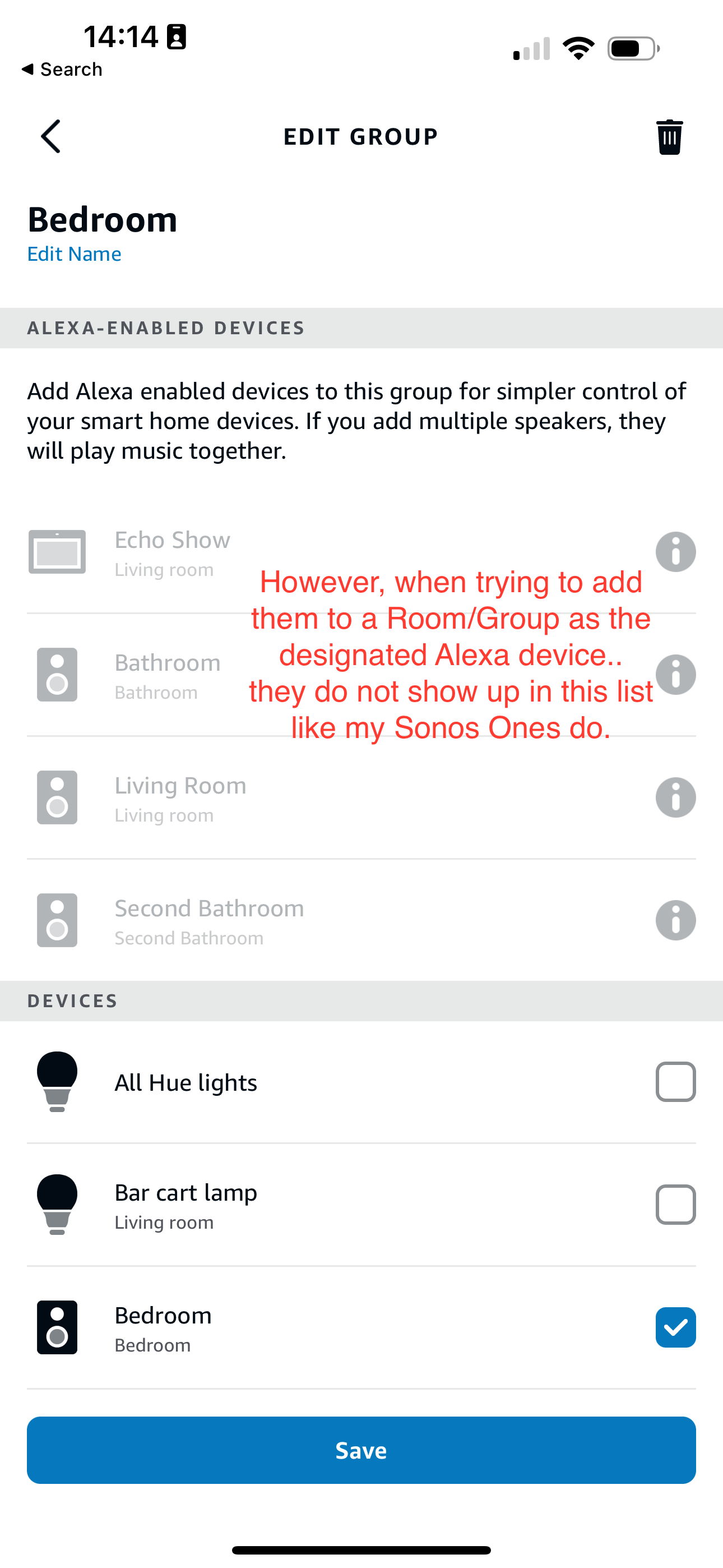
What’s weird is my Era 100s will show up under the Echo & Alexa devices section in the Alexa app, but they do not show up under Alexa-enabled devices when editing a room/group (see attached screenshots).

I’ve reached out to Alexa support and they were largely unhelpful, they claimed that from their resources Alexa isn’t supported on the Sonos Era 100 (maybe their documentation hasn’t been updated since this is a brand new product?). So they left the conversation there even after showing them that Sonos clearly states Alexa built-in support for the Era 100.

Has anyone else experienced this issue? Seems like a bug in the Alexa app, and their support team is unwilling to report the issue up their chain.
 

This topic has been closed for further comments. You can use the search bar to find a similar topic, or create a new one by clicking Create Topic at the top of the page.
Pinned Reply By Corry P

Hi Everyone

If you are still experiencing this issue (which we believed had stopped happening outside of Germany) please submit a support diagnostic and post the given number along with a screenshot of the Alexa app showing a lack of Era units under “Alexa-enabled Devices”, as above. Thank you.

102 replies

Ken_Griffiths
May 5, 2024

@jslin,

If you select the exclamation icon next to the Sonos entry in the ‘Alexa-enabled’ devices list, does it throw up a dialog box that states “Echo devices can only be in one group” - if so, then you simply need to remove the Sonos echo component device from the ‘other’ group and then go onto add it to the desired group. 

That said, it seems that some users in U.S. & Canada have reported issues with Sonos products not enabling/controlling Alexa groups, but that’s not something anyone here in the Sonos community can help with. You would be best to perhaps speak to Sonos Support, or more likely Amazon Customer Support Staff to resolve the issue, that’s if the Sonos component is not already enabling an(other) group in the Alexa App.

Lyricist II
May 5, 2024

@Ken_Griffiths I was responding to this pinned post by Sonos staff member @Corry P : 


As to your question, the “Family Room” speaker is for Beam which is working as intended.  It is added to Family Room.  I was trying to add Era 100 to “Main bedroom” but it’s not showing in the list of Alex-enabled devices; it does show up as a standalone speaker though.  

It looks like Sonos does not have a support email but only has a chat service, so I’ll try their chat on a weekday.

Ken_Griffiths
May 5, 2024

@Ken_Griffiths I was responding to this pinned post by Sonos staff member: 


As to your question, the “Family Room” speaker is for Beam which is working as intended.  It is added to Family Room.  I was trying to add Era 100 to “Main bedroom” but it’s not showing in the list of Alex-enabled devices; it does show up as a standalone speaker though.  

It looks like Sonos does not have a support email but only has a chat service, so I’ll try their chat on a weekday.

Have you checked that the Era-100 is not already enabling a group - it defaults to its own group on install and you may need to delete it from that group to add it to your Main bedroom group.

A device can only enable one Alexa group only, at any one time. If it’s not that, then you can call Sonos Support Staff via the link here (during opening hours)…

https://support.sonos.com/s/contact

Hope that assists.👍

Lyricist II
May 5, 2024

@Ken_Griffiths thanks for your reply too.  Yes, I’ve made sure that it didn’t already get added to a group I may not know of.  I will contact Support on the weekday and see if they can help resolve this.  Beam was really good experience, and I had hoped for the same experience with Era 100 as well and thinking of 300 if all goes well.  Now having doubts on the entire Era line of speakers since I’ve seen Era 300s are also having similar issues.

Lyricist II
May 7, 2024

Just an update to my post: 


Contacted Sonos support.  They have no idea what they are doing either.  Asked me to set timezone; asked whether I have reset it and re-setup; asked me to disable and re-enable Sonos skill in Alexa app (oblivious to the fact that Sonos Beam Gen 2, which is working fine for me, is using the same Sonos skill).  In the end, they ran out of idea and just straight out said controlling lights using Alexa on Era 100 is not supported, only music and asking for time and weather.  

There are many things wrong here:

  • Support has zero knowledge of existing Era 100 issues being reported here and elsewhere
  • Support makes a disclaimer that is not found on the Era 100 product page (there’s nothing that say Era 100 only supports playing music with Alexa and asking for time)
  • This issue has been being widely reported for over a year, yet Sonos failed to make any announcement regarding the status of the issue nor supported Alexa capabilities of Era 100 (or 300) speakers. 
  • Sonos continued to advertise Era speakers as Alexa compatible devices w/o caveats

Not knowing whether I am the only few remaining ones who are affected by this, or if this is still a widespread unresolved issue caused me to lose trust in Era line of speakers altogether, and by extension, in Sonos brand itself.  I had high hopes but not anymore.  I will be returning the device at this point and will go with another brand.

Ken_Griffiths
May 7, 2024

@jslin,

Just to very quickly add, I have both Era 100 and 300 speakers and each can control/enable Amazon Alexa groups here for controlling Philips Hue lights, TP-Link Smart Plugs, Louvolite Blinds etc. and grouping/ungrouping/playback of Sonos speakers. That said I’m based in the U.K. so I’m not too sure if that makes a difference🤔?

My thoughts are to perhaps go on and raise your issue with Amazon customer services. 

Just a minor point too, Sonos advertise their products as being Alexa ‘enabled’ devices and clearly not every echo feature is included in that description, but I can say for a fact that controlling Alexa groups via Sonos has always worked for me in our Home.
 

I have posted a video in the past showing Alexa on Sonos products controlling lights, performing music playback etc. whilst this video uses a Sonos Move, as part of the demo, rather than an Era 100/300, I can assure you that things works here in exactly the same way with the Sonos Era products.

Here’s the link to the previously shared video that you can maybe show to Amazon CS and see if they can resolve the issue for you and perhaps even refer them to my community post here.

https://www.icloud.com/sharedalbum/#B0S5QDa3dQsgw3

I hope the above goes some way in helping you to resolve your issue.


Lyricist I
May 15, 2024

Like so many, I finally invested and upgraded my various Dots to Era 100’s. Unlike my Arc, which is added to my Alexa group to control only that room’s capabilities, the Era 100’s are not able to be added to Alexa groups. Instead, they are only able to be set as the default music speaker. 

I suspect Amazon is not eager to fix this, as doing so renders their own hardware unnecessary, but it is Sonos’s responsibility to manage this relationship with Amazon and deliver the product they promised to their customers.

Diagnostics code ***********

Moderator edit: Diagnostic number recorded and removed (identifying info)

Contributor I
May 17, 2024

It seems like Sonos has given up on supporting Alexa properly. At least their Swedish support is now simply saying that:

The problem you are experiencing is specific to the Alexa-app whom's functionality we have no control over. Our team is focused to fix problems within the Sonos-system, but with these third-party applications such as Alexa, our influence is limited.


Lyricist I
May 23, 2024

This seems to be fixed, please try again

Lyricist III
May 24, 2024

Seems to now be fixed. Our long national nightmare is over.