
Contributor I
March 28, 2023

Unable to set Sonos Era 100 as Alexa-enabled device in room/group using Alexa app

  • March 28, 2023
  • 102 replies
  • 7852 views

Today I’ve upgraded my two Sonos Ones with Sonos Era 100s. After adding Alexa to the speakers, I tried to go into the Alexa app to associate them with their respective rooms. I’m able to add them as the room speaker, but I am unable to set them as the Alexa device for that room (allowing for room-specific commands like “Alexa, turn off the lights”, etc).

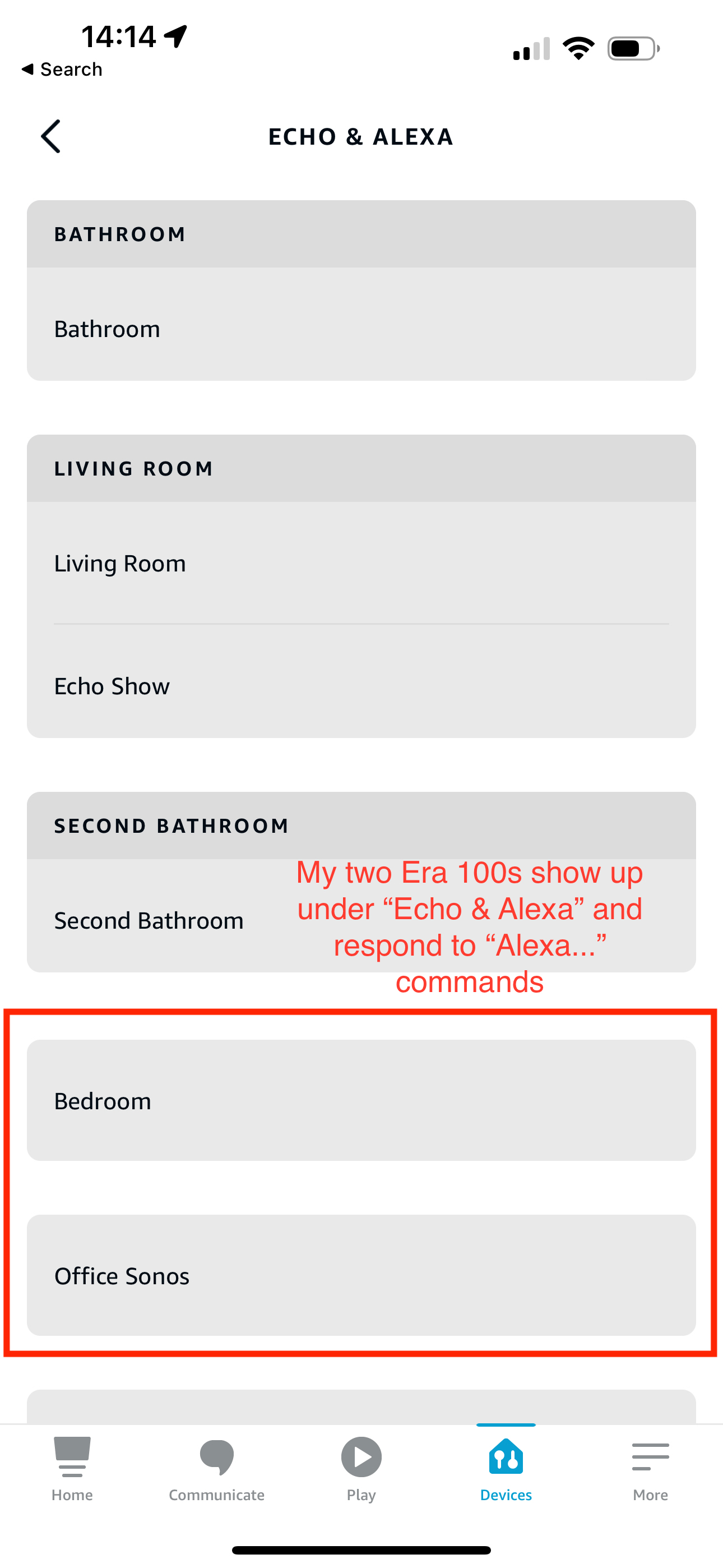
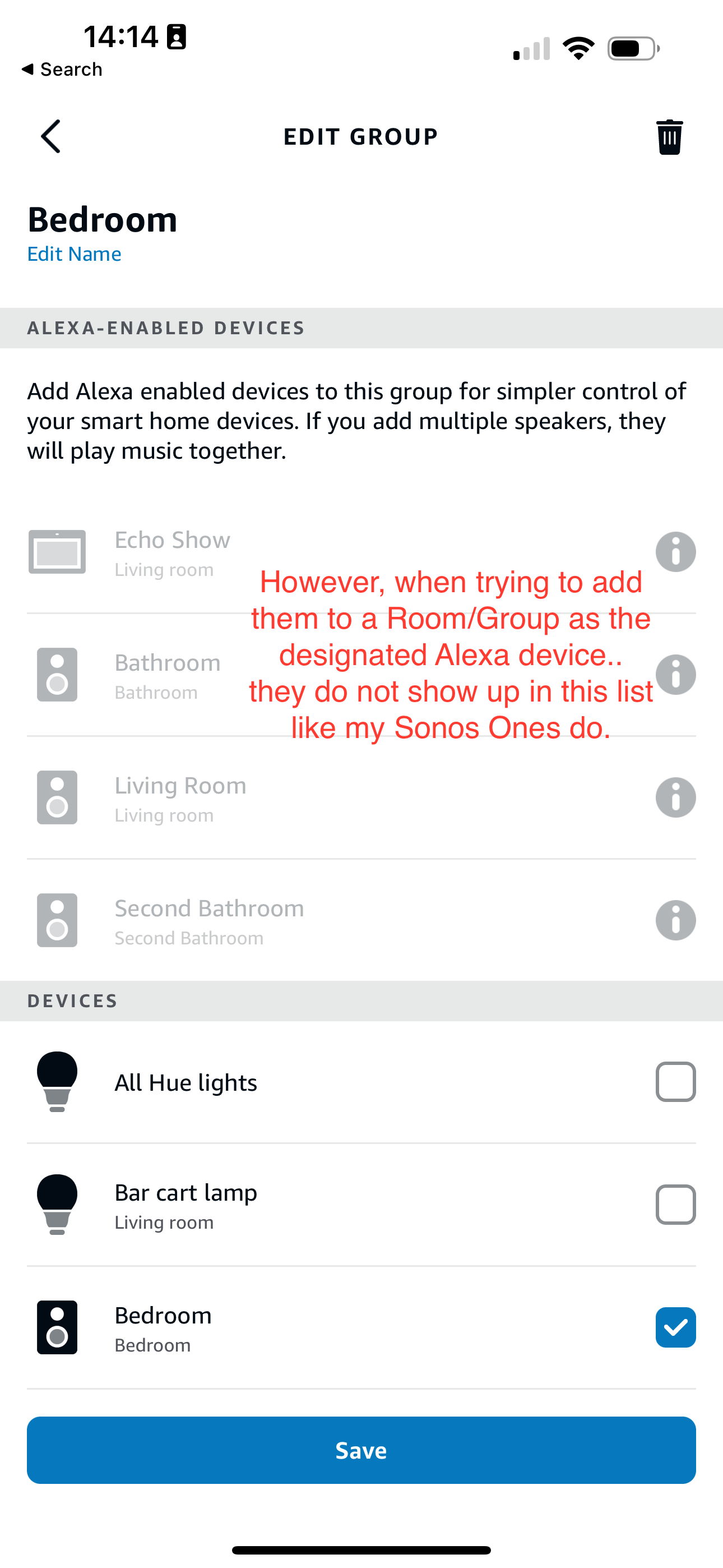
What’s weird is my Era 100s will show up under the Echo & Alexa devices section in the Alexa app, but they do not show up under Alexa-enabled devices when editing a room/group (see attached screenshots).

I’ve reached out to Alexa support and they were largely unhelpful, they claimed that from their resources Alexa isn’t supported on the Sonos Era 100 (maybe their documentation hasn’t been updated since this is a brand new product?). So they left the conversation there even after showing them that Sonos clearly states Alexa built-in support for the Era 100.

Has anyone else experienced this issue? Seems like a bug in the Alexa app, and their support team is unwilling to report the issue up their chain.
 

This topic has been closed for further comments. You can use the search bar to find a similar topic, or create a new one by clicking Create Topic at the top of the page.
Pinned Reply By Corry P

Hi Everyone

If you are still experiencing this issue (which we believed had stopped happening outside of Germany) please submit a support diagnostic and post the given number along with a screenshot of the Alexa app showing a lack of Era units under “Alexa-enabled Devices”, as above. Thank you.

102 replies

Lyricist I
December 13, 2023

Having the same issue with my Era 100 in the US 

Lyricist I
December 21, 2023

Having the exact same issue. Era 100. Works with voice commands, but no ability to control the room/group.


Sonos, are you working on this?

Lyricist I
December 25, 2023

Today I’ve upgraded my two Sonos Ones with Sonos Era 100s. After adding Alexa to the speakers, I tried to go into the Alexa app to associate them with their respective rooms. I’m able to add them as the room speaker, but I am unable to set them as the Alexa device for that room (allowing for room-specific commands like “Alexa, turn off the lights”, etc).

What’s weird is my Era 100s will show up under the Echo & Alexa devices section in the Alexa app, but they do not show up under Alexa-enabled devices when editing a room/group (see attached screenshots).

I’ve reached out to Alexa support and they were largely unhelpful, they claimed that from their resources Alexa isn’t supported on the Sonos Era 100 (maybe their documentation hasn’t been updated since this is a brand new product?). So they left the conversation there even after showing them that Sonos clearly states Alexa built-in support for the Era 100.

Has anyone else experienced this issue? Seems like a bug in the Alexa app, and their support team is unwilling to report the issue up their chain.


I have the same issue. As new user of sonos, I’m very disappointed, I had high expectations.

Lyricist I
December 26, 2023

I find it amazing that I researched buying an ERA 100 to replace an Echo device in my dining room to circumvent an Apple iMusic issue I have with Alexa. The ERA 100 is advertised as being able to function as an Alexa Echo device.  Absolutely zero caveats about that capability. So, I buy the ERA 100. Tout sweet, I run into this problem. I cannot add the ERA 100 to the everywhere Alexa group, or any group of speakers I try to set up, because while it responds to Alexa commands, it is not classified as an Alexa speaker after enabling the Alexa App skill. I then spend 2 days on the phone with both Sonos and Amazon, with nothing being resolved. I talked to at least 3 different Sonos support people. Not one word about this being an outstanding problem.  Instead my time was wasted by resetting and re-installing those 2 days, with a lot of finger pointing between the 2 companies. I give up, and google the issue and find this thread right on the Sonos site! INCOMPREHENSIBLE!  No one told me that this was an outstanding issue with an open ended ETA on a fix, and with more non-productive finger pointing! In 25 years of  working on getting music technology incorporated into my home you people still can’t get it right, especially across companies, and shame on Sonos support for pretending to scratch their heads over this with me like it was something they never heard of.

Ken_Griffiths
December 26, 2023

I find it amazing that I researched buying an ERA 100 to replace an Echo device in my dining room to circumvent an Apple iMusic issue I have with Alexa. The ERA 100 is advertised as being able to function as an Alexa Echo device.  

I believe it’s not advertised as a full blown Alexa echo device, because that would surely harm Amazons own hardware sales - I think it’s talked about here in the community as being an Alexa ‘enabled’ device where the assistant is primarily used for music playback and control, but overtime some additional functionality (not all) has been included, but some things clearly are still exclusive to Amazon in much the same way that the Sonos grouping, pairing, bonding features are exclusive to Sonos products.

Absolutely zero caveats about that capability. So, I buy the ERA 100. Tout sweet, I run into this problem. I cannot add the ERA 100 to the everywhere Alexa group, or any group of speakers I try to set up, because while it responds to Alexa commands, it is not classified as an Alexa speaker after enabling the Alexa App skill. I then spend 2 days on the phone with both Sonos and Amazon, with nothing being resolved. I talked to at least 3 different Sonos support people. Not one word about this being an outstanding problem.  Instead my time was wasted by resetting and re-installing those 2 days, with a lot of finger pointing between the 2 companies. I give up, and google the issue and find this thread right on the Sonos site! INCOMPREHENSIBLE!  No one told me that this was an outstanding issue with an open ended ETA on a fix, and with more non-productive finger pointing! In 25 years of  working on getting music technology incorporated into my home you people still can’t get it right, especially across companies, and shame on Sonos support for pretending to scratch their heads over this with me like it was something they never heard of.

Some Alexa ‘Routines’ functionality is available to the US. which apparently is not available to the UK and EU countries. The one odd thing here is Sonos is enabled here in the EU and UK to control Amazon Alexa ‘enabled’ groups and that includes Era 100s, Move 2 and Era 300s but some in the US/Canada say they do not have that functionality. I’m not sure why that is🤔?

Just to also add this is a different grouping method to Amazon Echo Groups - I’m referring to their smart-home control of lights, plugs and playback on speakers etc. Sonos has never grouped with Amazon devices to playback on both manufacturers speakers.. this thread is about enabling the smart-home groups to play audio just on Sonos devices only. 

I hope that helps clear any confusion.. clearly though some users in the US have the issue that their Era 100s are not enabling/controlling the (smart) groups and in my humble opinion that’s something that Amazon needs to resolve with their Alexa accounts. I only say that though, because it appears that not all Sonos users have this reported issue.

Lyricist I
December 26, 2023

Not a big social media guy.  Among other reasons, folks on social media believe everything is up for debate, often with an unquenchable need to “enlighten” a deluded or misinformed lost soul, like myself :-).  Well, don’t you sound like a lawyer for Sonos.  Interpreting from thin air limitations implied by the advertised “enabled” Alexa compatability.  Because no such limitations are either stated or implied in the description of the “enabled” capability in Sonos documentation.  In fact there is at least one, if not more than one document avainable online that describes how to include the ERA in an Alexa group of Alexa speakers.  Which, again, does not work. Thanks, but I I needed no “clearing up” of my understanding.  I’m quite comfortable with my understanding of my issue. Something Sonos says works, doesn’t.  You got a fix, great.  I’m responding because your uncolicited comments were so off base.  If you feel a need to weigh in with the last word, please do so. I have nothing more to say.

melvimbe
December 26, 2023

Not a big social media guy.  Among other reasons, folks on social media believe everything is up for debate, often with an unquenchable need to “enlighten” a deluded or misinformed lost soul, like myself :-).  Well, don’t you sound like a lawyer for Sonos.  Interpreting from thin air limitations implied by the advertised “enabled” Alexa compatability.  Because no such limitations are either stated or implied in the description of the “enabled” capability in Sonos documentation.  In fact there is at least one, if not more than one document avainable online that describes how to include the ERA in an Alexa group of Alexa speakers.  Which, again, does not work.


Can you provide a link to the document you found online?


Thanks, but I I needed no “clearing up” of my understanding.  I’m quite comfortable with my understanding of my issue. Something Sonos says works, doesn’t.


https://support.sonos.com/en-us/article/alexa-smart-home-device-groups-and-sonos


 You got a fix, great.  I’m responding because your uncolicited comments were so off base.  If you feel a need to weigh in with the last word, please do so. I have nothing more to say.


Danny
Ken_Griffiths
December 26, 2023

@RussPAnton,

I was just speaking about the Sonos and Alexa Group interaction, as briefly outlined in the Sonos Support documentation here…

https://support.sonos.com/en-us/article/alexa-smart-home-device-groups-and-sonos

Sonos (or any other 3rd-party speaker manufacturer) has not ever worked with the Amazon Alexa ‘Everywhere’ Group, or those user-created groups in that area of the Alexa App - they’re exclusively used by/for Amazon manufactured products only.  

That said, had you have been a little more polite here, I might have given you a way to achieve the outcome you were looking for, to play all your Sonos and Amazon devices ‘together’ around the home, but I will just leave you to carry on with your own research on this topic, but just to add it has nothing to do with the topic that’s being discussed in this thread.

Ken_Griffiths
December 26, 2023

Our posts crossed, but thanks (Danny) @melvimbe for your detailed post and referring to the Sonos support link too.👍 

Lyricist I
January 11, 2024

So glad I found this thread, but a little frustrated because I bought my Era 100 specifically because it is Alexa-enabled. Hoping for a resolution!

My diagnostic number is 1733313870. I am in the United States. Screenshots and detail below.

My Era 100 is named “Office Sonos” and does appear in the main Echo & Alexa list, along with my other Alexa-enabled devices.


If I select Office Sonos from my Echo & Amazon list, an additional device called seems to be displayed.


Selecting that device displays the device settings that you expect to see in an Alexa-enabled device. Note that this item originally appeared as “planigan’s Sonos Era 100” but I renamed it for clarity. I was able to rename directly in the Alexa app.


However, when I look at the Devices tab, I actually see these two devices listed separately for my Office Sonos. One displays with a speaker icon. The other displays with a generic device icon.


The device settings screen for the “Office Sonos” device just displays generic information when accessed from the devices tab.


When I try to add my speakers to my Office group, neither the Office Sonos device nor the Office Sonos Era 100 device appear in the list of Alexa-enabled devices. 


The Office Sonos device does appear in the regular devices list. However, selecting the checkbox does not persist across saves (i.e., I can select the box and hit save, but the device appears unselected the next time I return to the screen. The device never actually gets added to the group.) 


Despite all of the above, I am actually able to choose the Office Sonos device as the speakers to play for the Office group, even though the device itself is not in the group.