
Alexa show + stereo paired SONOS ones.
I ask Alexa to play music, I have the SONOS skill enabled and music starts to play.
I then tell Alexa to stop playing music and the music stops
An hour or so later the music just starts again.
This can happen at random times as well as throughout the night.
1. I should not need to enable or disable an Alexa skill. This is a temp workaround, not a fix.
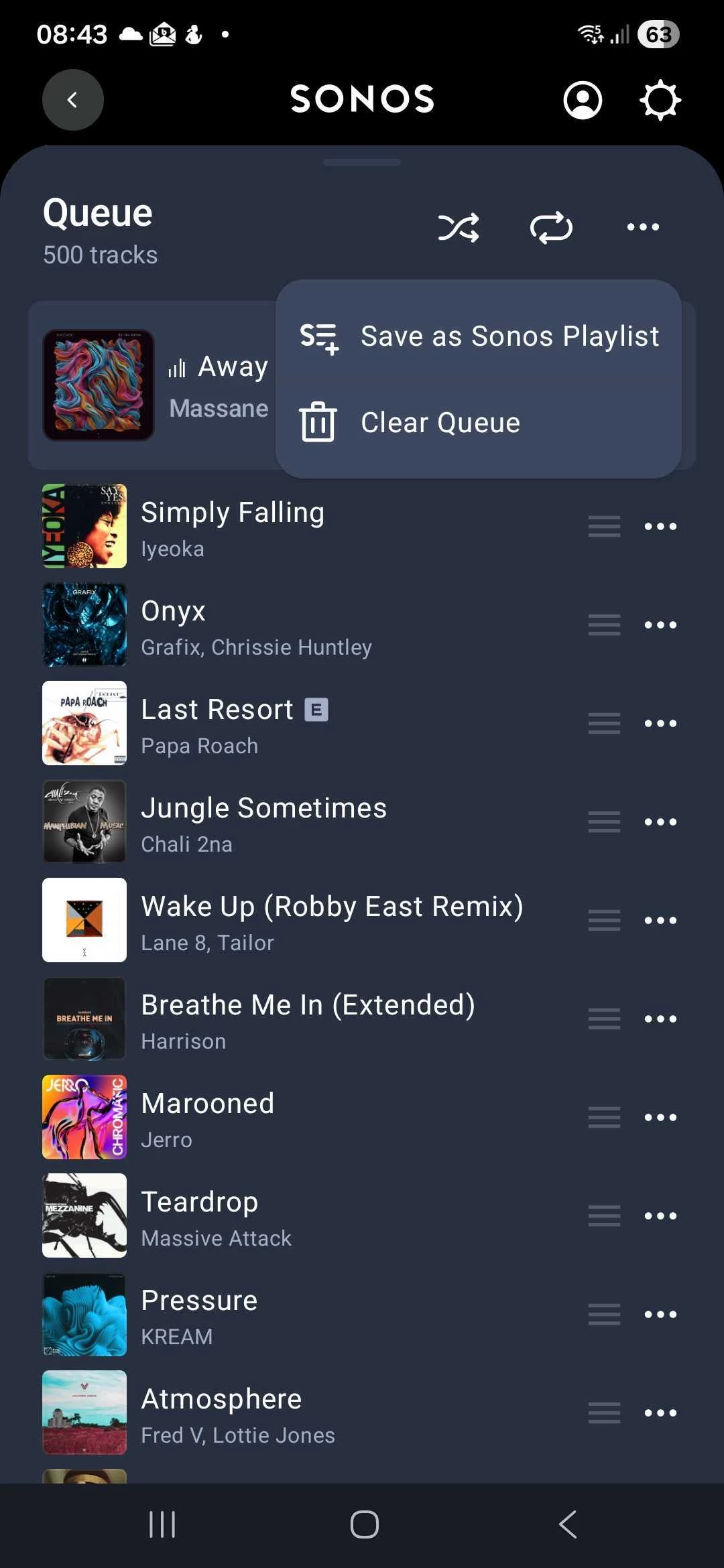
2. There is no way in the SONOS app to clear a queue. This is a SONOS feature request.
3. Random playing of music that has been paused in the SONOS app - This is a SONOS bug and caused by bad state handling. Need a feature as in 2 to make sure the queue can be cleared.
4. When music starts at 3am at night, I need a capability to stop all music playing from any and all sources - This is a SONOS feature request.
Yes I have tried enabling and disabling the skill, this is a temporary fix / workaround until I play music again, then the problem starts again. Source is Apple Play.
SONOS is the controller, as Alexa app does not show music playing and Apple Music app does not show music playing but SONOS app does and retains the music queue.

Answered
Sonos keeps playing music started from Alexa.
Best answer by Corry P
Hi
Ah right enough - my mistake! The queue does work differently for Alexa-initiated playback.
I still recommend that you contact our team to find out why the playback resumes in the middle of the night, however.
This topic has been closed for further comments. You can use the search bar to find a similar topic, or create a new one by clicking Create Topic at the top of the page.



Enter your E-mail address. We'll send you an e-mail with instructions to reset your password.