
Question

Sonos Arc with Alexa is controlling my TV like a light even if the device is deactivated or removed from Alexa

  • December 22, 2025
  • 1 reply
  • 20 views

Hi all, 

My Sonos Arc + 2 x Era 100 are set up as my home theater in the living room and connected to the TV via HDMI. In the Alexa App i have a group for the living room containing two lights. Whenever I use the phrase “Turn on the light in the living room” or similar, both via voice and routine, the TV and PS5 are turned on or off with the system. 

I’ve found other threads on this topic and have tried the following already: Unplugging the Arc and TV from power for a couple of minutes, disabling and re-enabling the Sonos skill in the Alexa app, and disabling and re-enabling Alexa on the Arc. When re-adding the Sonos Skill in the Alexa app, the TV is discovered as a device via Sonos. There is the option to disable the device or remove it completely. I’ve tried both options without luck - the TV still turns on/off. I’ve also tried removing the speaker from the group “Living room”, still the same. 

This problem is somewhat new, we’ve used this setup for years with no such problem. 

Any tips on what I can try?
1 reply

Corry P
Forum|alt.badge.img+19
  • Sonos Staff
  • December 23, 2025

Hi ​@floete2 

Welcome to the Sonos Community!

I am sorry to hear about this issue you are having with Alexa controlling your TV’s power as if it were a light.

I happen to have Alexa running on my Sonos Arc Ultra and have two lights in the same Alexa room. I do not have this issue when asking Alexa to turn the lights on, so I think this must be down to a misconfiguration in the Alexa app.

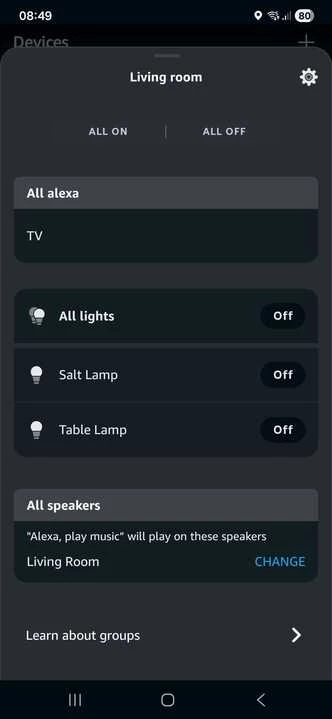
When I open the Alexa app, click on the Devices icon (a light bulb), then click on the “living room” group, I see the following:


Please go to the same screen on your Alexa app and verify that the TV (note that on my system, my Arc is labelled “TV”, so should show as the Sonos room name for the Arc in your system, here) is not being classified as a Light, as that definitely would result in the experience you report (and is the only reason I can think of why this might be happening).

If it is classed as a Light, I am not sure how to undo that - if you can’t figure it out, I recommend you talk to Amazon support for assistance.

If the Arc is not classed as a light in the screen shown above, I still recommend that you contact Amazon support, as the reason for the behaviour is not - as far as I am aware - something that we can address. If they are unable to resolve the issue, however, perhaps contacting Sonos Support would then be the next step to try.

I hope this helps.

