News

Sonos 27mcp

  • September 8, 2026
  • 8 replies
  • 307 views

Our Chief Innovation Officer, Nick Millington, put a message together that was shared on the Sonos subreddit about Sonos 27mcp. I thought it would be valuable to share with the community here as well:


“I’m excited to share with this community that you can be among the first to try Sonos 27mcp.

It’s live now at https://mcp.ws.sonos.com/mcp

MCP is the standard for connecting real world software-controlled systems like Sonos to AI assistants like ChatGPT and Claude. It’s the mechanism that lets you enter “Group my Kitchen and Patio speakers and crank up the volume” into an AI assistant app, and have the right thing happen on Sonos.

I’ve been living with Sonos 27mcp for the last several months, and as a software developer spending a lot of time on my computer using prompt-based engineering tools, Sonos 27mcp has become my most convenient way to control Sonos.  Without getting out of my flow I can tell my AI assistant to play or pause music, adjust volume, move music between my speakers, or (with their mobile apps) check up on what my Sonos system at home is doing and whether I left anything playing.  

In keeping with our efforts to move more development of Sonos “out into the open” and expose ourselves to more feedback, earlier, we’re releasing Sonos 27mcp as part of our “early access” initiative.  That means I’m exceptionally eager to hear your feedback on what’s working for you and not working, and looking forward to the conversation.  

As you dig in to what’s on offer in early access, I do want to be transparent that we will encounter a bit of a tradeoff between comprehensive coverage of every Sonos feature and putting a lot of rarely used tools and description into the AI model’s context (which costs users latency and tokens), so that’s a tradeoff we’ll have to navigate together.  

I also want to be candid that AI tools are still new to our Sonos Support team and possibly even some of our old pros here on r/sonos, and so we’re going to need to help one another build those skills as we get ready for a broader rollout and support a broader base of users.

Right now, you can add Sonos 27mcp as a custom connector in most AI Assistant apps using the URL above.  I’ve done a post on the Sonos Tech Blog describing what’s in there that you can also read for all the details.  I’m starting the submission process to the various “Connector Stores” later today.  

Enjoy!”


Share your thoughts and questions here, or join the conversation over on Reddit!

8 replies

melvimbe
  • September 8, 2026

Just got Claude connected to my Sonos.  I’m looking forward to explorer and see what use cases others will come up with!


melvimbe
  • September 9, 2026

A couple comments, I wanted to add.  As the blog describes, the mcp is fairly limited right now to playback related operations.  It can’t do diagnostic functions, can’t return search results, etc.  I  think that is a good start, but do hope to see additional functions/features, possibly as a separate mcp if needed,

There are a few advantages I see with using MCP that you don’t get what other methods of control, at least while using Claude.

  • Claude has a memory/skills feature.  I can tell claude that I always want to play the rooms Pool, Patio, and Patio 2 as a group, and commands to play music to one of the rooms will automatically play in the group, rather than a single room.
  • Claude can make assumptions.  Claude recognizes that Pool, Patio, and Patio 2 are probably located outside the house, so if I ask to play music outside, it will play to those rooms.
  • Claude’s sessions don’t time out.  With a typical voice assistant, you can give a follow up command a few seconds later, and it may interpret that 2nd command in context of the first.  Claude will do the same without any time limit.  So I can tell Claude to play purple rain in the family room, then tell it up the volume by 15 5 minutes later and know I am talking about the volume in the family room.

These factors also combine of course. In the same session as playing purple rain in the family, I  can follow with “play that outside” and it regroup Purple Rain to play on Pool/Patio/Patio 2, no longer in family room.

“play elo instead”  - will stop playing purple rain and start playing Electric Light Orchestra on the outdoor speakers

“depeche mode” - stop plying ELO and play depeche mode on those same outdoor speakers.

“stop” - will pause the music outside.

There are 2 things I wanted to test out that Claude could not do.

  • I wanted Claude to be able to start/stop music playback with timing.  Say for impromptu game of musical chairs/red light green light, timed exercise routine, or just a timer.  It could do any sort of timing, but could only start/stop when I give the command, not start/stop at a set later date.  Of course, I could probably get Claude to write a program/app to do this, but that wasn’t the point.  I suspect this  is perhaps a safety feature of sorts, or just a limitation of how Claude’s sessions work.
  • Other apps/services don’t have mcp’s yet.  A feature a thought would be useful is for Claude to read whatever was currently playing (or paused) in my Amazon music account and start playing that on Sonos.  I was hoping to be able to transfer what’s playing in my car when I get home over to Sonos without having to go through bluetooth or some other means.  Claude could not see what’s playing on Amazon Music since there is no mcp for that, and there really are not a lot of useful mcp’s for consumer services in general.  I suspect this will change in time.  I also recognize that this sort of thing may be accomplished without AI through various APIs (although Amazon Music doesn’t appear to have an API right now?), but AI has the advantage of making it easy and flexible.

  • Contributor I
  • September 9, 2026

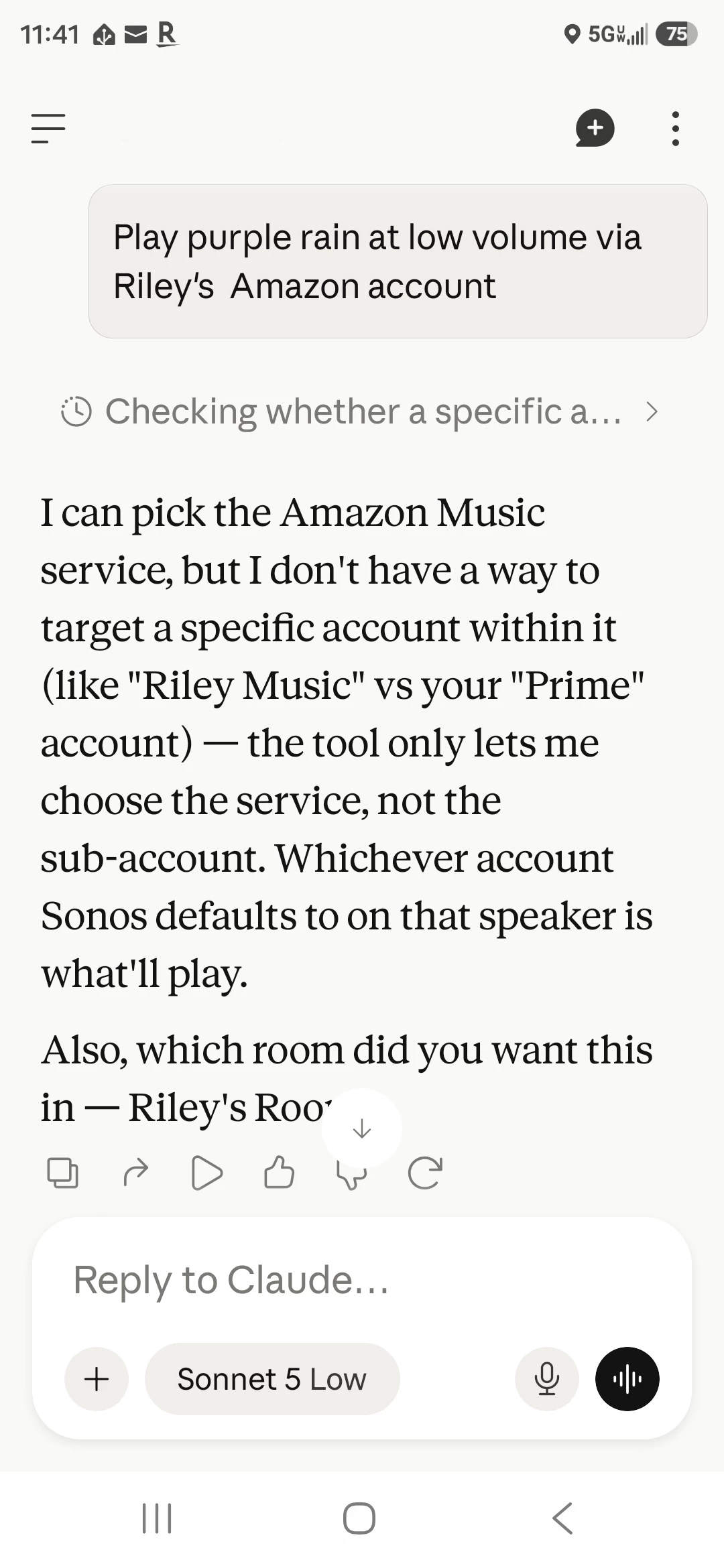
One observation - I was able to connect Claude paid license to 27mcp.

Seems to work, but one observation - if I ask to play some music from Spotify and there is a Family license (multiple profiles) it looks that giving commands via Claude to Sonos I cannot control to which user profile in Spotify the commands are targetted. I believe there should be data/capability to control which Spotify user profile I use. Sounds like those are now mixed or there is a default I cannot control.


melvimbe
  • September 9, 2026

One observation - I was able to connect Claude paid license to 27mcp.

Seems to work, but one observation - if I ask to play some music from Spotify and there is a Family license (multiple profiles) it looks that giving commands via Claude to Sonos I cannot control to which user profile in Spotify the commands are targetted. I believe there should be data/capability to control which Spotify user profile I use. Sounds like those are now mixed or there is a default I cannot control.

 I can confirm this with Amazon music as well.  


  • Contributor I
  • September 9, 2026

One observation - I was able to connect Claude paid license to 27mcp.

Seems to work, but one observation - if I ask to play some music from Spotify and there is a Family license (multiple profiles) it looks that giving commands via Claude to Sonos I cannot control to which user profile in Spotify the commands are targetted. I believe there should be data/capability to control which Spotify user profile I use. Sounds like those are now mixed or there is a default I cannot control.

 I can confirm this with Amazon music as well.  


Right - thanks for sharing this - so maybe I do not debug this further, as it seems to be “a feature” - not having control over the account to use.


AjTrek1
  • September 12, 2026

I setup ChatGPT. Had to go to the paid version @ $20/month. I changed the name to “Groove” 😂.

It sees all my Sonos rooms. It at first gave an incorrect response saying that “Nano” (Master Bedroom TV) was active. I asked it why it said so; as Nano was idle. It checked again and told me I was right. It then ran another scan and reported all rooms correctly!

I asked it to play something French (a’la Tom’s example) and it did so! I’ll have to play with it more as I haven’t gone as deep as ​@melvimbe. 😊

Thus far I’m impressed and looking forward to improvements. My only wish is that I would like it to work via the Sonos Microphone; as well as my phone. Hopefully that will come in a future update with the Sonos Fabric.


buzz
  • September 12, 2026

It sees all my Sonos rooms. It at first gave an incorrect response saying that “Nano” (Master Bedroom TV) was active. I asked it why it said so; as Nano was idle. It checked again and told me I was right. It then ran another scan and reported all rooms correctly!

 I wonder if AI is open to accepting corrections from premium users or this was An accident.


AjTrek1
  • September 13, 2026

It sees all my Sonos rooms. It at first gave an incorrect response saying that “Nano” (Master Bedroom TV) was active. I asked it why it said so; as Nano was idle. It checked again and told me I was right. It then ran another scan and reported all rooms correctly!

 I wonder if AI is open to accepting corrections from premium users or this was An accident.

Good question?

One more observation indirectly related to ChatGPT. Enabling the ChatGPT skill in the Alexa app allows you to ask Alexa on Sonos to open ChatGPT and ask inquiries. How complex of an inquiry I haven’t tested yet. Although it will not accept requests to play music.