
Trending Lyricist I
April 28, 2020
Answered

Undefined devices in matrix

hi all, i have a mix of wired and wireless units around the house inside and out. The colours on the matrix change often with sometimes red showing but the system works without dropouts. 

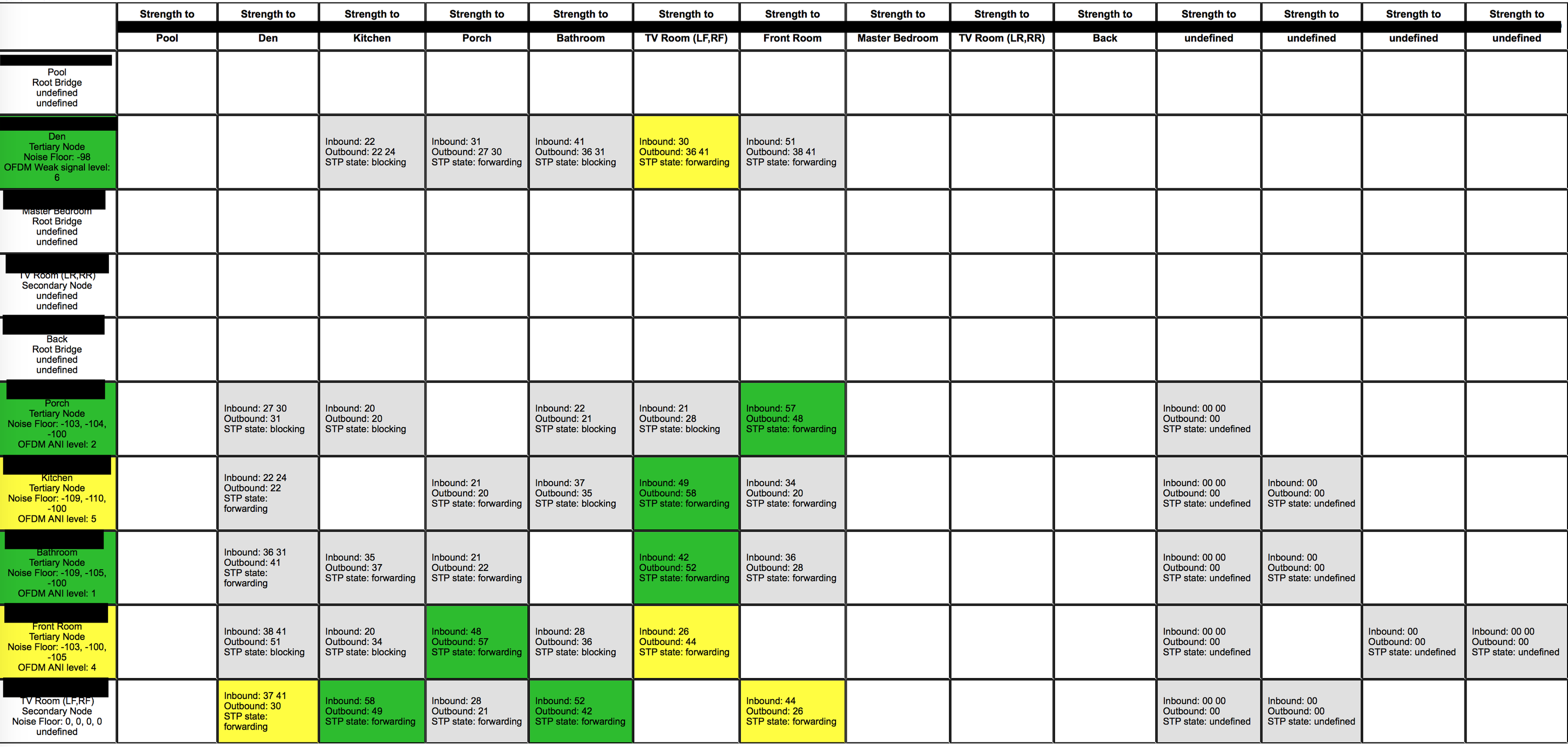
As you can see on the screenshot there are several undefined devices. i have several root bridges, not all devices have the noise floor info and OFDM info also.

I have my managed switch with STP on, but this setting makes no difference to the squares showing that the STP is forwarding, this is the same state with the STP turned on or off on my switch. I've also made sure all devices have their IP listed in the DHCP table of my router so they get the same IP every time.

looking for some help

thank you
 

    This topic has been closed for further comments. You can use the search bar to find a similar topic, or create a new one by clicking Create Topic at the top of the page.
    ratty
    rattyAnswer
    April 28, 2020

    According to a user manual for that switch, it looks like you’d need to go to L2 FEATURES > Spanning Tree > Port Config and enable STP on each of the ports which connect to Sonos devices.

    16 replies

    ratty
    April 28, 2020

    Four of the devices appear to have had their radios disabled. I take it they’re wired.

    Why three of them are showing as Root Bridge is a puzzle. It simply shouldn’t happen. There can be only one root per spanning tree domain.

    Is the switch set to block all BPDUs on certain ports? Are you using VLANs? Could you have MSTP enabled?

    BTW what STP bridge priority does the managed switch have?

    sen8orAuthor
    Trending Lyricist I
    April 28, 2020

    Hi Ratty, STP bridge priority on the switch is 4096. Set as STP, it has RSTP and MSTP options also but I have not tried them.

    My Sonos AMP, Connect:AMP, Play 3 and another older AMP are plugged in via cable and radios disabled. Was thinking to unplug all devices except the AMP and connect:amp which is running fronts/rears/sub for TV room and put everything on Wifi(Sonosnet) but I just entered all the MAC addresses recently so they have hardwired IPs for them.


    ill check BPDUs on the switch, not sure what that is. No VLANs, I was thinking about it.

    ratty
    April 28, 2020

    STP is the correct switch setting. At 4096 (hex 1000) the switch itself should be the root bridge if there was a single spanning tree domain. 

    In your /support/review open the Pool player and the TV Room (the main player). For each one click on /usr/sbin/brctl showstp br0. What does it say for designated root?

    Check whether any switch ports are set to block BPDUs in or out. BPDUs are the STP control frames. Such a setting may talk about STP, not BPDUs. What make/model of switch is it? 

    ---

    By the way you can move devices freely between wired and wireless (SonosNet) without touching your IP reservations. Devices use the same IP, whichever way they connect. 

    sen8orAuthor
    Trending Lyricist I
    April 28, 2020

    The designated root for the pool room and main TV room are different to each other and not related to the TP Link switch which has STP running. i assume they should be referring to the switch as the root?

    I have a TPLINK T2600G-28TS switch, i found this screen, which is not enabled


    ratty
    April 28, 2020

    The designated root for the pool room and main TV room are different to each other and not related to the TP Link switch which has STP running. i assume they should be referring to the switch as the root?


    What do they each show for the designated root?

    ratty
    rattyAnswer
    April 28, 2020

    According to a user manual for that switch, it looks like you’d need to go to L2 FEATURES > Spanning Tree > Port Config and enable STP on each of the ports which connect to Sonos devices.

    sen8orAuthor
    Trending Lyricist I
    April 28, 2020

    The Pool is showing the mac address of the Pool unit as its designated root.

    The TV Room is showing the mac address for the old amp ZP100 as its designated root.

    both these units are hardwired not wireless.

    Should the TP-Link be showing up at the designated root?

    thanks for your time on this also

    sen8orAuthor
    Trending Lyricist I
    April 28, 2020

    i enabled all ports here and now the designated root is the mac address of the TPLINK switch

    i have not adjusted anything on the BPDUs page, not sure if its needed?

    also wasn't sure if the ext or int path cost needed to be 10 as per the specs on the sonos page about this.


    ratty
    April 28, 2020

    That’s all beginning to look rather healthier. What does the network matrix now show? 

    I’d expect all the wired devices to be secondary nodes, and all the wireless ones to be tertiary. The switch should be the designated root everywhere.

    sen8orAuthor
    Trending Lyricist I
    April 28, 2020

    Here is what the latest is showing, the colours are not solid, they change a little but i guess there are no drop outs so i should not be worried.

    you are correct in regards to the nodes.
